Page 2 - Warning; WARNING; If you have any questions about this product:; For the State of California, USA only
2 GB Warning The nameplate indicating operating voltage, etc., is located on the bottom of the chassis. The validity of the CE marking is restricted to only those countries where it is legally enforced, mainly in the countries EEA (European Economic Area) and Switzerland. WARNING To prevent fire or ...
Page 3 - Note on the lithium battery; Important notice
3 GB WARNING: Do not ingest battery, Chemical Burn Hazard. The remote commander contains a coin/ button cell battery. If the coin/button cell battery is swallowed, it can cause severe internal burns in just 2 hours and can lead to death.Keep new and used batteries away from children. If the battery ...
Page 4 - Main Unit and Remote Commander; Guide to Parts and Controls
4 GB Main Unit and Remote Commander The remote commander can be used to operate the audio controls. For menu operations, use the touch panel. Note The white buttons in the illustration are not supported. Display/touch panel HOME Displays the HOME screen. STANDBY Press and hold to turn the unit t...
Page 5 - Screen displays
5 GB MONITOR OFF Turns off the monitor.To turn back on, press again. EQ (equalizer) Selects an equalizer curve. Number buttons (0 to 9) CLEAR ATT (attenuate) Attenuates the sound. Press again to cancel the attenuation. (play/pause) / (previous/next) / (fast-reverse/fast-forwa...
Page 7 - Pairing with a BLUETOOTH Device; Connecting Rear View Camera; Updating the Firmware; Basic Operations
7 GB Pairing with a BLUETOOTH Device When connecting a BLUETOOTH device for the first time, mutual registration (called “pairing”) is required. Pairing enables this unit and other devices to recognize each other. 1 Press HOME, then touch [Settings] [Bluetooth] [Bluetooth Connection] [ON] [Pa...
Page 8 - Precautions; Notes on safety; Additional Information; Preventing an accident
8 GB Precautions • Power antenna (aerial) extends automatically.• When you transfer ownership or dispose of your car with the unit installed, initialize all the settings to the factory settings by performing the factory reset. • Do not splash liquid onto the unit. Notes on safety • Comply with your ...
Page 9 - Maintenance; CAUTION; Specifications; AUDIO POWER SPECIFICATIONS; Monitor section; About iPhone
9 GB • Compatible iPhone models: iPhone X, iPhone 8 Plus, iPhone 8, iPhone 7 Plus, iPhone 7, iPhone SE, iPhone 6s Plus, iPhone 6s, iPhone 6 Plus, iPhone 6, iPhone 5s • Use of the Made for Apple badge means that an accessory has been designed to connect specifically to the Apple product(s) identified...
Page 10 - Tuner section; USB player section; Power amplifier section; Copyrights
10 GB Tuner section FM Tuning range: 87.5 MHz – 107.9 MHzUsable sensitivity: 7 dBfSignal-to-noise ratio: 70 dB (mono)Separation at 1 kHz: 45 dB AM Tuning range: 530 kHz – 1,710 kHzSensitivity: 32 μV USB player section Interface: USB port 1: USB (Hi-speed)USB port 2: USB (Full-speed) Maximum current:...
Page 11 - Cautions; Mounting angle adjustment; Parts List for Installation; Connection/Installation
11 GB Cautions • Do not install this unit in a car that has no ACC position. The display of the unit does not turn off even after turning the ignition off, and this causes battery drain. • Run all ground (earth) leads to a common ground (earth) point. • Do not get the leads trapped under a screw or ...
Page 12 - Connection
12 GB Connection * 3 * 3 * 3 Subwoofer* 1 Power amplifier* 1 Smartphone, USB device (for audio/video playback)* 1 from a wired remote control (not supplied) *4*12 * 6 * 7 White White/black striped Gray Gray/black striped Green Green/black striped Purple Purple/black striped Black Yellow Red Blue/w...
Page 13 - When connecting to the battery directly; Making connections
13 GB *1 Not supplied*2 Speaker impedance: 4 Ω to 8 Ω × 4*3 RCA pin cord (not supplied)*4 Depending on the type of car, use an adaptor for a wired remote control (not supplied).For details on using the wired remote control, see “Using the wired remote control” (page 14). *5 Depending on the type of ...
Page 14 - Connecting the speakers; Installing the microphone
14 GB Memory hold connection When the yellow power supply lead is connected, power will always be supplied to the memory circuit even when the ignition switch is turned off. • Before connecting the speakers, turn the unit off.• Use speakers with a 2 Ω impedance or 4 Ω to 8 Ω impedance, and with adeq...
Page 15 - Installation; Using the rear view camera; Fuse replacement
15 GB When using the wired remote control1 To enable the wired remote control, set [Steering Control] in [General] to [Preset]. Installation of the rear view camera (not supplied) is required before use.The picture from a rear view camera connected to the CAMERA IN terminal is displayed when:– the b...
Page 16 - Avertissement; AVERTISSEMENT; Remarque sur la pile au lithium
2 FR Avertissement La plaque signalétique indiquant la tension d’alimentation, etc. se trouve sur le dessous du châssis. La validité du marquage CE est uniquement limitée aux pays où la loi l’impose, principalement dans les pays de l’EEE (Espace économique européen) et en Suisse. AVERTISSEMENT Pour ...
Page 17 - Avis important
3 FR Attention SONY NE PEUT EN AUCUN CAS ÊTRE TENU RESPONSABLE DE TOUT DOMMAGE DIRECT, INDIRECT OU CONSÉCUTIF OU DE TOUT AUTRE DOMMAGE, Y COMPRIS, SANS LIMITATION, TOUTE PERTE DE PROFITS, DE REVENU, DE DONNÉES, D’UTILISATION DU PRODUIT OU DE TOUT APPAREIL ASSOCIÉ, DE DISPONIBILITÉ ET DE TEMPS DE L’U...
Page 18 - Appareil principal et télécommande; Guide des pièces et commandes
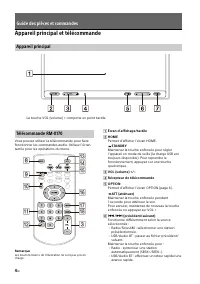
4 FR Appareil principal et télécommande Vous pouvez utiliser la télécommande pour faire fonctionner les commandes audio. Utilisez l’écran tactile pour les opérations du menu. Remarque Les boutons blancs de l’illustration ne sont pas pris en charge. Écran d’affichage/tactile HOME Permet d’affiche...
Page 19 - Affichages à l’écran
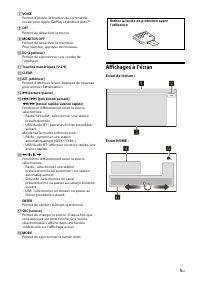
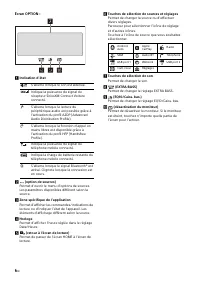
5 FR VOICE Permet d’activer la fonction de commande vocale pour Apple CarPlay et Android Auto™. OFF Permet de désactiver la source. MONITOR OFF Permet de désactiver le moniteur.Pour réactiver, appuyez de nouveau. EQ (égaliseur) Permet de sélectionner une courbe de l’égaliseur. Touches numé...
Page 21 - Pour afficher l’image de la caméra arrière; Mise à jour du micrologiciel; Opérations de base
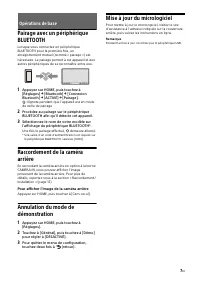
7 FR Pairage avec un périphérique BLUETOOTH Lorsque vous connectez un périphérique BLUETOOTH pour la première fois, un enregistrement mutuel (nommé « pairage ») est nécessaire. Le pairage permet à cet appareil et aux autres périphériques de se reconnaître entre eux. 1 Appuyez sur HOME, puis touchez ...
Page 22 - Précautions; Remarques sur la sécurité; Informations complémentaires; Prévention contre les accidents
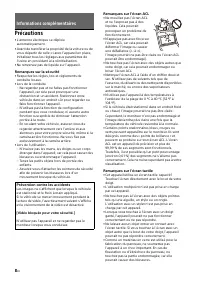
8 FR Précautions • L’antenne électrique se déploie automatiquement. • Avant de transférer la propriété de la voiture ou de vous départir de celle-ci avec l’appareil en place, initialisez tous les réglages aux paramètres de l’usine en procédant à la réinitialisation. • Ne renversez pas de liquide sur...
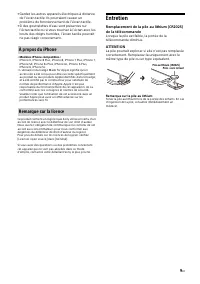
Page 23 - Entretien; ATTENTION; À propos du iPhone
9 FR • Gardez les autres appareils électriques à distance de l’écran tactile. Ils pourraient causer un problème de fonctionnement de l’écran tactile. • Si des gouttelettes d’eau sont présentes sur l’écran tactile ou si vous touchez à l’écran avec les bouts des doigts humides, l’écran tactile pourrai...
Page 24 - Caractéristiques techniques; Section du moniteur; Lecteur USB; Amplificateur de puissance
10 FR Caractéristiques techniques Section du moniteur Type d’écran : Moniteur ACL couleur largeDimensions : 6,95 po/176 mmSystème : Matrice active TFTNombre de pixels : 1 152 000 pixels (800 × 3 (RGB) × 480) Système couleur : Sélection automatique de PAL/NTSC pour la borne CAMERA IN Radio FM Plage d...
Page 25 - Droits d’auteur
11 FR Récepteur SiriusXM Connect Voiture et abonnement et frais d’activation requis.www.siriusxm.comSirius, XM et tous les autres logos et marques connexes sont des marques de commerce de Sirius XM Radio Inc. Tous droits réservés. La marque et les logos Bluetooth® sont des marques déposées de Blueto...
Page 26 - Mises en garde; Réglage de l’angle de montage; Raccordement/Installation
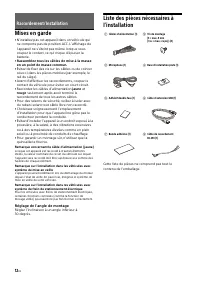
12 FR Mises en garde • N’installez pas cet appareil dans un véhicule qui ne comporte pas de position ACC. L’affichage de l’appareil ne s’éteint pas même lorsque vous coupez le contact, ce qui risque d’épuiser la batterie. • Rassemblez tous les câbles de mise à la masse en un point de masse commun. •...
Page 27 - Raccordement
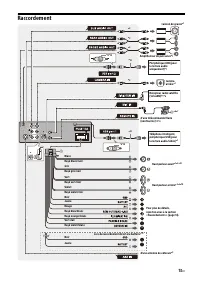
13 FR Raccordement * 3 * 3 * 3 Caisson de graves* 1 Amplificateur de puissance* 1 Téléphone intelligent, périphérique USB (pour la lecture audio/vidéo)* 1 d’une télécommande filaire (non fournie) *4*12 * 6 * 7 Blanc Rayé blanc/noir Gris Rayé gris/noir Vert Rayé vert/noir Violet Rayé violet/noir No...
Page 28 - Lors du raccordement direct à la batterie; Raccordements
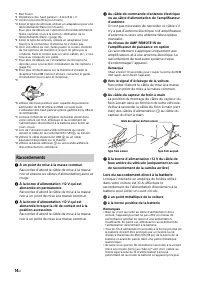
14 FR *1 Non fourni*2 Impédance des haut-parleurs : 4 Ω à 8 Ω × 4*3 Cordon à broche RCA (non fourni)*4 Selon le type de véhicule, utilisez un adaptateur pour une télécommande filaire (non fourni).Pour plus de détails sur l’utilisation de la télécommande filaire, reportez-vous à la section « Utilisat...
Page 29 - Raccordement des haut-parleurs; Installation du microphone
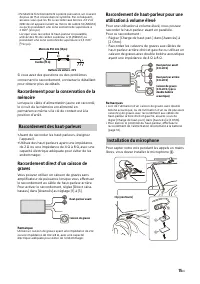
15 FR • Pendant le fonctionnement à pleine puissance, un courant de plus de 15 A circule dans le système. Par conséquent, assurez-vous que les fils à raccorder aux bornes +12 V et GND de cet appareil soient au moins de calibre 14 (AWG14) ou qu’ils possèdent une zone sectionnelle supérieure à 2 mm² (...
Page 30 - Utilisation de la télécommande filaire
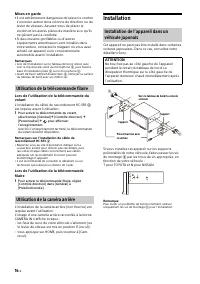
16 FR Mises en garde • Il est extrêmement dangereux de laisser le cordon s’enrouler autour de la colonne de direction ou du levier de vitesses. Assurez-vous de placer le cordon et les autres pièces de manière à ce qu’ils ne gênent pas la conduite. • Si des coussins gonflables ou d’autres équipements...
Page 31 - Remplacement du fusible
17 FR Lorsque vous remplacez le fusible, veillez à utiliser un fusible dont l’intensité, en ampères, correspond à la valeur indiquée sur le fusible original. Si le fusible grille, vérifiez le raccordement de l’alimentation et remplacez le fusible. Si le fusible neuf grille également, il est possible...
Page 32 - Advertencia; ADVERTENCIA; Nota sobre la pila de litio
2 ES Advertencia La placa de características que indica el voltaje de funcionamiento, etc., está situada en la parte inferior del chasis. La validez de la marca CE está limitada a aquellos países en los que la ley la impone, principalmente en los países del EEE (Espacio económico europeo) y Suiza. A...
Page 33 - Aviso importante
3 ES Precaución SONY NO SERÁ RESPONSABLE DE NINGÚN DAÑO INCIDENTAL, INDIRECTO O DERIVADO NI DE OTROS DAÑOS QUE INCLUYEN, ENTRE OTROS, PÉRDIDA DE GANANCIAS, PÉRDIDA DE INGRESOS, PÉRDIDA DE DATOS, PÉRDIDA DE LA UTILIDAD DEL PRODUCTO O DE CUALQUIER EQUIPO RELACIONADO, TIEMPO DE INACTIVIDAD Y TIEMPO DEL...
Page 34 - Unidad principal y control remoto; Guía para las partes y los controles
4 ES Unidad principal y control remoto El control remoto se puede utilizar para operar los controles de audio. Para las operaciones de menú, utilice el panel táctil. Nota No se admiten los botones blancos de la ilustración. Pantalla/panel táctil HOME Muestra la pantalla HOME. STANDBY Mantenga pr...
Page 35 - Pantallas; Pantalla de reproducción:
5 ES VOICE Activa la función de comando de voz para Apple CarPlay y Android Auto™. OFF Apaga la fuente. MONITOR OFF Apaga el monitor.Para volver a encenderlo, presiónelo nuevamente. EQ (ecualizador) Selecciona una curva del ecualizador. Botones numéricos (0 a 9) CLEAR ATT (atenuar) Ate...
Page 37 - Cancelar el modo demostración; Actualización del sistema; Funciones básicas
7 ES Emparejarse con un dispositivo BLUETOOTH Cuando conecta un dispositivo BLUETOOTH por primera vez, es necesario el registro de ambos dispositivos (denominado “emparejamiento”). El emparejamiento permite que la unidad y otros dispositivos se reconozcan entre sí. 1 Presione HOME, luego toque [Ajus...
Page 38 - Precauciones; Notas sobre la seguridad; Información complementaria; Prevención de accidentes
8 ES Precauciones • La antena de alimentación se extiende automáticamente. • Cuando cambie de propietario o venda el automóvil con la unidad instalada, inicie todos los ajustes a los ajustes de fábrica al restablecer la configuración predeterminada de fábrica. • No derrame ningún tipo de líquido sob...
Page 39 - Mantenimiento; PRECAUCIÓN; Acerca de iPhone
9 ES • Modelos de iPhone compatibles: iPhone X, iPhone 8 Plus, iPhone 8, iPhone 7 Plus, iPhone 7, iPhone SE, iPhone 6s Plus, iPhone 6s, iPhone 6 Plus, iPhone 6, iPhone 5s • El uso de la insignia Made for Apple significa que un accesorio ha sido diseñado para conectarse específicamente al producto o ...
Page 40 - Especificaciones; Sección del monitor; Sección del reproductor USB; Sección del amplificador de corriente
10 ES Especificaciones Sección del monitor Tipo de pantalla: monitor color LCD anchoDimensiones: 6,95 pulgadas/176 mmSistema: matriz activa TFTCantidad de píxeles: 1.152.000 píxeles (800 × 3 (RGB) × 480) Sistema de color: PAL/NTSC selección automática para CAMERA IN terminal Sección del sintonizador...
Page 41 - Derechos de autor
11 ES Sintonizador para vehículo SiriusXM Connect y las suscripciones se venden por separado.www.siriusxm.comSirius, XM y todas las marcas y logotipos relacionados son marcas comerciales de Sirius XM Radio Inc. Todos los derechos reservados. La marca de la palabra y logotipos Bluetooth® son marcas c...
Page 42 - Advertencias; Ajuste del ángulo de montaje
12 ES Advertencias • No instale esta unidad en un vehículo que no tenga posición ACC. La pantalla de la unidad no se apaga incluso después de apagar el encendido, y esto hace que la batería se agote. • Conecte todos los cables hacia un punto a tierra en común. • No deje que los cables queden atrapad...
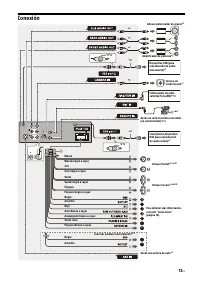
Page 43 - Conexión
13 ES Conexión * 3 * 3 * 3 Altavoz potenciador de graves* 1 Amplificador de potencia* 1 Smartphone, Dispositivo USB (para reproducción de audio/video)* 1 desde un control remoto conectado (no suministrado) *4*12 * 6 * 7 Blanco Blanco/negro a rayas Gris Gris/negro a rayas Verde Verde/negro a rayas ...
Page 44 - Conectar a la batería directamente; Conexiones
14 ES *1 No suministrado*2 Impedancia del altavoz: 4 Ω a 8 Ω × 4*3 Cable con clavija RCA (no suministrado)*4 Según el tipo de automóvil, utilice un adaptador para un control remoto conectado (no suministrado).Para conocer más detalles sobre cómo utilizar el control remoto conectado, consulte “Uso de...
Page 45 - Conexión para sostener la memoria; Conexión directa del altavoz de graves; Conectar las bocinas; Instalación del micrófono
15 ES • Durante el uso pleno, una corriente de 15 A atravesará el sistema. Por lo tanto, asegúrese de que los cables que se conectarán a las terminales de +12 V y GND de esta unidad sean al menos de calibre 14 (AWG14) o tengan una sección de más de 2 mm².Cuando realice la conexión paralela de altavo...
Page 46 - Cuando use el control remoto del volante; Instalación; Uso del control remoto conectado
16 ES Advertencias • Es extremadamente peligroso que el cable se enrede alrededor de la columna de dirección o la palanca de cambio. Asegúrese de que este y otras piezas no interfieran en sus operaciones de manejo. • Si su automóvil tiene airbags u otro equipo para amortiguar golpes, comuníquese con...
Page 47 - Reemplazo del fusible
17 ES Cuando reemplace el fusible, asegúrese de utilizar uno que coincida con la capacidad nominal del fusible original. Si el fusible se quema, verifique la conexión eléctrica y reemplace el fusible. Si el fusible se quema nuevamente después de reemplazarlo, puede haber un mal funcionamiento intern...
Page 48 - Printed in Thailand; If you have any questions/problems regarding; Read Troubleshooting in; Call
https://www.sony.com/am/support Support site If you have any questions or for the latest support information on this product, please visit the web site below: Site d’assistance Si vous avez des questions ou si vous souhaitez consulter les toutes dernières informations techniques sur ce produit, rend...