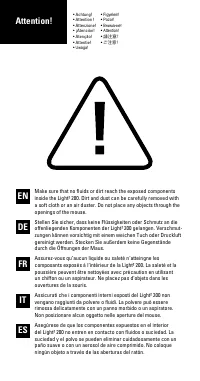
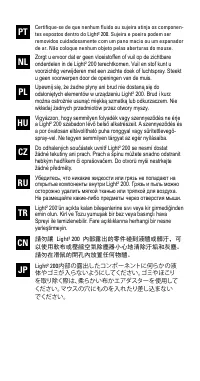
Page 3 - Zorgt u ervoor dat er geen vloeistoffen of vuil op de zichtbare
NL HU RU CN PL CZ TR JP PT Certifique-se de que nenhum fluido ou sujeira atinja os componen- tes expostos dentro do Light² 200. Sujeira e poeira podem ser removidos cuidadosamente com um pano macio ou um espanador de ar. Não coloque nenhum objeto pelas aberturas do mouse. Zorgt u ervoor dat er geen ...
Page 4 - Overview
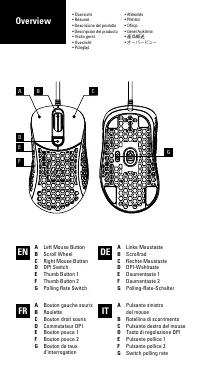
A Left Mouse Button B Scroll Wheel C Right Mouse Button D DPI Switch E Thumb Button 1 F Thumb Button 2 G Polling Rate Switch A Linke Maustaste B Scrollrad C Rechte Maustaste D DPI-Wahltaste E Daumentaste 1 F Daumentaste 2 G Polling-Rate-Schalter A Bouton gauche souris B Roulette C Bouton droit souri...
Page 5 - CN
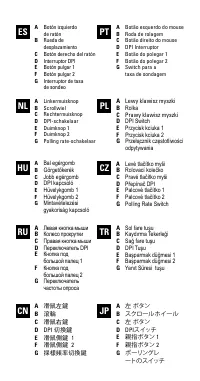
A Botón izquierdo de ratón B Rueda de desplazamiento C Botón derecho del ratón D Interruptor DPI E Botón pulgar 1 F Botón pulgar 2 G Interruptor de tasa de sondeo A Bal egérgomb B Görgetőkerék C Jobb egérgomb D DPI kapcsoló E Hüvelykgomb 1 F Hüvelykgomb 2 G Mintavételezési gyakoriság kapcsoló A Botã...
Page 6 - Shortcuts
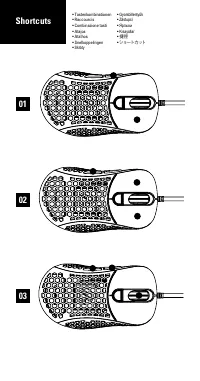
• Tastenkombinationen• Raccourcis• Combinazione tasti• Atajos• Atalhos• Snelkoppelingen• Skróty • Gyorsbillentyűk • Zástupci • Ярлыки • Kısayollar • 捷徑 • ショートカット 01 02 03 Shortcuts
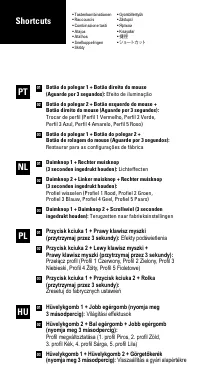
Page 8 - Botão do polegar 1 + Botão direito do mouse; Botão do polegar 2 + Botão esquerdo do mouse +; Duimknop 1 + Rechter muisknop; Duimknop 2 + Linker muisknop + Rechter muisknop; Efekty podświetlenia
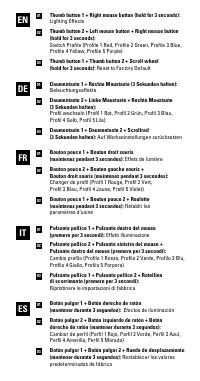
Botão do polegar 1 + Botão direito do mouse (Aguarde por 3 segundos): Efeito de iluminação Botão do polegar 2 + Botão esquerdo do mouse + Botão direito do mouse (Aguarde por 3 segundos): Trocar de perfil (Perfil 1 Vermelho, Perfil 2 Verde, Perfil 3 Azul, Perfil 4 Amarelo, Perfil 5 Roxo) Botão do pol...
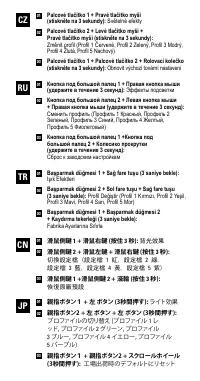
Page 9 - 背光效果; 滑鼠側鍵; 設定檔; 滑鼠側鍵; 恢復原廠預設
Palcové tlačítko 1 + Pravé tlačítko myši (stiskněte na 3 sekundy): Světelné efekty Palcové tlačítko 2 + Levé tlačítko myši + Pravé tlačítko myši (stiskněte na 3 sekundy): Změnit profil (Profil 1 Červené, Profil 2 Zelený, Profil 3 Modrý, Profil 4 Žlutá, Profil 5 Nachový) Palcové tlačítko 1 + Palcové ...
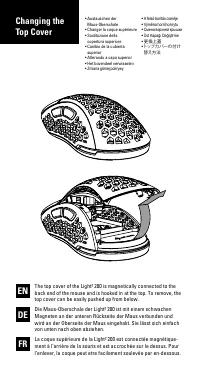
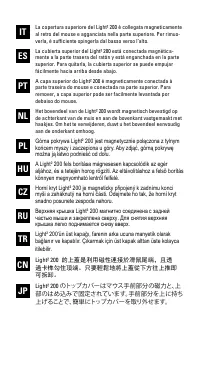
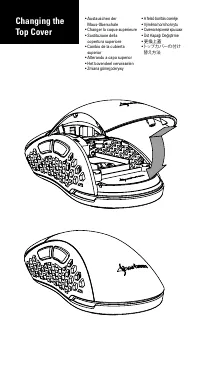
Page 11 - Górna pokrywa Light2 200 jest magnetycznie połączona z tylnym
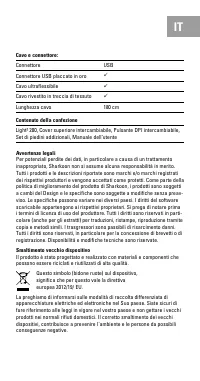
NL PL HU IT CZ ES RU CN PT TR JP La copertura superiore del Light² 200 è collegata magneticamente al retro del mouse e agganciata nella parte superiore. Per rimuo- verla, è sufficiente spingerla dal basso verso l‘alto. La cubierta superior del Light² 200 está conectada magnética- mente a la parte tr...
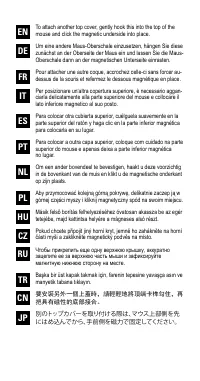
Page 13 - mouse and click the magnetic underside into place.
NL PL HU IT CZ ES RU CN PT TR JP To attach another top cover, gently hook this into the top of the mouse and click the magnetic underside into place. Um eine andere Maus-Oberschale einzusetzen, hängen Sie diese zunächst an der Oberseite der Maus ein und lassen Sie die Maus- Oberschale dann an der ma...
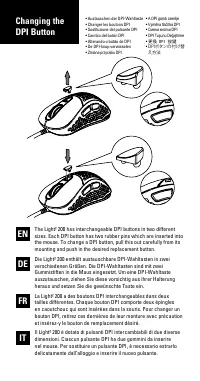
Page 15 - 可更換兩種不同尺寸的 DPI 切換鍵,每個按
NL PL HU CZ ES RU CN PT TR JP El Light² 200 dispone de botones DPI intercambiables en dos ta- maños diferentes. Cada botón DPI tiene dos clavijas de goma que se insertan en el ratón. Para cambiar un botón DPI, sáquelo con cuidado de su soporte y presione el botón de reemplazo deseado.O Light² 200 po...
Page 16 - DPI Indicator
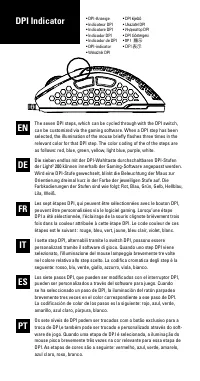
• DPI-Anzeige• Indicateur DPI• Indicatore DPI• Indicador DPI• Indicador de DPI• DPI-indicator• Wskaźnik DPI • DPI kijelző • Ukazatel DPI • Индикатор DPI • DPI Göstergesi • DPI 顯示 • DPI 表示 EN DE FR IT ES PT The seven DPI steps, which can be cycled through with the DPI switch, can be customized via th...
Page 20 - Specifications
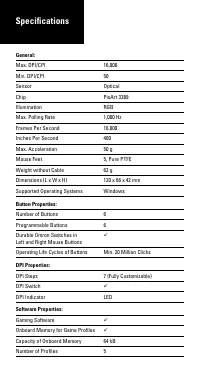
General: Max. DPI/CPI 16,000 Min. DPI/CPI 50 Sensor Optical Chip PixArt 3389 Illumination RGB Max. Polling Rate 1,000 Hz Frames Per Second 16,000 Inches Per Second 400 Max. Acceleration 50 g Mouse Feet 5, Pure PTFE Weight without Cable 62 g Dimensions (L x W x H) 120 x 66 x 42 mm Supported Operating...
Page 22 - Spezifikationen
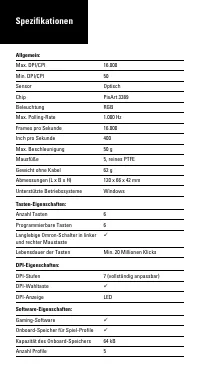
Allgemein: Max. DPI/CPI 16.000 Min. DPI/CPI 50 Sensor Optisch Chip PixArt 3389 Beleuchtung RGB Max. Polling-Rate 1.000 Hz Frames pro Sekunde 16.000 Inch pro Sekunde 400 Max. Beschleunigung 50 g Mausfüße 5, reines PTFE Gewicht ohne Kabel 62 g Abmessungen (L x B x H) 120 x 66 x 42 mm Unterstützte Betr...
Page 24 - Spécifications
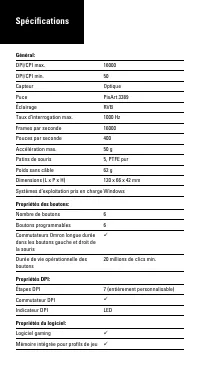
Général: DPI/CPI max. 16000 DPI/CPI min. 50 Capteur Optique Puce PixArt 3389 Éclairage RVB Taux d‘interrogation max. 1000 Hz Frames par seconde 16000 Pouces par seconde 400 Accélération max. 50 g Patins de souris 5, PTFE pur Poids sans câble 62 g Dimensions (L x P x H) 120 x 66 x 42 mm Systèmes d‘ex...
Page 25 - Contenu de l‘emballage:
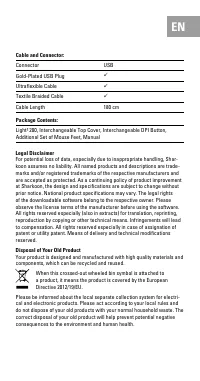
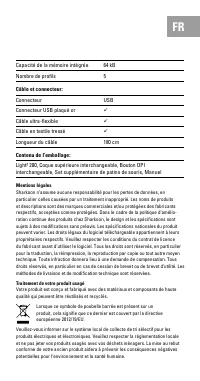
FR Mentions légales Sharkoon n’assume aucune responsabilité pour les pertes de données, en particulier celles causées par un traitement inapproprié. Les noms de produits et descriptions sont des marques commerciales et/ou protégées des fabricants respectifs, acceptées comme protégées. Dans le cadre ...
Page 26 - Specifiche tecniche
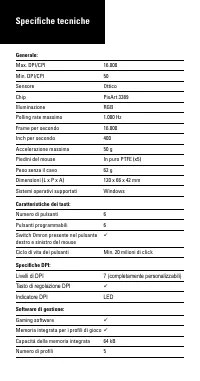
Generale: Max. DPI/CPI 16.000 Min. DPI/CPI 50 Sensore Ottico Chip PixArt 3389 Illuminazione RGB Polling rate massimo 1.000 Hz Frame per secondo 16.000 Inch per secondo 400 Accelerazione massima 50 g Piedini del mouse In puro PTFE (x5) Peso senza il cavo 62 g Dimensioni (L x P x A) 120 x 66 x 42 mm S...
Page 28 - Especificaciones
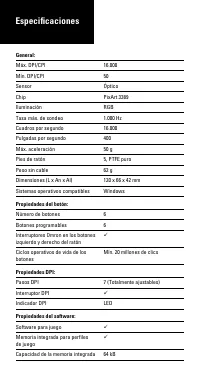
General: Máx. DPI/CPI 16.000 Mín. DPI/CPI 50 Sensor Óptico Chip PixArt 3389 Iluminación RGB Tasa máx. de sondeo 1.000 Hz Cuadros por segundo 16.000 Pulgadas por segundo 400 Máx. aceleración 50 g Pies de ratón 5, PTFE puro Peso sin cable 62 g Dimensiones (L x An x Al) 120 x 66 x 42 mm Sistemas operat...
Page 29 - Contenidos del paquete:
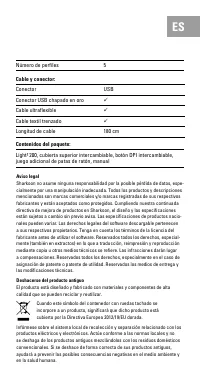
Aviso legal Sharkoon no asume ninguna responsabilidad por la posible pérdida de datos, espe-cialmente por una manipulación inadecuada. Todos los productos y descripciones mencionados son marcas comerciales y/o marcas registradas de sus respectivos fabricantes y están aceptados como protegidos. Cumpl...
Page 30 - Especificações
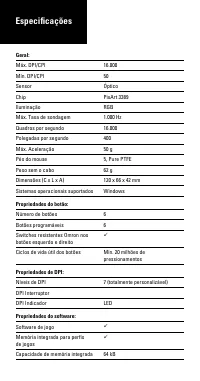
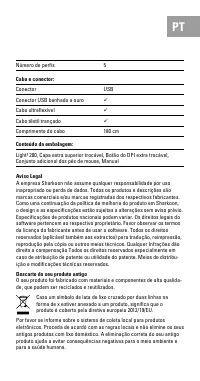
Geral: Máx. DPI/CPI 16.000 Mín. DPI/CPI 50 Sensor Óptico Chip PixArt 3389 Iluminação RGB Máx. Taxa de sondagem 1.000 Hz Quadros por segundo 16.000 Polegadas por segundo 400 Máx. Aceleração 50 g Pés do mouse 5, Pure PTFE Peso sem o cabo 62 g Dimensões (C x L x A) 120 x 66 x 42 mm Sistemas operacionai...
Page 32 - Specificaties
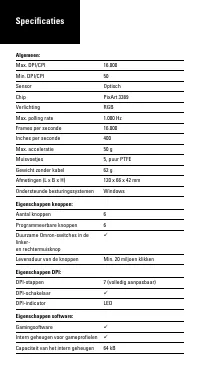
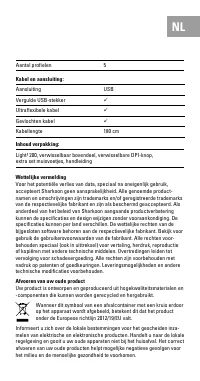
Algemeen: Max. DPI/CPI 16.000 Min. DPI/CPI 50 Sensor Optisch Chip PixArt 3389 Verlichting RGB Max. polling rate 1.000 Hz Frames per seconde 16.000 Inches per seconde 400 Max. acceleratie 50 g Muisvoetjes 5, puur PTFE Gewicht zonder kabel 62 g Afmetingen (L x B x H) 120 x 66 x 42 mm Ondersteunde best...
Page 34 - Specyfikacja
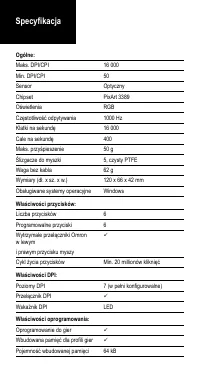
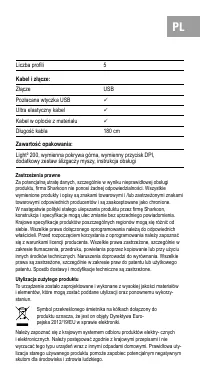
Ogólne: Maks. DPI/CPI 16 000 Min. DPI/CPI 50 Sensor Optyczny Chipset PixArt 3389 Oświetlenia RGB Częstotliwość odpytywania 1000 Hz Klatki na sekundę 16 000 Cale na sekundę 400 Maks. przyśpieszenie 50 g Ślizgacze do myszki 5, czysty PTFE Waga bez kabla 62 g Wymiary (dł. x sz. x w.) 120 x 66 x 42 mm O...
Page 35 - Zastrzeżenia prawne; Utylizacja zużytego produktu; Ultra elastyczny kabel; Zawartość opakowania:
PL Zastrzeżenia prawne Za potencjalną utratę danych, szczególnie w wyniku nieprawidłowej obsługi produktu, firma Sharkoon nie ponosi żadnej odpowiedzialności. Wszystkie wymienione produkty i opisy są znakami towarowymi i /lub zastrzeżonymi znakami towarowymi odpowiednich producentów i są zaakceptowa...
Page 36 - Gombtulajdonságok; Gombok száma; Szoftvertulajdonságok; Műszaki adatok
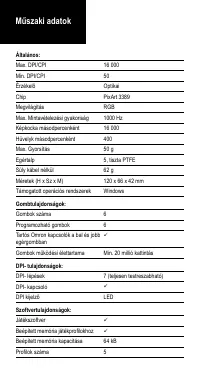
Általános: Max. DPI/CPI 16 000 Min. DPI/CPI 50 Érzékelő Optikai Chip PixArt 3389 Megvilágítás RGB Max. Mintavételezési gyakoriság 1000 Hz Képkocka másodpercenként 16 000 Hüvelyk másodpercenként 400 Max. Gyorsítás 50 g Egértalp 5, tiszta PTFE Súly kábel nélkül 62 g Méretek (H x Sz x M) 120 x 66 x 42 ...
Page 37 - Kábelhossz
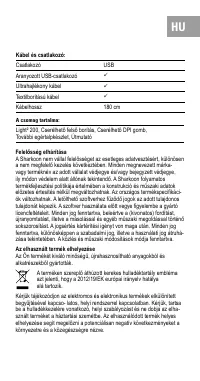
HU Felelősség elhárítása A Sharkoon nem vállal felelősséget az esetleges adatvesztésért, különösen a nem megfelelő kezelés következtében. Minden megnevezett márka- vagy terméknév az adott vállalat védjegye és/vagy bejegyzett védjegye, ily módon védelem alatt állónak tekintendő. A Sharkoon folyamatos...
Page 38 - Technické údaje
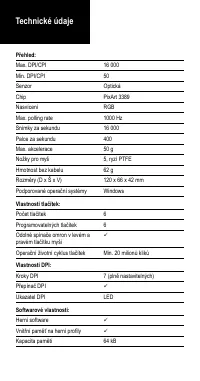
Přehled: Max. DPI/CPI 16 000 Min. DPI/CPI 50 Senzor Optická Chip PixArt 3389 Nasvícení RGB Max. polling rate 1000 Hz Snímky za sekundu 16 000 Palce za sekundu 400 Max. akcelerace 50 g Nožky pro myš 5, ryzí PTFE Hmotnost bez kabelu 62 g Rozměry (D x Š x V) 120 x 66 x 42 mm Podporované operační systém...
Page 39 - Konektor; Obsah balení
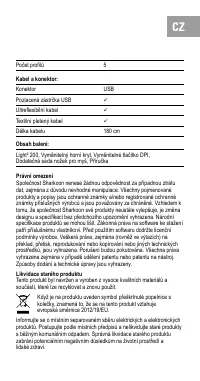
CZ Právní omezení Společnost Sharkoon nenese žádnou odpovědnost za případnou ztrátu dat, zejména z důvodu nevhodné manipulace. Všechny pojmenované produkty a popisy jsou ochranné známky a/nebo registrované ochranné známky příslušných výrobců a jsou považovány za chráněné. Vzhledem k tomu, že společn...
Page 40 - Свойства программного обеспечение:; Технические характеристики
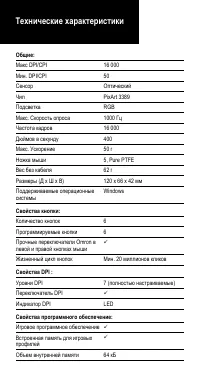
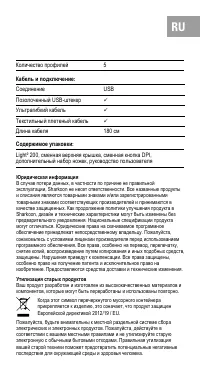
Общие: Макс DPI/CPI 16 000 Мин. DPI/CPI 50 Сенсор Оптический Чип PixArt 3389 Подсветка RGB Макс. Скорость опроса 1000 Гц Частота кадров 16 000 Дюймов в секунду 400 Макс. Ускорение 50 г Ножка мыши 5, Pure PTFE Вес без кабеля 62 г Размеры (Д x Ш x В) 120 x 66 x 42 мм Поддерживаемые операционные систем...
Page 41 - Кабель и подключение
RU Юридическая информация В случае потери данных, в частности по причине не правильной эксплуатации, Sharkoon не несет ответственности. Все названные продукты и описания являются товарными знаками и/или зарегистрированными товарными знаками соответствующих производителей и принимаются в качестве защ...
Page 42 - DPI Özellikleri; DPI Göstergesi; Yazılım Özellikleri; Özellikler
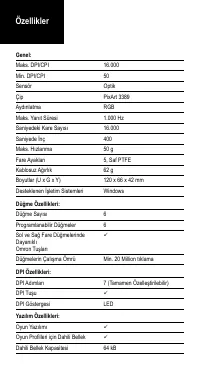
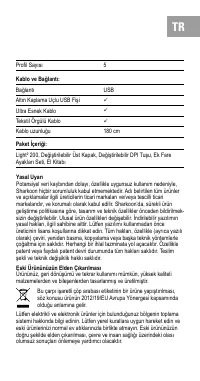
Genel: Maks. DPI/CPI 16.000 Min. DPI/CPI 50 Sensör Optik Çip PixArt 3389 Aydınlatma RGB Maks. Yanıt Süresi 1.000 Hz Saniyedeki Kare Sayısı 16.000 Saniyede İnç 400 Maks. Hızlanma 50 g Fare Ayakları 5, Saf PTFE Kablosuz Ağırlık 62 g Boyutlar (U x G x Y) 120 x 66 x 42 mm Desteklenen İşletim Sistemleri ...
Page 43 - Ultra Esnek Kablo; Paket İçeriği
TR Yasal Uyarı Potansiyel veri kaybından dolayı, özellikle uygunsuz kullanım nedeniyle, Sharkoon hiçbir sorumluluk kabul etmemektedir. Adı belirtilen tüm ürünler ve açıklamalar ilgili üreticilerin ticari markaları ve/veya tescilli ticari markalarıdır, ve korumalı olarak kabul edilir. Sharkoon’da, sü...
Page 44 - 規格
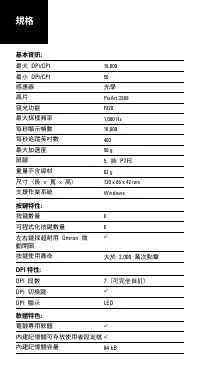
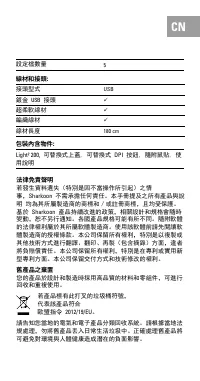
基本資訊: 最大 DPI/CPI 16,000 最小 DPI/CPI 50 感應器 光學 晶片 PixArt 3389 發光功能 RGB 最大採樣頻率 1,000 Hz 每秒顯示幀數 16,000 每秒追蹤英吋數 400 最大加速度 50 g 鼠腳 5, 純 PTFE 重量不含線材 62 g 尺寸 (長 x 寬 x 高) 120 x 66 x 42 mm 支援作業系統 Windows 按鍵特性: 按鍵數量 6 可程式化按鍵數量 6 左右鍵採超耐用 Omron 微 動開關 按鍵使用壽命 大於 2,000 萬次點擊 DPI 特性: DPI 段數 7 (可完全自訂) DPI 切換鍵 DPI ...
Page 45 - 法律免責聲明; Sharkoon; 舊產品之棄置; DPI
CN 法律免責聲明 若發生資料遺失(特別是因不當操作所引起)之情事, Sharkoon 不需承擔任何責任。本手冊提及之所有產品與說 明 均為其所屬製造商的商標和/或註冊商標,且均受保護。基於 Sharkoon 產品持續改進的政策,相關設計和規格會隨時 變動,恕不另行通知。各國產品規格可能有所不同。隨附軟體的法律權利屬於其所屬軟體製造商。使用該軟體前請先閱讀軟體製造商的授權條款。本公司保留所有權利,特別是以複製或其他技術方式進行翻譯、翻印、再製(包含摘錄)方面,違者將負賠償責任。本公司保留所有權利,特別是在專利或實用新型專利方面。本公司保留交付方式和技術修改的權利。 舊產品之棄置 您的產品於設計...
Page 46 - PTFE; 仕様
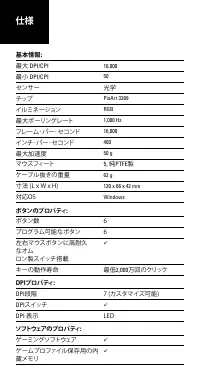
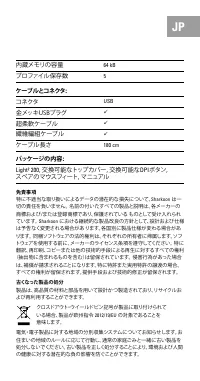
基本情報: 最大 DPI/CPI 16,000 最小 DPI/CPI 50 センサー 光学 チップ PixArt 3389 イルミネーション RGB 最大ポーリングレート 1,000 Hz フレーム・パー・セコンド 16,000 インチ・パー・セコンド 400 最大加速度 50 g マウスフィート 5, 純 PTFE 製 ケーブル抜きの重量 62 g 寸法 (L x W x H) 120 x 66 x 42 mm 対応OS Windows ボタンのプロパティ: ボタン数 6 プログラム可能なボタン 6 左右マウスボタンに高耐久 なオム ロン製スイッチ搭載 キーの動作寿命 最低 2,000 ...
Page 47 - JP
JP 免責事項 特に不適当な取り扱いによるデータの潜在的な損失について、 Sharkoon は一 切の責任を負いません。 名前の付いたすべての製品と説明は、各メーカーの商標および/または登録商標であり、保護されている ものとして受け入れられています。 Sharkoon における継続的な製品改良の方針として、設計および仕様 は予告なく変更される場合があ ります。各国別に製品仕様が変わる場合があ ります。 同梱ソフトウェアの法的権利は、それぞれの所有者に帰属します。ソフトウェアを使用する前に、メーカーのライセンス条項を遵守してください。 特に 翻訳、再印刷、コピーまたは他の技術的手段による再生に対...
Page 48 - Sharkoon Technologies GmbH; Grüninger Weg 48; © Sharkoon Technologies 2020
Sharkoon Technologies GmbH Grüninger Weg 48 35415 Pohlheim Germany © Sharkoon Technologies 2020 DETAILED DOWNLOADABLE SOFTWARE MANUAL R39507