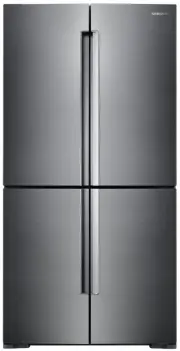
Page 2 - Contents; Safety information
English 2 Contents Contents Safety information 3 Important safety symbols and precautions: 4 Severe warning signs for transportation and site 4 Critical installation warnings 4 Installation cautions 7 Critical usage warnings 7 Usage cautions 10 Cleaning cautions 11 Critical disposal warnings 12 Addi...
Page 4 - Important safety symbols and precautions:; Severe warning signs for transportation and site; Critical installation warnings
Safety information English 4 Safety information Important safety symbols and precautions: Please follow all safety instructions in this manual. This manual uses the following safety symbols. WARNING Hazards or unsafe practices that may result in severe personal injury, property damage, and/or death ...
Page 7 - Installation cautions; Critical usage warnings
English 7 Safety information Installation cautions CAUTION • Allow sufficient space around the refrigerator and install it on a flat surface. - Keep the ventilation space in the appliance enclosure or mounting structure clear of obstructions. • Allow the appliance to stand for 2 hours before loading...
Page 10 - Usage cautions
Safety information English 10 Safety information Usage cautions CAUTION • Do not re-freeze frozen foods that have thawed completely. Do not place carbonated or fizzy drinks in the freezer compartment. Do not put bottles or glass containers in the freezer.- When the contents freeze, the glass may bre...
Page 11 - Cleaning cautions
English 11 Safety information • Do not keep vegetable oil in your refrigerator’s door bins. The oil can solidify, making it foul-tasting and difficult to use. In addition, the open container can leak and the leaked oil can cause the door bin to crack. After opening an oil container, it is best to ke...
Page 12 - Critical disposal warnings
Safety information English 12 Safety information Critical disposal warnings WARNING • Please dispose of the packaging material from this product in an environmentally friendly manner. • Ensure that none of the pipes on the back of the refrigerator are damaged prior to disposal. • R-600a or R-134a is...
Page 13 - Additional tips for proper usage
English 13 Safety information Additional tips for proper usage • In the event of a power failure, call the local office of your electric company and ask how long the failure is going to last.- Most power failures that are corrected in an hour or two will not affect your refrigerator temperatures. Ho...
Page 14 - Saving Energy Tips
Safety information English 14 Safety information Saving Energy Tips • Install the appliance in a cool, dry room with adequate ventilation. Ensure that it is not exposed to direct sunlight and never put it near a direct source of heat (a radiator, for example). • Not to block any vents and grilles is...
Page 15 - Instructions about the WEEE
English 15 Safety information Instructions about the WEEE Correct Disposal of This Product (Waste Electrical & Electronic Equipment) (Applicable in countries with separate collection systems) This marking on the product, accessories or literature indicates that the product and its electronic acc...
Page 16 - Installation; Refrigerator at a glance
English 16 Installation Follow these instructions carefully to ensure a proper installation of this refrigerator and to prevent accidents before using it. WARNING • Use the refrigerator only for its intended purpose as described in this manual.• Any servicing must be performed by a qualified technic...
Page 18 - Door bins
Installation English 18 Installation Door bins Your refrigerator ships with door bins of different types and sizes. If the door bins for your refrigerator were packaged separately, use the figure below to help you position the bins properly.The number of door bins provided may differ with the model....
Page 19 - Door removal for entrance; Detach the fridge doors
English 19 Installation Door removal for entrance If the refrigerator cannot pass through the entrance due to its size, follow these instructions: Tools required (not provided) Phillips screwdriver Flat-heat screwdriver Socket spanner (10 mm) Pliers Allen spanner (4 mm) Allen spanner (5 mm) Detach t...
Page 21 - Detach the freezer doors
English 21 Installation 6. Gently pull up the door vertically to remove. Do not apply excessive force to the door. The door may fall, causing physical injury. 7. Lay the door down on a flat surface. 8. Repeat the above steps for the other door. Detach the freezer doors CAUTION • Be sure to remove th...
Page 23 - Reattach the freezer doors
English 23 Installation Reattach the freezer doors CAUTION • Before reattaching the doors, make sure all the electrical connectors are properly connected. • The freezer door must be reattached before the fridge door.• Be careful not to damage or step on the wires during this process. 1. Insert the f...
Page 24 - Reattach the fridge doors
Installation English 24 Installation 4. Attach the levelling foot cover using a Phillips screwdriver. Use caution not to damage or step on the connectors. 5. Repeat the above steps for the other door. Reattach the fridge doors 1. While holding the door open by more than 90 degrees, reinsert it into ...
Page 26 - STEP 1; Select a site
Installation English 26 Installation Step-by-step installation STEP 1 Select a site Site requirements: • Solid, level surface without carpeting or flooring that may obstruct ventilation• Away from direct sunlight• Adequate room for opening and closing the door• Away from a heat source• Room for main...
Page 28 - STEP 2; WiFi connection
Installation English 28 Installation STEP 2 WiFi connection You can control the refrigerator remotely using the Smart Home Dongle that is sold separately. To purchase the Smart Home Dongle, visit www.samsung.com and follow the product information about the dongle. CAUTION • The Samsung Smart Home Do...
Page 29 - STEP 3; Flooring; STEP 4; Adjust the levelling feet
English 29 Installation STEP 3 Flooring • The surface to install the refrigerator must support a fully loaded refrigerator. • To protect the floor, put a large piece of cardboard on each leg of the refrigerator. • Once the refrigerator is in its final position, do not move it unless necessary to pro...
Page 30 - STEP 5; Adjust the door height as well as the door gap
Installation English 30 Installation STEP 5 Adjust the door height as well as the door gap Snap ring The height of a door can be adjusted using the provided snap rings, which come in 4 different sizes (1 mm, 1.5 mm, 2 mm, and 2.5 mm). To adjust the height of a door 1. Check the height difference bet...
Page 32 - STEP 6; Initial settings; STEP 7; Final check
Installation English 32 Installation STEP 6 Initial settings By completing the following steps, the refrigerator should be fully functioning. 1. Plug the power cord into the wall socket to turn the refrigerator on. 2. Open the door, and check if the interior light lights up. 3. Set the temperature t...
Page 33 - Operations; Feature panel
English 33 Operations Feature panel 01 02 04 05 07 03 01 Fridge / Power Cool 02 Freezer / Power Freeze 03 Cool Select 04 Door Alarm 05 Control Lock 06 Network connection Operations Untitled-1 33 2017-10-12 5:33:14
Page 37 - Samsung Smart Home; Refrigerator app
English 37 Operations Samsung Smart Home Installation Visit the Google Play Store, Galaxy Apps, or Apple App Store and search for “Samsung Smart Home”. Download and install the Samsung Smart Home app provided by Samsung Electronics to your smart device. NOTE • The Samsung Smart Home app is designed ...
Page 39 - Special features; Multipurpose door bin (applicable models only)
English 39 Operations Special features The refrigerator has features convenient for you. Multipurpose door bin (applicable models only) This detachable bin has a divider that you use to store food items in separate sections. Divider You can use the removable divider to divide the bin section.Slide t...
Page 42 - Maintenance; Handle and care
English 42 Maintenance Handle and care Tempered glass shelves (fridge) • To remove a shelf, fully open the corresponding door. Hold the front of the shelf, and then gently lift up and slide out. • To reinsert, lower the rear side of the shelf and insert into the shelf hooks. Then, lower the front si...
Page 48 - Cleaning; Interior and exterior
Maintenance English 48 Maintenance Cleaning Interior and exterior WARNING • Do not use benzene, thinner, or home/car detergent such as Clorox™ for cleaning purposes. They may damage the surface of the refrigerator and cause a fire. • Do not spray water onto the refrigerator. This may cause electric ...
Page 49 - Replacement; LED Lamps
English 49 Maintenance Replacement LED Lamps To replace the lamps of the refrigerator, contact a local Samsung service centre. WARNING The lamps are not user-serviceable. Do not attempt to replace a lamp yourself. This can cause electric shock. Deodorizer (applicable models only) NOTE The performanc...
Page 50 - Troubleshooting; General
English 50 Troubleshooting If you encounter a problem with the refrigerator, first check the tables starting below, and then try the suggested actions. General Symptom Action The refrigerator does not operate or cool. • Make sure the power cord is connected properly.• Make sure the temperature contr...
Page 53 - Memo