Page 2 - Safety information; SAFETY INFORMATION; Contents
Safety information SAFETY INFORMATION • Before operating the appliance, please read this manual thoroughly and retain it at a safe place near the appliance for your future reference. • Use this appliance only for its intended purpose as described in this instruction manual. This appliance is not int...
Page 3 - Important safety symbols; severe personal; minor personal injury
• Warnings and Important Safety Instructions in this manual do not cover all possible conditions and situations that may occur. It is your responsibility to use common sense, caution, and care when installing, maintaining, and operating your appliance. • Because these following operating instruction...
Page 17 - Selecting the best location for the
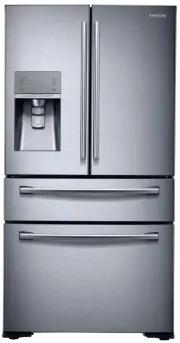
Setting up your French Door Refrigerator GETTING READY TO INSTALL THE REFRIGERATOR Congratulations on your purchase of this Samsung French Door Refrigerator. We hope you enjoy the state-of-art features and efficiencies that this new appliance offers. Selecting the best location for the refrigerator ...
Page 18 - When moving your refrigerator; FLOORING; ACCESSORIES AND
When moving your refrigerator To prevent floor damage, be sure the front adjusting legs are in the up position (above the floor). Refer to ‘Leveling the Refrigerator’ in the manual (on page 23). Flat-blade screw driver (-) Control Lever FLOORING For proper installation, you must place this refrigera...
Page 19 - Do not remove the doors/drawer if you don’t; Disassemble the refrigerator doors; With the door opened
REMOVING THE REFRIGERATOR DOORS For some installations you need to remove the fridge and freezer drawers so you can move the refrigerator to its final location. Do not remove the doors/drawer if you don’t need to. If you need to remove the doors. continue below. If you do not need to remove the refr...
Page 22 - DISASSEMBLING THE
5. Lift up the Flex door from the rails. Putting too much food into the freezer drawers can prevent the freezer from closing completely and can cause frost build-up. RE-ASSEMBLING THE FLEX DOOR To reattach the flex doors, assemble parts in reverse order. Be sure to connect the Flex Door Wire Connect...
Page 23 - FREEZER DOOR; How to level the refrigerator
5. Holding the top of the Freezer Drawer, pull it out all the way, and then remove it from the rail system. Be careful not to scratch or dent the sliding rail by letting it strike the floor. Make sure that you mount the freezer basket in the right position when removing / installing the freezer door...
Page 24 - MAKING MINOR
Both control levers must be touching the floor to avoid possible personal injury or property damage because of tipping. The refrigerator on an uneven floor may tilt. To prevent this, adjust the leg so that it contacts the floor. If the right side is lower, perform the same procedure, but with the ri...
Page 25 - Parts for water line Installation; Connecting to the water supply line
INSTALLING THE WATER DISPENSER LINE A water dispenser with a filter is one of the helpful features on your new refrigerator. To help promote better health, the water filter removes unwanted particles from your water. However, it does not sterilize or destroy microorganisms. You may need to purchase ...
Page 27 - Purchasing SodaStream 60 L CO
Installing a SodaStream 60 L CO 2 Carbonator To use the Sparkling Water feature on your refrigerator, you need to install a Sodastream 60 L CO 2 Carbonator. You can pick up the SodaStream 60 L CO 2 Carbonator at retailer near you and your first Sodastream CO 2 Carbonator is free. (For further inform...
Page 28 - Installing a Carbonator into the Refrigerator
Installing a Carbonator into the Refrigerator To install a new SodaStream 60 L Carbonator in the refrigerator, follow these steps: 1. Open the CO 2 cylinder cover. • The sparkling water maker is turned off by default. Since the sparkling water maker is turned off, the “OFF” icon on the display is tu...
Page 29 - Completing the Set Up
5. The sparkling water concentration is set to ‘2’ by default. Press the “Sparkling Water” button to set the concentration to a desired level and press and hold the Quick Sparkling button for 3 seconds to activate the Fill Up. If the Sparkling Water function is deactivated, press and hold the Sparkl...
Page 30 - USING THE CONTROL PANEL
Operating your French Door Refrigerator USING THE CONTROL PANEL (1) (2) (3) (4) (14) (5) (6) (12) (7) (8) (10) (9) (13) (11) ( 1 ) Freezer (Power Freezer (3 sec)) The Freezer button serves two purposes: - To set the Freezer to your desired temperature. - To turn the power freeze function on and off....
Page 35 - To Change the Water Filter
CHANGING THE WATER FILTER To reduce the risk water damage to your property DO NOT use generic brands of water filters in your SAMSUNG Refrigerator. USE ONLY SAMSUNG BRAND WATER FILTERS. SAMSUNG is not legally responsible for any damage, including, but not limited to, property damage caused by water ...
Page 37 - Reverse Osmosis Water Supply; CONTROLLING THE; Basic temperature of Freezer and
Reverse Osmosis Water Supply IMPORTANT: The pressure of the water supply coming out of a reverse osmosis system going to the water inlet valve of the refrigerator needs to be between 35 and 120 psi (241 and 827 kPa). If a reverse osmosis water filtration system is connected to your cold water supply...
Page 38 - Controlling the fridge temperature; USING THE COLD WATER; Push the appropriate ice/
Controlling the fridge temperature Recommend Temp (Fridge) : 3 °C The fridge temperature can be set between 1 °C and 7 °C to suit your particular needs. Press the Fridge button repeatedly until the desired temperature is shown in the temperature display. The temperature will change by 1 °C with each...
Page 39 - Maintaining the Ice Bucket
Using the Ice & Water Dispenser together To get Ice and water, select the type of ice, then push the Ice/Sparkling lever ( 1 ) first for ice, and then move your glass down and press the water dispenser lever ( 2 ) for water. Maintaining the Ice Bucket • To clean the ice bin/bucket, wash with...
Page 40 - Using the ice off Function
Note that the ice cubes in the ice bucket may spill out over the drawer when you remove the ice bucket from the drawer. If this occurs, be sure to clear the ice cubes that spilled out of the drawer. If a power failure occurs, ice cubes may melt, and then freeze together when the power comes back on,...
Page 41 - Ice Maker Do’s and Don’ts; Water clouding phenomenon
Going on vacation... If you have a long vacation or business trip and won’t use the water or ice dispensers for a long time: - Close the water valve. Otherwise, water leakage may occur. - Remove all food. - Unplug the refrigerator. - Wipe excess moisture from inside and leave the doors open. Otherwi...
Page 42 - Using the Sparkling Water Function; Making Sparkling Water; Sparkling Water Production Time; Dispensing Sparkling Water
Using the Sparkling Water Function With a Sodastream CO 2 cylinder installed, your refrigerator can make and dispense sparkling (carbonated) water. Making Sparkling Water Press and hold the Quick Sparkling button for 3 seconds to activate the Fill Up. If the Sparkling Water function is deactivated, ...
Page 44 - Turning Off the Sparkling Water Function; How to set the Quick Sparkling option
Turning Off the Sparkling Water Function To turn off the Sparkling Water function, press the Sparkling Water button for 3 seconds. Any sparkling water remaining in the Sparkling Water tank after you have turned off the Sparkling Water function can still be dispensed. If you turn off the function whe...
Page 45 - PARTS AND FEATURES
PARTS AND FEATURES Review the illustration below to become more familiar with the parts and features of your refrigerator. Light (3) 2 Step Foldable- Shelf Auto Closer (8) Sparkling Module Cover (Optional) (1) (4)(3) Vertical Hinged Section Cylinder Cover (Option) (5) Water Filter Auto Closer Light ...
Page 47 - USING FLEX ZONE; Temperature Selection Button; “Cold Drink”
USING FLEX ZONE The Flex Zone is a full-width drawer with an adjustable temperature control. You can use the Flex Zone for large party trays, deli items, wines, pizzas, beverages, or miscellaneous items. There is a temperature sensor which lets you adjust the amount of cold air allowed into the Zone...
Page 48 - RECOMMENDED LOCATION; REMOVING THE
Examples of food items you can store in the Flex Zone by temperature setting. Wine Party Dishes Deli Snacks Cold Drinks Meat Fish • wine • pineapples • bottled water • steaks • cocktails • lemons • juice • cold cuts • cakes • biscuits • soft drinks • bacon • cheeses • potatoes • beer • chili dogs Fr...
Page 49 - Tempered Glass shelves; To remove
(3) (1) (2) • Sparkling Water model door bins ( 3 ). Do not remove Sparkling Water model door bin ( 3 ). To clean, wipe it completely with a clean cloth without removing it. Do not remove door bins ( 3 ). Do not adjust a bin full of food. Remove the food first. To remove dust from the bins, re...
Page 51 - Using the doors; REMOVING THE FREEZER; Freezer Room Guard; Super Extended Drawer
5. Flex Zone - To remove the Flex Zone : Pull the Flex door out to full extension. Lift the Flex Zone up, pulling it to your body with both hands. - To re-install the Flex Zone : Open the Flex door to full extension. Tilt the front of the Flex Zone up, place the back of the Flex Zone onto the rails,...
Page 52 - REPLACING A SODASTREAM
3. Freezer Drawer - To remove the freezer drawer : Pull the freezer drawer out fully. Tilt up the rear of the bin and lift it out to remove. - To re-install the freezer drawer : Place the bin into the rail assembly. You can scratch the side of the bin if you twist it left or right when disassembling...
Page 53 - Sparkling Water: Operational Notes
Sparkling Water: Operational Notes • Be sure to use genuine SodaStream Cylinders from authorized resellers. • The refrigerator starts making sparkling water about 10 seconds after you turn on the Sparkling Water Production function. • If you open the refrigerator door while the refrigerator is makin...
Page 54 - Cleaning the Interior; Cleaning the Exterior
CLEANING THE REFRIGERATOR Caring for your Samsung French Door Refrigerator prolongs its life and helps keep it free of odor and germs. Do not use benzene, thinner, Clorox, or car detergent to clean the refrigerator. They can damage the surface of the appliance and may cause a fire. Do not spray the ...
Page 56 - FOOD STORAGE TIPS
FOOD STORAGE TIPS Foods Refrigerator Freezer Storage Tips DAIRY PRODUCTS Butter 2-3 Weeks 6-9 Months Wrap or cover tightly. Milk 1-2 Weeks Not recommended Check date code. Most milk and similar products are sold in date- coded cartons that indicate a products’s peak freshness. Re-seal with cap or wr...
Page 58 - Troubleshooting
PROBLEM SOLUTION The refrigerator does not work at all or it does not chill sufficiently. • Check if the power plug is properly connected.• Check if the set temperature on the digital display is warmer than the freezer or fridge inner temperature. If it is, set the refrigerator colder. • Is the refr...
Page 61 - memo
memo DA68-03022B (EN)-04.indd 61 14. 6. 23. �� 2:48
Page 64 - Ambient Room Temperature Limits; English; Correct Disposal of This Product; Contact SAMSUNG WORLD WIDE
Ambient Room Temperature Limits This refrigerator is designed to operate in ambient temperatures specified by its temperature class marked on the rating plate. Class Symbol Ambient Temperature range (°C) IEC 62552 (ISO 15502) ISO 8561 Extended Temperate SN +10 to +32 +10 to +32 Temperate N +16 to +3...




 Samsung SRF639GDLS User Manual
 Samsung SRF651BFH3 User Manual
 Samsung SRF653CDLS User Manual
 Samsung SRF662BFH4 User Manual
 Samsung SRF677CDBLS User Manual
 Samsung SRF678CDLS User Manual
 Samsung SRF680CDLS User Manual
 Samsung SRF714NCDBLS User Manual
 Samsung SRF717CDBLS User Manual
 Samsung SRF719DLS User Manual
 Samsung SRF751CCSS User Manual
 Samsung SRF801GDLS User Manual