Page 2 - Contents
2 English C ontents Contents Using this user manual 3 The following symbols are used in this User Manual: 3 Safety instructions 3 Important safety instructions 3 Cooking instructions on food packaging 8 Cooking instructions 8 Installation 9 Accessories 9Installation site 9 Turntable 9 Maintenance 10...
Page 3 - Safety instructions; IMPORTANT SAFETY INSTRUCTIONS; Using this user manual; The following symbols are used in this User Manual:
English 3 Using this user manual & Saf ety Ins truc tions Safety instructions IMPORTANT SAFETY INSTRUCTIONS READ CAREFULLY AND KEEP FOR FUTURE REFERENCE. MICROWAVE FUNCTION ONLY WARNING : If the door or door seals are damaged, the oven must not be operated until it has been repaired by a compete...
Page 4 - Safety Instructions; bed and breakfast type environments.
4 English Safety Ins truc tions Safety Instructions • by clients in hotels, motels and other residential environments; • bed and breakfast type environments. Only use utensils that are suitable for use in microwave ovens.When heating food in plastic or paper containers, keep an eye on the oven due t...
Page 5 - General safety
English 5 Safety Ins truc tions This appliance can be used by children aged from 8 years and above and persons with reduced physical, sensory or mental capabilities or lack of experience and knowledge if they have been given supervision or instruction concerning use of the appliance in a safe way an...
Page 6 - Microwave operation precautions
6 English Safety Ins truc tions Safety Instructions Stand at arms length from the oven when opening the door to avoid getting scalded by escaping hot air or steam.Do not operate the oven when it is empty. The oven will automatically shut down for 30 minutes for safety purposes. We recommend placing ...
Page 7 - Limited warranty
English 7 Safety Ins truc tions Limited warranty Samsung will charge a repair fee for replacing an accessory or repairing a cosmetic defect if the damage to the unit or accessory was caused by the customer. Items this stipulation covers include: • Door, handles, out-panel, or control panel that are ...
Page 8 - COOKING INSTRUCTIONS ON FOOD PACKAGING; COOKING INSTRUCTIONS
8 English Safety Ins truc tions Safety Instructions COOKING INSTRUCTIONS ON FOOD PACKAGING Microwave Symbols On the front of your oven there is a microwave oven symbol, as shown below. This symbol has been introduced for your benefit when cooking or reheating packaged food.Packaged food is also, inc...
Page 9 - Installation; Accessories; Installation site
English 9 Installation Installation Accessories Depending on the model that you have purchased, you are supplied with several accessories that can be used in a variety of ways. 01 Roller ring , to be placed in the centre of the oven. Purpose: The roller ring supports the turntable. 02 Turntable, to ...
Page 10 - Maintenance; Cleaning; Care against an extended period of disuse
10 English Maint enanc e Maintenance Cleaning Clean the oven regularly to prevent impurities from building up on or inside the oven. Also pay special attention to the door, door sealing, and turntable and roller ring (applicable models only).If the door won’t open or close smoothly, first check if t...
Page 12 - Oven features; Oven
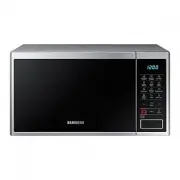
12 English O v en f eatur es Oven features Oven 01 02 03 05 10 11 06 09 04 07 08 01 Ventilation holes 02 Light 03 Display 04 Door latches 05 Door 06 Turntable 07 Coupler 08 Roller ring 09 Safety interlock holes 10 Open door push button 11 Control panel Control panel 01 03 06 09 12 14 16 04 07 10 13 ...
Page 13 - Oven use; How a microwave oven works; Checking that your oven is operating correctly
English 13 O v en use Oven use How a microwave oven works Microwaves are high-frequency electromagnetic waves; the energy released enables food to be cooked or reheated without the foods form or colour changing.You can use your microwave oven to: • Defrost (manual & auto) • Cook • Reheat Cooking...
Page 14 - Setting the time
14 English O v en use Oven use Cooking/Reheating The following procedure explains how to cook or reheat food. IMPORTANT ALWAYS check your cooking settings before leaving the oven unattended. Open the door. Place the food in the centre of the turntable. Close the door. Never switch the microwave oven...
Page 15 - Power levels; Adjusting the cooking time; Stopping the cooking
English 15 O v en use IMPORTANT Never switch the microwave oven on when it is empty. NOTE If you wish to heat a dish for a short period of time at maximum power (800 W), simply press the +30s button once for each 30 seconds of cooking time. Press the START button to start cooking. Power levels You c...
Page 16 - Using the healthy cooking features; Setting the energy save mode
16 English O v en use Oven use Using the healthy cooking features The 16 Healthy Cooking features provide pre-programmed cooking times. You do not need to set either the cooking times or the power level. NOTE Use only recipients that are microwave-safe. Open the door. Place the food in the centre of...
Page 18 - Using the my plate features
18 English O v en use Oven use Using the my plate features The My Plate features has two pre-programmed cooking times. You do not need to set either the cooking times or the power level. You can adjust the number of servings by Pressing Up/Down button. First, place the food in the centre of the turn...
Page 19 - Using the power defrost features
English 19 O v en use The following table presents the My Plate auto reheat programmes, quantities and appropriate Instructions. Those programmes are running with microwave energy only. Code/Food Serving Size Instructions 1Chilled Ready Meal 300-350 g400-450 g Put on a ceramic plate and cover with m...
Page 20 - Using the soften/melt features
20 English O v en use Oven use Using the soften/melt features The Soften/Melt features has four pre-programmed cooking times. You do not need to set either the cooking times or the power level. You can adjust the number of servings by Pressing Up/Down button. First, place the food in the centre of t...
Page 21 - Using the keep warm features
English 21 O v en use The following table presents the Soften/Melt programmes, quantities and appropriate Instructions. Those programmes are running with microwave energy only. Code/Food Serving Size Instructions 1Melt Butter 50 g 100 g Cut butter into 3 or 4 pieces and Put them on small glass bowl....
Page 22 - Using the deodorisation features; Using the memory cook features
22 English O v en use Oven use Using the deodorisation features Use this features after cooking odorous food or when there is a lot of smoke in the oven interior. First clean the oven interior. Press the Deodorisation button after you have finished cleaning and press the Start button. You will hear ...
Page 23 - Safety-locking your microwave oven; Switching the beefer off
English 23 O v en use Safety-locking your microwave oven Your microwave oven is fitted with a special Child Safety programme, which enables the oven to be “locked” so that children or anyone unfamiliar with it cannot operate it accidentally.The oven can be locked at any time. 12 1. Press the Child L...
Page 24 - Cookware guide
24 English C ookw ar e guide Cookware guide To cook food in the microwave oven, the microwaves must be able to penetrate the food, without being reflected or absorbed by the dish used.Care must therefore be taken when choosing the cookware. If the cookware is marked microwave-safe, you do not need t...
Page 25 - Cooking guide; Microwaves
English 25 C ooking g uide Cooking guide Microwaves Microwave energy actually penetrates food, attracted and absorbed by its water, fat and sugar content.The microwaves cause the molecules in the food to move rapidly. The rapid movement of these molecules creates friction and the resulting heat cook...
Page 26 - Troubleshooting
26 English Tr ouble shoo ting and inf ormation c ode Cooking guide Food Serving Size Power Time (min.) Plated Meal(Chilled) 350 g 600 W 5½-6½ Instructions Plate a meal of 2-3 chilled components on a ceramic dish. Cover with microwave cling-film. Stand for 3 minutes. Pasta (Frozen)(Cannelloni, Macaro...
Page 28 - Troubleshooting and information code
28 English Tr ouble shoo ting and inf ormation c ode Troubleshooting and information code Problem Cause Action When power is connected, the oven immediately starts to work. The door is not properly closed. Close the door and check again. There is electricity coming from the oven. The power or power ...
Page 29 - Information code; Technical specifications
English 29 Technic al speci fications Information code Check code Cause Action C-d0 Control buttons are pressed over 10 seconds. Clean the keys and check if there is water on the surface around key. If it occurs again, turn off the microwave oven over 30 seconds and try setting again. If it appears ...
Page 30 - Memo
Memo MS23J5133A_EU_DE68-04328C-01_EN.indd 30 2015-11-05 �� 1:22:35


 Samsung MS23F301TFK User Manual
 Samsung MS23F302EAS User Manual
 Samsung MS23H3125FK User Manual
 Samsung MS23J5133AK User Manual
 Samsung MS23J5133AM User Manual
 Samsung MS23K3513AK User Manual
 Samsung MS23K3513AS User Manual
 Samsung MS23K3515AS User Manual
 Samsung MS23K3515AS/EU User Manual
 Samsung MS23K3523AW User Manual