Page 2 - Contents
2 English C ontents Contents Safety instructions 3 Important safety instructions 3 General safety 6 Microwave operation precautions 8 Limited warranty 8 Product group definition 8 Correct Disposal of This Product (Waste Electrical & Electronic Equipment) 9 Cooking Instructions On Food Packaging ...
Page 3 - Safety instructions; IMPORTANT SAFETY INSTRUCTIONS; WARNING
English 3 Safety ins truc tions Safety instructions IMPORTANT SAFETY INSTRUCTIONS READ CAREFULLY AND KEEP FOR FUTURE REFERENCE. WARNING : If the door or door seals are damaged, the oven must not be operated until it has been repaired by a competent person. WARNING : It is hazardous for anyone other ...
Page 5 - : When the appliance is operated in the; : Accessible parts may become hot during use.; : Ensure that the appliance is switched off; : The appliance and its accessible parts; CAUTION; : The cooking process has to be supervised.
English 5 Safety ins truc tions Before using the your oven first time, oven should be operated with the water during 10 minute and then used.If the oven generates a strange noise, a burning smell, or smoke is emitted, unplug the power plug immediately and contact your nearest service center.The micr...
Page 6 - General safety
6 English Safety ins truc tions Safety instructions General safety Any modifications or repairs must be performed by qualified personnel only.Do not heat food or liquids sealed in containers for the microwave function.Do not use benzene, thinner, alcohol, or steam or high-pressure cleaners to clean ...
Page 8 - Limited warranty
8 English Safety ins truc tions Safety instructions Limited warranty Samsung will charge a repair fee for replacing an accessory or repairing a cosmetic defect if the damage to the unit or accessory was caused by the customer. Items this stipulation covers include: • Door, handles, out-panel, or con...
Page 9 - COOKING INSTRUCTIONS ON FOOD PACKAGING
English 9 Safety ins truc tions Correct Disposal of This Product (Waste Electrical & Electronic Equipment) (Applicable in countries with separate collection systems) This marking on the product, accessories or literature indicates that the product and its electronic accessories (e.g. charger, he...
Page 10 - Installation; Accessories; COOKING INSTRUCTIONS
10 English Installation Installation Accessories Depending on the model that you have purchased, you are supplied with several accessories that can be used in a variety of ways. 01 01 Roller ring , to be placed in the centre of the oven. Purpose: The roller ring supports the turntable. 02 02 Turntab...
Page 11 - Installation site; Maintenance; Cleaning
English 11 Maint enanc e Installation site 0 cm 0 cm behind behind 20 cm 20 cm above above 10 cm on 10 cm on the side the side 85 cm of the 85 cm of the floor floor • Select a flat, level surface approx. 85 cm above the floor. The surface must support the weight of the oven. • We recommend installin...
Page 12 - Care against an extended period of disuse; Oven features; Oven
12 English O v en f eatur es Replacement (repair) WARNING This oven has no user-removable parts inside. Do not try to replace or repair the oven yourself. • If you encounter a problem with hinges, sealing, and/or the door, contact a qualified technician or a local Samsung service centre for technica...
Page 13 - Control panel; Oven use; How a microwave oven works
English 13 O v en use Control panel 01 03 05 07 12 09 02 04 06 08 11 10 01 Heat Wave Grill Button 02 Heat Wave Auto Button 03 Quick Defrost Button 04 Auto Cook Button 05 Microwave Button 06 Keep Warm Button 07 Combi Button 08 Grill+30s Button 09 Dial Knob (Weight/Serving/Time) 10 Select/Clock Button...
Page 14 - Checking that your oven is operating correctly
14 English O v en use Oven use Checking that your oven is operating correctly The following simple procedure enables you to check that your oven is working correctly at all times. If you are in doubt, refer to the section entitled “ Troubleshooting ” on the pages 36 to 39 . NOTE The oven must be plu...
Page 15 - Setting the time; Power levels and time variations
English 15 O v en use Setting the time When power is supplied, “88:88” and then “12:00” is automatically displayed on the display.Please set the current time. The time can be displayed in either the 24-hour or 12-hour notation. You must set the clock: • When you first install your microwave oven • A...
Page 16 - Adjusting the cooking time; Stopping the cooking; Setting the energy save mode
16 English O v en use Oven use Adjusting the cooking time You can increase the cooking time by pressing the START/+30s button once for each 30 seconds to be added.In Microwave, Heat Wave Grill, or Combi mode, pressing START/+30s button increases cooking time. • Check how cooking is progressing at an...
Page 17 - Using the heat wave auto features; Using the heat wave grill features
English 17 O v en use Using the heat wave auto features The Heat Wave Auto features has 15 pre-programmed cooking times. You do not need to set either the cooking times or the power level. You can adjust the number of servings by turning the Dial Knob . IMPORTANT Always use oven gloves when touching...
Page 20 - Using the quick defrost features
20 English O v en use Oven use Code/Food Serving Size Instructions 13Salmon Steaks 400 g • Ingredients 400 g salmon steaks (2 pieces), 1 tsp. salt, pepper • Method Season the salmon with salt and pepper. Place skin side down on rack. Turn over as soon as the oven beeps. 14Frozen Mini Spring Rolls 20...
Page 21 - Using the auto cook features
English 21 O v en use Using the auto cook features The Auto Cook features has 20 pre-programmed cooking times. You do not need to set either the cooking times or the power level.You can adjust the type of the serving by turning the Dial Knob . IMPORTANT Use only recipients that are microwave-safe. F...
Page 23 - Using the keep warm features
English 23 O v en use Using the keep warm features The Keep Warm feature keeps food hot until it’s served. Use this function to keep food warm until ready to serve. You can select warming temperature either hot or mild by turning the Dial Knob . NOTE The Keep Warm time has been specified as 60 minut...
Page 24 - Combining microwaves and grill
24 English O v en use Oven use Recommend Keep warm menu Code/Mode Menu 1. Hot Lasagne, Soup, Gratin, Casserole, Pizza, Steaks (Well done), Bacon, Fish Dishes, Dry Cakes 2. Mild Pie, Bread, Egg Dishes, Steaks (Rare or Midium rare) IMPORTANT Do not use this function to reheat cold foods. This programm...
Page 25 - Using the grill+30s features; Using the child lock features
English 25 O v en use Using the grill+30s features The Grill+30s function also lets you increase the operation time of Heat Wave Grill mode by 30 seconds with one press, so you can brown surfaces exquisitely without overcooking.To increase the Heat Wave Grill mode cooking time, press the Grill+30s b...
Page 26 - Cookware guide
26 English C ookw ar e guide Cookware guide To cook food in the microwave oven, the microwaves must be able to penetrate the food, without being reflected or absorbed by the dish used.Care must therefore be taken when choosing the cookware. If the cookware is marked microwave-safe, you do not need t...
Page 27 - Cooking guide; Microwaves
English 27 C ooking g uide Cooking guide Microwaves Microwave energy actually penetrates food, attracted and absorbed by its water, fat and sugar content.The microwaves cause the molecules in the food to move rapidly. The rapid movement of these molecules creates friction and the resulting heat cook...
Page 29 - Reheating
English 29 C ooking g uide Cooking Guide for rice and pastaRice: Use a large glass pyrex bowl with lid - rice doubles in volume during cooking. Cook covered. After the cooking time is over, stir before standing time and salt or add herbs and butter. Remark: the rice may not have absorbed all water a...
Page 30 - Reheating liquids
30 English C ooking g uide Cooking guide Take particular care when heating liquids and baby food. See also the chapter with the safety precautions. Reheating liquids Always allow a standing time of at least 20 seconds after the oven has been switched off to allow the temperature to even out. Stir du...
Page 31 - Manual defrosting
English 31 C ooking g uide Food Serving Size Power Time (min.) Plated Meal (Chilled) 350 g 600 W 5½-6½ Instructions Plate a meal of 2-3 chilled components on a ceramic dish. Cover with microwave cling-film. Stand for 3 minutes. Reheating baby food and milk Use the power levels and times in this tabl...
Page 32 - Grill
32 English C ooking g uide Cooking guide Food Serving Size Power Time (min.) Poultry Chicken Pieces 500 g (2 pcs) 180 W 14½-15½ Whole Chicken 900 g 180 W 28-30 Instructions First, put chicken pieces first skin-side down, whole chicken first breast-side-down on a flat ceramic plate. Shield the thinne...
Page 35 - Tips and tricks
English 35 C ooking g uide Tips and tricks MELTING BUTTER Put 50 g butter into a small deep glass dish. Cover with plastic lid.Heat for 30-40 seconds using 800 W, until butter is melted. MELTING CHOCOLATE Put 100 g chocolate into a small deep glass dish.Heat for 3-5 minutes, using 450 W until chocol...
Page 36 - Troubleshooting and information code
36 English Tr ouble shoo ting and inf ormation c ode Troubleshooting and information code Troubleshooting If you have any of the problems listed below try the solutions given. Problem Cause Action General The buttons cannot be pressed properly. Foreign matter may be caught between the buttons. Remov...
Page 39 - Information code
English 39 Tr ouble shoo ting and inf ormation c ode Problem Cause Action Steam I can hear water boiling during Vapour cooking Water is heated using the steam heater. This is not an oven malfunction. There is an unusual sound when I stop Vapour cooking. Water is being removed from inside the steam h...
Page 40 - Technical specifications; Memo
40 English Technic al specific ations Technical specifications Samsung strives to improve its products at all times. Both the design specifications and these user instructions are thus subject to change without notice. Model MG23K3575** Power source 230 V ~ 50 Hz AC Power consumption Maximum powerMi...
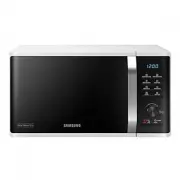


 Samsung MG23K3505AK User Manual
 Samsung MG23K3505AS User Manual
 Samsung MG23K3513AK User Manual
 Samsung MG23K3515AS User Manual
 Samsung MG23K3575AK User Manual
 Samsung MG23K3575AS User Manual
 Samsung MG28H5125NK User Manual
 Samsung MG28J5215AS User Manual
 Samsung MG30T5018AK User Manual
 Samsung MJ26A6051AT/EU User Manual
 Samsung MS11K3000AS User Manual
 Samsung MS14K6000AG User Manual