Samsung 2000 - User Manual
A troubleshooting guide for resolving compatibility issues between Samsung Portable SSDs and macOS, particularly due to updated security policies that block system extensions. The document addresses common errors–such as failed installations or false disconnections–caused by macOS’s stricter security settings. It highlights key areas like software updates, adjusting macOS permissions, and distinguishing between different SSD model requirements (e.g., T7 Touch vs. older models). The focus remains on diagnosing and mitigating operational conflicts rather than detailed installation steps.
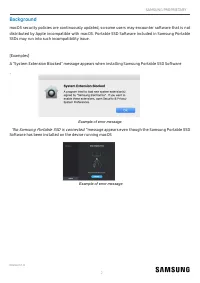
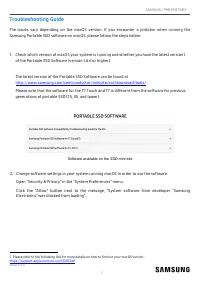
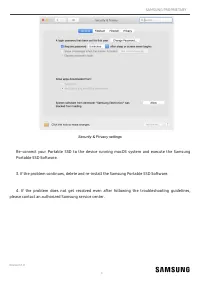
Table of Contents:
- Page 1 – Product Identification and Disclaimer
- Page 2 – macOS Compatibility Error Messages
- Page 3 – Troubleshooting Software Compatibility
- Page 4 – Advanced SSD Troubleshooting Steps
SAMSUNG PROPRIETARY
Revision 1.0
1
DISCLAIMER
SAMSUNG ELECTRONICS RESERVES THE RIGHT TO CHANGE PRODUCTS, INFORMATION AND
SPECIFICATIONS WITHOUT NOTICE.
Products and specifications discussed herein are for reference purposes only. All information
discussed herein may change without notice and is provided on an “AS IS” basis, without warranties of
any kind. This document and all information discussed herein remain the sole and exclusive property
of Samsung Electronics. No license of any patent, copyright, mask work, trademark or any other
intellectual property right is granted by one party to the other party under this document, by
implication, estoppels or otherwise. Samsung products are not intended for use in life support, critical
care, medical, safety equipment, or similar applications where product failure could result in loss of
life or personal or physical harm, or any military or defense application, or any governmental
procurement to which special terms or provisions may apply. For updates or additional information
about Samsung products, contact your nearest Samsung office (www.samsung.com/ssd and
www.samsung.com/support). All brand names, trademarks and registered trademarks belong to their
respective owners.
COPYRIGHT © 2020
This material is copyrighted by Samsung Electronics. Any unauthorized reproductions, use or
disclosure of this material, or any part thereof, is strictly prohibited and is a violation under copyright
law.
Revision 1.0
Add Title (SamsungOne300, 10pt)
Samsung Portable SSD
macOS Compatibility
Troubleshooting Guide
"Loading the manual" means you need to wait until the file loads and becomes available for online reading. Some manuals are very large, and the time they take to appear depends on your internet speed.
Was this manual helpful?
About this manual
- Brand
- Samsung
- Model
- 2000
- Document type
- User Manual
- Category
- RAM & Storage
- Language(s)
- English
- Pages
- 4
- File size
- 513.6 KB
- Format
Summary
Cover information, copyright notice for 2020, and a disclaimer stating the information is for reference only and carries no warranties.
Explanation of compatibility issues related to macOS security policies and details on specific error messages regarding system extensions and SSD disconnection errors during software installation.
Steps to resolve compatibility issues by checking the latest software version, adjusting macOS security settings, and noting differences in software for T7 Touch and T7 models compared to earlier versions.
Ask a question
Related manuals
More Samsung RAM & Storage models
- Samsung 1000 User Manual
 Samsung MU-PA1T0B User Manual
 Samsung MU-PA500B User Manual
 Samsung MU-PB1T0B User Manual
 Samsung MU-PC1T0H User Manual
 Samsung MU-PC1T0T User Manual
 Samsung MU-PC2T0T User Manual
 Samsung MU-PE1T0S User Manual
 Samsung MU-PE2T0S User Manual
 Samsung MU-PE4T0S User Manual
 Samsung MU-PT250B User Manual


