PureGuardian AP2200CA - User Manual
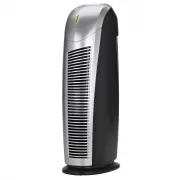
PureGuardian AP2200CA Air Purifier – User Manual, read for free online in PDF format. We hope this helps you resolve any issues you may have. If you have further questions, please contact us through the contact form.


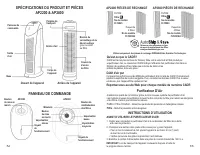


Table of Contents:
- Page 2 – READ AND SAVE THESE INSTRUCTIONS; WARNINGS; Failure to comply with the warnings listed below may; PRODUCT SPECIFICATIONS
- Page 3 – PRODUCT SPECIFICATIONS AND PARTS; AIR PURIFIER; Filter; CONTROL PANEL; BEFORE OPERATING THE AIR PURIFIER:; OPERATING INSTRUCTIONS
- Page 4 – FILTER REPLACEMENT; TROUBLESHOOTING GUIDE; PROBLEM
- Page 5 – Purificateur D’Air; UTILISATION ET INSTRUCTIONS D’ENTRETIEN; GARANTIE LIMITÉE; Service à la clientèle :
- Page 6 – SPÉCIFICATIONS DU PRODUIT; LIRE ET CONSERVER CES INSTRUCTIONS; AVERTISSEMENTS
- Page 7 – INSTRUCTIONS D’UTILISATION; SPÉCIFICATIONS DU PRODUIT ET PIÈCES; Devant de l’appareil; PANNEAU DE COMMANDE; Reportez-vous au site Web pour chaque modèle de numéros CADR; AVANT D’UTILISER LE PURIFICATEUR D’AIR:
- Page 8 – REMPLACEMENT DU FILTRE; NETTOYAGE ET ENTRETIEN DE LA COMBINASION DE FILTRES; GUIDE DE DÉPANNAGE; PROBLÈME
- Page 9 – Purificador de aire; INSTRUCCIONES DE USO Y CUIDADO; GARANTÍA LIMITADA; Departamento Deservicio
- Page 10 – LEA Y GUARDE ESTAS INSTRUCCIONES; ADVERTENCIAS; El no cumplir las advertencias que se enumeran a continuación
- Page 11 – Parte anterior; Consulte el sitio web para los números CADR modelo individuales.; Prefiltro - Conocido También Como Carbón Activado -; INSTRUCCIONES DE FUNCIONAMIENTO
- Page 12 – REEMPLACE EL FILTRO; INDICADOR DE CAMBIO DE FILTRO; GUÍA DE SOLUCIÓN DE PROBLEMAS
E-1
Air Purifier
USE & CARE INSTRUCTIONS
Model No. AP2200
3-Year Limited Warranty
Model No. AP2800
5-Year Limited Warranty
English E - 1 French F - 1 Spanish S - 1
Date Purchased
month ________ year _________
Customer Service
1.866.603.5900
www.guardiantechnologies.com
Use GENUINE Guardian Technologies replacement parts only.
REV0920
©2016 Guardian Technologies LLC
LIMITED WARRANTY
To the consumer, Guardian Technologies LLC warrants this product to be free of defects in materials or
workmanship commencing upon the date of the original purchase. In order to be eligible for this Limited Warranty,
an original sales receipt or comparable substitute proof of purchase bearing the date of original purchase is
required. Refer to the original product carton or specific product/model page on the Guardian Technologies
website for warranty length for your particular model. This warranty applies only to the original purchaser of this
product from the original date of purchase. This warranty covers product purchased from authorized distributors only.
This warranty applies to repair or replacement of product found to be defective in materials or workmanship. This
warranty does not apply to damage resulting from unusual wear, commercial, abusive, unreasonable use or
supplemental damage. This warranty does not cover damage from unauthorized repairs or from any use not in
accordance with the instruction manual. Defects that are the result of normal wear and tear will not be considered
manufacturing defects under this warranty.
If this product should become defective within the warranty period, we will repair or replace any defective parts
free of charge. All warranty repairs must be completed by Guardian Technologies LLC. This warranty gives you
specific legal rights and you may also have other rights (other rights may vary from state to state in the U.S.A.)
To submit product under warranty the complete machine must be delivered pre-paid to GuardianTechnologies LLC.
Please include complete information including: the problem, the model number of the product, the day of purchase,
and a copy of the original sales receipt along with your name, address, and telephone (email optional). Address
returns to the attention of: Customer Service, at the address below. Additional questions or comments can be made
toll free to the number listed below.
Additional copies of the instruction manual can be obtained by accessing and
printing directly from our website or calling customer service.
USA and Canada
Guardian Technologies LLC
26251 Bluestone Blvd.
Euclid, Ohio 44132
1.866.603.5900
www.guardiantechnologies.com
Please go to www.guardiantechnologies.com to register your product. We consider the registration process important
to ensuring superior service to our customers, however submitting the warranty registration is optional and does not
affect your rights to utilize this warranty according to the conditions stated above.
"Loading the manual" means you need to wait until the file loads and becomes available for online reading. Some manuals are very large, and the time they take to appear depends on your internet speed.
Summary
READ AND SAVE THESE INSTRUCTIONS WARNINGS Failure to comply with the warnings listed below may result in electric shock or serious injury. This product should be used only in accordance with the specifications outlined in this manual. Usage other than what has been specified here may result in serio...
PRODUCT SPECIFICATIONS AND PARTS AP2200 & AP2800 AP2200 REPLACEMENT PARTS AIR PURIFIER Improve your indoor air quality with your new Guardian Technologies ® Air Purifier. Multiple levels of cleaning include a combination filter that captures allergens, and Charcoal filter to remove odors. Pre-Fi...
E-6 E-7 OPERATING THE AIR PURIFIER AP2200: 1. Turn the air purifier ON by rotating POWER KNOB clockwise. 2. Upon turning the air purifier ON, the power indicator will be lit and the unit will be in LOW mode ( I ). 3. Rotate the POWER KNOB clockwise to set the air purifier to MEDIUM ( II ) or High mo...