Page 3 - Evoke H4; ES IT
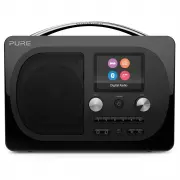
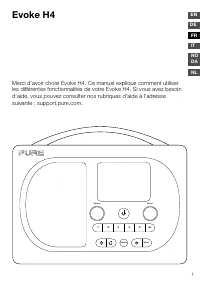
1 Evoke H4 Thank you for choosing the Evoke H4. This user manual explains how to use the various features of your Evoke H4. If you need more help, you can view our help topics at support.pure.com. Source 1 2 3 4 5 6+ Menu Volume Select FR ES IT NO DA EN DE NL
Page 5 - Contents
3 Contents Evoke H4 1 Safety 4 Getting started 5 Your Evoke 5 Setting up your Evoke H4 6 Switching your Evoke H4 on and off 7 Changing the volume 7 Digital radio 8 Listening to digital radio 8 Changing the digital radio station 8 Automatically tuning to digital radio stations 8 FM radio 9 Listening ...
Page 6 - Name; Aux in; History
4 Symbols on the product and in the user manual Potentially serious risk to your personal safety. To avoid possible injury or death, obey all safety notices with this symbol. Caution. Read the user manual before use. PantoneCool Grey 7C Name Windsor Trim Button Artwork Part # 15A90 Version 4 Date 02...
Page 7 - Getting started; Your Evoke; Front controls
5 Getting started Your Evoke Front controls Source 1 2 3 4 5 6+ Menu Volume Select 1 2 3 4 5 6 7 8 9 10 1 Snoozehandle Tap to snooze an alarm or brighten the screen when dimmed 2 Standby Switch your Evoke H4 on and off, or put it in standby 3 Volume Turn to change the volume, press to mute the volum...
Page 8 - Rear connections; Setting up your Evoke H4
6 Rear connections 12V DC 1.2A x in Au Input for supplied mains adapter only 3.5mm output for stereo headphones Analogue stereo input for auxiliary cables Micro USB connector for software updates Setting up your Evoke H4 To set up your Evoke H4: 1. Unclip the aerial and fully extend it.2. Connect th...
Page 9 - Switching your Evoke H4 on and off; Changing the volume
7 Switching your Evoke H4 on and off If you have a ChargePAK rechargeable battery, insert it before you switch your Evoke H4 on. Read more about using a ChargePAK on page 17. To switch your Evoke H4 on: • Press . Note: When you switch your Evoke H4 on for the first time, it starts tuning to digital ...
Page 10 - Digital radio; Listening to digital radio; Changing the digital radio station
8 Digital radio Listening to digital radio To listen to digital radio: • Press Source until ‘Digital Radio’ is displayed. Tip: Some digital radio stations also broadcast information and graphics, such as music album artwork or weather updates. Press the Select dial to change between slideshow, large...
Page 11 - FM radio; Listening to FM radio; Changing the FM radio station; Choosing stereo or mono reception for FM radio
9 FM radio Listening to FM radio To listen to FM radio: • Press Source until ‘FM’ is displayed. Changing the FM radio station To change the FM radio station: • To scan to the previous or next radio station, turn the Select dial left or right and then press the Select dial. > • To manually tune to...
Page 12 - Radio station presets; About presets
10 Radio station presets About presets You can store your favourite radio stations as presets. You can use presets to quickly tune to your stored radio stations whenever you want. On the front of your Evoke H4, there are six preset buttons. Use 1 to 5 for quick access to your favourite radio station...
Page 13 - Bluetooth and auxiliary devices; Connecting a Bluetooth device; Connecting a device with an auxiliary cable
11 Bluetooth and auxiliary devices Connecting a Bluetooth device You can use Bluetooth to wirelessly connect to a device, such as a mobile phone or tablet. You can then stream music from your mobile phone or tablet through your Evoke H4.The first time you connect a Bluetooth device to your Evoke H4,...
Page 14 - Alarms; Setting an alarm; Cancelling an existing alarm
12 Alarms To wake up to your favourite radio station, you can set up to two alarms on your Evoke H4. Note: Alarms will not work when your Evoke H4 is being powered by a ChargePAK and off. Setting an alarm To set an alarm: 1. Press . 2. Turn and press the Select dial to choose ‘Alarm 1’ or ‘Alarm 2’....
Page 15 - Timers; Setting the kitchen timer
13 Timers Setting the kitchen timer The kitchen timer counts down and then ends with an alarm tone. To set the kitchen timer: 1. Press . 2. Turn and press the Select dial to choose ‘Timer’. 3. Turn the Select dial to choose the duration of the timer. 4. Press the Select dial to start the timer. The ...
Page 16 - Settings; Personalising the sound on your Evoke H4; Display settings; Changing the information displayed on the screen; Changing the screen brightness
14 Settings Personalising the sound on your Evoke H4 Use the equaliser and boost setting to get the most out of your music. There are several equaliser settings set up already. For example, to hear classical music at its best, change the equaliser setting to ‘Classic’. You can also customise the equ...
Page 17 - Clock settings; Setting the time and date; Changing the time format
15 To dim the screen after 10 seconds of inactivity: 1. Press Menu . 2. Turn and press the Select dial to choose ‘Display’. 3. Turn and press the Select dial to choose ‘Duration’. 4. Turn and press the Select dial to choose ‘Timed’. To change the brightness of the screen when dimmed: 1. Press Menu ....
Page 18 - Changing the date format; Changing the language; Resetting to factory settings; Updating the software
16 Changing the date format To change the date format: 1. Press Menu . 2. Turn and press the Select dial to choose ‘Clock’. 3. Turn and press the Select dial to choose ‘Set Date Format’. 4. Turn and press the Select dial to choose the date format. Changing the language You can change the language of...
Page 19 - Using a ChargePAK; About ChargePAKs
17 Using a ChargePAK About ChargePAKs A ChargePAK is a rechargeable battery pack that allows you to listen to your music anywhere. When your Evoke H4 is connected to a power outlet, it charges the ChargePAK. You can then disconnect your Evoke H4 from the power and take your music with you. Inserting...
Page 20 - Troubleshooting
18 Troubleshooting Problem Solution I can’t hear any sound Use the Volume dial to turn the volume up. For digital radio, perform an autotune. Read more on page 8. For Bluetooth or auxiliary devices, check a device is connected. Turn the volume up on the connected device. The screen is very dark Remo...
Page 21 - Specifications
19 Specifications Radio Digital and FM radio Frequencies DAB/DAB+ FM radio 87.5-108MHz Bluetooth Bluetooth v4.1 Frequency range: 2402 < 2480 MHz, Maximum power: 10.00 dBm (EIRP) A2DP support SpeakerAudio output power Full range 3” driver unit10 Watts RMS Inputs 12V DC power adapter socket (230V s...
Page 23 - NO
1 FR ES IT NO DA EN DE NL Evoke H4 Vielen Dank, dass Sie sich für das Evoke H4 entschieden haben. Dieses Benutzerhandbuch beschreibt die Nutzung der verschiedenen Funktionen Ihres Evoke H4. Wenn Sie weitere Hilfe benötigen, rufen Sie unsere Hilfethemen unter support.pure.com auf. Source 1 2 3 4 5 6+...
Page 25 - Inhaltsverzeichnis
3 DE Inhaltsverzeichnis Evoke H4 1 Sicherheitsanweisungen 4 Erste Schritte 5 Ihr Evoke 5 Einrichten Ihres Evoke H4 6 Ein- und Ausschalten Ihres Evoke H4 7 Ändern der Lautstärke 7 Digitalradio 8 Hören von digitalen Radiosendern 8Ändern des digitalen Radiosenders 8Automatisches Einstellen von digital...
Page 26 - Sicherheitsanweisungen; Sicherheitsanweisungen und Warnhinweise
4 Sicherheitsanweisungen 1. Lesen und beachten Sie die folgenden Anweisungen, und bewahren Sie diese auf. Alle Sicherheits- und Bedienungsanweisungen sind vor der Verwendung dieses Produkts zu lesen und zur späteren Einsichtnahme aufzubewahren. Alle Warnhinweise am Gerät und in den Bedienungsanweisu...
Page 27 - Erste Schritte; Ihr Evoke; Bedienelemente auf der Vorderseite
5 DE Erste Schritte Ihr Evoke Bedienelemente auf der Vorderseite Source 1 2 3 4 5 6+ Menu Volume Select 1 2 3 4 5 6 7 8 9 10 1 SnoozeHandle Tippen Sie auf diesen Griff, um die Schlummerfunktion des Weckers zu verwenden oder den Bildschirm zu beleuchten, wenn dieser abgeblendet ist 2 Standby Schalten...
Page 28 - Anschlüsse auf der Rückseite; Einrichten Ihres Evoke H4
6 Anschlüsse auf der Rückseite 12V DC 1.2A x in Au Eingang für das mitgelieferte Netzteil 3,5-mm-Buchse für Stereo-Kopfhörer Analoger Stereo- Eingang für externe Geräte Micro-USB- Anschluss für Software-Updates Einrichten Ihres Evoke H4 So richten Sie Ihr Evoke H4 ein: 1. Lösen Sie die Antenne aus d...
Page 30 - Digitalradio; Hören von digitalen Radiosendern; Ändern des digitalen Radiosenders; Automatisches Einstellen von digitalen Radiosendern
8 Digitalradio Hören von digitalen Radiosendern So hören Sie Digitalradio: • Drücken Sie Source , bis „Digital Radio“ angezeigt wird. Tipp: Manche digitalen Radiosender übertragen auch Informationen und Grafiken, z. B. Albumcover oder Wetterdaten. Drücken Sie den Select-Regler, um zwischen Diashow, ...
Page 31 - Hören von UKW-Radiosendern; Ändern des UKW-Radiosenders
9 DE UKW-Radio Hören von UKW-Radiosendern So hören Sie UKW-Sender: • Drücken Sie Source , bis „FM“ angezeigt wird. Ändern des UKW-Radiosenders So stellen Sie einen anderen UKW-Radiosender ein: • Um einen Suchlauf zum vorherigen oder nächsten Radiosender durchzuführen, drehen Sie den Select -Regler n...
Page 32 - Speicherplätze für Radiosender; Info über Speicherplätze; Aufrufen eines gespeicherten Senders
10 Speicherplätze für Radiosender Info über Speicherplätze Sie können Ihre Lieblingssender speichern. Über diese Speicherplätze können Sie jederzeit schnell auf Ihre gespeicherten Radiosender zugreifen. Auf der Vorderseite Ihres Evoke H4 befinden sich sechs Speichertasten. Verwenden Sie die Tasten 1...
Page 33 - Bluetooth und externe Geräte; Anschließen eines Bluetooth-Geräts; Anschließen eines Geräts per Kabel
11 DE Bluetooth und externe Geräte Anschließen eines Bluetooth-Geräts Sie können ein Gerät (z. B. ein Mobiltelefon oder Tablet) drahtlos über Bluetooth anschließen. Auf diese Weise können Sie Musik von Ihrem Mobiltelefon oder Tablet über Ihr Evoke H4 abspielen.Wenn Sie ein Bluetooth-Gerät zum ersten...
Page 34 - Wecker; Einstellen eines Weckers; Deaktivieren eines vorhandenen Weckers
12 Wecker Um sich von Ihrem Lieblingssender wecken zu lassen, können Sie auf Ihrem Evoke H4 bis zu zwei Wecker einstellen. Hinweis: Alarme werden nicht funktionieren, wenn Ihr Evoke H4 wird von einem ChargePAK angetrieben wird und ausgeschaltet. Einstellen eines Weckers So richten Sie einen Wecker e...
Page 35 - Kurzzeitmesser; Einrichten des Kurzzeitmessers; Abschalten des Kurzzeitmessers; Einrichten des Sleeptimers
13 DE Kurzzeitmesser Einrichten des Kurzzeitmessers Der Kurzzeitmesser zählt abwärts und gibt nach Ablauf der Zeit einen Alarmton aus. So richten Sie den Kurzzeitmesser ein: 1. Drücken Sie . 2. Drehen und drücken Sie den Select -Regler, um „Timer“ auszuwählen. 3. Drehen Sie den Select -Regler, um di...
Page 36 - Einstellungen; Individuelles Anpassen des Klangs Ihres Evoke H4; Anzeigeeinstellungen; Ändern der auf dem Bildschirm angezeigten Informationen; Ändern der Bildschirmhelligkeit
14 Einstellungen Individuelles Anpassen des Klangs Ihres Evoke H4 Mit den Equaliser- und Boost-Einstellungen können Sie das Beste aus Ihrer Musik herausholen. Es sind bereits diverse Equaliser-Einstellungen eingerichtet. Um beispielsweise den optimalen Klang für klassische Musik zu erhalten, setzen ...
Page 37 - Uhreinstellungen; Einstellen von Uhrzeit und Datum; Ändern des Uhrzeitformats
15 DE So dunkeln Sie den Bildschirm nach 10 Sekunden Inaktivität ab: 1. Drücken Sie Menu . 2. Drehen und drücken Sie den Select -Regler, um „Display“ auszuwählen. 3. Drehen und drücken Sie den Select -Regler, um „Dauer“ auszuwählen. 4. Drehen und drücken Sie den Select -Regler, um „Zeitgesteuert“ au...
Page 38 - Ändern des Datumsformats; Ändern der Sprache; Rücksetzung auf die Werkseinstellungen; Aktualisieren der Software
16 Ändern des Datumsformats So ändern Sie das Datumsformat: 1. Drücken Sie Menu . 2. Drehen und drücken Sie den Select -Regler, um „Uhr“ auszuwählen. 3. Drehen und drücken Sie den Select -Regler, um „Datumsformat einst.“ auszuwählen. 4. Drehen und drücken Sie den Select -Regler, um das Datumsformat ...
Page 39 - Verwenden eines ChargePAK-Akkus; Info über ChargePAK-Akkus
17 DE Verwenden eines ChargePAK-Akkus Info über ChargePAK-Akkus Ein ChargePAK ist ein wiederaufladbarer Akku, mit dessen Hilfe Sie Ihre Musik überall hören können. Wenn Ihr Evoke H4 an eine Steckdose angeschlossen ist, wird der ChargePAK-Akku aufgeladen. Sie können den Stecker des Evoke H4 dann aus ...
Page 40 - Fehlerbehebung
18 Fehlerbehebung Problem Lösung Ich kann nichts hören Erhöhen Sie die Lautstärke mit dem Volume -Regler. Bei Digitalradio nehmen Sie einen automatischen Suchlauf vor. Mehr darüber finden Sie auf Seite 8.Prüfen Sie im Falle von Bluetooth oder externen Geräten, ob ein Gerät angeschlossen ist. Erhöhen...
Page 41 - Technische Daten
19 DE Technische Daten Radio Digital- und UKW-Radio Frequenzen DAB/DAB+ UKW-Radio 87,5-108 MHz Bluetooth Bluetooth v4.1 Frequenzbereich: 2402 < 2480 MHz, Maximale Leistung: 10.00 dBm (EIRP) A2DP-support LautsprecherAudio-Ausgangsleistung 3-Zoll-Breitbandtreiber 10 Watt RMS Eingänge 12 V-DC-Netzad...
Page 45 - Contenu
3 Contenu Evoke H4 1 Instructions de sécurité 4 Démarrage 5 Votre Evoke 5 Paramétrage de votre Evoke H4 6 Mise en route et arrêt de votre Evoke H4 7 Modification du volume 7 Radio numérique 8 Écoute de la radio numérique 8 Changement de station radio numérique 8Syntonisation automatique des stations...
Page 46 - Instructions de sécurité; Instructions et précautions de sécurité
4 Instructions de sécurité 1. Lisez attentivement et conservez ces instructions – Toutes les instructions de sécurité et de fonctionnement doivent être lues avant d’utiliser ce produit et conservées pour être consultées ultérieurement. Vous devez respecter tous les avertissements figurant sur l’appa...
Page 47 - Démarrage; Votre Evoke; Commandes en face avant
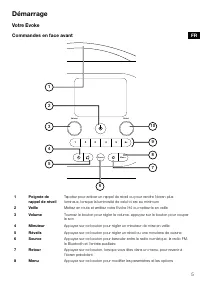
5 Démarrage Votre Evoke Commandes en face avant Source 1 2 3 4 5 6+ Menu Volume Select 1 2 3 4 5 6 7 8 9 10 1 Poignée de rappel de réveil Tapotez pour activer un rappel de réveil ou pour rendre l'écran plus lumineux, lorsque la luminosité de celui-ci est au minimum 2 Veille Mettez en route et arrête...
Page 48 - Connexions en face arrière; Paramétrage de votre Evoke H4
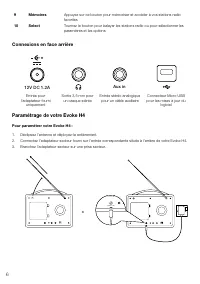
6 Connexions en face arrière 12V DC 1.2A x in Au Entrée pour l'adaptateur fourni uniquement Sortie 3,5 mm pour un casque stéréo Entrée stéréo analogique pour un câble auxiliaire Connecteur Micro USB pour les mises à jour du logiciel Paramétrage de votre Evoke H4 Pour paramétrer votre Evoke H4 : 1. D...
Page 49 - Mise en route et arrêt de votre Evoke H4; Modification du volume
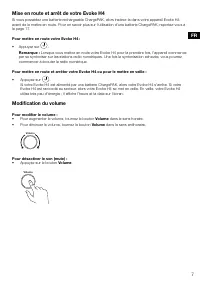
7 Mise en route et arrêt de votre Evoke H4 Si vous possédez une batterie rechargeable ChargePAK, alors insérez-la dans votre appareil Evoke H4 avant de le mettre en route. Pour en savoir plus sur l'utilisation d'une batterie ChargePAK, reportez-vous à la page 17. Pour mettre en route votre Evoke H4 ...
Page 50 - Radio numérique; Écoute de la radio numérique; Changement de station radio numérique; Syntonisation automatique des stations radio numériques
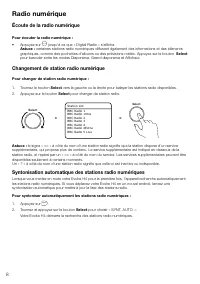
8 Radio numérique Écoute de la radio numérique Pour écouter la radio numérique : • Appuyez sur Source jusqu'à ce que « Digital Radio » s'affiche. Astuce : certaines stations radio numériques diffusent également des informations et des éléments graphiques, comme des pochettes d’albums ou des prévisio...
Page 51 - Radio FM; Écoute de la radio FM; Changement de station radio FM; Choix de la réception Stéréo ou Mono pour la radio FM
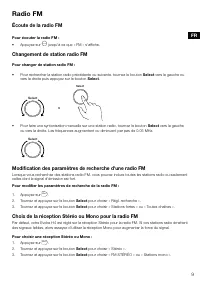
9 Radio FM Écoute de la radio FM Pour écouter la radio FM : • Appuyez sur Source jusqu'à ce que « FM » s'affiche. Changement de station radio FM Pour changer de station radio FM : • Pour rechercher la station radio précédente ou suivante, tournez le bouton Select vers la gauche ou vers la droite pui...
Page 52 - Mémorisation des stations radio; À propos des mémorisations
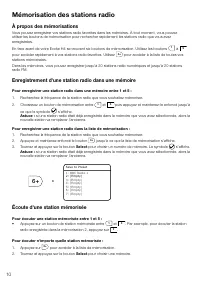
10 Mémorisation des stations radio À propos des mémorisations Vous pouvez enregistrer vos stations radio favorites dans les mémoires. À tout moment, vous pouvez utiliser les boutons de mémorisation pour rechercher rapidement les stations radio que vous avez enregistrées. En face avant de votre Evoke...
Page 53 - Bluetooth et appareils auxiliaires; Connexion d'un appareil Bluetooth
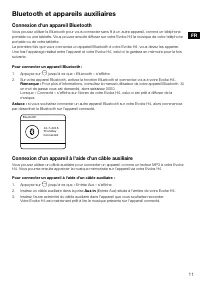
11 Bluetooth et appareils auxiliaires Connexion d'un appareil Bluetooth Vous pouvez utiliser le Bluetooth pour vous connecter sans fil à un autre appareil, comme un téléphone portable ou une tablette. Vous pouvez ensuite diffuser sur votre Evoke H4 la musique de votre téléphone portable ou de votre ...
Page 54 - Réveils; Paramétrage des réveils; Suppression d'un réveil existant
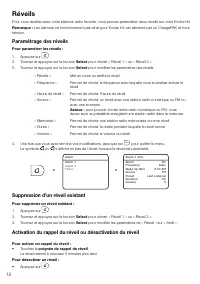
12 Réveils Pour vous réveiller avec votre stations radio favorite, vous pouvez paramétrer deux réveils sur votre Evoke H4. Remarque : Les alarmes ne fonctionneront pas whenyour Evoke H4 est alimenté par un ChargePAK et hors tension. Paramétrage des réveils Pour paramétrer les réveils : 1. Appuyez su...
Page 55 - Minuteurs; Paramétrage de la minuterie de cuisine
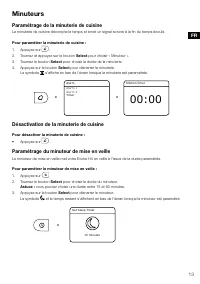
13 Minuteurs Paramétrage de la minuterie de cuisine La minuterie de cuisine décompte le temps et émet un signal sonore à la fin du temps écoulé. Pour paramétrer la minuterie de cuisine : 1. Appuyez sur . 2. Tournez et appuyez sur le bouton Select pour choisir « Minuteur ». 3. Tournez le bouton Selec...
Page 56 - Paramètres; Personnalisation du son sur votre Evoke H4; Paramètres d'affichage; Modification des informations affichées à l'écran; Modification de la luminosité de l'écran
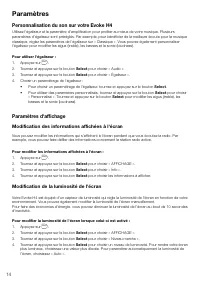
14 Paramètres Personnalisation du son sur votre Evoke H4 Utilisez l'égaliseur et le paramètre d'amplification pour profiter au mieux de votre musique. Plusieurs paramètres d'égaliseur sont préréglés. Par exemple, pour bénéficier de la meilleure écoute pour la musique classique, réglez les paramètres...
Page 57 - Paramétrage de l'heure et de la date; Modification du format de l'heure
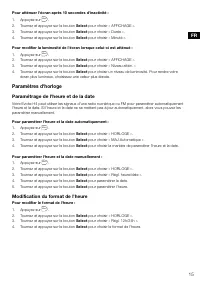
15 Pour atténuer l'écran après 10 secondes d'inactivité : 1. Appuyez sur Menu . 2. Tournez et appuyez sur le bouton Select pour choisir « AFFICHAGE ». 3. Tournez et appuyez sur le bouton Select pour choisir « Durée ». 4. Tournez et appuyez sur le bouton Select pour choisir « Minuté ». Pour modifier ...
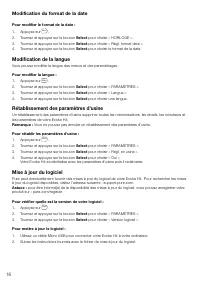
Page 58 - Modification du format de la date; Modification de la langue; Rétablissement des paramètres d'usine; Mise à jour du logiciel
16 Modification du format de la date Pour modifier le format de la date : 1. Appuyez sur Menu . 2. Tournez et appuyez sur le bouton Select pour choisir « HORLOGE ». 3. Tournez et appuyez sur le bouton Select pour choisir « Régl. format date ». 4. Tournez et appuyez sur le bouton Select pour choisir ...
Page 59 - Utilisation d'une batterie ChargePAK; À propos des batteries ChargePAK
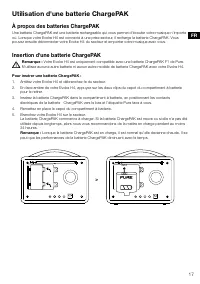
17 Utilisation d'une batterie ChargePAK À propos des batteries ChargePAK Une batterie ChargePAK est une batterie rechargeable qui vous permet d'écouter votre musique n'importe où. Lorsque votre Evoke H4 est connecté à une prise secteur, il recharge la batterie ChargePAK. Vous pouvez ensuite déconnec...
Page 60 - Dépannage
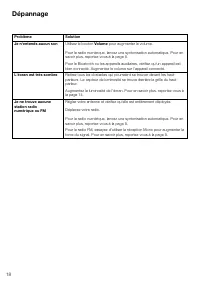
18 Dépannage Problème Solution Je n'entends aucun son Utilisez le bouton Volume pour augmenter le volume. Pour la radio numérique, lancez une syntonisation automatique. Pour en savoir plus, reportez-vous à la page 8.Pour le Bluetooth ou les appareils auxiliaires, vérifiez qu'un appareil est bien con...
Page 61 - Spécifications
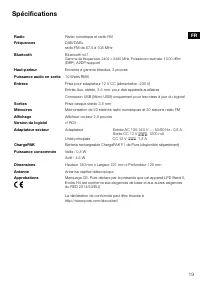
19 Spécifications Radio Radio numérique et radio FM Fréquences DAB/DAB+ radio FM de 87,5 à 108 MHz Bluetooth Bluetooth v4.1 Gamme de fréquences: 2402 < 2480 MHz, Puissance maximale: 10.00 dBm (EIRP) , A2DP-support Haut-parleur Puissance audio en sortie Enceinte à gamme étendue, 3 pouces 10 Watts ...
Page 63 - ENGLISH
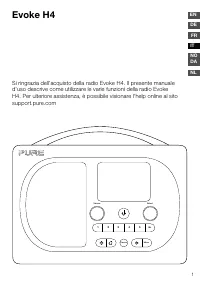
1 Evoke H4 Si ringrazia dell'acquisto della radio Evoke H4. Il presente manuale d'uso descrive come utilizzare le varie funzioni della radio Evoke H4. Per ulteriore assistenza, è possibile visionare l'help online al sito support.pure.com Source 1 2 3 4 5 6+ Menu Volume Select ENGLISH FR ES IT NO DA ...
Page 65 - Indice
3 Indice Evoke H4 1 Istruzioni di sicurezza 4 Informazioni preliminari 5 La radio Evoke 5 Impostazione della radio Evoke H4 6Accensione e spegnimento della radio Evoke H4 7 Regolazione del volume 7 Radio digitale 8 Ascolto delle stazioni radio digitali 8 Ricerca delle stazioni radio digitali 8 Sinto...
Page 66 - Istruzioni di sicurezza; Istruzioni di sicurezza e avvertenze
4 Istruzioni di sicurezza 1. Leggere, rispettare e conservare le seguenti istruzioni – prima di utilizzare questo prodotto, è opportuno leggere tutte le istruzioni di sicurezza e di funzionamento, conservandole per futura consultazione. Dovrebbero essere rispettate tutte le avvertenze riportate sull...
Page 67 - Informazioni preliminari; La radio Evoke; Comandi anteriori
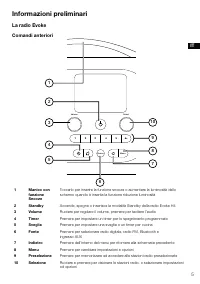
5 Informazioni preliminari La radio Evoke Comandi anteriori Source 1 2 3 4 5 6+ Menu Volume Select 1 2 3 4 5 6 7 8 9 10 1 Manico con funzione Snooze Toccarlo per inserire la funzione snooze o aumentare la luminosità dello schermo quando è inserita la funzione riduzione luminosità 2 Standby Accende, ...
Page 68 - Connessioni posteriori; Impostazione della radio Evoke H4
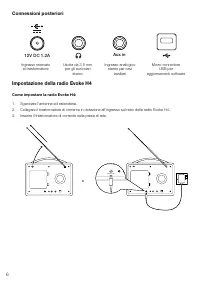
6 Connessioni posteriori 12V DC 1.2A x in Au Ingresso riservato al trasformatore Uscita da 3,5 mm per gli auricolari stereo Ingresso analogico stereo per cavi ausiliari Micro-connettore USB per aggiornamenti software Impostazione della radio Evoke H4 Come impostare la radio Evoke H4: 1. Sganciare l'...
Page 70 - Radio digitale; Ascolto delle stazioni radio digitali; Ricerca delle stazioni radio digitali
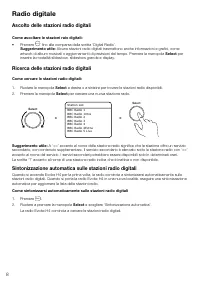
8 Radio digitale Ascolto delle stazioni radio digitali Come ascoltare le stazioni raio digitali: • Premere Source fino alla comparsa della scritta ‘Digital Radio’. Suggerimento utile: Alcune stazioni radio digitali trasmettono anche informazioni e grafici, come artwork di album musicali o aggiorname...
Page 71 - Ascolto delle stazioni radio FM; Ricerca delle stazioni radio FM; Scelta di ricezione stereo o mono per stazioni radio FM
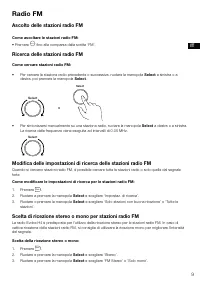
9 Radio FM Ascolto delle stazioni radio FM Come ascoltare le stazioni radio FM: • Premere Source fino alla comparsa della scritta ‘FM’. Ricerca delle stazioni radio FM Come cercare stazioni radio FM: • Per cercare la stazione radio precedente o successiva, ruotare la manopola Select a sinistra o a d...
Page 72 - Stazioni radio preselezionate; Informazioni sulle stazioni radio preselezionate; Ascolto di una stazione preselezionata
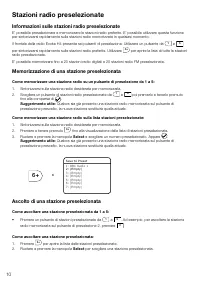
10 Stazioni radio preselezionate Informazioni sulle stazioni radio preselezionate E' possibile preselezionare e memorizzare le stazioni radio preferite. E' possibile utilizzare questa funzione per sintonizzarsi rapidamente sulle stazioni radio memorizzate in qualsiasi momento. Il frontale della radi...
Page 73 - Bluetooth e dispositivi ausiliari; Connessione di un dispositivo Bluetooth; Collegamento di un dispositivo con un cavo ausiliario
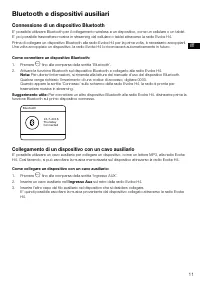
11 Bluetooth e dispositivi ausiliari Connessione di un dispositivo Bluetooth E' possibile utilizzare Bluetooth per il collegamento wireless a un dispositivo, come un cellulare o un tablet. E' poi possibile trasmettere musica in streaming dal cellulare o tablet attraverso la radio Evoke H4.Prima di c...
Page 74 - Funzione sceglia; Impostazione di una sveglia; Rimozione di una sveglia già inserita
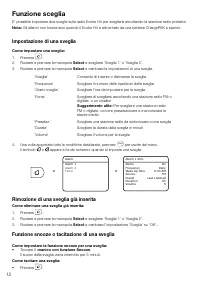
12 Funzione sceglia E' possibile impostare due sveglie sulla radio Evoke H4 per svegliarsi ascoltando la stazione radio preferita. Nota: Gli allarmi non funzionano quando il Evoke H4 è alimentato da una batteria ChargePAK e spento. Impostazione di una sveglia Come impostare una sveglia: 1. Premere ....
Page 75 - Timer; Impostazione del timer per cucina
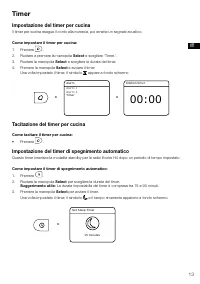
13 Timer Impostazione del timer per cucina Il timer per cucina esegue il conto alla rovescia, poi emette un segnale acustico. Come impostare il timer per cucina: 1. Premere .2. Ruotare a premere la manopola Select e scegliere ‘Timer.’. 3. Ruotare la manopola Select e scegliere la durata del timer. 4...
Page 76 - Impostazioni; Personalizzazione dell'audio sulla radio Evoke H4; Impostazioni per il display; Modifica delle informazioni sul display:; Regolazione della luminosità dello schermo
14 Impostazioni Personalizzazione dell'audio sulla radio Evoke H4 Per ottimizzare la qualità del suono, si consiglia di utilizzare le impostazioni Equaliser e Amplificazione. Sono già predisposte numerose impostazioni per l'Equaliser. Ad esempio, per l'ascolto ottimale della musica classica, si cons...
Page 77 - Impostazione dell'orologio; Impostazione dell'ora e della data; Modifica del formato di visualizzazione dell'ora
15 Per ridurre la luminosità del display dopo 10 secondi di inattività: 1. Premere Menu . 2. Ruotare e premere la manopola Select e scegliere ‘Display’. 3. Ruotare a premere la manopola Select e scegliere ‘Durata.’. 4. Ruotare a premere la manopola Select e scegliere ‘Temporiz.’. Come regolare la lu...
Page 78 - Modifica del formato di visualizzazione della data; Scelta della lingua; Ripristino delle impostazioni di default; Aggiornamento del software
16 Modifica del formato di visualizzazione della data Come modificare il formato di visualizzazione della data: 1. Premere Menu . 2. Ruotare e premere la manopola Select e scegliere ‘Orologio’. 3. Ruotare e premere la manopola Select e scegliere 'Impost. formato data'. 4. Ruotare a premere la manopo...
Page 79 - Utilizzo della batteria ChargePAK; Informazioni sulla batteria ChargePAK
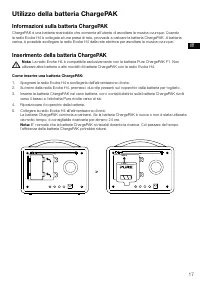
17 Utilizzo della batteria ChargePAK Informazioni sulla batteria ChargePAK ChargePAK è una batteria ricaricabile che consente all'utente di ascoltare la musica ovunque. Quando la radio Evoke H4 è collegata al una presa di rete, provvede a caricare la batteria ChargePAK. A batteria carica, è possibil...
Page 80 - Ricerca e soluzione problemi
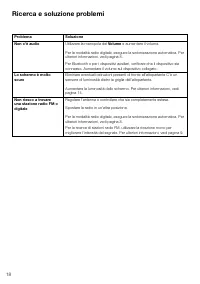
18 Ricerca e soluzione problemi Problema Soluzione Non c'è audio Utilizzare la manopola del Volume e aumentare il volume. Per la modalità radio digitale, eseguire la sintonizzazione automatica. Per ulteriori informazioni, vedi pagina 8.Per Bluetooth o per i dispositivi ausiliari, verificare che il d...
Page 81 - Dati tecnici
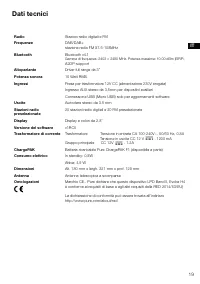
19 Dati tecnici Radio Stazioni radio digitali e FM Frequenze DAB/DAB+ stazione radio FM 87.5-108MHz Bluetooth Bluetooth v4.1 Gamma di frequenza: 2402 < 2480 MHz, Potenza massima: 10.00 dBm (EIRP) , A2DP-support Altoparlante Potenza sonora Driver full range da 3”10 Watt RMS Ingressi Presa per tras...
Page 85 - Innhold
3 Innhold Evoke H4 1 Sikkerhetsanvisninger 4 Kom i gang 5 Din Evoke 5 Installasjon av Evoke H4 6 Slå Evoke H4 av og på 7 Endre volum 7 Digital radio 8 Høre på digital radio 8 Bytte digital radiostasjon 8 Automatisk søk etter digitale radiostasjoner 8 FM-radio 9 Høre på FM-radio 9 Bytte FM-radiostasj...
Page 86 - Sikkerhetsanvisninger; Sikkerhetsanvisninger og advarsler
4 Sikkerhetsanvisninger 1. Les og følg disse anvisningene. Alle sikkerhetsanvisningene og anvisningene for bruk bør leses før dette produktet tas i bruk. Ta vare på anvisningene. Følg alle advarsler på produktet og i bruksanvisningen. 2. Dersom produktet ikke installeres i samsvar med anvisningene, ...
Page 87 - Kom i gang; Din Evoke; Frontkontroller
5 Kom i gang Din Evoke Frontkontroller Source 1 2 3 4 5 6+ Menu Volume Select 1 2 3 4 5 6 7 8 9 10 1 Slumrehåndtak Slå lett for å slumre en alarm eller gjøre skjermen lysere når den er nedtonet 2 Ventemodus Slå Evoke H4 på og av, eller sett den i ventemodus 3 Volum Vri for å endre volum, trykk for å...
Page 88 - Tilkoblinger bak; Installasjon av Evoke H4
6 Tilkoblinger bak 12V DC 1.2A x in Au Inngang kun for medfølgende strømadapter 3,5 mm utgang for stereohodetelefoner Analog stereo- inngang for AUX- kabler Mikro-USB- kontakt for programvare- oppdateringer Installasjon av Evoke H4 Slik installerer du Evoke H4: 1. Løsne antennen og brett den helt ut...
Page 89 - Slå Evoke H4 av og på; Endre volum
7 Slå Evoke H4 av og på Hvis du har et ChargePAK-oppladbart batteri, sett det inn før du slår på Evoke H4. Les mer om å bruke en ChargePAK på side 17. Slik slår du på Evoke H4: • Trykk . Merk: Når du slår på Evoke H4 for første gang, begynner den å stille seg inn på digitale radiostasjoner. Etter at...
Page 90 - Høre på digital radio; Bytte digital radiostasjon
8 Digital radio Høre på digital radio Slik lytter du til digital radio: • Trykk ned Source til «Digital Radio» vises. Tips: Noen digitale radiostasjoner sender også ut informasjon og grafikk, for eksempel musikkalbumbilde eller værmeldinger. Trykk på Velg -knappen for å skifte mellom lysbildefremvis...
Page 91 - Bytte FM-radiostasjon
9 FM-radio Høre på FM-radio Slik lytter du til FM-radio: • Trykk ned Source til «FM» vises. Bytte FM-radiostasjon Slik bytter du FM-radiostasjon: • For å skanne til forrige eller neste radiostasjon, kan du vri Velg -hjulet mot venstre eller høyre og deretter trykke ned Velg -hjulet. > • For å sti...
Page 92 - Forvalgte radiostasjoner; Om forvalg
10 Forvalgte radiostasjoner Om forvalg Du kan lagre favorittene dine blant radiostasjonene som forvalg. Du kan bruke forvalg til å raskt stille inn på de lagrede radiostasjonene når du måtte ønske. Foran på Evoke H4 er det seks knapper for forvalg. Bruk 1 til 5 for å få rask tilgang til favoritt- ra...
Page 93 - Bluetooth og AUX-enheter; Tilkobling av en Bluetoorth-enhet; Tilkobling av en enhet med en AUX-kabel
11 Bluetooth og AUX-enheter Tilkobling av en Bluetoorth-enhet Du kan bruke Bluetooth til å koble deg trådløst til en enhet, for eksempel en mobiltelefon eller et nettbrett. Deretter kan du streame musikk fra mobiltelefonen eller nettbrettet via Evoke H4.Første gang du kobler til en Bluetooth-enhet t...
Page 94 - Alarmer; Innstilling av alarm; Avbryte en eksisterende alarm
12 Alarmer For å våkne opp til favoritt-radiostasjonen din, kan du stille inn to alarmer på Evoke H4. Merk: Alarmer vil ikke fungere, når din Evoke H4 bliver drevet af en ChargePAK og fra. Innstilling av alarm Slik stiller du inn en alarm: 1. Trykk . 2. Drei og trykk på Velg -hjulet for å velge «Ala...
Page 95 - Tidtakere; Innstilling av kjøkkenklokken
13 Tidtakere Innstilling av kjøkkenklokken Kjøkkenklokken teller ned og avslutter med en alarm-tone. Slik stiller du inn kjøkkenklokken: 1. Trykk .2. Drei og trykk på Velg -hjulet for å velge «Tidtaker». 3. Vri på Velg -hjulet for å velge varigheten av tidtakeren. 4. Trykk ned Velg -hjulet for å sta...
Page 96 - Innstillinger; Tilpassing av lyden på Evoke H4; Skjerminnstillinger; Endring av informasjonen som vises på skjermen; Endring av lysstyrken på skjermen
14 Innstillinger Tilpassing av lyden på Evoke H4 Bruk innstillingene til å utjevne eller forsterke slik at du får mest mulig ut av musikken. Det er mange equaliser-innstillinger som allerede er installert. F.eks. kan du, for å høre klassisk musikk på sitt beste, endre equaliser-innstillingen til «kl...
Page 97 - Innstillinger for klokke; Innstilling av tid og dato; Endre tidsformatet
15 Slik dimmer du skjermen etter 10 sekunder uten aktivitet: 1. Trykk Menu . 2. Drei og trykk på Velg -hjulet for å velge «Display». 3. Drei og trykk på Velg -hjulet for å velge «Varighet». 4. Drei og trykk på Velg -hjulet for å velge «Tidsinnstilt». Slik endrer du lysstyrken på skjermen når den er ...
Page 98 - Endre datoformatet; Endring av språk; Nullstille til fabrikkoppsett; Oppdatering av programvare
16 Endre datoformatet Slik endrer du datoformatet: 1. Trykk Menu . 2. Drei og trykk på Velg -hjulet for å velge «Clock». 3. Drei og trykk på Velg -hjulet for å velge «Still inn datoformat». 4. Drei og trykk på Velg -hjulet for å velge datoformatet. Endring av språk Du kan endre språket på menyer og ...
Page 99 - Bruk av ChargePAK; Om ChargePAKs
17 Bruk av ChargePAK Om ChargePAKs En ChargePAK er en oppladbar batteripakke som lar deg lytte til musikken din hvor som helst. Når Evoke H4 er koblet til en strømkontakt, lader den ChargePAK-en. Du kan deretter koble Evoke H4 fra strømuttaket og ta musikken din med deg. Innsetting av ChargePAK Merk...
Page 100 - Feilsøking
18 Feilsøking Problem Løsning Jeg kan ikke høre en lyd Bruk Volum -hjulet til å skru volumet opp. Når det gjelder digital radio, må du utføre en autotuning. Les mer på side 8.Når det gjelder Bluetooth- og AUX-enheter, må du sjekke om enheten er tilkoblet. Skru volumet opp på den tilkoblede enheten. ...
Page 101 - Spesifikasjoner
19 Spesifikasjoner Radio Digital eller FM-radio Frekvenser DAB/DAB+ FM-radio 87,5-108MHz Bluetooth Bluetooth v4.1 Frekvensområde: 2402 < 2480 MHz, Maksimal effekt: 10.00 dBm (EIRP) , A2DP-support Høyttaler Full range 3” driverenhet Audio utgangseffekt 10 watt RMS Innganger 12V likestrømsadapter (...
Page 105 - Inhoud
3 NL Inhoud Evoke H4 1 Veiligheidsaanwijzingen 4 Aan de slag 5 Uw Evoke 5 De Evoke H4 gereedmaken voor gebruik 6 De Evoke H4 in- en uitschakelen 7 Het geluidsvolume regelen 7 Digitale radio 8 Naar digitale radiozenders luisteren 8Een ander digitaal radiostation selecteren 8Automatisch afstemmen op d...
Page 106 - Veiligheidsaanwijzingen; Instructies en waarschuwingen ten aanzien van de veiligheid
4 Veiligheidsaanwijzingen 1. Lees, volg en bewaar deze handleiding – Alle veiligheidsvoorschriften en gebruiksaanwijzingen moeten worden gelezen voordat dit product in gebruik wordt genomen en voor toekomstige raadpleging worden bewaard. Alle waarschuwingen op het apparaat en in de handleiding moete...
Page 107 - Aan de slag; Uw Evoke; Bedieningselementen voorzijde
5 NL Aan de slag Uw Evoke Bedieningselementen voorzijde Source 1 2 3 4 5 6+ Menu Volume Select 1 2 3 4 5 6 7 8 9 10 1 SnoozeHandle Tik op deze handgreep om een alarm te laten sluimeren of om de displayverlichting aan te zetten wanneer de display is gedimd 2 Stand-by Druk op deze toets om de Evoke H4...
Page 108 - Aansluitingen aan de achterzijde; De Evoke H4 gereedmaken voor gebruik
6 Aansluitingen aan de achterzijde 12V DC 1.2A x in Au Aansluiting voor voedingsadapter (alleen meegeleverde adapter) 3.5 mm-aansluiting voor stereo- hoofdtelefoon Analoge stereo-ingang voor aansluiten van andere bronnen Micro-USB- aansluiting voor software-updates De Evoke H4 gereedmaken voor gebru...
Page 110 - Digitale radio; Naar digitale radiozenders luisteren; Een ander digitaal radiostation selecteren
8 Digitale radio Naar digitale radiozenders luisteren U schakelt als volgt over naar digitale radio: • Druk op de toets Source totdat ‘Digital Radio’ is geselecteerd. Tip: sommige digitale radiostations zenden ook informatie en afbeeldingen mee, zoals artwork van muziekalbums of weersverwachtingen. ...
Page 111 - Naar FM-radiozenders luisteren; Een ander FM-radiostation selecteren
9 NL FM-radio Naar FM-radiozenders luisteren U schakelt als volgt over naar FM-radio: • Druk op de toets Source totdat de display de tekst ‘FM’ toont. Een ander FM-radiostation selecteren U selecteert als volgt een ander FM-radiostation: • Draai de knop Select naar links of rechts om te zoeken naar ...
Page 112 - Over voorkeuzestations; Naar een voorkeuzestation luisteren
10 Voorkeuzestations Over voorkeuzestations U kunt uw favoriete radiostations vastleggen als voorkeuzestations. Dit stelt u in staat om op ieder moment snel over te schakelen naar een van deze stations. Aan de voorzijde van de Evoke H4 vindt u zes voorkeuzetoetsen. Met de toetsen 1 tot en met 5 hebt...
Page 113 - Bluetooth en externe bronnen; Verbinding maken met een Bluetooth-apparaat; Verbinding maken met een externe bron via de extra ingang
11 NL Bluetooth en externe bronnen Verbinding maken met een Bluetooth-apparaat Met Bluetooth kunt u een draadloze verbinding tot stand brengen tussen de Evoke H4 en een extern apparaat zoals een mobiele telefoon of een tablet. Vervolgens kunt u vanaf het gekoppelde toestel muziek streamen naar de Ev...
Page 114 - Wekkers; Een wekker instellen; Een ingestelde wekker annuleren
12 Wekkers Als u wilt worden gewekt met uw favoriete radiostation, kunt u Evoke H4 instellen op twee verschillende wekstanden. Opmerking: Alarmen zal niet werken als je Evoke H4 wordt aangedreven door een ChargePAK en eraf. Een wekker instellen U stelt een wekker als volgt in: 1. Druk op . 2. Draai ...
Page 115 - De keukenwekker instellen
13 NL De wekker sluimert gedurende 5 minuten. U zet een afgaande wekker als volgt uit: • Druk op . Timers De keukenwekker instellen De keukenwekker telt een ingestelde tijdsduur af en laat dan een wektoon horen. U stelt de keukenwekker als volgt in: 1. Druk op . 2. Draai aan de Select -knop totdat ‘...
Page 116 - INSTELLINGEN; De geluidsweergave van de Evoke H4 aanpassen; De weergegeven informatie aanpassen
14 INSTELLINGEN De geluidsweergave van de Evoke H4 aanpassen De equaliser en de instelling ‘Boost’ geven u de mogelijkheid om de geluidsweergave van uw audio optimaal in te stellen. De equaliser beschikt hiervoor over een aantal voorgedefinieerde opties. Voor weergave van klassieke muziek is er bijv...
Page 117 - De displayhelderheid instellen; Klokinstellingen; Tijd en datum instellen
15 NL De displayhelderheid instellen De Evoke H4 is voorzien van een lichtsensor, die ervoor zorgt dat de helderheid van de display wordt afgestemd op de sterkte van het omgevingslicht. U kunt de helderheid echter ook handmatig aanpassen.Om energie te besparen, kan het scherm ook worden gedimd als e...
Page 118 - De tijdnotatie wijzigen; De datumnotatie wijzigen; De displaytaal wijzigen; De fabrieksinstellingen terugzetten
16 U stelt de tijd en datum als volgt handmatig in: 1. Druk op Menu . 2. Draai aan de Select -knop totdat ‘Klok’ is geselecteerd en druk de knop in om uw keuze te bevestigen. 3. Draai aan de Select -knop totdat ‘Tijd/datum instellen’ is geselecteerd en druk de knop in om uw keuze te bevestigen. 4. D...
Page 119 - De software bijwerken; Een ChargePAK gebruiken; Over de ChargePAK
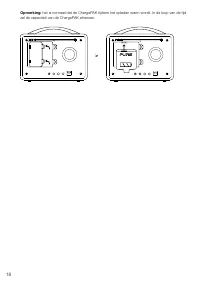
17 NL U zet de fabrieksinstellingen als volgt terug: 1. Druk op Menu . 2. Draai aan de Select -knop totdat ‘Instellingen’ is geselecteerd en druk de knop in om uw keuze te bevestigen. 3. Draai aan de Select -knop totdat ‘Fabrieksreset’ is geselecteerd en druk de knop in om uw keuze te bevestigen. 4....
Page 121 - Probleemoplossing
19 NL Probleemoplossing Probleem Oplossing Ik hoor helemaal geen geluid Stel het volume harder in met de knop Volume . Als u naar digitale radio wilt luisteren, voer dan het automatisch afstemmen uit. Meer informatie over dit onderwerp vindt u op pagina 8. Als u een externe bron gebruikt via Bluetoo...
Page 122 - Specificaties
20 Specificaties Radio Digitale radio en FM-radio Frequenties DAB/DAB+ FM-radio 87,5-108 MHz Bluetooth Bluetooth v4.1 Frequentiebereik: 2402 < 2480 MHz, Maximale kracht: 10.00 dBm (EIRP) , A2DP-support Luidspreker 3”-luidsprekerdrivers met volledig bereik Uitgangsvermogen audio 10 watt RMS Ingang...