Page 2 - Settings
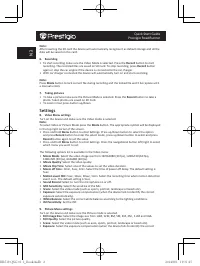
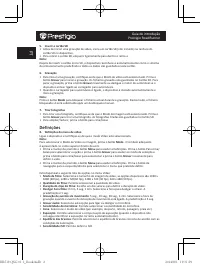
Quick Start Guide Prestigio RoadRunner EN Note: After inserting the SD card the device will automatically recognize it as default storage and all the data will be saved on this card. 6. Recording • To start recording make sure the Video Mode is selected. Press the Record button to start recording. T...
Page 4 - Safety precautions
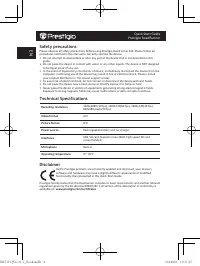
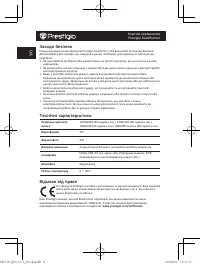
Quick Start Guide Prestigio RoadRunner EN Safety precautions Please observe all safety precautions before using Prestigio Roadrunner 519. Please follow all procedures outlined in this manual to correctly operate the device. • Do not attempt to disassemble or alter any part of the device that is not ...
Page 5 - Комплект поставки; Начало работы; Включение / Выключение
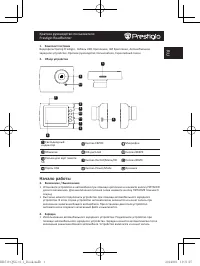
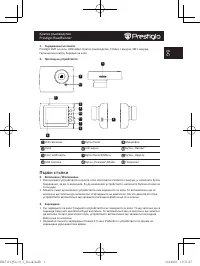
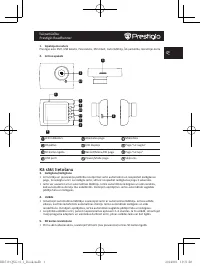
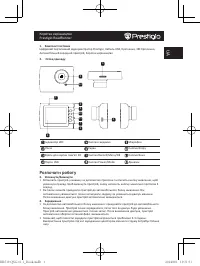
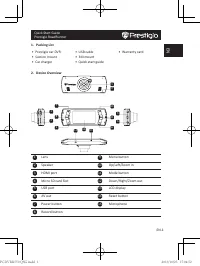
Краткое руководство пользователя Prestigio RoadRunner RU 1. Комплект поставки Видеорегистратор Prestigio, Кабель USB, Крепление, 3M Крепление, Автомобильное зарядное устройство, Краткое руководство пользователя, Гарантийный талон 2. Обзор устройства 1 2 3 4 5 6 7 8 9 10 11 12 Светодиодный индикатор ...
Page 6 - Настройки
Краткое руководство пользователя Prestigio RoadRunner RU автоматически. При остановке двигателя устройство автоматически сохранит записанный файл и выключится. • Обычно полная зарядка аккумулятора устройства занимает около 2-3 часов. Зарядка может занять большее время, если устройство находится в ра...
Page 7 - ISO
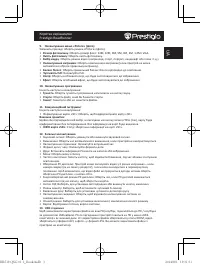
Краткое руководство пользователя Prestigio RoadRunner RU • Выбор режима : Выбор режима видео (спортивный, портрет, пейзаж, пляж, проч.). • Экспозиция : коррекция экспозиции (если устройство не может произвести коррекцию экспозиции самостоятельно). • Баланс белого : Выберите правильный баланс белого ...
Page 8 - Инструкции по безопасности; Примечание
Краткое руководство пользователя Prestigio RoadRunner RU 13. Соединение USB Для переноса записанных файлов на компьютер/ноутбук воспользуйтесь входящим в комплект поставки кабелем USB. После подключения устройства к компьютеру устройство будет обнаружено и отображено компьютером в папке “Мой компьют...
Page 9 - BA; Sadržaj pakovanja; Početna uputstva; Uključivanje/Isključivanje; Punjenje
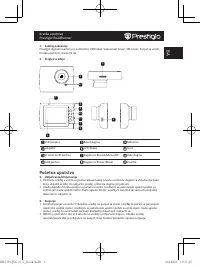
Kratko uputstvo Prestigio RoadRunner BA 1. Sadržaj pakovanja Prestigio digitalna kamera za automobil, USB kabal, Vakuumski nosač, 3M nosač, Punjač za vozilo, Kratko uputstvol, Garantni list 2. Pregled uređaja 1 2 3 4 5 6 7 8 9 10 11 12 LED lampica Reset dugme Mikrofon Objektiv LCD displej Gore Prost...
Page 10 - Podešavanja; Video
Kratko uputstvo Prestigio RoadRunner BA 5. Ubacivanje SD memorijske kartice • Prije nego što počnete sa snimanjem, molimo Vas da ubacite SD karticu (nije isporučena uz uređaj) u odgovarajući prostor na uređaju. • Kako biste izvadili SD karticu, lagano je pritisnite ka unutra, a potom izvadite. Napom...
Page 12 - Mjere predostrožnosti; Rezolucija snimanja; Fotografski format; Izvor napajanja; Izjava o ograničenju odgovornosti
Kratko uputstvo Prestigio RoadRunner BA pojaviti u folderu “My computer” kao prenosivi disk. Svi snimljeni dokumenti sačuvani su u folderu DCIM, video dokumenti se čuvaju u formatu AVI, a fotografije u formatu JPG. Sada možete prenijeti dokumenta sa uređaja. Mjere predostrožnosti Molimo Vas da vodit...
Page 13 - Съдържание на пакета; Първи стъпки; Включване / Изключване
Кратко ръководство Prestigio RoadRunner BG 1. Съдържание на пакета Prestigio DVR за кола, USB кабел, Кратко ръководство, Стойка с вакуум, 3M с вакуум, Гаранционна карта, Зарядно за кола 2. Преглед на устройството 1 2 3 4 5 6 7 8 9 10 11 12 LED светлини Бутон Ресет Микрофон Лупа LCD екран Бутон „Наго...
Page 14 - Menu
Кратко ръководство Prestigio RoadRunner BG 5. Поставяне на SD картата • Преди да започнете видеозапис, моля поставете SD карта в слота за micro SD карта (не е вкллючена в пакета) в слота за m SD карти в устройството. • За да извадите SD картата, натиснете я леко навътре и след това я изтеглете. Забе...
Page 16 - Мерки за безопасност; Отхвърляне на претенции
Кратко ръководство Prestigio RoadRunner BG видеофайловете са в AVI формат, а снимките – в JPG формат. Можете сега да изтеглите (копирате) файловете от устройството. Мерки за безопасност Моля прочетете информацията за всички мерки за безопасност преди да започнете да използвате Prestigio Roadrunner 5...
Page 17 - Přehled zařízení; První kroky; Nabíjení
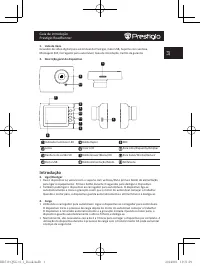
Stručný návod k obsluze Prestigio RoadRunner CZ 1. Obsah balení Digitální kamera Prestigio do auta, USB kabel, Přísavný držák, 3M držák, Autonabíječka, Stručný návod k obsluze, Záruční list 2. Přehled zařízení 1 2 3 4 5 6 7 8 9 10 11 12 LED dioda Tlačítko Reset Mikrofon Čočka LCD displej Tlačítko Na...
Page 18 - Nastavení
Stručný návod k obsluze Prestigio RoadRunner CZ 5. Vložení SD karty • Před zahájením nahrávání videa prosím vložte SD kartu do slotu pro Micro SD kartu v zařízení. • Chcete-li SD kartu vyjmout, opatrně ji zatlačte do zařízení a poté vyjměte. Poznámka: Po vložení SD karty ji zařízení automaticky rozp...
Page 20 - Bezpečnostní opatření; Zdroj napájení; Zřeknutí se odpovědnosti
Stručný návod k obsluze Prestigio RoadRunner CZ Bezpečnostní opatření Před použitím zařízení Prestigio Roadrunner 519 si prosím prostudujte všechna bezpečnostní opatření. Správné zacházení se zařízením je podmíněno dodržováním všech postupů nastíněných v této příručce. • Nepokoušejte se rozmontovat ...
Page 21 - Erste Schritte
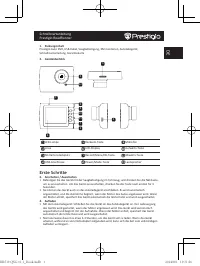
Schnellstartanleitung Prestigio RoadRunner DE 1. Packungsinhalt Prestigio Auto DVR, USB-Kabel, Saugbefestigung, 3M montieren, Autoladegerät, Schnellstartanleitung, Garantiekarte 2. Geräteüberblick 1 2 3 4 5 6 7 8 9 10 11 12 LED-Lampe Rücksetz-Taste Mikrofon Linse LCD-Display Aufwärts-Taste SD-Karten...
Page 22 - Einstellungen
Schnellstartanleitung Prestigio RoadRunner DE 5. Einlegen der SD-Karte • Bevor Sie mit der Videoaufnahme beginnen, stecken Sie bitte eine SD-Karte in den SD- Kartensteckplatz des Geräts. • Zum Herausziehen der SD-Karte drücken Sie diese leicht in das Gerät und entnehmen sie. Anmerkung: Nach dem Einf...
Page 23 - Wiedergabeeinstellungen
Schnellstartanleitung Prestigio RoadRunner DE die richtige Belichtung nicht automatisch erkennen kann). • White Balance (Weißabgleich) : Wählen Sie den richtigen Weißabgleich entsprechend den Lichtverhältnissen. • ISO Sensivity (ISO-Empfindlichkeit) : ISO einstellen. 9. Einstellungen des Picture-Men...
Page 24 - Sicherheitsvorkehrungen; Aufnahmeauflösung; Haftungsausschluss
Schnellstartanleitung Prestigio RoadRunner DE 13. USB-Anschluss Um die registrierten Dateien auf Ihren PC/Ihr Notebook herunterzuladen, schließen Sie das Gerät mit dem mitgelieferten USB-Kabel bitte an den PC oder das Notebook an. Nachdem Sie das Gerät mit dem PC verbunden haben, wird es in "My ...
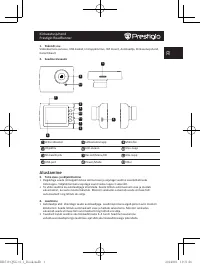
Page 25 - EE; Alustamine; Toite sisse- ja väljalülitamine
Kiirkasutusjuhend Prestigio RoadRunner EE 1. Pakendi sisu Videokaamera autosse, USB-kaabel, Iminappkinnitus, 3M mount, Autolaadija, Kiirkasutusjuhend, Garantiikaart 2. Seadme ülevaade 1 2 3 4 5 6 7 8 9 10 11 12 LED-indikaator Lähtestamisnupp Mikrofon Objektiiv LCD-ekraan Üles-nupp SD-kaardi pilu Rec...
Page 26 - Sätted; Filmimise väljalülitamise aeg
Kiirkasutusjuhend Prestigio RoadRunner EE 5. SD-kaardi sisestamine • Enne video salvestamist sisestage SD-kaart (ei kuulu komplekti) seadme SD-kaardi pesasse. • SD-kaardi väljavõtmiseks suruge seda kergelt sissepoole ja seejärel eemaldage kaart. Märkus. SD-kaardi sisestamise järel tuvastab seade sel...
Page 27 - Pildistamismenüü sätted
Kiirkasutusjuhend Prestigio RoadRunner EE 9. Pildistamismenüü sätted Lülitage seade sisse ja veenduge, et pildistamisrežiim on valitud. • Still Image Size (foto suurus) : valige järgmiste valikute seast soovitud suurus: 14 M, 12 M, 8 M, 5 M, 3 M, 2 M, 1,2 M ja VGA. • Still Quality (foto kvaliteet) :...
Page 28 - Ettevaatusabinõud; Tehnilised andmed; Töökeskkonna temperatuur; Vastutusest loobumine
Kiirkasutusjuhend Prestigio RoadRunner EE Ettevaatusabinõud Enne seadme Prestigio Roadrunner 519 kasutamist lugege kõik ettevaatusabinõud läbi ja järgige neid. Seadme korrektseks kasutamiseks järgige palun kõiki selles juhendis kirjeldatud toiminguid. • Ärge püüdke seadet lahti võtta ega seadme mis ...
Page 29 - Lista de embalaje; Información del dispositivo; Introducción
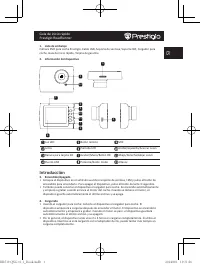
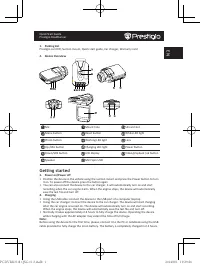
Guía de inicio rápido Prestigio RoadRunner ES 1. Lista de embalaje Cámara DVR para coche Prestigio, Cable USB, Soporte de ventosa, Soporte 3M, Cargador para coche, Guía de inicio rápido, Tarjeta de garantía 2. Información del dispositivo 1 2 3 4 5 6 7 8 9 10 11 12 Luz LED Botón reinicio MIC Lente Pa...
Page 30 - Introducir la tarjeta SD; Configuración; Ajustes del menú de vídeo
Guía de inicio rápido Prestigio RoadRunner ES 5. Introducir la tarjeta SD • Antes de empezar a grabar el vídeo, introduzca una tarjeta SD (no incluida) en la ranura para tarjeta SD del dispositivo.La tarjeta SD no está incluida en el suministro. • Para extraer la tarjeta SD, apriétela ligeramente de...
Page 32 - Precauciones de seguridad; Especificaciones técnicas
Guía de inicio rápido Prestigio RoadRunner ES Precauciones de seguridad Respete todas las precauciones de seguridad cuando utilice Prestigio Roadrunner 519. Siga todos los procedimientos expuestos en el presente manual para utilizar correctamente su dispositivo. • No intente desmontar ni alterar nin...
Page 33 - Matériel inclus; Démarrage
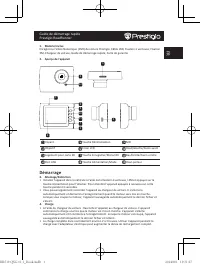
Guide de démarrage rapide Prestigio RoadRunner FR 1. Matériel inclus Enregistreur Vidéo Numérique (DVR) de voiture Prestigio, Câble USB, Fixation à ventouse, Fixation 3M, Chargeur de voiture, Guide de démarrage rapide, Carte de garantie 2. Aperçu de l'appareil 1 2 3 4 5 6 7 8 9 10 11 12 Voyant Touch...
Page 34 - Paramètres
Guide de démarrage rapide Prestigio RoadRunner FR 5. Insertion d'une carte SD • Avant de démarrer l'enregistrement vidéo, merci d'insérer une carte SD (non fournie) dans le logement pour carte SD de l'appareil. • Pour retirer la carte SD, enfoncez-la légèrement à l'intérieur de l'appareil et retirez...
Page 36 - Consignes de sécurité; Résolution d'enregistrement; Format Image; Alimentation électrique; Interfaces; Avis de non-responsabilité
Guide de démarrage rapide Prestigio RoadRunner FR dans le dossier DCIM, les vidéos sont stockés au format AVI et les fichiers images au format JPG. Vous pouvez alors télécharger les fichiers depuis l'appareil. Consignes de sécurité Merci de respecter toutes les consignes de sécurité avant d'utiliser...
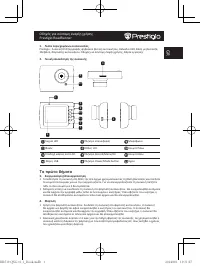
Page 37 - Λίστα περιεχομένων συσκευασίας; Τα πρώτα βήματα; Ενεργοποίηση/Απενεργοποίηση
Οδηγός για σύντομη έναρξη χρήσης Prestigio RoadRunner GR 1. Λίστα περιεχομένων συσκευασίας Prestigio - Συσκευή DVR (εγγραφής ψηφιακού βίντεο) αυτοκινήτου, Καλώδιο USB, Βάση με βεντούζα, 3M βάση, Φορτιστής αυτοκινήτου, Οδηγός για σύντομη έναρξη χρήσης, Κάρτα εγγύησης 2. Γενική επισκόπηση της συσκευής...
Page 38 - Εισαγωγή της κάρτας SD; Ρυθμίσεις
Οδηγός για σύντομη έναρξη χρήσης Prestigio RoadRunner GR 5. Εισαγωγή της κάρτας SD • Πριν ξεκινήσετε την εγγραφή βίντεο, εισάγετε μια κάρτα SD (δεν περιλαμβάνεται) στην υποδοχή κάρτας SD της συσκευής. • Για να βγάλετε την κάρτα SD, πατήστε την ελαφρά προς τα μέσα και κατόπιν αφαιρέστε τη. Παρατήρηση...
Page 39 - Playback settings (Ρυθμίσεις αναπαραγωγής)
Οδηγός για σύντομη έναρξη χρήσης Prestigio RoadRunner GR συνθήκες φωτισμού. • ISO Sensitivity (Ευαισθησία ISO) : Ρυθμίστε την τιμή ISO. 9. Ρυθμίσεις μενού Picture (Φωτογραφίες) Ενεργοποιήστε τη συσκευή και βεβαιωθείτε ότι έχει επιλεγεί η λειτουργία Picture (Φωτογραφίες). • Still Image Size (Μέγεθος ...
Page 40 - Προφυλάξεις ασφαλείας; Αποποίηση ευθυνών
Οδηγός για σύντομη έναρξη χρήσης Prestigio RoadRunner GR στο σταθερή ή φορητό υπολογιστή με το παρεχόμενο καλώδιο USB. Αφού συνδέσετε τη συσκευή στον υπολογιστή, η συσκευή θα εμφανιστεί στο “Ο Υπολογιστής μου” ως αφαιρούμενος δίσκος. Όλα τα αρχεία από εγγραφή αποθηκεύονται στο φάκελο DCIM, τα βίντεο...
Page 41 - Popis pakiranja; Početak; Napajanje uključeno/isključeno
Kratke upute Prestigio RoadRunner HR 1. Popis pakiranja Prestigio auto DVR, USB kabel, Nosač, 3M Nosač, Auto punjač, Kratke upute, Jamstvo 2. Pregled uređaja 1 2 3 4 5 6 7 8 9 10 11 12 LED svjetlo Tipka za resetiranje Mikrofon Objektiv LCD zaslon Tipka za smjergore Utor SD kartice Tipka Record/Menu/...
Page 42 - Postavke; Izbornik
Kratke upute Prestigio RoadRunner HR na uređaju. • Da biste izvadili SD karticu pritisnite ju unutar uređaja i izvadite. Napomena: • Nakon što ste umetnuli SD karticu uređaj će ju automatski prepoznati kao zadanu pohranu i svi podatci bit će spremljeni na ovoj kartici. 6. Snimanje • Za početak snima...
Page 43 - INFORMACIJE O SD kartici
Kratke upute Prestigio RoadRunner HR identificirati ispravnu ekspoziciju). • Nijanse bijele: Odaberite ispravnu nijansu bijele boje prema uvjetima osvjetljenja. • ISO Osjetljivost: Namjestite ISO osjetljivost. • Boja: Odaberite boju koju želite primijeniti na slici. • Efekt: Odaberite efekt koji žel...
Page 44 - Mjere opreza; Format slike; Napajanje; Izjava o odricanju
Kratke upute Prestigio RoadRunner HR Mjere opreza Poštujte sve mjere opreza prije korištenja Prestigio Roadrunner 519. Pratite sve procedure kako su opisane u ovim uputama da bi ispravno koristili vaš uređaj. • Ne pokušavajte rastaviti ili zamijeniti bilo koji dio uređaja ako nije tako opisano u ovi...
Page 45 - A készülék áttekintése; Kezdő lépések; Töltés
Rövid használati útmutató Prestigio RoadRunner HU 1. Csomag tartalma Prestigio autó DVR, USB-kábel, Vákuumos rögzítő, 3M szerelhető, Autós töltő, Rövid használati útmutató, Garancialevél 2. A készülék áttekintése 1 2 3 4 5 6 7 8 9 10 11 12 LED lámpa Újraindító gomb Mikrofon Lencse LCD kijelző Fel go...
Page 46 - Beállítások
Rövid használati útmutató Prestigio RoadRunner HU 5. Az SD-kártya behelyezése • Videofelvétel készítése előtt kérjük, helyezze a SD kártyát (nem alaptartozék) az eszközön található SD kártya nyílásba. • A SD kártya kivételéhez óvatosan nyomja be a kártyát az eszközbe, majd vegye ki. Megjegyzés: A SD...
Page 48 - Biztonsági óvintézkedések; Műszaki jellemzők; Rögzítési felbontás; Képformátum; Áramforrás; Csatlakozófelületek; Üzemi hőmérséklet; Felelősség kizárása
Rövid használati útmutató Prestigio RoadRunner HU Biztonsági óvintézkedések Kérjük, hogy a Prestigio Roadrunner 519 használata előtt tájékozódjon minden biztonsági óvintézkedés felől. Az eszköz helyes működtetéséhez kérjük, kövesse a jelen kézikönyvben leírt eljárásokat. • Ne próbálja meg szétszerel...
Page 49 - Contenuto della confezione; Per iniziare
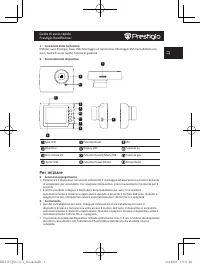
Guida di avvio rapido Prestigio RoadRunner IT 1. Contenuto della confezione DVR per auto Prestigio, Cavo USB, Montaggio ad aspirazione, Montaggio 3M, Caricabatteria da auto, Guida di avvio rapido, Scheda di garanzia 2. Panoramica del dispositivo 1 2 3 4 5 6 7 8 9 10 11 12 Spia LED Pulsante Reset Mic...
Page 50 - Impostazioni
Guida di avvio rapido Prestigio RoadRunner IT 5. Inserimento della scheda SD • Prima di avviare la registrazione video, inserire una scheda SD (non in dotazione) nello slot SD del dispositivo. • Per estrarre la scheda SD, spingerla delicatamente all'interno del dispositivo e rimuoverla. Nota: Dopo a...
Page 51 - Frequenza di sfarfallio
Guida di avvio rapido Prestigio RoadRunner IT 9. Impostazioni menu immagini Accendere il dispositivo e assicurarsi che la modalità Immagine sia selezionata. • Dimensioni fermo immagine: selezionare le dimensioni dell'immagine tra 14M, 12M, 8M, 5M, 3M, 2M, 1,2M e VGA. • Qualità fermo immagine: selezi...
Page 52 - Precauzioni di sicurezza; Esclusione di responsabilità
Guida di avvio rapido Prestigio RoadRunner IT Precauzioni di sicurezza Attenersi a tutte le precauzioni di sicurezza prima di utilizzare Prestigio Roadrunner 519. Seguire tutte le procedure delineate nel presente manuale per utilizzare correttamente il dispositivo. • Non tentare di smontare o altera...
Page 53 - Pakuotės sąrašas; Darbo pradžia; Maitinimo įjungimas/Maitinimo išjungimas
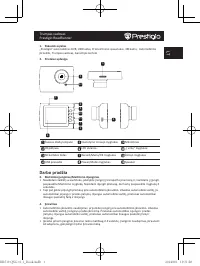
Trumpas vadovas Prestigio RoadRunner LT 1. Pakuotės sąrašas „Prestigio“ automobilinis DVR, USB laidas, Prisitvirtinimo spaustukas, 3M kalno, Automobilinis įkroviklis, Trumpas vadovas, Garantijos kortelė 2. Prietaiso apžvalga 1 2 3 4 5 6 7 8 9 10 11 12 Šviesos diodų lemputė Nustatymo iš naujo mygtuka...
Page 54 - Nustatymai
Trumpas vadovas Prestigio RoadRunner LT 5. SD kortelės įdėjimas • Prieš pradedami vaizdo įrašymą, įdėkite SD kortelę (nepridedama) į SD kortelės lizdą, esantį prietaise. • Norėdami ištraukti SD kortelę, švelniai paspauskite ją į įrenginio vidų ir ištraukite. Pastaba: Įdėjus SD kortelę, prietaisas au...
Page 56 - Atsargumo priemonės; Techninės specifikacijos; Įrašymo raiška; Nuotraukų formatas; Maitinimo šaltinis; Sąsajos; Eksploatavimo temperatūra; Atsakomybės atsisakymas
Trumpas vadovas Prestigio RoadRunner LT Atsargumo priemonės Prieš pradėdami naudotis Prestigio Roadrunner 519, atkreipkite dėmesį į visas atsargumo priemones. Kad įrenginys tinkamai veiktų, vadovaukitės šiame vadove pateiktomis instrukcijomis. • Nemėginkite ardyti arba pakeisti kurios nors įrenginio...
Page 57 - Iepakojuma saturs; Kā sākt lietošanu; Ieslēgšana/izslēgšana
Īsā pamācība Prestigio RoadRunner LV 1. Iepakojuma saturs Prestigio auto DVR, USB kabelis, Piesūceknis, 3M stāvēt, Auto lādētājs, Īsā pamācība, Garantijas karte 2. Ierīces apskats 1 2 3 4 5 6 7 8 9 10 11 12 LED indikators Atiestates poga Mikrofons Objektīvs LCD displejs Poga “Uz augšu” SD kartes lig...
Page 58 - Iestatījumi; Videoieraksta ilgums
Īsā pamācība Prestigio RoadRunner LV • Lai izņemtu SD karti, nedaudz piespiediet to uz iekšu un pēc tam izņemiet. Piebilde. Pēc SD kartes ievietošanas ierīce to automātiski pazīs kā noklusējuma krātuvi, un visi dati tiks saglabāti šajā kartē. 6. Ierakstīšana • Lai sāktu ierakstīšanu, pārliecinieties...
Page 59 - Efekti
Īsā pamācība Prestigio RoadRunner LV • Skata izvēle : izvēlieties skata režīmu (piemēram, sporta, portreta, ainavas, pludmales utt. režīmu). • Ekspozīcijas regulēšana : izvēlieties ekspozīcijas kompensāciju (kad ierīce nespēj automātiski izvēlēties pareizu ekspozīciju). • Baltā balanss : atbilstoši ...
Page 60 - Drošības pasākumi; Ieraksta izšķirtspēja; Attēlu formāts; Barošanas avots; Atruna
Īsā pamācība Prestigio RoadRunner LV Drošības pasākumi Lūdzu, ievērojiet visus drošības pasākumus, pirms sākat lietot Prestigio Roadrunner 519. Lai pareizi lietotu ierīci, ievērojiet visas šajā īsajā lietošanas pamācībā aprakstītās darbības. • Nemēģiniet izjaukt vai pārveidot nevienu ierīces detaļu,...
Page 61 - Inhoud van de verpakking; Aan de slag
Snelstartgids Prestigio RoadRunner NL 1. Inhoud van de verpakking Prestigio auto DVR, USB-kabel, Montageset met zuignap, 3M montageset, Autolader, Snelstartgids, Garantiekaart 2. Overzicht van het apparaat 1 2 3 4 5 6 7 8 9 10 11 12 LED lamp Reset-knop Microfoon Lens LCD scherm Omhoog/Links/Inzoomen...
Page 62 - Instellingen
Snelstartgids Prestigio RoadRunner NL 5. De SD-kaart plaatsen • Plaats voordat u een video opname start eerst een SD-kaart (niet inbegrepen) in de SD- kaartslot van het apparaat. • Om de SD-kaart te verwijderen duwt u de kaart een klein stukje naar binnen en trekt u het eruit. NB: Na het plaatsen va...
Page 63 - Afbeelding menu instellingen
Snelstartgids Prestigio RoadRunner NL 9. Afbeelding menu instellingen Schakel het apparaat in en controleer dat de afbeelding modus is geselecteerd. • "Still Image Size (Stilstaand beeld)" : Selecteer de afbeeldingsgrootte 14M, 12M, 8M, 5M, 3M, 2M , 1.2M en VGA. • "Still Quality (Stilsta...
Page 64 - Veiligheidsmaatregelen; Technische specificaties; Bedrijfstemperatuur; Disclaimer
Snelstartgids Prestigio RoadRunner NL geregistreerde bestanden worden opgeslagen in de DCIM map, video's worden opgeslagen als AVI formaat, en afbeeldingen worden opgeslagen als JPG formaat. U kunt nu bestanden downloaden vanaf het apparaat. Veiligheidsmaatregelen Volg a.u.b. alle veiligheidsmaatreg...
Page 65 - Zawartość opakowania; Przegląd; Rozpoczęcie pracy; Włączanie / wyłączanie urządzenia; Ładowanie
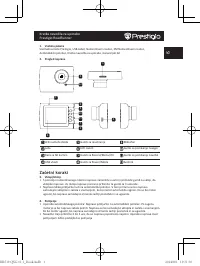
Podręcznik skrócony Prestigio RoadRunner PL 1. Zawartość opakowania Cyfrowa kamera samochodowa Prestigio, Kabel USB, Uchwyt z przyssawką, 3M stać, Ładowarka samochodowa, Podręcznik skrócony, Karta gwarancyjna 2. Przegląd 1 2 3 4 5 6 7 8 9 10 11 12 Wskaźnik diodowy Przycisk Reset Mikrofon Obiektyw Wy...
Page 66 - Ustawienia
Podręcznik skrócony Prestigio RoadRunner PL 5. Wkładanie karty SD • Przed rozpoczęciem nagrywania wideo, włożyć do gniazda kartę SD (nie jest załączona w zestawie). • Aby wyjąć kartę SD, delikatnie wcisnąć ją do środka i wyjąć z urządzenia. Uwaga: Po włożeniu karty SD, urządzenie automatycznie rozpo...
Page 68 - Środki ostrożności; Nagrywanie; Temperatura; Klauzula zrzeczenia się odpowiedzialności
Podręcznik skrócony Prestigio RoadRunner PL Środki ostrożności Przed rozpoczęciem eksploatacji rejestratora Prestigio Roadrunner 519, zastosować wszystkie przewidziane środki ostrożności. Aby prawidłowo obsługiwać urządzenie, należy przestrzegać wszystkich procedur przedstawionych w niniejszym podrę...
Page 69 - Descrição geral do dispositivo; Introdução
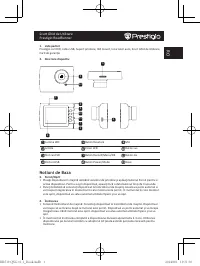
Guia de introdução Prestigio RoadRunner PT 1. Lista de itens Gravador de vídeo digital para automóvel da Prestigio, Cabo USB, Suporte com ventosa, Montagem 3M, Carregador para automóvel, Guia de introdução, Cartão de garantia 2. Descrição geral do dispositivo 1 2 3 4 5 6 7 8 9 10 11 12 Indicador lum...
Page 70 - Definições; Equilíbrio dos brancos
Guia de introdução Prestigio RoadRunner PT 5. Inserir o cartão SD • Antes de iniciar uma gravação de vídeo, insira um cartão SD (não incluído) na ranhura do cartão SD no dispositivo. • Para retirar o cartão SD, empurre ligeiramente para dentro e retire-o. Nota: Depois de inserir o cartão micro SD, o...
Page 72 - Precauções de segurança; Especificações técnicas; Exclusão de responsabilidade
Guia de introdução Prestigio RoadRunner PT Precauções de segurança Siga todas as precauções de segurança antes de utilizar o Prestigio Roadrunner 519. Siga todos os procedimentos indicados neste manual para utilizar correctamente o dispositivo. • Não tente desmontar ou alterar qualquer peça do dispo...
Page 73 - Descriere dispozitiv; Notiuni de Baza; Încărcarea
Scurt Ghid de Utilizare Prestigio RoadRunner RO 1. Lista pachet Prestigio car DVR, cablu USB, Suport prindere, 3M mount, Incarcator auto, Scurt Ghid de Utilizare, Card de garanţie 2. Descriere dispozitiv 1 2 3 4 5 6 7 8 9 10 11 12 Lumina LED Buton Resetare Mic Lentile Ecran LCD Buton sus Slot card S...
Page 74 - Setari; Setări meniu video; Selecţie Scenă
Scurt Ghid de Utilizare Prestigio RoadRunner RO 5. Introducerea cardului SD • Înainte de începerea înregistrării, vă rugăm să introduceţi un card SD (nu este inclus) în fanta de card SD a dispozitivului. • Pentru a scoate cu uşurinţă cardul SD împingeţi-l înspre interiorul dispozitivului şi apoi sco...
Page 76 - Măsuri de siguranţă; Specificaţii Tehnice; Înregistrare Rezoluţie; Format Imagine; Sursă alimentare; Interfeţe; Temperatura de operare; Precizare
Scurt Ghid de Utilizare Prestigio RoadRunner RO Măsuri de siguranţă Vă rugăm să citiţi măsurile de siguranţă înainte de utilizarea Prestigio Roadrunner 519. Pentru operarea corespunzătoare a dispozitivului urmaţi recomandările din prezentul manual. • Nu încercaţi să demontaţi sau să modificaţi nicio...
Page 77 - RS; Start; Ubacivanje SD kartice
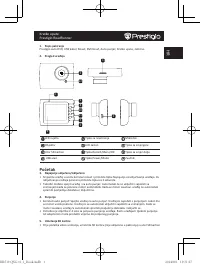
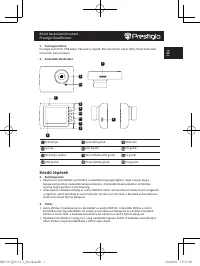
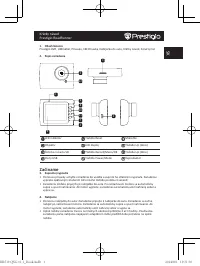
Brzo uputstvo Prestigio RoadRunner RS 1. Sadržaj pakovanja Prestigio kamera DVR, USB kabl, Držač uređaja, 3M штанд, Punjuač za automobil, Brzo uputstvo, Garantni list 2. Pregled uredjaja 1 2 3 4 5 6 7 8 9 10 11 12 LED indikator Reset taster Mikrofon Lens LCD display Gore taster Otvor za SD karticu R...
Page 80 - Bezbednosne mere; Tehničke specifikacije; Format slika; Priključci; Odricanje od odgovornosti
Brzo uputstvo Prestigio RoadRunner RS Bezbednosne mere Molimo Vas da obratite pažnju na sve mere opreza pre korišćenja Prestigio Roadrunner 519. Pratite sve dole pomenute procedure da bi pravilno rukovali uredjajem. • Ne pokušavajte da otvorite ili zamenite bilo koji deo uredjaja, a koji nije opisan...
Page 81 - Začetni koraki; Polnjenje
Kratka navodila za uporabo Prestigio RoadRunner SI 1. Vsebina paketa Snemalna enota Prestigio, USB kabel, Namestitveni nosilec, 3M Namestitveni nosilec, Avtomobilski polnilec, Kratka navodila za uporabo, Garancijski list 2. Pregled naprave 1 2 3 4 5 6 7 8 9 10 11 12 LED svetleča dioda Gumb za reseti...
Page 82 - Nastavitve; meni; Izklop filma
Kratka navodila za uporabo Prestigio RoadRunner SI 5. Vstavljanje SD kartice • Prosimo, da pred začetkom snemanja v režo naprave vstavite SD kartico (ni priložena). • Za odstranitev SD kartice to rahlo pritisnite v napravo in jo odstranite. Opomba: Po vstavitvi SD kartice bo to naprava samodejno pre...
Page 83 - Barva; Motion Detection
Kratka navodila za uporabo Prestigio RoadRunner SI 9. Nastavitve menija za slikanje Vklopite napravo in se prepričajte, da je izbran način za slikanje. • Velikost slike(Still Image Size) : Izberite velikost slike med 14M, 12M, 8M, 5M, 3M, 2M, 1.2M in VGA. • Kakovost slike (Still Quality) : Izberite ...
Page 84 - Varnostna opozorila; Tehnične podrobnosti; Snemalna ločljivost; Format slik; Vir napajanja; Vmesniki; Temperatura delovanja; Izjava o odgovornosti
Kratka navodila za uporabo Prestigio RoadRunner SI Varnostna opozorila Prosimo, da skrbno preberete varnostna opozorila pred prvo uporabo naprave Prestigio Roadrunner 519. Prosimo natančno upoštevajte spodnja navodila za pravilno uporabo naprave: • Ne poskušajte razstaviti ali zamenjati kateregakoli...
Page 85 - Začíname; Nabíjanie
Krátky návod Prestigio RoadRunner SK 1. Obsah balenia Prestigio DVR, USB kábel, Prísavka, 3M Prísavka, Nabíjačka do auta, Krátky návod, Záručný list 2. Popis zariadenia 1 2 3 4 5 6 7 8 9 10 11 12 LED indikátor Tlačidlo Reset Mikrofón Objektív LCD displej Tlačidlo Up (Hore) Štrbina na kartu SD Tlačid...
Page 86 - Vloženie SD karty; Nastavenia; Tlačidlo Record
Krátky návod Prestigio RoadRunner SK 5. Vloženie SD karty • Pred spustením nahrávania videozáznamu vložte do štrbiny na SD kartu na zariadení pamäťovú kartu typu SD (nebola priložená). • SD kartu vysuniete opatrným zatlačením do zariadenia. Uvoľní sa jej zámok a kartu môžete vytiahnuť. Poznámka: Po ...
Page 87 - Nastavenie prehrávania; Detekcia pohybu
Krátky návod Prestigio RoadRunner SK • White Balance (Vyváženie bielej) : Vyberte správne vyváženie bielej v závislosti od okolitých svetelných podmienok. • ISO Sensitivity (Citlivosť ISO) : Nastavte citlivosť ISO. 9. Nastavenia v menu Picture (Foto) Zapnite zariadenie a zvoľte na ňom režim Picture ...
Page 88 - Pripojenie USB; Bezpečnostné upozornenia; Rozlíšenie videozáznamu; Napájanie; Zrieknutie sa zodpovednosti
Krátky návod Prestigio RoadRunner SK 13. Pripojenie USB Ak chcete zaregistrované súbory presunúť do počítača/notebooku, pripojte k nemu zariadenie priloženým USB káblom. Po pripojení zariadenia k počítaču sa zariadenie zobrazí v okne Tento počítač ako vymeniteľný disk. Všetky zaregistrované súbory s...
Page 89 - Kutu içeriği; Başlarken; Şarj Edilmesi
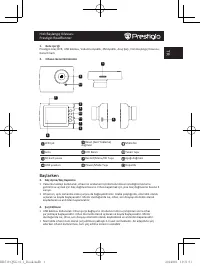
Hızlı Başlangıç Kılavuzu Prestigio RoadRunner TR 1. Kutu içeriği Prestigio Araç DVR, USB kablosu, Vakumlu Ayaklık, 3M Ayaklık, Araç Şarjı, Hızlı Başlangıç Kılavuzu, Garanti kartı 2. Cihazın Genel Görünümü 1 2 3 4 5 6 7 8 9 10 11 12 LED Işık Reset (Geri Yükleme) düğmesi Mikrofon Lens LCD Ekran Yukarı...
Page 90 - Ayarlar
Hızlı Başlangıç Kılavuzu Prestigio RoadRunner TR 5. Mikro SD-kartın takılması • Video kaydını başlatmadan önce, cihazın içindeki SD kart yuvasına bir SD kart (paket içeriğinde yer almamaktadır) yerleştiriniz. • SD kartı çıkartmak için, kartı yavaşça cihazın içine doğru itin ve çıkartın. Not: SD kart...
Page 92 - Güvenlik önlemleri; Kayıt çözünürlüğü; Resim formatı; Güç kaynağı; Uyarı
Hızlı Başlangıç Kılavuzu Prestigio RoadRunner TR Güvenlik önlemleri Prestigio Roadrunner 519’yi kullanmadan önce, tüm güvenlik önlemlerine uyunuz. Cihazı doğru şekilde kullanmak için bu kılavuzda belirtilen tüm işlemleri yerine getiriniz. • Cihazın bu kılavuzda tanımlanmayan hiç bir parçasını sökmey...
Page 93 - Розпочати роботу; Заряджання
Коротке керівництво Prestigio RoadRunner UA 1. Комплект поставки Цифровий портативний відеореєстратор Prestigio, Кабель USB, Кріплення, 3M Кріплення, Автомобільний зарядний пристрій, Коротке керівництво 2. Огляд приладу 1 2 3 4 5 6 7 8 9 10 11 12 Індикатор LED Кнопка скидання Мікрофон Лінза Екран Кн...
Page 94 - Налаштування
Коротке керівництво Prestigio RoadRunner UA 5. Вставлення SD-карти • Перед тим як розпочати відеозапис, вставте карту «SD» (не входить до комплекту) у роз’єм для карти «SD» у пристрої. • Щоб витягнути карту «SD», втисніть її у пристрій і витягніть. Примітка: Після вставлення карти «SD» пристрій авто...
Page 96 - Заходи безпеки; Відмова від права
Коротке керівництво Prestigio RoadRunner UA Заходи безпеки Перед використанням пристрою Prestigio Roadrunner 519 виконайте всі заходи безпеки. Дотримуйтеся всіх заходів, що наведені в цьому посібнику, для правильної експлуатації пристрою. • Не намагайтеся розібрати або змінити будь-які деталі пристр...