Page 2 - Technical Assistance
2 Thank you for your Polk purchase. If you have a question or comment, please feel free to call or email us. Technical Assistance In North America, call Polk Customer Service at 800-377-POLK(7655) (M–F, 9 a.m.–5:30 p.m. EST) Outside the US, call +1-410-358-3600 email [email protected] Polk Audio 1 V...
Page 3 - What’s in the Box
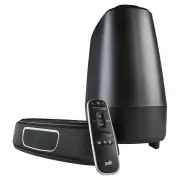
3 What’s in the Box Sound bar Remote control Batteries Subwoofer Sound bar power cord 6’ Optical cable 6.5’ HDMI cable 6’ AUX cable Literature Subwoofer power cord Sound bar power supply AAA AAA
Page 4 - Connecting Your MagniFi Mini to Your TV; Is an HDMI input jack on your TV labeled “; Use the provided; TV; TV; MUST; have an; HDMI ARC; input on your TV to use HDMI.
4 Connecting Your MagniFi Mini to Your TV Is an HDMI input jack on your TV labeled “ ARC ”? Use the provided HDMI cable to connect the sound bar to the TV. Use the provided Optical cable to connect the sound bar to the TV. YES NO TV ARC 5V 500mA TV ARC 5V 500mA TV AUX OPT HDMI AUX OPT ARC HDMI TV TV...
Page 6 - the
6 Position subwoofer and connect to an AC outlet (for best performance place on the same wall as the TV) Turn on your sound bar Press the Power button on the sound bar or remote. NOTE: make sure TV internal speakers are off when using optical and aux inputs. NOTE: The MagniFi Mini sound bar and wire...
Page 7 - Remote Control
7 Remote Control Power on/off Mute *Play/Pause Sport Mode AUX VoiceAdjust Up/Down Optical Night Effect HDMI *Previous Track *For music only Bass Up/Down Movie Mode *Next Track Master Volume Up/Down Music Mode
Page 8 - Sound Bar Top Panel; Bluetooth
8 Sound Bar Top Panel Power on/off Source Master Volume Down Master Volume Up Night Effect Bluetooth
Page 9 - Sound Bar Back Panel
9 Sound Bar Back Panel Power Optical USB* HDMI (ARC) AUX WIFI LED Solid LED when connected to your Wi-Fi network. Flashing LED when NOT connected to your Wi-Fi network. Reset Wi-Fi reset hold for 8 seconds Ethernet TV ARC (Service Only) *Factory use only
Page 10 - Sound Bar LEDs; The MagniFi Mini has a vertical row of LED lights that provide
10 Sound Bar LEDs The MagniFi Mini has a vertical row of LED lights that provide status indications, like source, volume and listening modes. HDMI (TV ARC) OPT AUX Bluetooth Google Cast Dolby Content Night Effect ON SOURCE INDICATORS
Page 11 - to Control the MagniFi Mini; The MagniFi Mini works best with the included remote, however you
Using Your TV or Cable/Satellite Remote (IR only) to Control the MagniFi Mini The MagniFi Mini works best with the included remote, however you can also teach it to respond to your favorite TV or cable IR remote by following these steps: 1. Enter learn mode by pressing and holding the Source button ...
Page 12 - Optimizing Your Listening Experience; Control Dialogue; Bass Control; Control Bass
12 Optimizing Your Listening Experience Control Dialogue Volume Levels Isolate and adjust the voice channel level to reproduce clear, crisp dialogue. Bass Control Control Bass Volume Levels Easily adjust bass volume for more or less impact. Louder Voice More Bass Softer Voice Less Bass DEFAULT LEVEL...
Page 14 - Music Services; How to Set Up Google CastTM
14 Music Services How to Set Up Google Cast™ 1. Power on the sound bar.2. From your phone, tablet or computer visit: chromecast.com/setup 3. Download the Google Home app, click on the devices tab within the app and select MagniFi Mini. Follow in app setup intructions. 4. When you’re streaming Google...
Page 16 - Assistance technique
16 Merci de votre achat d’un produit Polk. Pour toute question ou tout commentaire, veuillez nous appeler ou nous écrire par courriel sans hésiter. Assistance technique En Amérique du Nord, appelez le service à la clientèle de Polk au 800-377-POLK(7655) (L-V, 9 h – 17 h 30 HNE) Hors des É.-U., appel...
Page 17 - Dans la boîte
17 Dans la boîte Barre de son Télécommande Batteries Caisson d’extrêmes graves sans-fils Barre de son cordon d’alimentation Câble optique de 6 pi (1,8 m) Câble HDMI de 6,5 po (2 m) Câble AUX de 6 pi (1,8 m) Littérature Subwoofer cordon d'alimentation Alimentation de la barre sonore AAA AAA fr
Page 18 - Connexion votre MagniFi Mini à votre télé; OUI
18 Connexion votre MagniFi Mini à votre télé Est-ce qu’un un connecteur d’entrée HDMI sur votre télé est nommé « ARC »? Utilisez le câble HDMI fourni pour connecter la barre de son à la télé. Utilisez le câble optique fourni pour connecter la barre de son à la télé. OUI NON TV ARC 5V 500mA TV ARC 5V...
Page 19 - Si votre télé n’a pas
19 Vous n’avez pas d’entrée HDMI ou optique disponible sur votre télé? Installation des piles de la télécommande Connecter le cordon d’alimentation barre de son the sound bar power cord to an AC outlet Insérer les piles AAA fournies. Un indicateur à DEL rouge clignotera à l’avant de la barre de son ...
Page 20 - Allumez votre barre de son; Appuyez sur le bouton de mise sous tension sur la barre de son
20 Positionnement du caisson d’extrêmes graves et connexion à une prise de courant (pour de meilleures performances, placez-le sur le même mur que la télé) NOTE : La barre de son MagniFi Mini et le caisson d’extrêmes graves sans fil sont configurés à l’usine pour fonctionner ensemble. Si votre caiss...
Page 21 - Télécommande
21 Télécommande Mise sous/hors tension Sourdine *Lecture/Pause Mode sport AUX Ajustement de la voix Augmenter/Diminuer Optique Effet de soir HDMI *Piste précédente *Pour la musique seulement Basses fréquences Augmenter/Diminuer Mode film *Piste suivante Volume principal Augmenter/Diminuer Mode musiq...
Page 22 - Panneau supérieur de la barre de son
22 Panneau supérieur de la barre de son Mise sous/hors tension Source Diminuer le volume principal Augmenter le volume principal Effet de soir Bluetooth
Page 23 - Panneau arrière de la barre de son
23 Panneau arrière de la barre de son Mise sous/hors tension Optique USB* Réinitialiser Wi-Fi reset tenir pour 8 secondes HDMI (ARC) AUX DEL WI-FI La DEL sera allumée lorsque l’appareil est connecté à votre réseau sans fil. La DEL clignotera lorsque l’appareil N’EST PAS connecté à votre réseau sans ...
Page 24 - Indicateurs à DEL de la barre de son
24 Indicateurs à DEL de la barre de son Le MagniFi Mini comporte une colonne d’indicateurs à DEL qui fournit des indications de statut, comme la source, le volume et les modes d’écoute. HDMI (TV ARC) OPT AUX Bluetooth Google Cast Contenu Dolby Effet de soir ON INDICATEURS DE SOURCES
Page 26 - Optimisation de votre expérience d’écoute; Contrôle; Contrôlez le volume
26 Optimisation de votre expérience d’écoute Contrôlez le volume des dialogues Isolez et ajustez le canal de la voix afin de reproduire des dialogues clairs et nets. Contrôle des basses fréquences Contrôlez le volume des basse fréquences Réglez facilement le volume de la basse pour plus ou moins d’i...
Page 28 - Services de musique; Comment configurer Google CastTM
28 Services de musique Comment configurer Google Cast™ 1. Allumez la barre de son.2. À partir de votre téléphone, tablette ou ordinateur, visitez : chromecast.com/setup 3. Téléchargez l’appli Cast, cliquez sur l’onglet des appareils dans l’appli et sélectionner MagniFi Mini. Suivez les intructions d...
Page 31 - Qué hay en la caja
31 Qué hay en la caja Barra de sonido Mando a distancia Pilas Subwoofer Cable de alimentación princip. Cable óptico 1,8 m Cable 2 m HDMI Cable AUX 1,8 m Literatura Cable de alim. subwoofer Suministro eléctrico princip. AAA AAA es
Page 32 - Conectar el MagniFi Mini a la TV; ¿Hay un puerto de HDMI en su TV llamado «; cable HDMI; DEBE; tener un puerto; en la TV para usar HDMI.
32 Conectar el MagniFi Mini a la TV ¿Hay un puerto de HDMI en su TV llamado « ARC »? Use el cable HDMI incluido para conectar la barra de sonido a la TV. Use el cable óptico incluido para conectar la barra de sonido a la TV. SÍ NO TV ARC 5V 500mA TV ARC 5V 500mA TV AUX OPT HDMI AUX OPT ARC HDMI TV T...
Page 35 - Mando a distancia
35 Mando a distancia Encender/apagar Silencio *Play/parar Modo deporte AUX Ajuste de voz Más/menos Cable óptico Efecto noche HDMI *Canción previa *Solo para música Bajo Más/menos Modo película *Siguiente canción Volumen princip. Más/menos Modo música
Page 36 - Panel superior de la barra de sonido
36 Panel superior de la barra de sonido Encen. / apagar Fuente Bajar volumen Subir volumen Efecto noche Bluetooth
Page 37 - Panel trasero de la barra de sonido
37 Panel trasero de la barra de sonido Corriente Cable óptico USB* Reinicio reinicio Wi-Fi mantener durante 8 segundos HDMI (ARC) AUX LED del WiFi LED fijo cuando esté conectado a su red wifi. LED parpadeando cuando NO esté conectado a su red wifi. Ethernet TV ARC (Service Only) *Solo uso en fábrica
Page 38 - LEDs de la barra de sonido; MagniFi Mini tiene una fila vertical de LEDs que informan del
38 LEDs de la barra de sonido MagniFi Mini tiene una fila vertical de LEDs que informan del estado, como la fuente, el volumen y los modos de escucha. HDMI (ARC TV) ÓPT AUX Bluetooth Google Cast Conten. Dolby Efecto noche ON INDICADORES DE FUENTE
Page 40 - Optimice su experiencia de escucha; Controle el volumen de; Control de bajo; Controle el volumen
40 Optimice su experiencia de escucha Controle el volumen de los diálogos Separe y ajuste el nivel del canal de voz para reproducir un diálogo claro y nítido. Control de bajo Controle el volumen de bajo Ajuste de volumen de bajo fácil para más o menos impacto. Más voz Más bajo Menos voz Menos bajo N...
Page 42 - Servicios de música; Cómo configurar Google CastTM
42 Servicios de música Cómo configurar Google Cast™ 1. Encienda la barra de sonido.2. Desde su teléfono, tableta u ordenador visite: chromecast.com/setup 3. Descargue la aplicación Cast, haga clic en la pestaña de dispositivos en la aplicación y seleccione MagniFi Mini. Siga las instrucciones de con...
Page 45 - LIEFERUMFANG
45 LIEFERUMFANG Soundbar Fernbedienung Batterie Drahtloser Subwoofer Soundbar elektrische anschlusskabel 6’ (1,8m) Optisches Verbindungskabel 6,5' (2m) HDMI-Kabel 6' (1,8m) AUX-Kabel Literatur Subwoofer elektrische anschlusskabel Soundbar Stromversorgung AAA AAA de
Page 46 - So schließen Sie Ihr MagniFi Mini an Ihren Fernseher an; Befindet sich an Ihrem Fernsehgerät ein HDMI-Eingang mit; optische Kabel; MUSS; Ihr Gerät über einen
46 So schließen Sie Ihr MagniFi Mini an Ihren Fernseher an Befindet sich an Ihrem Fernsehgerät ein HDMI-Eingang mit der Beschriftung ARC ? Verwenden Sie das mitgelieferte HDMI-Kabel , um die Soundbar an Ihren Fernseher anzuschließen. Verwenden Sie das mitgelieferte optische Kabel , um die Soundbar a...
Page 49 - Fernbedienung
49 Fernbedienung Ein/Aus-Schalter Stumm *Wiedergabe/Pause Sportmodus AUX Stimme anpassen Erhöhen/Verringern Optisch Nachtmodus HDMI *Vorheriger Titel *Nur für Musik Bass Erhöhen/Verringern Filmmodus *Nächster Titel Gesamt-Lautstärke Erhöhen/Verringern Musikmodus
Page 50 - Bedienelemente auf der Oberseite der Soundbar
50 Bedienelemente auf der Oberseite der Soundbar Stromversorgung ein-/ausschalten Quelle Gesamt- Lautstärke verringern Gesamt- Lautstärke erhöhen Nachtmodus Bluetooth
Page 52 - LEDs der Soundbar; MagniFi Mini verfügt über eine Reihe vertikal angebrachter LEDs,
52 LEDs der Soundbar MagniFi Mini verfügt über eine Reihe vertikal angebrachter LEDs, über die bestimmte Statusmeldungen für die Quelle, Lautstärke, Wiedergabemodi usw. angezeigt werden. HDMI (TV ARC) OPT AUX Bluetooth Google Cast Dolby Inhalt Nacht- modus AN ANZEIGE DER QUELLE
Page 54 - Optimierung des Hörerlebnisses; Lautstärke der Sprech-; Tiefenregelung; Lautstärke der
54 Optimierung des Hörerlebnisses Lautstärke der Sprech- Stimmen einstellen Den Sprachkanalpegel isolieren und anpassen, um Dialoge glasklar zu hören. Tiefenregelung Lautstärke der Bässe einstellen Je nach Geschmack mehr oder weniger Bassklang einstellen. Lautere Stimmen Mehr Bass Leisere Stimmen We...
Page 56 - Musikdienste; Google CastTM einstellen
56 Musikdienste Google Cast™ einstellen 1. Schalten Sie die Soundbar ein.2. Rufen Sie mit dem Smartphone, Tablet oder Computer folgende Seite auf: chromecast.com/setup 3. Laden Sie die Cast-App herunter, tippen Sie in der App auf die Registerkarte Geräte und wählen Sie MagniFi Mini. Befolgen Sie die...
Page 58 - Assistenza tecnica
58 Grazie per avere acquistato un prodotto Polk. Per qualsiasi domanda o commento non estare a contattarci via telefono o email. Assistenza tecnica In Nord America, Chiama il Polk Customer Service al 800-377-POLK(7655) (M–F, 9 a.m.–5:30 p.m. EST) Fuoru dagli USA, chiama il +1-410-358-3600 email [ema...
Page 59 - Contenuto
59 Contenuto Sound bar Telecomando Batterie Subwoofer Cavo di alimentazione sound bar Cavo ottico da 6’ (1,8 m) Cavo HDMI da 6.5’ (2 m) Cavo AUX da 6’ (1,8 m) Materiale illustrativo Cavo di alimentazione Subwoofer Alimentatore sound bar AAA AAA it
Page 60 - Connettere il tuo MagniFi Mini alla tua TV; C’è un jack di ingresso HDMI indicato come “ARC” sulla tua TV?; *DEVI avere un ingresso; sulla tua TV per usare l’HDMI.
60 Connettere il tuo MagniFi Mini alla tua TV C’è un jack di ingresso HDMI indicato come “ARC” sulla tua TV? Usa il cavo HDMI in dotazione per connettere la sound bar alla TV. Usa il cavo ottico in dotazione per connettere la sound bar alla TV. S Ì NO TV ARC 5V 500mA TV ARC 5V 500mA TV AUX OPT HDMI ...
Page 62 - Accendi la tua sound bar. Premi contemporaneamente il pulsante
62 Posiziona il subwoofer e connettilo ad una presa AC (Per migliori prestazioni posizionalo sullo stesso muro su cui c’è la TV) Accendi la tua sound bar Premi il pulsante di accensione sulla sound bar o sul telecomando. Nota: assicurati che gli altoparlanti interni della TV siano spenti quando usi ...
Page 63 - Telecomando
63 Telecomando Accensione/ spegnimentoMuto *Play/Pausa Modalità Sport AUX Voce Su/Giù Ottico Effetto notte HDMI *Traccia precendente *Solo per la musica Bassi Su/Giù Modalità Film *Traccia Successiva Volume Su/Giù Modalità Musica
Page 64 - Pannello superiore sound bar
64 Pannello superiore sound bar Accensione / spegnimento Fonte Volume Master giù Volume master su Effetto notte Bluetooth
Page 65 - Pannello posteriore sound bar
65 Pannello posteriore sound bar Power Ottico USB* Reset Reset Wi-Fi tenere premuto per 8 secondi HDMI (ARC) AUX LED WIFI Il LED sarà acceso quando connesso alla tua rete Wi-Fi. Il LED lampeggerà quando NON connesso alla tua rete Wi-Fi. Ethernet TV ARC (Service Only) *Solo per uso di fabbrica
Page 66 - LED sound bar; MagniFi Mini ha una linea verticale di luci LED che indicano
66 LED sound bar MagniFi Mini ha una linea verticale di luci LED che indicano lo stato, come la fonte, il volume e modalità d’ascolto. HDMI (TV ARC) OTT AUX Bluetooth Google Cast Contenuto Dolby Effetto Notte ON INDICATORI FONTE
Page 68 - Ottimizza la tua esperienza d’ascolto; Controllla i livelli di; Controllo Bassi; Controlla i livelli di
68 Ottimizza la tua esperienza d’ascolto Controllla i livelli di volme dei dialighi Isola e regola i livelli dei canali vocali per riprodurre dialoghi limpidi e cristallini. Controllo Bassi Controlla i livelli di volume dei bassi Regola il volume dei bassi per un impatto maggiore o minore. Voce più ...
Page 70 - Servizi musicali; Come impostare Google CastTM
70 Servizi musicali Come impostare Google Cast™ 1. Accendi la sound bar.2. Dal tuo telefono, tablet o computer visita: chromecast.com/setup 3. Scarica la app Cast, fai clic sul tasto dispositivi nella app e seleziona MagniFi Mini. Segui le istruzioni di setup nella app. 4. Quando fai lo straming da ...
Page 72 - Viper Way
1 Viper Way Vista, CA 92081 800-3777655 www.polkaudio.com HBP3656E