Pioneer SPH 10BT - Manual
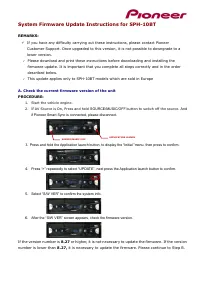
A user manual for the Pioneer SPH-10BT car audio system covers essential topics like checking current firmware versions, preparing and executing updates via USB, and handling safety precautions during software upgrades. The instructions emphasize verifying compatibility (e.g., European models) before proceeding and highlight key operational areas such as menu navigation, error management, and system reset procedures for firmware maintenance.


Table of Contents:
- Page 1 – Firmware Version Check and Update Prerequisites
- Page 2 – Firmware File Preparation and Safety
- Page 3 – Car Stereo Firmware Update Procedure
- Page 4 – Smartphone Receiver Firmware Update and Support
System Firmware Update Instructions for SPH-10BT
REMARKS:
✓
If you have any difficulty carrying out these instructions, please contact Pioneer
Customer Support. Once upgraded to this version, it is not possible to downgrade to a
lower version.
✓
Please download and print these instructions before downloading and installing the
firmware update. It is important that you complete all steps correctly and in the order
described below.
✓
This update applies only to SPH-10BT models which are sold in Europe
A.
Check the current firmware version of the unit
PROCEDURE:
1.
Start the vehicle engine.
2.
If AV Source is On, Press and hold
SOURCE/MUSIC/OFF
button to switch off the source.
And
if Pioneer Smart Sync is connected, please disconnect.
3.
Press and hold the Application launch button, to display the “Initial ”menu. then press to confirm.
4.
Press “>” repeatedly to select “UPDATE”, next press the Application launch button to confirm.
5.
Select “S/W VER” to confirm the system info.
6.
After the “S/W VER” screen appears, check the firmware version.
If the version number is
8.27
or higher, it is not necessary to update the firmware. If the version
number is lower than
8.27,
it is necessary to update the firmware. Please continue to Step B.
APPLICATION LAUNCH
launch
SOURCE/MUSIC/OFF
"Loading the manual" means you need to wait until the file loads and becomes available for online reading. Some manuals are very large, and the time they take to appear depends on your internet speed.
Was this manual helpful?
About this manual
- Brand
- Pioneer
- Model
- SPH 10BT
- Document type
- Manual
- Language(s)
- English
- Pages
- 4
- File size
- 337.1 KB
- Format
Other Manuals for Pioneer SPH 10BT
Summary
Procedure for checking the current firmware version on the Pioneer SPH-10BT car audio system before updating, noting restrictions for European models and checks against firmware version 8.27 or higher.
Instructions for downloading and preparing a firmware update file for the SPH-10BT device, requirements for the USB memory device, and safety precautions to prevent damage during the update process.
Step-by-step instructions for updating the Pioneer car stereo firmware using a USB device, including visual guidance and methods for handling update errors.


