Philips SC1996/00 - Quick Guide
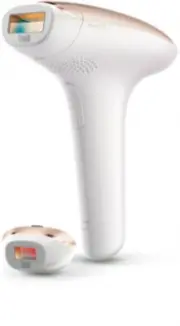
Philips SC1996/00 – Quick Guide, read for free online in PDF format. We hope this helps you resolve any issues you may have. If you have further questions, please contact us through the contact form.


Shave the desired treatment area.
Once the hairs stop growing back visibly
(after approx. 4-5 treatments), you no longer have
to shave before you use the appliance.
Clean the appliance and attachments.
Check if the attachments and light exit window
are clean. If there is dir t or fibre on them, clean
them with the cloth supplied before use.
Choose the body or precision attachment.
Make sure that you place the attachment properly.
Put the plug in the wall socket and
switch on the appliance.
Using the appliance.
Please read the user manual, including all safety precautions and
warnings, before you use the appliance for the first time to ensure
correct, safe and proper use. You can find the user manual at the
bottom of the box. This quick start guide does not replace the user
manual, but makes it as easy as possible for you to use this product.
We advise you to store the quick start guide in the pouch for future
reference.
QUICK START GUIDE
Philips Lumea Essential SC1996
Choose the right light intensity setting.
To adjust the light intensity setting, press the on/off button one or
more times until you have reached the required setting.
Note
: To choose the appropriate setting, simply consult the information
on the back of this quick star t guide.
Place Philips Lumea Essential on your skin.
Place the appliance at a 90-degree angle on your skin and ensure full
skin contact. The appliance then automatically performs a skin tone
analysis and the ‘ready to flash light’ lights up.
Note
: The ‘ready to flash light’ only lights up if the appliance is fully in
contact with the skin.
Skin tone analysis.
When the ‘ready to flash’ light on the back of the appliance lights up
white, your skin is suitable for treatment and you can continue. When
the ‘ready to flash’ light lights up orange, your skin is not suitable for
treatment with the appliance. The appliance is disabled automatically.*
Press the flash button to release a flash.
Release the flash button once the appliance has flashed and lift the
appliance off your skin. Then place it on the next area to be treated.
Make sure that there is some overlap, but do not treat the same area
twice. Then press the flash button again.
TIP: Use the Slide & Flash mode for faster treatment.
For a more efficient treatment, keep the flash button pressed while
you slide the appliance over your skin. After each flash, it takes up
to 3.5 seconds until the appliance is ready to flash again. During this
charging time, the ‘ready to flash’ light blinks when the appliance is in
full contact with your skin.
1
6
5
7
8
9
2
3
4
*
You might be able to use Philips Lumea Essential on less tanned or naturally lighter body parts.
If you need information or support, please visit www.philips.com/support
"Loading the manual" means you need to wait until the file loads and becomes available for online reading. Some manuals are very large, and the time they take to appear depends on your internet speed.


