Page 3 - Contents; English
English Contents Introduction_______________________________________________________ 6 General description_______________________________________________ 7 What do the icons on my appliance handle mean?_____________ 8 What does the icon on my Quick Clean Pod mean?_____________ 9 How do I charge my a...
Page 4 - General description
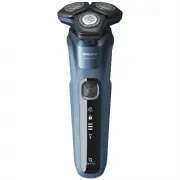
General description 1 Pop-up trimmer 2 Trimmer release slide3 Shaving unit4 Shaving unit release button5 On/off button6 Handle7 Socket for small plug8 Charging stand9 Supply unit10 Small plug11 Protection cap12 Pouch13 Philips Quick Clean Pod cartridge14 Quick Clean Pod15 Cleaning brush16 Length set...
Page 6 - How do I charge my appliance?
Icon Behavior Meaning Lights upwhen youpick up theappliance The number of bars lit up show theremaining battery charge. Bottom lightflashingorange The battery is almost empty (see 'How doI charge my appliance?'). Lightsflashing insequence The appliance is charging. Lights upcontinuously The applianc...
Page 7 - Charging with the supply unit; Charging in the charging stand (specific models only)
Quick Charge: After approx. 5 minutes of charging,the battery contains enough energy for one shave. When the appliance is fully charged it has acordless operating time of up to 60 minutes.Note: You cannot use the appliance while it ischarging. Charging with the supply unit 1 Make sure that the appli...
Page 8 - Specific models only:
2 Put the small plug in the charging stand and putthe supply unit in the wall socket. 3 Place the appliance in the charging stand. Specific models only: The light ring on the bottom of the charging stand lights up androtates quickly. - After approximately 5 minutes, the light ring rotates slower. Th...
Page 9 - Shaving
the tap. For safety reasons, the appliance cantherefore only be used without cord. Shaving You can use this appliance either wet or dry, oreven under the shower. For a wet shave, applysome water and shaving foam or gel to your skinand rinse the shaving heads under the tap withwarm water before follo...
Page 10 - Trimming
Note: Make sure you rinse all foam or shavinggel off the appliance. Skin adaptation period Your first shaves may not bring you the result youexpect and your skin may even become slightlyirritated. This is normal. Your skin and beard needtime to adapt to any new shaving system. To allowyour skin to a...
Page 11 - Using the click-on attachments
3 Hold the trimmer perpendicular to the skin andmove the appliance downwards while you exertgentle pressure. 4 You can also use the trimmer under your nose. 5 Switch off the appliance and clean the trimmerafter each use to prevent clogging and damage(see 'How do I clean my appliance and theattachmen...
Page 12 - Using the beard styler attachment without comb
2 Slide the comb straight into the guiding grooveson both sides of the beard styler attachment. 3 Press the length selector and then push it tothe left or right to select the desired hair lengthsetting. 4 Switch on the appliance. 5 Move the appliance upwards while you exertgentle pressure. Make sure...
Page 13 - Trimming ear hair
3 Hold the beard styler attachment perpendicularto the skin and move the appliance downwardswhile you exert gentle pressure. 4 Switch off the appliance and clean theattachment after use. Using the nose/ear trimmer attachment You can use the nose/ear trimmer attachment totrim your nose and/or ear hai...
Page 14 - Storage and travel; Travel lock
2 Slowly move the trimming head along the rim ofthe ear to remove hairs that stick out beyondthe rim. 3 Carefully insert the trimming head into theouter ear channel.Do not insert the trimming head more than0.5 cm into your ear channel, as this could damage the eardrum. 4 Slowly turn the trimming h...
Page 15 - Cleaning the shaver under the tap
Once the travel lock is deactivated, the applianceswitches on automatically.Note: The shaver unlocks automatically when it isconnected to a wall socket. How do I clean my appliance and theattachments? Clean the appliance and the attachments aftereach use for optimal performance. Cleaning the shaver ...
Page 16 - Thorough cleaning
4 Rinse the hair chamber under a warm tap. 5 Rinse the shaving head holder under a warmtap. 6 Carefully shake off excess water and let theshaving head holder air-dry completely. 7 Close the shaving unit. Thorough cleaning We advise you to clean the shaving headsthoroughly once a month or when the sh...
Page 17 - Cleaning the pop-up trimmer
3 Rinse the hair chamber and shaving headholder under the tap. 4 Remove the shaving heads. For detailedinstructions, see 'How do I replace the shavingheads?.'Note: Do not clean more than one cutter andguard at a time, since they are all matching sets.If you accidentally put a cutter in the wrongshav...
Page 18 - Cleaning the click-on attachments
3 Switch on the appliance and rinse the pop-uptrimmer with warm water. 4 After cleaning, switch off the appliance. 5 Carefully shake off excess water and let thepop-up trimmer air dry. 6 Close the trimmer. Tip: For optimal performance, lubricate the teethof the pop-up trimmer with a drop of mineral ...
Page 19 - How do I use the Quick Clean Pod?; Preparing the Quick Clean Pod for use
4 Carefully shake off excess water from the beardstyler, combs and nose/ear trimmerattachments and let them air dry completely. Dry the cleansing brush attachment with atowel. Never dry the cutting unit with a towel ortissue, as this may damage the trimming teeth. Tip: For optimal performance, lubri...
Page 20 - Using the Quick Clean Pod
4 Press the small circular piece on the handle ofthe Quick Clean Pod Cartridge to break thesnap hook on the handle. 5 Place the Quick Clean Pod Cartridge into theQuick Clean Pod. 6 Put the top of the Quick Clean Pod back ontothe base and turn it clockwise until you hear aclick. Do not tilt the Quick...
Page 21 - Replacing the Quick Clean Pod Cartridge; Frequency of use
Always shake excess water off the shaver beforeyou place it in the Quick Clean Pod. 1 Place the shaver upside down into the QuickClean Pod. The shaver automatically detectsthat it is in the Quick Clean Pod. 2 Switch on the shaver to start the cleaningprogram. Each cleaning program takes approximatel...
Page 22 - How do I replace the shaving heads?; Replacing the shaving heads
1 Twist and remove the top of the Quick CleanPod. 2 Lift the Quick Clean Pod Cartridge out of theQuick Clean Pod by the handle. 3 Pour any remaining fluid down a drain andrecycle the empty cartridge in accordance withlocal waste regulations. 4 Place a new Quick Clean Pod Cartridge into theQuick Clea...
Page 24 - Support; Ordering accessories
- Each retaining ring has two recesses that fit exactly into the projections of the shaving headholder. Turn the ring clockwise until your hear aclick to indicate that the ring is fixed. Note: Hold the shaving head holder in yourhand when you reinsert the shaving heads andreattach the retaining ring...
Page 25 - Troubleshooting; Shaver; Problem
Troubleshooting This chapter summarizes the most commonproblems you could encounter with the appliance.If you are unable to solve the problem with theinformation below, visit www.philips.com/support for a list of frequently asked questions or contactthe Consumer Care Center in your country. Shaver P...
Page 26 - Philips Quick Clean Pod
Problem Possible cause Solution Water isleaking fromthe bottom ofthe appliance. During cleaning,water may collectbetween the innerbody and the outershell of theappliance. This is normal and notdangerous because allelectronics are enclosed in asealed power unit inside theappliance. Philips Quick Clea...