Philips QP2834/70 - User Manual
Philips QP2834/70 – User Manual, read for free online in PDF format. We hope this helps you resolve any issues you may have. If you have further questions, please contact us through the contact form.


QP2724
QP2834
>75 % recycled paper
>75 % papier recyclé
© 2023 Koninklijke Philips N.V.
All rights reserved
Tous droits réservés
3000.103.1018.2 (23/03/2023)
NOT INCLUDED
2
1
1
2
NOT INCLUDED
3
1
2
2
1
6
10
14
18
3
7
11
15
19
4
8
12
16
20
5
9
13
17
21
English
IMPORTANT SAFETY INSTRUCTIONS
When using an electric product, basic precautions should always be
followed, including the following:
Read all instructions before using this product.
DANGER
To reduce the risk of electric shock:
-
To charge the product, only use a USB power source on a certified
product with output rating 5 V, ≥ 1 A. For safe charging in a moist
environment (e.g. in a bathroom), only use an IPX4 (splash-proof)
power source. A suitable power source (e.g. Philips HQ87) is available
via www.philips.com/support. If you need support finding the correct
USB power source, contact Philips support at 1-866-800-9311. Using a
non-certified USB power source may cause hazards or serious injuries.
-
Keep the USB cable and the USB power source dry.
-
Do not reach for a corded product that has fallen into water. Unplug
immediately from the power outlet.
-
Do not place or store the product where it can fall or be pulled into a
tub or sink. Do not place or drop the product into water or other liquid.
-
This product does not work while it is connected to the power outlet.
Except when charging, always unplug this product from the power
outlet.
-
Remove USB power source from power outlet and product before
cleaning the product with water.
WARNING
To reduce the risk of burns, fire, electric shock, or injury to persons:
-
This product is not intended for use by persons (including children)
with reduced physical, sensory or mental capabilities, or lack of
experience and knowledge, unless they have been given supervision
or instruction concerning use of the product by a person responsible
for their safety. Children should be supervised to ensure that they do
not play with the product.
Using OneBlade
Facial Hair
Shaving and contouring
To shave with OneBlade, remove any combs. Your OneBlade is
waterproof, so you can shave in the shower or with foam or gel.
1 To shave, make long, slow and steady strokes (Fig. 5), applying gentle
pressure with the blade flat against your skin (Fig. 6). Move the blade
back and forth to make use of both sides of the blade (Fig. 7).
2 To edge or contour your beard (Fig. 8), mustache or sideburns, hold
the blade perpendicular to your skin (Fig. 9).
3 For best results, clean your OneBlade after each use.
Trimming
To trim the length of your facial hair, use the 5-in-1 comb. The numbers
on the comb relate to the hair length remaining after trimming
(in millimeters).
Tip: if you are unsure which length you prefer, start with the longest
setting and reduce the length further if necessary.
1 Hook the back of the comb under the bottom of the blade, then
gently press on the front of the comb until it clicks into place (Fig. 10).
Note: if you experience difficulties attaching the comb, ensure that
the two small hooks on the bottom (on the side closest to the teeth)
are properly aligned on the upper edge of the blade.
2 Press down on the length dial on the comb using your thumb, and
roll it until your preferred length is selected (Fig. 11).
3 Trim against the direction of hair growth (Fig. 12), with the teeth of
the comb flat against your skin (Fig. 13)
4 To detach the comb, hold the handle firmly and gently lift the comb
off the blade (Fig. 14). For best results, clean your OneBlade after
each use.
Body Hair
Shaving body hair
Note: For hygiene reasons, we recommend using the separate body
blade provided when trimming body hair.
Use your OneBlade with the body blade attached to shave hair anywhere
below the neck.
Areas including your chest, stomach and legs can be shaved using the
bare blade, in the same was as shaving your face.
Note: to minimize the risk of cuts always use the skin guard when
trimming sensitive areas. This includes when shaving your armpits or
groin (including scrotum).
1 If you are using the skin guard, place it onto the blade and gently
press until it clicks into place.
2 Switch on your OneBlade, and place the blade flat against your skin.
3 Make long, steady strokes, exerting gentle pressure and allowing the
blade to glide across the surface of your skin.
Tip: on certain areas, using the fingers of your free hand to spread the
skin and hold it taut will provide better results.
4 The blade and skin guard are double sided. Move the blade back and
forth to catch hairs growing in different directions.
5 Clean your OneBlade after each use. If you used the skin guard, press
your thumb onto the exposed flat surface of the blade, and use your
fingers to gently pull off the skin guard before cleaning.
Trimming body hair
The 3 mm (1/8 inch) body comb allows you to trim hair on your body
below the neckline (for example chest, armpits and groin)
For delicate areas such as the groin, only trim when the body comb or
skin guard is attached.
1 Place the the comb onto the blade and gently press until it clicks into
place (Fig. 15).
2 Switch on your OneBlade.
3 Trim against the direction of hair growth, with the teeth of the
comb flat against your skin. The comb is double sided, so you can
move your OneBlade back and forth to cut hairs growing in different
directions (Fig. 16).
4 To detach the comb, hold the handle firmly and gently lift the comb
off the blade. For best results, clean your OneBlade after each use.
Maintenance
Cleaning OneBlade
Clean after each use
For a quick clean, simply blow on the blade and any accessories to
remove hairs and dirt (Fig. 17).
Thorough cleaning
1 Turn on your OneBlade and rinse it under the tap with cold or
lukewarm water (Fig. 18). If you shave with foam or gel, be sure to
remove all residue after each shave.
2 Combs can also be cleaned under the tap using warm water.
3 Allow your OneBlade and accessories to air dry completely before
storage.
Note: Do not bang the handle on the sink or any hard surface, a this may
damage your OneBlade. Do not use a towel or cloth to dry the blade.
Storage
Store your OneBlade in a safe, dry location where it will not be crushed,
banged, or subject to damage. To protect the blade, store the product
with the protection cap attached. Do not wrap the cable around the
product when storing, and do not place or store the product where it can
fall or be pulled into a tub or sink, water or other liquid while plugged in.
Blade Replacement
When to replace the blade
We recommend replacing the blade of your OneBlade at least once
every four months, or whenever the blade shows signs of wear.
Wear indicator
A replacement symbol will gradually appear on the blade as you use it.
When the replacement symbol is fully visible, it‘s time to replace your blade.
Note that accessories such as combs can prevent the replacement
symbol from becoming visible.
Tip: the replacement symbol resembles the arrow icon on the handle of
your OneBlade. For older blades, a green rectangle may appear in place
of the replacement symbol.
If blade is damaged
If you notice any damage on your blade, please replace it immediately.
1-5 mm
3mm
(1/8in.)
QP2834
1
2
3
4
5
6
7
8
9
10
-
Use this product only for its intended household use as described in
this manual. Misuse can lead to hazards or serious injuries. Do not use
attachments not recommended by Philips Electronics Ltd (Canada).
-
Never operate this product if it has a damaged USB power source, if
it is not working properly, after it has been dropped or damaged, or
after the product or the USB power source has been dropped into
water. For assistance call 1-866-800-9311.
-
Keep the USB cable and the USB power source away from heated
surfaces.
-
Never drop or insert any object into any opening.
-
Do not use the USB power source in or near a power outlet that
contains an electric air freshener to prevent damage to the USB
power source.
-
Do not use product outdoors or operate where aerosol (spray)
products are being used or where oxygen is being administered.
-
Always check cutting units and other attachments and accessories
before you use the product. Never use the product with a damaged
cutting unit, attachment or accessory, as injury may occur.
-
Always attach the USB cable to the USB power source and the
product first, then attach the USB power source to the power outlet.
To disconnect, set all controls to ‚off‘ position. Then remove the USB
power source from the power outlet.
-
Plug USB power source directly into power outlet. Do not use an
extension cord.
-
Unplug USB power source before plugging in or unplugging the
product.
-
The batteries used in this product may present a fire or chemical burn
hazard if mistreated. Do not disassemble, heat above 100 °C (212 °F)
or incinerate.
-
Only use original Philips accessories or consumables.
-
Charge, use and store the product at a temperature between 5 °C
and 35 °C.
-
Keep product and batteries away from fire and do not expose them
to direct sunlight or high temperatures.
-
If the product becomes abnormally hot or smelly, changes color or
if charging takes longer than usual, stop using and charging the
product and contact Philips.
-
Do not place products and their batteries in microwave ovens or on
induction cookers.
-
Do not open, modify, pierce, damage or dismantle the product or
battery to prevent batteries from heating up or releasing toxic or
hazardous substances. Do not short-circuit, overcharge or reverse
charge batteries.
-
If batteries are damaged or leaking, avoid contact with the skin
or eyes. If this occurs, immediately rinse well with water and seek
medical care.
-
When you handle batteries, make sure that your hands, the product
and the batteries are dry.
-
To avoid accidental short-circuiting of batteries after removal, do not
let battery terminals come into contact with metal objects (e.g. coins,
hairpins, rings). Do not wrap batteries in aluminum foil. Tape battery
terminals or put batteries in a plastic bag before you discard them.
Electromagnetic fields (EMF)
This Philips appliance complies with all applicable standards and
regulations regarding exposure to electromagnetic fields.
SAVE THESE INSTRUCTIONS
Introduction
Congratulations on your purchase and welcome to Philips! To fully
benefit from the support that Philips offers, register your product at
www.philips.com/welcome
.
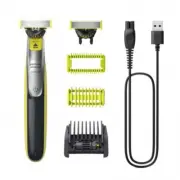
General description (Fig. 1)
1 Protection cap
2 360 face blade
3 Blade release switch
4 On/off button
5 Charging light
6 5-in-1 comb
7 Body comb (QP2834 only)
8 Skin guard (QP2834 only)
9 Body blade (QP2834 only)
10 USB cable
Note: A suitable power source (e.g. Philips HQ87) is available via
www.philips.com/support.
Getting started
Charging
Low Battery
When the battery is low, the motor will run more slowly.
Charging with the USB cable
Warning: Keep the USB cable and the USB power source dry.
1 Insert the small plug of the USB cable into the socket in the bottom of
the product.
2 Insert the USB plug into the USB power source (not included) (Fig. 2).
3 Insert the USB power source into the power outlet (Fig. 3). The
charging indicator will remain illuminated when the product is
connected to the power outlet.
4 Unplug the adapter from the power source, then remove the USB
cable from the handle.
Note: for safety reasons, the product can only be used when the USB
cable is not attached.
The charging and usage times for your OneBlade are shown below.
Note that usage times are based on a fully charged battery. To find out
which model you own, refer to the text on the back of the handle, or the
original packaging.
OneBlade model
Charging time
Usage time
QP2724
8 hours
45 minutes
QP2834
4 hours
60 minutes
Turning OneBlade on and off
To turn your OneBlade on or off, simply press the power button once
(Fig. 4).
Tip: If the OneBlade will not turn on, check that the battery is fully
charged and remove the charging cable from the handle before pressing
the power button.
QP2724-QP2834-SIGMA-OneBlade_CAN_3000.103.1018.2_LFLT_folded96x171mm_BW.indd 1,4
QP2724-QP2834-SIGMA-OneBlade_CAN_3000.103.1018.2_LFLT_folded96x171mm_BW.indd 1,4
23-03-2023 12:44
23-03-2023 12:44
"Loading the manual" means you need to wait until the file loads and becomes available for online reading. Some manuals are very large, and the time they take to appear depends on your internet speed.
Was this manual helpful?
About this manual
- Brand
- Philips
- Model
- QP2834/70
- Document type
- User Manual
- Language(s)
- English
- Pages
- 2
- File size
- 1 MB
- Format
Ask a question
Related manuals
Popular Philips Other


More Philips Other models
 Philips QP2734/30 User Manual
 Philips QP2824/20 User Manual
 Philips QP2824/30 User Manual
 Philips QP2834/20 User Manual
 Philips QP2834/23 User Manual
 Philips QP2834/31 User Manual
 Philips QP4631/30 User Manual
 Philips QP4631/65 User Manual
 Philips QP6504/15 User Manual
 Philips QP6506/15 User Manual
 Philips QP6520/30 User Manual
 Philips QP6541/15 User Manual