Page 3 - Contents
1 EN Contents 1 Safety 2 2 Your CD Soundmachine 3 Introduction 3 What's in the box 3 Over view of the main unit 4 3 Get started 6 Power supply 6 Turn on 7 4 Play 8 Play CD 8 Play from USB devices 8 Play from Bluetooth devices 8 Play from external devices 9 5 Play options 10 Control play 10 Program t...
Page 4 - Safety
2 EN 1 Safety Warning • Never remove the casing of this product. • Never lubricate any par t of this product. • Never place this product on other electrical equipment. • Keep this product away from direct sunlight, naked flames or heat. • Only use attachments/accessories specified by the manufacture...
Page 5 - Introduction
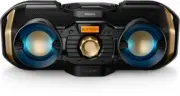
3 EN 2 Your CD Soundmachine Introduction With this CD Soundmachine, you can: • listen to FM/AM radio; and • enjoy audio from discs, USB storage devices, Bluetooth enabled devices, and other external audio devices. The product offers you Dynamic Bass Boost (DBB) and Digital Sound Control (DSC) to enr...
Page 6 - Overview of the main unit
4 EN Overview of the main unit a Disc compartment b • Turn on the product. • Switch to standby mode. c • Stop play. • Erase the programmed list. d / • Press to skip to the previous or next track. a c d efg h i j k l o nm q p b • Press and hold to fast-forward or fast- backward. • Tune to radio stati...
Page 8 - Get started; Power supply; Option 2: Battery power
6 EN 3 Get started Caution • Use of controls or adjustments or performance of procedures other than herein may result in hazardous laser exposure or other unsafe operation. Always follow the instructions in this chapter in sequence. If you contact Philips, you will be asked for the model and serial ...
Page 9 - Turn on; Switch to standby mode
7 EN Turn on Press to turn on the product. » [POWER ON] scrolls on the display, and then the product switches to your last selected source. Tip • To select a source, press SOURCE repeatedly. Switch to standby mode Press again to switch the product to standby mode.
Page 10 - Play CD; Play from USB devices; Play from Bluetooth devices
8 EN 4 Play Play CD 1 Press SOURCE repeatedly to select [CD] source. 2 Press down to open the CD compar tment. 3 Inser t a disc with the printed side facing up, then close the CD compar tment. » Play star ts automatically. Play from USB devices Note • Make sure that the USB device contains playable ...
Page 11 - Play from external devices
9 EN Tip • If you cannot find " Philips PX8 '' for pairing, press and hold PAIRING for two seconds to enter pairing mode, and then tr y again. To disconnect the Bluetooth-enabled device: • Press and hold PAIRING for two seconds; • Disable Bluetooth on your device; or • Move the device beyond the...
Page 12 - Play options; Control play; Program tracks; Select a preset sound effect; Enhance bass
10 EN 5 Play options Control play In CD or USB mode, you can control play through the following operations. / Press and hold to fast-forward or fast-reverse the track during playback, then release to resume play. -ALB/PRE/ ALB/PRE+ Skip to the previous or next MP3 album.Star t or pause play.Stop pla...
Page 13 - AM radio; Tune to FM/AM radio stations; Store radio stations; Store radio stations manually; Select a preset radio station
11 EN 6 Listen to FM/ AM radio Tune to FM/AM radio stations Note • For better reception, fully extend and adjust the position of the telescopic antenna. • To prevent interference, position the antenna as far as possible from any other electrical appliances. 1 Press SOURCE repeatedly to select FM/ AM...
Page 14 - Other features; Adjust display brightness; Enjoy decorative light; Powerful; Use the shoulder strap
12 EN 7 Other features Adjust display brightness Note • Make sure that the product is turned on. 1 Press and hold DIM for two seconds. 2 Press DIM repeatedly to select different brightness levels: • [LOW] • [MEDIUM] • [HIGH] • [OFF] Enjoy decorative light Note • Make sure that the product is turned ...
Page 15 - Amplifier
13 EN 8 Product information Note • Product information is subject to change without prior notice. Specifications Amplifier Total Output Power Max. 50W Frequency Response 50-20000 Hz, ±3 dB Signal to Noise Ratio (A- weighted) ≥78 dBA Total Harmonic Distor tion <1 %Audio-in Input 650mV±100mV Disc L...
Page 16 - Maintenance
14 EN - Batter y 8 X 1.5V D/R20 CELL/ UM1 batteries (not supplied) Operation Power Consumption 20 W Eco Standby Power Consumption <0.5 W Dimensions - Main Unit (W x H x D) 523 x 208 x 223 mm Weight (Main Unit) 3.8 kg Supported MP3 disc formats • ISO9660, Joliet • Maximum title number : 512 (depen...
Page 17 - Troubleshooting; About Bluetooth device
15 EN 9 Troubleshooting Warning • Never remove the casing of this device. To keep the warranty valid, never tr y to repair the system yourself. If you encounter problems when using this device, check the following points before requesting ser vice. If the problem remains unsolved, go to the Philips ...
Page 18 - Compliance; Trademark notice
16 10 Notice Any changes or modifications made to this device that are not expressly approved by Gibson Innovations may void the user’s authority to operate the equipment. Compliance Hereby, Gibson Innovations declares that this product is in compliance with the essential requirements and other rele...