Additional attachments and troubleshooting - Philips BRE610-BRE652 - User Manual - Page 3
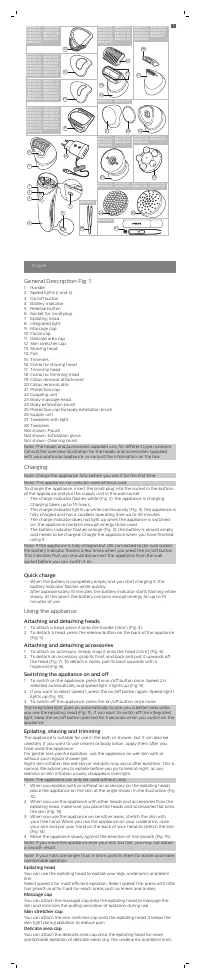
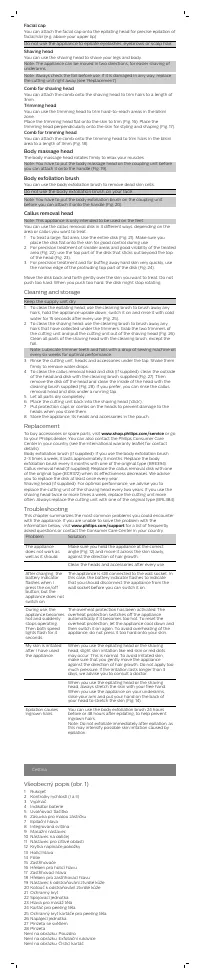
Table of Contents:
- Page 2 – Device components, charging, and basic operation
- Page 3 – Additional attachments and troubleshooting
- Page 4 – Czech charging and usage instructions
- Page 5 – Czech replacement parts and troubleshooting, Estonian parts
- Page 6 – Estonian usage, maintenance, and troubleshooting
- Page 7 – Latvian parts list and basic instructions
- Page 8 – Latvian cleaning, replacement, and troubleshooting
- Page 9 – Lithuanian troubleshooting, parts, and charging
- Page 10 – Hungarian troubleshooting, parts, and charging
- Page 11 – Hungarian attachments, cleaning, and replacement
- Page 12 – Polish charging, basic operation, and parts
- Page 13 – Polish troubleshooting and replacement, Slovak parts
- Page 14 – Slovak usage, cleaning, and troubleshooting
Facial cap
You can attach the facial cap onto the epilating head for precise epilation of facial hair (e.g. above your upper lip).
Do not use the appliance to epilate eyelashes, eyebrows or scalp hair.
Shaving head
You can use the shaving head to shave your legs and body.
Note: The appliance can be moved in two directions, for easier shaving of underarms.
Note: Always check the foil before use. If it is damaged in any way, replace the cutting unit right away (see 'Replacement').
Comb for shaving head
You can attach the comb onto the shaving head to trim hairs to a length of 3mm.
Trimming head
You can use the trimming head to trim hard-to-reach areas in the bikini zone.
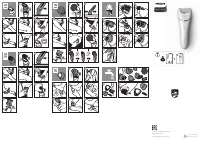
Place the trimming head flat onto the skin to trim (Fig. 16). Place the trimming head perpendicularly onto the skin for styling and shaping (Fig. 17).
Comb for trimming head
You can attach the comb onto the trimming head to trim hairs in the bikini area to a length of 3mm (Fig. 18).
Body massage head
The body massage head rotates firmly to relax your muscles.
Note: You have to put the body massage head on the coupling unit before you can attach it onto the handle (Fig. 19).
Body exfoliation brush
You can use the body exfoliation brush to remove dead skin cells.
Do not use the body exfoliation brush on your face.
Note: You have to put the body exfoliation brush on the coupling unit before you can attach it onto the handle (Fig. 20).
Callus removal head
Note: This appliance is only intended to be used on the feet.
You can use the callus removal disk in 3 different ways, depending on the area or callus you want to treat.
1 To treat a large, flat area, use the entire disk (Fig. 21). Make sure you place the disk flat onto the skin for good control during use.
2 For precision treatment of smaller areas and good visibility of the treated area (Fig. 22), use the top part of the disk that sticks out beyond the top of the head (Fig. 23).
3 For precision treatment and for buffing away hard skin very quickly, use the narrow edge of the protruding top part of the disk (Fig. 24).
Move the disk back and forth gently over the skin you want to treat. Do not push too hard. When you push too hard, the disk might stop rotating.
Cleaning and storage
Keep the supply unit dry.
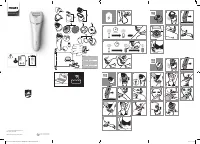
1 To clean the epilating head, use the cleaning brush to brush away any hairs, hold the appliance upside down, switch it on and rinse it with cold water for 15 seconds after every use (Fig. 25).
2 To clean the shaving head: use the cleaning brush to brush away any hairs that have collected under the trimmers. Grab the two trimmers of the cutting unit and pull the cutting unit out of the shaving head (Fig. 26). Clean all parts of the shaving head with the cleaning brush, except the foil.
Note: Lubricate trimmer teeth and foils with a drop of sewing machine oil every six weeks for optimal performance.
3 Rinse the cutting unit, heads and accessories under the tap. Shake them firmly to remove water drops.
4 To clean the callus removal head and disk (if supplied): clean the outside of the head and disk with the cleaning brush supplied (Fig. 27). Then remove the disk off the head and clean the inside of the head with the cleaning brush supplied (Fig. 28). If you prefer, you can rinse the callus removal head and disk under a running tap.
5 Let all parts dry completely.
6 Place the cutting unit back into the shaving head ('click').
7 Put protection caps or combs on the heads to prevent damage to the heads when you store them.
8 Store the appliance, its heads and accessories in the pouch.
Replacement
To buy accessories or spare parts, visit www.shop.philips.com/service or go to your Philips dealer. You can also contact the Philips Consumer Care Center in your country (see the international warranty leaflet for contact details).
Body exfoliation brush (if supplied): If you use the body exfoliation brush 2-3 times a week, it lasts approximately 3 months. Replace the body exfoliation brush every 3 months with one of the original type (BRE394).
Callus removal head (if supplied): Replace the callus removal disk with one of the original type (BCR372) when its effectiveness decreases. We advise you to replace the disk at least once every year.
Shaving head (if supplied): For optimal performance, we advise you to replace the cutting unit of the shaving head every two years. If you use the shaving head twice or more times a week, replace the cutting unit more often. Always replace the cutting unit with one of the original type (BRL384).
Troubleshooting
This chapter summarizes the most common problems you could encounter with the appliance. If you are unable to solve the problem with the information below, visit www.philips.com/support for a list of frequently asked questions or contact the Consumer Care Center in your country.
Problem Solution
The appliance does not work as well as it should. Make sure you hold the appliance at the correct angle (Fig. 12) and move it across the skin slowly, against the direction of hair growth.
Clean the heads and accessories after every use.
After charging, the battery indicator flashes when I press the on/off button, but the appliance does not switch on. The appliance is still connected to the wall socket. In this case, the battery indicator flashes to indicate that you should disconnect the appliance from the wall socket before you can switch it on.
During use, the appliance becomes hot and suddenly stops operating. Then both speed lights flash for 4 seconds. The overheat protection has been activated. The overheat protection switches off the appliance automatically if it becomes too hot. To reset the overheat protection, let the appliance cool down and then switch it on again. To avoid overheating of the appliance, do not press it too hard onto your skin.
My skin is irritated after I have used the appliance. When you use the epilating head or the shaving head, slight skin irritation like red skin or red dots may occur. This is normal. To avoid irritated skin, make sure that you gently move the appliance against the direction of hair growth. Do not apply too much pressure. If the irritation lasts longer than 3 days, we advise you to consult a doctor.
When you use the epilating head or the shaving head, always stretch the skin with your free hand. When you use the appliance on your underarms, raise your arm and put your hand on the back of your head to stretch the skin (Fig. 14).
Epilation causes ingrown hairs. You can use the body exfoliation brush 24 hours before or 48 hours after epilating, to help prevent ingrown hairs.
Note: Do not exfoliate immediately after epilating, as this may intensify possible skin irritation caused by epilation.
Čeština
Všeobecný popis (obr. 1)
1 Rukojet
2 Kontroly rychlosti (I a II)
3 Vypínač
4 Indikátor baterie
5 Uvolňovací tlačítko
6 Zásuvka pro malou zástřiku
7 Epilační hlava
8 Integrovaná svítilna
9 Masážní nástavec
10 Nástavec na obličej
11 Nástavec pro citlivé oblasti
12 Krytka napínací pогоžky
13 Holící hlava
14 Fólie
15 Zastihovače
16 Hřebík pro holící hlavu
17 Zastihovací hlava
18 Hřebík pro zastihovací hlavu
19 Nástavec k odstraňování ztvrdlé kůže
20 Kotouč k odstraňování ztvrdlé kůže
21 Ochranný kryt
22 Spojovací jednotka
23 Hlava pro masáž těla
24 Kartač pro peeling těla
25 Ochranný kryt kartáče pro peeling těla
26 Napájecí jednotka
27 Pinzeta se světlem
28 Pinzeta
Není na obrázku: Pouzdro
Není na obrázku: Exfoliační rukavice
Není na obrázku: Čisticí kartáč
"Loading the manual" means you need to wait until the file loads and becomes available for online reading. Some manuals are very large, and the time they take to appear depends on your internet speed.
Summary
Illustrated listing of all parts (handle, heads, caps, accessories). Charging details: full charge in 1.5 hours, quick charge provides 10 minutes of use after 15 minutes. Instructions for attaching and detaching heads, turning on/off, speed selection, and epilation technique: hold at a 90-degree angle, move slowly against hair growth, stretch skin. Covers epilating head and massage cap....
Describes facial cap, shaving head with comb, trimming head, body massage head, exfoliation brush, and callus removal head. Includes English troubleshooting for common issues: device not working, battery indicator flashing, overheating, skin irritation, ingrown hairs. Also contains a Czech parts list....
Czech translation of charging procedures (full and quick charge) and usage steps: attaching/detaching parts, turning on/off, epilation technique. Repeats general description in Czech.
Tips
- For best results, use the epilator on clean, dry skin or wet skin with shower gel for less painful epilation.
- Clean the epilating head and shaving head after each use to maintain performance.
- Lubricate the trimmer teeth and foil with sewing machine oil every six weeks.
- Replace the body exfoliation brush every three months if used 2-3 times per week.
- To prevent ingrown hairs, use the exfoliation brush 24 hours before or 48 hours after epilation.
- Do not exfoliate immediately after epilation as it may irritate the skin.
- If the device overheats, let it cool down before switching on again.
- Always disconnect from the mains before turning on to avoid battery indicator confusion.