Page 3 - Contents; Your 3-in-1: air purifier, fan and heater ������������������������������������ 2
1 EN English Contents 1 Your 3-in-1: air purifier, fan and heater ������������������������������������ 2 Product overview ....................................................................................................... 2Display overview ...........................................................
Page 4 - Product overview
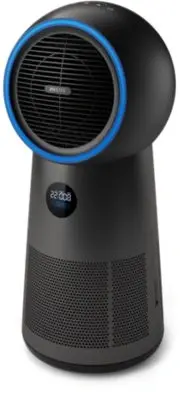
2 EN 1 Your 3-in-1: air purifier, fan and heater Congratulations on your purchase, and welcome to Philips!To fully benefit from the support that Philips offers, register your product at www.philips.com/welcome. Product overview A B C D F E G H I J A Remote control F Display screen B Housing G Philip...
Page 5 - Display overview
3 EN English Display overview K L M N O K Temperature display N Air quality indicator L Child lock indicator O Filter replacement alert M PM2.5 display
Page 6 - Controls overview
4 EN Controls overview Short press Timer Oscillation Fan setting Heater setting On/off Press for 3 seconds Sleep Light on/off Reset filter lifetime Child lock
Page 7 - Getting started; Installing the filter; Air quality light
5 EN English 2 Getting started Installing the filter Note: Make sure the appliance is unplugged from the electrical outlet before installing the filter. 1 2 3 4 5 1 To remove the back cover, hold the side of it with both hands and pull. 2 Pull the filter from the appliance. 3 Remove all packaging ma...
Page 8 - Turning on and off; Heater and fan
6 EN Turning on and off Note: • Plug the appliance into the power outlet; do not use a power strip. • If the appliance is running in heating mode when you turn it off, it continues working for a few seconds to exhaust the remaining heat. 1 Press to switch on the appliance. 2 The display panel lights...
Page 9 - Pairing your remote control; Replacing the battery
7 EN English Sleep, turning light on/off 1 Press and hold the button for 3 seconds. » The display screen dims, rest lights will turn off. 2 Press any button to turn all lights on. Pairing your remote control X 2 1 5s 2 1 Unplug the appliance from the power outlet and wait for 10 seconds. Plug in the...
Page 10 - Cleaning and maintenance; Cleaning the body of the appliance; When the filter replacement alert lights up
8 EN 4 Cleaning and maintenance Note: Switch off the appliance and unplug it from the power outlet before continuing. Cleaning the body of the appliance Use a soft, dry cloth to clean the appliance surface, including air inlet and outlet. Clean particle sensor surface. Do not open particle sensor co...
Page 11 - Before the filter replacement alert lights up; Troubleshooting
9 EN English 3 Press and hold the button for 3 seconds to reset the filter replacement time. » The filter replacement alert disappears from the screen. 4 Wash your hands thoroughly after replacing the filter. 3 3s 4 Before the filter replacement alert lights up You can replace the filter before the ...
Page 14 - 目錄
12 ZH-T 目錄 1 您的 3 合 1 風扇、暖風空氣清新機 ......................................13 產品概要 .........................................................................................................13 顯示概覽 ........................................................................................................ 14 ...
Page 15 - 您的; 產品概要
13 ZH-T 繁體中文 1 您的 3 合 1 風扇、暖風空氣清新機 感謝您購買 Philips 產品,同時歡迎您來到 Philips 世界! 請前往以下網址註冊您的產品,以獲得 Philips 的完整支援: www.philips.com/welcome 。 產品概要 A B C D F E G H I J A 遙控器 F 顯示屏幕 B 外殼 G Philips 濾網 (FYM220/30) C 控制按鈕 H 後蓋 D 燈帶 I 遙控器收藏槽 E 排氣口 J 空氣質素感應器
Page 16 - 顯示概覽
14 ZH-T 顯示概覽 K L M N O K 氣温顯示 N 空氣質素顯示 L 兒童安全鎖指示燈 O 濾網更換 警示 M PM2.5 顯示
Page 17 - 控制鍵概覽
15 ZH-T 繁體中文 控制鍵概覽 短按 定時器 擺動 風扇設定 暖風設定 開啟 / 關閉 長按 3 秒 睡眠 開燈 / 關燈 重設濾網壽命 兒童安全鎖
Page 18 - 使用入門; 安裝濾網; 設定遙控器; 使用; 空氣質素燈
16 ZH-T 2 使用入門 安裝濾網 備註: 安裝濾網前,請確保將產品的插頭從電源插座拔出。 1 2 3 4 5 1 請用雙手抓緊產品的兩側,然後拉出以拆卸後蓋。 2 從產品拉出濾網。 3 從濾網移除所有包裝物料。 4 將濾網裝回本產品。 5 重新裝上後蓋。 設定遙控器 1 將遙控器的膠片拉出,以啟用電池。 2 如果您在同一個房子內擁有多個裝置,則請將遙控器與產品進行配對(請參閱「配對您的遙控器」章節)。 備註: 將遙控器放入收藏槽中,它會自動地卡合穩固。 3 使用 3 合 1 風扇、暖風空氣清新機 空氣質素燈 PM2.5 水平 空氣質素指示燈的顏色 空氣質素水平 ≤ 12 藍色 良好 13...
Page 19 - 開關; 暖風及風扇
17 ZH-T 繁體中文 開關 備註: • 將產品插頭插入電源插座;切勿使用拖板。 • 如關閉產品時正在使用暖風模式,產品將繼續工作數秒,以將剩餘的暖風 排出。 1 按 以開啟本產品。 2 顯示面板會亮起,然後產品會顯示 PM2.5 水平及温度。 3 按下 按鈕以關閉產品。 暖風及風扇 燈帶 暖風 ( ) 低 中 高 紅色 風扇 ( ) 低 中 高 藍色 擺動 按下 按鈕,產品可以 60 °、 120 ° 及 350 ° 三個角度擺動。 設定定時功能 重複按下 按鈕以設定產品的運作時數。 定時功能可選擇 1 至 7 小時。 1 小時 2 小時 3 小時 4 小時 5 小時 6 小時 7 小時 ...
Page 20 - 更換電池
18 ZH-T 睡眠、開燈 / 關燈 1 按住 按鈕 3 秒。 » 顯示螢幕會變暗,其他燈光將會關閉。 2 按動任何按鈕以亮起所有燈光。 配對您的遙控器 X 2 1 5s 2 1 將產品插頭從電源插座拔出,並等待 10 秒。將產品插頭插入電源,然後在 5 秒 內按下 按鈕兩次。 » 2 小時指示燈會亮起。 2 在 5 秒內,長按遙控器的 按鈕 5 秒。 » 產品上風扇按鈕的 及 指示燈會亮起,然後產品會以風扇模式運作, 表示配對成功。 備註: 如果「 2h 」指示燈在閃爍,您必須重複進行配對。 更換電池 1 1 2 2 3 1 輕推電池支架的邊緣,然後將其從遙控器中拉出。 2 如圖所示,依照正...
Page 21 - 清潔及保養; 清潔本產品機身
19 ZH-T 繁體中文 4 清潔及保養 備註: 請先關閉產品並從電源插座拔出插頭,然後繼續進行操作。 . 清潔本產品機身 使用柔軟的乾布清潔產品表面,包括進氣口及排氣口。 清潔微粒感應器的表面。切勿打開微粒感應器的護蓋。 清潔濾網表面 每兩星期使用吸塵機或刷子清潔濾網表面。 1 4 5 3 2 1 拉起後蓋,從產品拆下。 2 從產品拉出濾網。 3 使用吸塵機清潔濾網表面。 4 將濾網裝回本產品。 5 重新裝上後蓋。 6 清潔濾網後,必須徹底洗淨雙手。 6
Page 22 - 濾網更換; 當濾網更換指示燈亮起時; 在濾網更換指示燈亮起之前
20 ZH-T 濾網更換 當濾網更換指示燈亮起時 備註: • 請勿清洗或重用濾網。 • 切勿用鼻子聞濾網,因為其含有空氣污染物。 當螢幕的 燈亮起時,請更換濾網。 1 使用 Philips 濾網 (FYM220/30) 進行更換。按照「安裝濾網」 章節的說明進行操作。 2 按 以開啟本產品。 3 按住 按鈕 3 秒即可重設濾網更換 時間。 » 螢幕的濾網更換指示燈 將會 消失。 4 更換濾網後,必須徹底洗淨雙手。 3 3s 4 在濾網更換指示燈亮起之前 您可以在濾網更換指示燈 ( ) 亮起之前更換濾網。更換後,您需要手動重設濾網壽 命計算器。 1 將產品插頭從電源插座拔出,並等待 10 秒。 ...
Page 23 - 疑難排解
21 ZH-T 繁體中文 5 疑難排解 本章節總結一些您在本產品上最常見的問題。如果您按照以下資料仍未能解決問題,請聯絡您的國家的 Philips 顧客服務中心。 問題 可行解決方案 排氣口的氣流明顯比以前弱。 • 濾網的表面骯髒。請清潔濾網表面(請查看「清潔與保養」章節)。 即使本產品經過長時間運作,空氣質素仍沒有改善。 • 請檢查是否已移除濾網的所有包裝物料。 • 請檢查產品是否已安裝濾網。 • 請以抹布或吸塵機清潔感應器護蓋的表面。 切勿打開感應器護蓋或觸摸其內部。 • 房間面積太大或室外空氣質素太差。 為獲得最佳淨化性能,請在操作產品時關閉門窗。 • 有室內污染源頭。例如包括香煙煙霧、...