Panasonic RP-BTD10E-K - User Manual
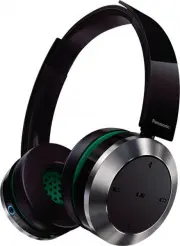
Panasonic RP-BTD10E-K Headphones – User Manual, read for free online in PDF format. We hope this helps you resolve any issues you may have. If you have further questions, please contact us through the contact form.


Table of Contents:
- Page 2 – Part names; Accessories
- Page 3 – ENGLISH; Charging; Connecting a Bluetooth
- Page 4 – Listening to music
- Page 5 – Making a phone call
- Page 6 – About Bluetooth; Maintenance; Restoring to the factory settings
- Page 7 – Safety precautions
- Page 8 – Troubleshooting guide
- Page 9 – Specifications
- Page 12 – Pr
ENGLISH
FRANÇAIS
ESP
AÑOL
PORTUGUÊS
VQT5J78
Owner’s Manual
Manuel d’utilisation
Instrucciones de funcionamiento
Manual de instruções
Digital Wireless Stereo Headphones
Casque d’écoute stéréo sans fil numérique
Cascos auriculares estéreo inalámbricos digitales
Auscultadores estéreo sem fios digitais
Model No.
N° de modèle
RP-BTD10
PP
If you have any questions, visit:
In the U.S.A. and Puerto Rico:
www.panasonic.com/support
In Canada:
www.panasonic.ca/english/support
Si vous avez une question, visitez :
www.panasonic.ca/french/support
Si usted tiene alguna pregunta, visite:
www.panasonic.com/support
For U.S.A. and Puerto Rico only /
Pour les É.-U. et Porto Rico seulement
The warranty can be found on page 10.
Register online at
www.panasonic.com/register
(U.S. customers only)
La garantía se puede encontrar en la página 10.
For Canada only / Pour le Canada seulement
The warranty can be found on page 11.
La garantie se trouve à la page 10.
"Loading the manual" means you need to wait until the file loads and becomes available for online reading. Some manuals are very large, and the time they take to appear depends on your internet speed.
Summary
VQT5J78 2 2 7 8 9 10 11 12 13 2 3 4 14 15 1 5 6 Please check and identify the supplied accessories.Use numbers indicated in parentheses when asking for replacement parts.(As of February 2014) Only for U.S.A. and Puerto Rico: To order accessories, refer to “Accessory Purchases (United States and Puer...
VQT5J78 3 ENGLISH 3 The rechargeable battery (installed in the unit) is not charged initially. Charge the battery before using the unit. 1 Connect this unit to a computer using the USB charging cord • During charging, the LED on the left speaker will light in red. When charging is completed, the LED...
VQT5J78 4 4 For NFC-compatible Android™ devices only The NFC (Near Field Communication) feature allows this unit to connect easily to an NFC-compatible Bluetooth ® device. Just touch this unit with your Bluetooth ® device to automatically turn on this unit, pair the Bluetooth ® device, and establish...

