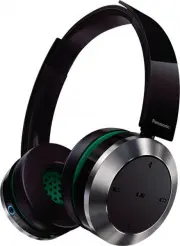
Page 2 - Part names; Accessories
VQT5J78 2 2 7 8 9 10 11 12 13 2 3 4 14 15 1 5 6 Please check and identify the supplied accessories.Use numbers indicated in parentheses when asking for replacement parts.(As of February 2014) Only for U.S.A. and Puerto Rico: To order accessories, refer to “Accessory Purchases (United States and Puer...
Page 3 - ENGLISH; Charging; Connecting a Bluetooth
VQT5J78 3 ENGLISH 3 The rechargeable battery (installed in the unit) is not charged initially. Charge the battery before using the unit. 1 Connect this unit to a computer using the USB charging cord • During charging, the LED on the left speaker will light in red. When charging is completed, the LED...
Page 4 - Listening to music
VQT5J78 4 4 For NFC-compatible Android™ devices only The NFC (Near Field Communication) feature allows this unit to connect easily to an NFC-compatible Bluetooth ® device. Just touch this unit with your Bluetooth ® device to automatically turn on this unit, pair the Bluetooth ® device, and establish...
Page 5 - Making a phone call
VQT5J78 5 ENGLISH 5 With Bluetooth ® enabled phones (cell phones or smartphones) that support the “HSP” or “HFP” Bluetooth ® profile, you can use the unit for phone calls. • HSP (Headset Profile): This profile can be used to receive monaural sounds and establish two-way communication using the micro...
Page 6 - About Bluetooth; Maintenance; Restoring to the factory settings
VQT5J78 6 6 Panasonic bears no responsibility for data and/or information that is compromised during a wireless transmission. ■ Frequency band used This unit uses the 2.4 GHz frequency band. ■ Certification of this unit • This unit conforms to frequency restrictions and has received certification ba...
Page 7 - Safety precautions
VQT5J78 7 ENGLISH 7 ■ Unit • Avoid using or placing this unit near sources of heat. • Do not use while operating a motorized vehicle. It may create a traffic hazard and is illegal in many areas. • Do not listen with this unit at high volume in places where you need to hear sounds from the surroundin...
Page 8 - Troubleshooting guide
VQT5J78 8 8 Before requesting service, make the following checks. If you are in doubt about some of the check points, or if the remedies indicated in the chart do not solve the problem, refer to “Customer Services Directory (United States and Puerto Rico)” on page 10 if you reside in the U.S.A. or P...
Page 9 - Specifications
VQT5J78 9 ENGLISH 9 ■ General Power supply DC 5 V, 500 mA(Internal battery : 3.6 V (Li-ion 690 mAh)) Operating time* 1 (SBC mode) Approx. 30 hours Charging time* 2 (25 ºC (77 ºF)) Approx. 4.5 hours Charging temperature range 10 ºC to 35 ºC (50 ºF to 95 ºF) Operating temperature range 0 ºC to 40 ºC (...
Page 12 - Pr
VQT5J78 M0214KZ0 © Panasonic Corporation 2014Printed in China/Imprimé en Chine/Impreso en China/Impresso na China Panasonic Canada Inc. 5770 Ambler Drive, Mississauga, Ontario L4W 2T3 www.panasonic.com Panasonic Corporation of North America Two Riverfront Plaza, Newark, NJ 07102-5490 http://www.pana...