Page 2 - Table of Contents
2 Before Start Table of Contents Before Start............................................................. 2 What's in the box ..................................................... 3 Part Names ............................................................. 4 Part Names ..................................
Page 4 - Part Names; Front Panel
4 Par t Names Part Names Front Panel 1. Í ON/STANDBY button 2. MEMORY button: Used to register DAB (European models)/AM (North American models)/FM radio stations (P18). 3. TUNING/PRESET button: Switch between the TUNING mode, where you select a frequency to tune to a station, and the PRESET mode, wh...
Page 5 - Display
5 > Before Start > Part Names > Install > Playback Setup | Others En 16. BALANCE buttons: Adjusts the balance of the sounds output from the left and right speakers (P20). Display 1. The currently selected speaker system lights.2. Lights when headphones are connected.3. Lights when PCM si...
Page 6 - Rear Panel
6 Rear Panel 1. GND jack: The ground wire of the turntable is connected.2. FM 75 Ω /AM ANTENNA terminals (North American models): Connect the supplied FM indoor antenna and AM indoor antenna.DAB/FM ANTENNA terminal (European models): Connect the supplied FM/DAB antenna. 3. SUBWOOFER PRE OUT jack: Co...
Page 7 - Remote Controller
7 En Remote Controller 1. Í ON/STANDBY button 2. SLEEP button: Set the sleep timer (P23).3. INPUT SELECTOR buttons: Switches the input to be played.4. Numbered buttons5. D.TUN button: Use to select the number of a preset station or to directly input the frequency of the station. 6. MUTING button: Te...
Page 8 - Step1: Connect the Speakers; Speaker B; Right; Speaker Cable
8 Install Step1: Connect the Speakers You can connect two systems, Speaker A and Speaker B, as the Speaker System. When connecting only one set, connect to the SPEAKERS A terminals. With one set, use speakers with 4 ≠ to 16 ≠ impedance. Note that when connecting to both SPEAKERS A and B terminals, c...
Page 9 - Step2: Connect an other External Device; DIGITAL IN connection; TV; Digital Optical Cable,
9 En Step2: Connect an other External Device 1. DIGITAL IN connection Connect an other external device with a digital optical cable or digital coaxial cable. 0 Only PCM audio is supported for input through the DIGITAL IN OPTICAL/COAXIAL jacks. Set the audio output on the other external device to out...
Page 10 - AUDIO IN connection; CD; Analog Audio Cable
10 2. AUDIO IN connection Connect an other external device with an analog audio cable. You can connect a turntable that has an MM-type cartridge to the PHONO jack. 0 If the turntable has a built-in audio equalizer, connect it to an AUDIO IN jack other than the PHONO jack. Also, if the turntable uses...
Page 11 - FM; AM indoor antenna
11 En Step3: Connect Other Cables (North American Models) Antenna Hookup Move the antenna around while playing the radio to find the position with the best reception. Power Cord Hookup The power cord must be connected only after all other connections are completed. > Before Start > Part Names ...
Page 13 - Playing Audio from a Connected Device; Basic Operations
13 En Playback Playing Audio from a Connected Device Basic Operations You can play the audio from other external devices such as Blu-ray Disc players through this unit. Perform the following procedure when the unit is on.1. Press the input selector button (a) on the remote controller with the same n...
Page 14 - Pairing; Playing Back
14 BLUETOOTH ® Playback You can wirelessly play music on a smartphone or other BLUETOOTH wireless technology enabled device. Perform the following procedure when the unit is on. Pairing 1. When you press BLUETOOTH (a), "Now Pairing..." is displayed on this unit's display, and the pairing mod...
Page 15 - Tuning into a Radio Station; Tuning Automatically; Tuning Manually; Tuning into Stations by Frequency
15 En > Before Start > Part Names > Install > Playback Setup | Others Listening to the AM/FM Radio (AM: North American Models only) You can receive AM (North American models) /FM radio stations on this unit with the built-in tuner. Perform the following procedure when the unit is on. ∫ T...
Page 17 - Listening to DAB Digital Radio (European Models only); DAB
17 En Listening to DAB Digital Radio (European Models only) Basic Operations 1. Repeatedly press TUNER (b) on the remote controller and select "DAB". 0 The very first time you select DAB, the Auto Tuning function automatically scans the DAB Band 3 for the multiplexes (i.e., stations) availab...
Page 18 - Registering a Station; Registering; Selecting a Preset Radio Station; Deleting a Preset Radio Station
18 Registering a Station You can register up to 40 of your favorite radio stations. Registering After tuning into the radio station you want to register, perform the following procedure.1. Press MEMORY on the main unit so that the preset number on the display flashes. 2. While the preset number is f...
Page 19 - Naming Radio Stations Registered as Presets; Characters that can be entered
19 En Naming Radio Stations Registered as Presets You can enter names of up to 8 characters for the stations you have preset. Uses the following procedure. 1. Press TUNER on the remote controller, select AM (North American models)/FM, then select the preset number. 2. After pressing SETUP on the rem...
Page 20 - Adjusting the Sound Quality
20 Adjusting the Sound Quality By pressing BASS, TREBLE, etc. on the remote controller during play, you can adjust frequently used settings, such as the sound quality. 0 BALANCE adjustments can only be made with BALANCE on the main unit. ∫ BASS (a) Enhance or moderate the bass range of the speakers....
Page 21 - Setup Menu; Digital Input
21 En Setup Setup Menu The unit allows you to configure advanced settings to provide you with an even better experience.1. Press SETUP (b) on the remote controller. 2. Select the item with the Up/Down buttons (a) on the remote controller and press ENTER (d) to confirm your selection. 3. Select the s...
Page 22 - SP Impedance
22 > Before Start > Part Names > Install > Playback Setup | Others OPTICAL jacks. If you do not assign a jack, select "----". 0 Supported sampling rates for PCM signals (stereo, mono) from a digital input are 32 kHz, 44.1 kHz, 48 kHz, 88.2 kHz, 96 kHz/16 bit, 24 bit. SP Impedance...
Page 23 - Bluetooth
> Before Start > Part Names > Install > Playback Setup | Others 23 En Bluetooth Sleep Timer You can make the unit enter standby automatically when the specified time elapses.1. Press SLEEP on the remote controller to display the time to set on the display. 0 Press SLEEP repeatedly on the...
Page 24 - Troubleshooting; Before starting the procedure
24 Others Troubleshooting Before starting the procedure Problems may be solved by simply turning the power on/off or disconnecting/connecting the power cord, which is easier than working on the connection, setting and operating procedure. Try the simple measures on both the unit and the connected de...
Page 26 - General Specifications; Tuner Section
26 General Specifications Amplifier (Audio) section Rated Output Power (FTC) (North American) 0 With 8 ohm loads, both channels driven, from 20 - 20,000 Hz; rated 45 watts per channel minimum RMS power, with no more than 0.08% total harmonic distortion from 250 milliwatts to rated output. 0 With 6 o...
Page 30 - Table des matières
2 Avant de démarrer Table des matières Avant de démarrer ................................................. 2 Ce que contient la boîte .......................................... 3 Nom des pièces...................................................... 4 Nom des pièces ......................................
Page 31 - Ce que contient la boîte
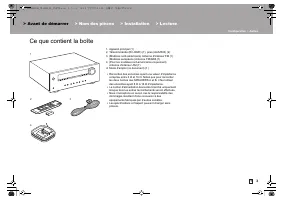
3 Fr Ce que contient la boîte 1. Appareil principal (1)2. Télécommande (RC-962R) (1), piles (AAA/R03) (2)3. (Modèles nord-américains) Antenne d'intérieur FM (1) (Modèles européens) Antenne FM/DAB (1) 4. (Pour les modèles nord-américains uniquement) Antenne d'intérieur AM (1) ≥ Mode d'emploi (ce docu...
Page 32 - Nom des pièces; Panneau frontal
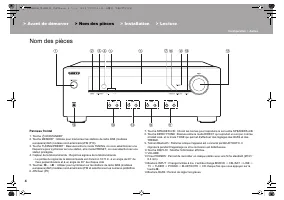
4 Nom des pièces Nom des pièces Panneau frontal 1. Touche Í ON/STANDBY 2. Touche MEMORY : Utilisée pour mémoriser les stations de radio DAB (modèles européens)/AM (modèles nord-américains)/FM (P18). 3. Touche TUNING/PRESET : Basculez entre le mode TUNING, où vous sélectionnez une fréquence pour synt...
Page 33 - Afficheur
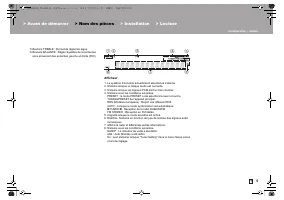
5 > Avant de démarrer > Nom des pièces > Installation > Lecture Configuration | Autres Fr 15. Boutons TREBLE : Permet de régler les aigus.16. Boutons BALANCE : Règle l'équilibre de la sortie des sons provenant des enceintes gauche et droite (P20). Afficheur 1. Le système d’enceinte actue...
Page 34 - Panneau arrière
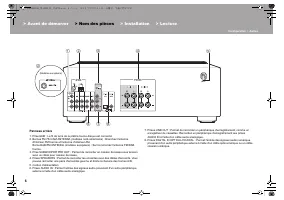
6 Panneau arrière 1. Prise GND : Le fil de terre de la platine tourne-disque est connecté.2. Bornes FM 75 Ω /AM ANTENNA (modèles nord-américains) : Branchez l'antenne d'intérieur FM fournie et l'antenne d'intérieur AM.Borne DAB/FM ANTENNA (modèles européens) : Sert à raccorder l'antenne FM/DAB fourn...
Page 35 - Télécommande
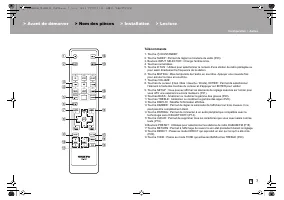
7 Fr Télécommande 1. Touche Í ON/STANDBY 2. Touche SLEEP : Permet de régler la minuterie de veille (P23).3. Boutons INPUT SELECTOR : Change l'entrée à lire.4. Touches numérotées5. Touche D.TUN : Utilisez pour sélectionner le numéro d'une station de radio préréglée ou pour saisir directement la fréqu...
Page 36 - Étape 1 : Raccorder les enceintes; Droite
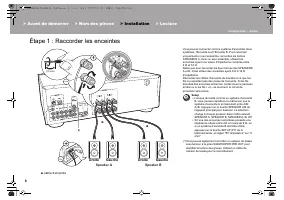
8 Installation Étape 1 : Raccorder les enceintes Vous pouvez connecter comme système d'enceintes deux systèmes, l'Enceinte A et l'Enceinte B. Pour raccorder uniquement un seul ensemble, raccordez les bornes SPEAKERS A. Avec un seul ensemble, utilisez les enceintes ayant une valeur d'impédance compri...
Page 37 - Étape 2 : Raccorder un autre périphérique externe; Connexion DIGITAL IN; Câble optonumérique,
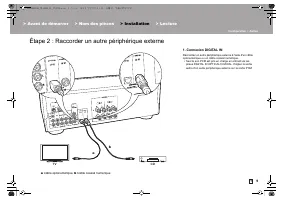
9 Fr Étape 2 : Raccorder un autre périphérique externe 1. Connexion DIGITAL IN Raccordez un autre périphérique externe à l'aide d'un câble optonumérique ou un câble coaxial numérique. 0 Seul le son PCM est pris en charge en entrant via les prises DIGITAL IN OPTICAL/COAXIAL. Réglez la sortie audio d'...
Page 38 - Connexion AUDIO IN; Câble audio analogique
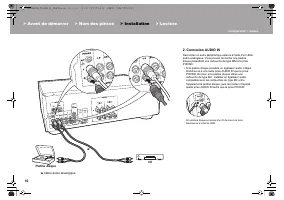
10 2. Connexion AUDIO IN Raccordez un autre périphérique externe à l'aide d'un câble audio analogique. Vous pouvez raccorder une platine disque possédant une cartouche de type MM à la prise PHONO. 0 Si la platine disque possède un égaliseur audio intégré, branchez-la à une autre prise AUDIO IN que l...
Page 39 - Antenne d'intérieur AM
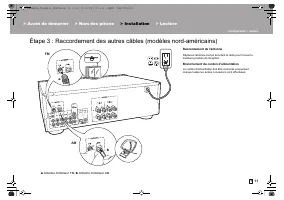
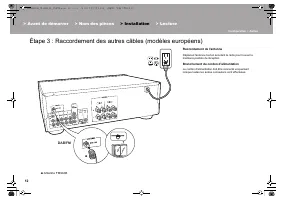
11 Fr Étape 3 : Raccordement des autres câbles (modèles nord-américains) Raccordement de l'antenne Déplacez l'antenne tout en écoutant la radio pour trouver la meilleure position de réception. Branchement du cordon d'alimentation Le cordon d'alimentation doit être connecté uniquement lorsque toutes ...
Page 41 - Lecture du son provenant d'un périphérique externe; Commandes de base
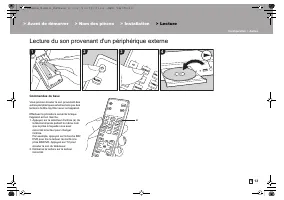
13 Fr Lecture Lecture du son provenant d'un périphérique externe Commandes de base Vous pouvez écouter le son provenant des autres périphériques externes tels que des lecteurs de Blu-ray Disc avec cet appareil. Effectuez la procédure suivante lorsque l'appareil est en marche.1. Appuyez sur le sélect...
Page 42 - Lecture BLUETOOTH; Jumelage; Écouter
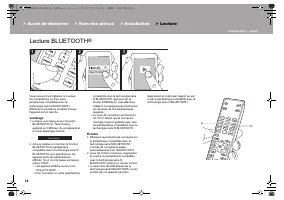
14 Lecture BLUETOOTH ® Vous pouvez lire à distance la musique d'un smartphone ou d'un autre périphérique compatible avec la technologie sans fil BLUETOOTH. Effectuez la procédure suivante lorsque l'appareil est en marche. Jumelage 1. Lorsque vous appuyez sur la touche BLUETOOTH (a), "Now Pairing...
Page 43 - Syntonisation automatique; Syntonisation manuelle
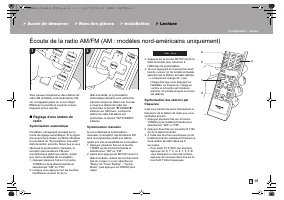
15 Fr > Avant de démarrer > Nom des pièces > Installation > Lecture Configuration | Autres Écoute de la radio AM/FM (AM : modèles nord-américains uniquement) Vous pouvez réceptionner des stations de radio AM (modèles nord-américains) /FM sur cet appareil grâce au tuner intégré. Effectuez...
Page 45 - Écoute de la radio numérique DAB (modèles européens uniquement)
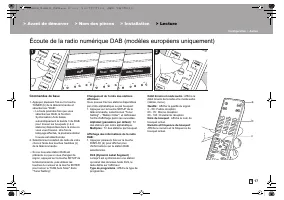
17 Fr Écoute de la radio numérique DAB (modèles européens uniquement) Commandes de base 1. Appuyez plusieurs fois sur la touche TUNER (b) de la télécommande et sélectionnez "DAB". 0 La toute première fois que vous sélectionnez DAB, la fonction Syntonisation Auto balaie automatiquement la ban...
Page 46 - Mémorisation d'une station; Mémorisation
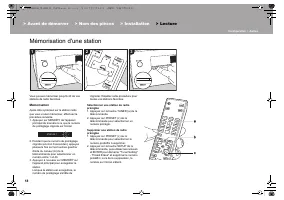
18 Mémorisation d'une station Vous pouvez mémoriser jusqu'à 40 de vos stations de radio favorites. Mémorisation Après être syntonisé sur la station radio que vous voulez mémoriser, effectuez la procédure suivante.1. Appuyez sur MEMORY de l'appareil principal de manière à ce que le numéro de prérégla...
Page 47 - Nommer les Stations Radio préréglées; Caractères pouvant être saisis
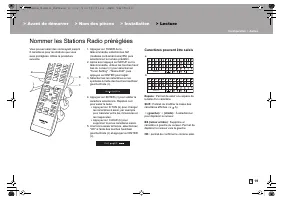
19 Fr Nommer les Stations Radio préréglées Vous pouvez saisir des noms ayant jusqu'à 8 caractères pour les stations que vous avez préréglées. Utilise la procédure suivante. 1. Appuyez sur TUNER de la télécommande, sélectionnez AM (modèles nord-américains)/FM, puis sélectionnez le numéro prédéfini. 2...
Page 48 - Ajustement de la qualité du son
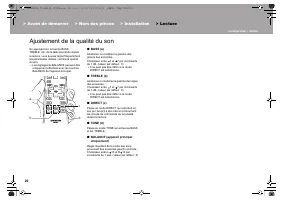
20 Ajustement de la qualité du son En appuyant sur la touche BASS, TREBLE, etc. de la télécommande durant la lecture, vous pouvez régler fréquemment les paramètres utilisés, comme la qualité du son. 0 Les réglages de BALANCE peuvent être uniquement effectués avec les touches BALANCE de l'appareil pr...
Page 49 - Menu Setup
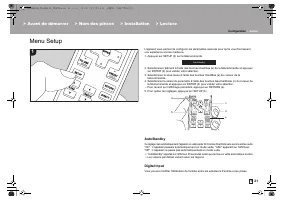
21 Fr Configuration Menu Setup L'appareil vous permet de configurer les paramètres avancés pour qu'ils vous fournissent une expérience encore meilleure.1. Appuyez sur SETUP (b) sur la télécommande. 2. Sélectionnez l'élément à l'aide des touches Haut/bas (a) de la télécommande et appuyez sur ENTER (d...
Page 50 - Tuner Setting
22 > Avant de démarrer > Nom des pièces > Installation > Lecture Configuration | Autres DIGITAL IN COAXIAL/OPTICAL. Si vous n'attribuez pas de prise, sélectionnez "----". 0 Les taux d'échantillonnage pris en charge pour des signaux PCM (stéréo, mono) à partir d'une entrée numériq...
Page 52 - Dépannage; Avant de démarrer la procédure; Alimentation; Audio
24 Autres Dépannage Avant de démarrer la procédure Les problèmes peuvent être résolus simplement en allumant et en coupant l'alimentation, ou en débranchant/rebranchant le cordon d'alimentation, ce qui est plus facile que de travailler sur la connexion, la procédure de paramétrage et de fonctionneme...
Page 53 - La fonctionnalité BLUETOOTH
> Avant de démarrer > Nom des pièces > Installation > Lecture Configuration | Autres 25 Fr analogique, les cordons d'alimentation, les câbles d'enceinte, etc. peut dégrader la performance audio. Ne regroupez pas les câbles ensemble. 0 Un câble audio peut capter des interférences. Essayez...
Page 54 - Caractéristiques générales; Partie du tuner
26 Caractéristiques générales Section amplificateur (Audio) Puissance de sortie nominale (FTC) (Nord-américain) 0 Avec 8 ohms de charge, deux canaux entraînés, de 20 - 20.000 Hz ; puissance RMS minimale 45 watts nominaux par canal, avec pas plus de 0,08% de distorsion harmonique totale de 250 milliw...
Page 57 - STEREO RECEIVER; Manual de instrucciones; En Fr
TX-8220 STEREO RECEIVER Instruction ManualMode d’emploi Manual de instrucciones En Fr Es SN29403245_TX-8220_Es_1707XX.book 1 ページ 2017年7月11日 火曜日 午後7時31分
Page 58 - Tabla de contenidos; > Nombres de las piezas
2 Antes de empezar Tabla de contenidos Antes de empezar .................................................. 2 Qué se encuentra en la caja ................................... 3 Nombres de las piezas .......................................... 4 Nombres de las piezas .......................................
Page 59 - Qué se encuentra en la caja
3 Es Qué se encuentra en la caja 1. Unidad principal (1)2. Mando a distancia (RC-962R) (1), pilas (AAA/R03) (2)3. (Modelos norteamericanos) Antena FM para interiores (1)(Modelos europeos) Antena FM/DAB (1) 4. (Solo para modelos norteamericanos) Antena AM para interiores (1) ≥ Manual de instrucciones...
Page 60 - Nombres de las piezas; Panel frontal
4 Nombres de las piezas Nombres de las piezas Panel frontal 1. Botón Í ON/STANDBY 2. Botón MEMORY: Se utiliza para registrar emisoras de radio DAB (modelos europeos)/ AM (modelos norteamericanos)/FM (P18). 3. Botón TUNING/PRESET: Cambie entre el modo TUNING, donde selecciona una frecuencia para sint...
Page 61 - Pantalla
5 > Antes de empezar > Nombres de las piezas > Instalación > Reproducción Configuración | Otros Es 15. Botones TREBLE: Ajusta los agudos.16. Botones BALANCE: Ajusta el balance de los sonidos emitidos por los altavoces derechos e izquierdos (P20). Pantalla 1. El sistema de altavoces actua...
Page 62 - Panel trasero
6 Panel trasero 1. Conector GND: Está conectado el cable de puesta a tierra de la tornamesa.2. Terminales FM 75 Ω /AM ANTENNA (Modelos norteamericanos): Conecte la antena FM para interiores y la antena AM para interiores suministradas.Terminal DAB/FM ANTENNA (modelos europeos): Conecte la antena FM/...
Page 63 - Mando a distancia
7 Es Mando a distancia 1. Botón Í ON/STANDBY 2. Botón SLEEP: Ajuste el temporizador de apagado (P23).3. Botones INPUT SELECTOR: Cambia la entrada a reproducir.4. Botones numerados5. Botón D.TUN: Utilizado para seleccionar el número de una emisora preestablecida o introducir directamente la frecuenci...
Page 64 - Paso 1: Conexión de los altavoces; Derecho; Cable de altavoz
8 Instalación Paso 1: Conexión de los altavoces Puede conectar dos sistemas, Altavoz A y Altavoz B, como sistema de altavoces. Si conecta un único conjunto, utilice los terminales SPEAKERS A. Con un set, utilice altavoces con una impedancia de entre 4 ≠ y 16 ≠ . Tenga en cuenta que cuando se conecte...
Page 65 - Paso 2: Conecte otro dispositivo externo; Conexión DIGITAL IN; Cable óptico digital,
9 Es Paso 2: Conecte otro dispositivo externo 1. Conexión DIGITAL IN Conecte un otro dispositivo externo con un cable óptico digital o un cable coaxial digital. 0 Únicamente se puede introducir audio PCM a través de los conectores DIGITAL IN OPTICAL/COAXIAL. Ajuste la salida de audio en el otro disp...
Page 66 - Cable de audio analógico
10 2. Conexión AUDIO IN Conecte un otro dispositivo externo con un cable de audio analógico. Puede conectar una tornamesa que tenga un cartucho de tipo MM al conector PHONO. 0 Si la tornamesa tiene un ecualizador de audio integrado, conéctelo a un conector AUDIO IN distinto del conector PHONO. Ademá...
Page 67 - Antena FM para interiores,
11 Es Paso 3: Conexión de otros cables (modelos norteamericanos) Conexión de antenas Mueva la antena mientras reproduce la radio para encontrar la posición con mejor recepción. Conexión del cable de alimentación El cable de alimentación debe conectarse sólo después de que todas las otras conexiones ...
Page 69 - Reproducir audio desde un dispositivo conectado; Operaciones básicas
13 Es Reproducción Reproducir audio desde un dispositivo conectado Operaciones básicas Puede reproducir el audio desde otros dispositivos externos como reproductores de discos Blu-ray a través de esta unidad. Realice el siguiente procedimiento cuando la unidad esté encendida.1. Pulse el selector de ...
Page 70 - Reproducción BLUETOOTH; Emparejado
14 Reproducción BLUETOOTH ® Puede reproducir música de forma inalámbrica en un teléfono inteligente u otro dispositivo habilitado con tecnología inalámbrica BLUETOOTH. Realice el siguiente procedimiento cuando la unidad esté encendida. Emparejado 1. Cuando pulsa el botón BLUETOOTH (a), en la pantall...
Page 71 - Sintonización automática; Sintonización manual
15 Es > Antes de empezar > Nombres de las piezas > Instalación > Reproducción Configuración | Otros Escuchar la radio AM/FM (AM: solo modelos norteamericanos) Con el sintonizador integrado, puede recibir emisoras de radio AM (modelos norteamericanos)/FM en esta unidad. Realice el siguien...
Page 73 - Escuchar la radio digital DAB (solo modelos europeos)
17 Es Escuchar la radio digital DAB (solo modelos europeos) Operaciones básicas 1. Pulse repetidamente TUNER (b) en el mando a distancia y seleccione "DAB". 0 La primera vez que seleccione la opción DAB, la función de sintonización automática buscará automáticamente la Banda 3 DAB para los m...
Page 74 - Registrar una emisora; Registrar
18 Registrar una emisora Puede registrar hasta un máximo de 40 emisoras de radio favoritas. Registrar Después de sintonizar la emisora de radio que desea registrar, siga el siguiente procedimiento.1. Pulse MEMORY en la unidad principal, de modo que el número preajustado parpadee en la pantalla. 2. M...
Page 76 - Ajuste de la calidad de sonido
20 Ajuste de la calidad de sonido Pulsando BASS, TREBLE, etc. en el mando a distancia durante la reproducción, puede ajustar los ajustes de uso más frecuente, como la calidad del sonido. 0 Los ajustes de BALANCE solo pueden realizarse con los botones BALANCE de la unidad principal. ∫ BASS (a) Intens...
Page 80 - Resolución de problemas; Antes de iniciar el procedimiento; Alimentación
24 Otros Resolución de problemas Antes de iniciar el procedimiento El problema puede solucionarse simplemente encendiendo y apagando la alimentación o desconectando/conectando el cable de alimentación, lo cual es más sencillo que el procedimiento de conexión, ajuste y operación. Intente las medidas ...
Page 81 - La función BLUETOOTH
> Antes de empezar > Nombres de las piezas > Instalación > Reproducción Configuración | Otros 25 Es Se puede escuchar ruido 0 Usar abrazaderas para cables para unir cables de audio analógico, cables de alimentación, cables de altavoz, etc., puede reducir el rendimiento del audio. Por lo ...
Page 82 - Especificaciones generales; Sección del sintonizador
26 Especificaciones generales Sección del amplificador (Audio) Potencia de salida nominal (FTC) (Norteamericano) 0 Con cargas de 8 ohmios, ambos canales accionados, entre 20 - 20.000 Hz; de 45 vatios por canal de potencia RMS mínima, con no más del 0,08% de distorsión armónica total desde 250 miliva...