Page 2 - 安全上のご注意; 注 意; 警 告; 絵 表 示 の 例
この表示を無視して、誤った取り扱いをすると、人が死亡または重傷を負う 可能性が想定される内容を示しています。 この表示を無視して、誤った取り扱いをすると、人が傷害を負う可能性が想 定される内容および物的損害の発生が想定される内容を示しています。 安全上のご注意 ご使用の前に「安全上のご注意」をよくお読みのうえ、正しくお使いください。この「安全上のご注意」は製品を安全に正しく使用していただき、あなたや他の人々への危害や財産への損害を未然に防止するために、重要な内容を記載しています。お読みになった後は、お使いになる方がいつでも見られる所に必ず保管してください。 表示について 表示と意味は次のように...
Page 3 - Jp
3 Jp 警 告 熱くなる、煙が出る、こげ臭いなどの異常時は、速やかにカメラの電池を取り出すこと そのまま使用すると火災、やけどの原因となります。電池を取り出す際、やけどに十分注意してください。電池を抜いて、販売店またはニコンサービス機関に修理を依頼してください。 水につけたり水をかけたり、雨にぬらしたりしないこと 発火したり感電の原因となります。 引火・爆発のおそれのある場所では使用しないこと プロパンガス・ガソリンなど引火性ガスや粉塵の発生する場所で使用すると、爆発や火災の原因となります。 レンズまたはカメラで直接太陽や強い光を見ないこと 失明や視力障害の原因となります。 注 意 ぬれた手...
Page 4 - ( )参照頁
4 Jp 各部の名称 : ( )参照頁 1 フード着脱指標(P.8) 2 フォーカスリング(P.7) 3 距離目盛 4 距離目盛基準線 5 ズームリング(P.8) 6 焦点距離目盛 7 焦点距離目盛基準線 8 レンズ着脱指標 9 レンズマウントゴムリング(P.6) ! CPU信号接点(P.6) " フォーカスモード切り換えスイッチ(P.7) # フード(P.8) $ フードロック解除ボタン(P.8) % フード取り付け指標(P.8) & フードセット指標(P.8)
Page 5 - カメラ別の使用可能機能表; ■ 主な特長
5 Jp カメラ別の使用可能機能表 使用できる機能には制限・制約がある場合があります。カメラの使用説明書もご確認ください。 ※1:PにはAUTO(オート)モード、イメージプログラムモードを含みます。※2:Mモードの設定はありません。 1. はじめに このたびはニッコールレンズをお買い上げいただき、誠にありがとうございます。このレンズは、高速で静かなAF(オートフォーカス)撮影を可能にするレンズ内超音波モーター(サイレント・ウェーブ・モーター)駆動方式を採用した高性能なズームレンズです。 ■ 主な特長 ● AF(オートフォーカス)撮影およびMF(マニュアルフォーカス)撮影の切り換えが簡単にできる...
Page 6 - ■ 注 記
6 Jp ● 被写体までの距離情報をカメラボディー側に伝達する機能を備え、3Dマルチパターン測光機能を持ったカメラとの組み合わせでは、より的確な露出制御を実現します。 ● ニコン独自のED(特殊低分散)ガラスによる色収差の補正とともに、非球面レンズや良好なボケ味が得られる円形絞りの採用により優れた光学性能、描写性能を発揮します。 ● ナノクリスタルコート(Nano Crystal Coat)を一部のレンズに施したことにより、強い太陽光が当たるスポーツ撮影から、スポットライトのある室内撮影まで、クリアーな画像を提供します。 ● 最短撮影距離0.38m(焦点距離35mm〜50mmの場合)までの...
Page 7 - ■M/A(マニュアル優先オートフォーカス)モードの使い方
7 Jp 2. ピント合わせの方法 ご使用のカメラや撮影目的によって、下表のようなピント合わせが選択できます。 ■M/A(マニュアル優先オートフォーカス)モードの使い方 1 フォーカスモード切り換えスイッチ " を[M/A]に セットします。 ● スイッチは、指標が合うようにセットしてください。 2 AF(オートフォーカス)撮影時、シャッターボタン を半押ししたまま、あるいはカメラのAF作動ボタンを保持したまま、フォーカスリング 2 を手で回転さ せると、瞬時にMF(マニュアルフォーカス)撮影が行えます。 3 シャッターボタンの半押しやAF作動ボタンを再度操 作するとAFで撮影が可能と...
Page 8 - の取り付け、取り外し; ■取り付け方(図A)
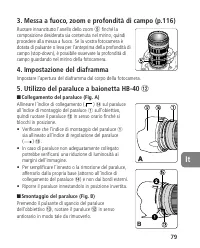
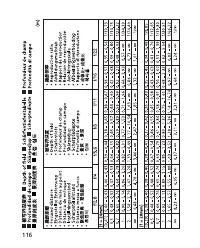
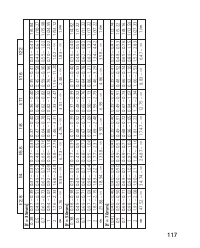
8 Jp 3. ズーミングと被写界深度(P.116) 撮影を行う場合は、ズームリング 5 を回転させ構図を 決めてから、ピント合わせを行ってください。プレビュー(絞り込み)機構を持つカメラでは、撮影前に被写界深度を確認することができます。 4. 絞り値の設定 絞り値は、カメラ側で設定してください。 5. バヨネットフードHB-40 # の取り付け、取り外し ■取り付け方(図A) レンズ先端のフード着脱指標 1 とフード取り付け指 標( ) % を合わせて、時計回りにカチッと音が するまでフード # を回転させ、確実に取り付けます。 ● フード着脱指標 1 とフードセット指標( ) & ...
Page 10 - ファインダースクリーンとの組み合わせ; ■構図の決定やピント合わせの目的には; レンズのお手入れと取り扱い上のご注意
10 Jp 7. ファインダースクリーンとの組み合わせ ■構図の決定やピント合わせの目的には ◎: 好適です ○: 視野の一部が多少見にくくなりますが、撮影結果には全く影響がありません。 ―: 各カメラに存在しないファインダースクリーンです。 空欄: 使用不適当です。ただし、Mスクリーンの場合、撮影倍率1/1倍以上の近接 撮影に用いられるため、この限りではありません。 注意 ・上記以外のカメラでB、Eスクリーンをご使用の場合は、それぞれB、Eスクリー ンの欄をご覧ください。 8. レンズのお手入れと取り扱い上のご注意 ● レンズ面の清掃は、ホコリを拭う程度にしてください。指紋がついたときは、柔...
Page 14 - Notes on Safety Operations; CAUTION; • In backlit shooting, keep the sun well out of the frame.
14 Notes on Safety Operations CAUTION Do not disassemble Touching the internal parts of the camera or lens could result in injury. Repairsshould be performed only by qualified technicians. Should the camera or lensbreak open as the result of a fall or other accident, take the product to a Nikon-auth...
Page 15 - Nomenclature; Distance scale
15 Nomenclature ( ): Reference page 1 Lens hood mounting index (p.19) 2 Focus ring (p.18) 3 Distance scale 4 Distance index line 5 Zoom ring (p.19) 6 Focal length scale 7 Focal length index line 8 Mounting index 9 Lens mount rubber gasket (p.17) ! CPU contacts (p.17) " Focus mode switch (p.18) #...
Page 16 - Usable cameras and available functions; Major features; autofocusing to manual focusing.; Cameras
16 Usable cameras and available functions There may be some restrictions or limitation for available functions. Refer to yourcamera instruction manual for details. *Sold exclusively in the USA. **Sold exclusively in the USA and Canada.*1 P includes AUTO (General-Purpose Program) and Vari-Program Sys...
Page 17 - Important; • Be careful not to soil or damage the CPU contacts
17 • More accurate exposure control is possible when this is mounted on a Nikon camera having 3D Matrix Metering capability, because subject distanceinformation is transferred from the lens to the camera body. • The use of three aspherical and three ED (extra-low dispersion) lens elements ensures sh...
Page 18 - Lens’ focus mode
18 2. Focusing Set your camera’s focus mode selector according to this chart. ■ Autofocus with manual override (M/A mode) 1 Set the Focus mode switch " to [M/A]. Note: Be sure to set the switch so that the indicator aligns with [M/A] precisely. 2 Autofocus is provided, but you can manually overr...
Page 19 - Setting the aperture
19 3. Focusing, zooming, and depth of field (p.116) First turn the zoom ring 5 until the desired composition is framed in the viewfinder before focusing. If your camerahas a depth of field preview (stop-down) button or lever,depth of field can be observed while looking through thecamera viewfinder. ...
Page 20 - lens is not recommended.
20 En 6. Taking flash pictures using cameras with a built-in flash Vignetting is the darkening of the corners around the image that occurs when thelight emitted from the flash is obstructed by the lens hood, or lens barreldepending on the focal length or shooting distance. * Sold exclusively in the ...
Page 21 - Recommended focusing screens; above, refer to the columns for the B and E screens.
21 En 7. Recommended focusing screens Various interchangeable focusing screens are available for certain Nikon SLRcameras to suit any picture-taking situation. The ones recommended for use withthis lens are: : Excellent focusing: Acceptable focusing Slight vignetting or moiré patterns appear in the ...
Page 22 - leave the lens in an excessively hot place.; Standard accessories; • 77mm screw-in filters; Incompatible accessories
22 En • When the lens will not be used for a long time, store it in a cool, dry place to prevent mold. Also store the lens away from direct sunlight or chemicals suchas camphor or naphthalene. • Do not get water on the lens or drop it in water as this will cause it to rust and malfunction. • Reinfor...
Page 23 - Distance information:; Output to camera body; Shooting distance scale:; Fully automatic; Exposure measurement:; Via full-aperture method
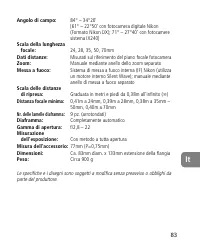
23 En Focal length scale: 24, 28, 35, 50, 70mm Distance information: Output to camera body Zoom control: Manually via separate zoom ring Focusing: Nikon Internal Focusing (IF) system (utilizing aninternal Silent Wave Motor); manually via separatefocus ring Shooting distance scale: Graduated in meter...
Page 24 - Hinweise für sicheren Betrieb; ACHTUNG; Nehmen Sie das Objektiv nicht auseinander
24 De Hinweise für sicheren Betrieb ACHTUNG Nehmen Sie das Objektiv nicht auseinander Beim Berühren der Innenteile von Kamera oder Objektiv droht Verletzungsgefahr.Überlassen Sie Reparaturen unbedingt ausschließlich qualifizierten Technikern. Kommt esdurch einen heftigen Stoß (z. B. Fall auf den Bod...
Page 25 - Entfernungsskala
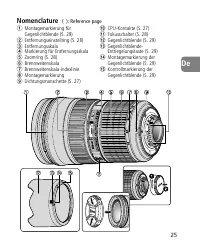
25 De Nomenclature ( ): Reference page 1 Montagemarkierung fürGegenlichtblende (S. 29) 2 Entfernungseinstellring (S. 28) 3 Entfernungsskala 4 Markierung für Entfernungsskala 5 Zoomring (S. 28) 6 Brennweitenskala 7 Brennweitenskala-Indexlinie 8 Montagemarkierung 9 Dichtungsmanschette (S. 27) ! CPU-Ko...
Page 26 - Verwendbare Kameras und verfügbare Funktionen; Die wichtigsten Merkmale; Kameras
26 De Verwendbare Kameras und verfügbare Funktionen Möglicherweise gibt es hinsichtlich der verfügbaren Funktionen Einschränkungen.Informationen hierzu finden Sie in der Bedienungsanleitung zu Ihrer Kamera. *1 P schließt die Automatik (AUTO) und Motivprogramme mit ein.*2 Manuelle Belichtungssteuerun...
Page 27 - Wichtige Hinweise; • Halten Sie die CPU-Kontakte
27 De außerhalb des Schärfenbereichs vor und hinter dem Motiv liegende Elemente inansprechende Unschärfe getaucht werd en. • Die Nanokristallvergütung einiger Linsen sorgt für klare Bilder in den unterschiedlichsten Aufnahmesituationen, von Außenaufnahmen bei hellemSonnenschein bis hin zu Innenaufna...
Page 28 - Blendeneinstellung; Stellen Sie die Blende an der Kamera ein.
28 De ■ Autofokus mit Priorität der manuellen Scharfeinstellung (M/A-Modus) 1 Stellen Sie den Fokusschalter " auf [M/A]. Hinweis: Dabei muss der Schalter so eingestellt sein, dass die Markierung genau mit der Aufschrift[M/A] fluchtet. 2 Bei dieser Einstellung ist der Autofokus-Modus zwaraktivier...
Page 30 - Blitzaufnahmen mit Kameras mit eingebautem Blitz
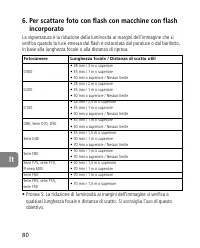
30 De 6. Blitzaufnahmen mit Kameras mit eingebautem Blitz Unter Vignettierung versteht man die Abdunkelung der Bildecken, wenn dasBlitzlicht von der Gegenlichtblende oder, je nach Brennweite oderAufnahmedistanz, vom Objektivtubus verdeckt wird. • Pronea S: Randunschärfen (Vignettierungen) treten bei...
Page 31 - Empfohlene Einstellscheiben; B und E in anderen als den oben genannten Kameras.; Einstellscheibe
31 De 7. Empfohlene Einstellscheiben Für bestimmte Nikon-Kameras stehen verschiedene auswechselbareEinstellscheiben zur Verfügung, um jeder Aufnahmesituation gerecht zu werden.Die für dieses Objektiv empfohlenen werden in der Tabelle aufgeführt. : Hervorragende Scharfeinstellung: Akzeptable Scharfei...
Page 32 - Pflege des Objektivs; Gegenlichtblende; Im Lieferumfang enthaltenes Zubehör
32 De 8. Pflege des Objektivs • Säubern Sie Glasflächen mit einem Blasepinsel. Entfernen Sie Staub und Flecken mit einem sauberen, weichen Baumwolltuch oder Optik-Reinigungstuch, das Siemit Ethanol (Alkohol) oder Optik-Reinigungsflüssigkeit anfeuchten. Wischen Siein kreisförmigen Bewegungen von der ...
Page 33 - Kürzeste Aufnahmedistanz:
33 De 12. Technische Daten Objektivtyp: AF-S-Zoom-Nikkor mit G-Charakteristik, eingebauterCPU und Nikon-F-Bajonett. Brennweite: 24–70mm Lichtstärke: f/2,8 Optischer Aufbau: 15 Linsen in 11 Gruppen (3 Linsen aus ED-Glas, 3aus asphärisch und eine mit Nanokristallvergütung) Bildwinkel: 84° – 34°20’ [61...
Page 34 - Remarques concernant une utilisation en toute sécurité; ATTENTION; peut provoquer un incendie ou une électrocution.
34 Fr Remarques concernant une utilisation en toute sécurité ATTENTION Ne démontez pas le matériel Le fait de toucher aux pièces internes de l’appareil ou de l’objectif pourrait entraînerdes blessures. Les réparations doivent être effectuées uniquement par destechniciens qualifiés. Si l’appareil ou ...
Page 35 - Échelle des distances
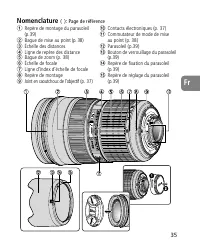
35 Fr Nomenclature ( ): Page de référence 1 Repère de montage du parasoleil(p.39) 2 Bague de mise au point (p. 38) 3 Échelle des distances 4 Ligne de repère des distance 5 Bague de zoom (p. 38) 6 Échelle de focale 7 Ligne d’index d’échelle de focale 8 Repère de montage 9 Joint en caoutchouc de l’obj...
Page 36 - Appareils utilisables et fonctions disponibles; Principales caractéristiques; commutateur de mode de mise au point.; Appareil
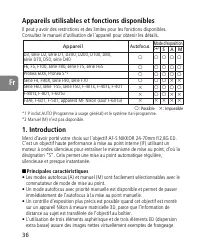
36 Fr Appareils utilisables et fonctions disponibles Il peut y avoir des restrictions et des limites pour les fonctions disponibles.Consultez le manuel d’utilisation de l’appareil pour obtenir les détails. *1 P inclut AUTO (Programme à usage général) et le système Vari-programme.*2 Manuel (M) n’est ...
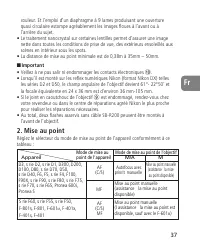
Page 37 - • La distance de mise au point minimale est de 0,38m à 35mm – 50mm.; • Veillez à ne pas salir ni endommager les contacts électroniques; Mode de mise au point de l’objectif
couleur. Et l’emploi d’un diaphragme à 9 lames produisant une ouverture quasi circulaire estompe agréablement les images floues à l’avant ou à l’arrière du sujet. • Le traitement nanocrystal sur certaines lentilles permet d'assurer une image nette dans toutes les conditions de prise de vue, des exté...
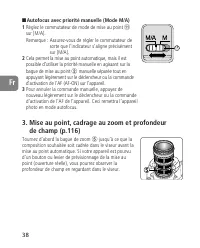
Page 38 - Mise au point, cadrage au zoom et profondeur; Tournez d’abord la bague de zoom
38 ■ Autofocus avec priorité manuelle (Mode M/A) 1 Réglez le commutateur de mode de mise au point " sur [M/A]. Remarque : Assurez-vous de régler le commutateur de sorte que l’indicateur s’aligne précisémentsur [M/A]. 2 Cela permet la mise au point automatique, mais il estpossible d’utiliser la p...
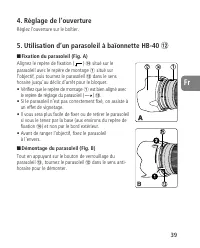
Page 40 - Prise de vues avec un appareil à flash intégré
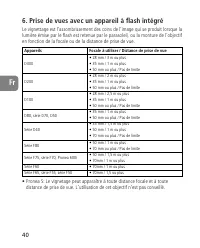
6. Prise de vues avec un appareil à flash intégré Le vignettage est l’assombrissement des coins de l’image qui se produit lorsque lalumière émise par le flash est retenue par le parasoleil, ou la monture de l’objectifen fonction de la focale ou de la distance de prise de vue. • Pronea S: Le vignetag...
Page 41 - l’objectif, prendre feu ou nuire à la santé.
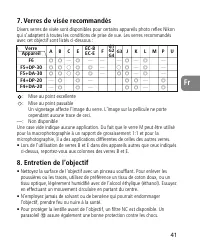
41 Fr 7. Verres de visée recommandés Divers verres de visée sont disponibles pour certains appareils photo reflex Nikonqui s’adaptent à toutes les conditions de prise de vue. Les verres recommandésavec cet objectif sont listés ci-dessous : : Mise au point excellente: Mise au point passable Un vignet...
Page 42 - Accessoires fournis; • Autres filtres à vis 77 mm; Accessoires incompatibles; Construction optique :
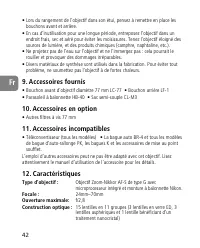
42 Fr • Lors du rangement de l’objectif dans son étui, pensez à remettre en place les bouchons avant et arrière. • En cas d’inutilisation pour une longue période, entreposez l’objectif dans un endroit frais, sec et aéré pour éviter les moisissures. Tenez l'objectif éloigné dessources de lumière, et ...
Page 44 - Notas sobre un uso seguro; PRECAUCIÓN; incendio o una descarga eléctrica.
44 Es Notas sobre un uso seguro PRECAUCIÓN No desarme el equipo El contacto con las piezas internas de la cámara o del objetivo puede provocarlesiones. Las reparaciones solamente deben ser ejecutadas por técnicos cualificados.Si a causa de un golpe u otro tipo de accidente la cámara o el objetivo se...
Page 45 - Nomenclatura; Escala de distancias
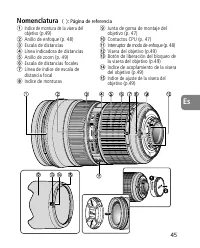
45 Es Nomenclatura ( ): Página de referencia 1 Indice de montura de la visera delobjetivo (p.49) 2 Anillo de enfoque (p. 48) 3 Escala de distancias 4 Línea indicadora de distancias 5 Anillo de zoom (p. 49) 6 Escala de distancias focales 7 Línea de índice de escala dedistancia focal 8 Indice de montu...
Page 46 - Cámaras que puede utilizar y funciones disponibles; Principales funciones; seleccionarse mediante le interruptor de modo de enfoque.; Cámaras
46 Es Cámaras que puede utilizar y funciones disponibles Puede haber algunas restricciones o limitaciones para las funciones disponibles.Para más detalles, consulte el manual de instrucción de la cámara. *De venta exclusiva en los EE.UU. **De venta exclusiva en los EE.UU. y Canadá.*1 P incluye AUTO ...
Page 48 - Modo de enfoque del objetivo
48 Es 2. Enfoque Ajuste el selector de modo de enfoque de su cámara de acuerdo con este cuadro: ■ Enfoque automático con prioridad manual (Modo M/A) 1 Ajuste el interruptor de modo de enfoque " a [M/A]. Nota: Asegúrese de colocar el interruptor de forma que el indicador quede perfectamente aline...
Page 50 - distancia de fotografía. No se recomienda usar este objetivo.
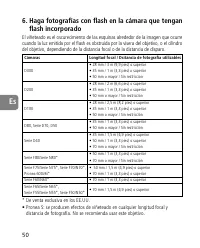
50 Es 6. Haga fotografías con flash en la cámara que tengan flash incorporado El viñeteado es el oscurecimiento de las esquinas alrededor de la imagen que ocurrecuando la luz emitida por el flash es obstruida por la visera del objetivo, o el cilindrodel objetivo, dependiendo de la distancia focal o ...
Page 51 - Pantalla
51 Es 7. Pantallas de enfoque recomendadas Hay diferentes pantallas de enfoque intercambiables para algunas cámaras SLRde Nikon apropiados para cualquier situación fotográfica. Las recomendadas parautilizar con este objetivo son las que aparecen en la lista a continuación. : Enfoque excelente: Enfoq...
Page 54 - Information om säkerhetsföreskrifter; VARNING; brand eller elektriska stötar.
54 Se Information om säkerhetsföreskrifter VARNING Plocka inte isär produkten Undvik skador genom att aldrig vidröra kamerans inre delar. Eventuellareparationer bör endast utföras av kvalificerade tekniker. Om du råkar tappa ellerstöta till kameran så att den öppnas avlägsnar du batteriet eller kopp...
Page 55 - Terminologi; Avståndsmätare
55 Se Terminologi ( ): Referenssida 1 Riktmärke för montering avobjektivkåpan (s. 59) 2 Fokusring (s. 58) 3 Avståndsmätare 4 Distansindikeringslinje 5 Zoomring (s. 59) 6 Brännviddsskala 7 Brännviddsindexlinje 8 Monteringsindikering 9 Gummipackning för objektivgänga (s. 57) ! CPU-kontakter (s. 57) &#...
Page 56 - Vilka kameror och funktioner som kan användas; Huvudfunktioner; att byta snabbt från autofokus till manuell fokusering.; Kameror
56 Se Vilka kameror och funktioner som kan användas Vissa avvikelser kan förekomma vad gäller tillgängliga funktioner. Läs kameransbruksanvisning om du vill ha mer information. *1 P omfattar AUTO (General-Purpose Program) och systemet Vari-Program.*2 Manuell (M) kan inte användas. 1. Introduktion Gr...
Page 57 - • Näravståndet är 0,38 m vid en brännvidd på 35 mm – 50 mm.; Viktigt; • Om gummipackningen för objektivgänga
• Med tre asfäriska linselement och tre ED-linselement (Extra-low Dispersion) blir bilderna skarpa och så gott som fria från färgskiftningar. Och med nio lamellersom ger en nästan cirkulär bländaröppning återges oskärpan framför ellerbakom motivet med en tilltalande suddighet. • Nano Crystal Coat på...
Page 60 - Ta blixtbilder med en kamera med inbyggd blixt; avråder från användning av detta objektiv.
60 Se 6. Ta blixtbilder med en kamera med inbyggd blixt Vinjettering är ett fenomen som innebär att bilden blir mörkare i hörnen på grundav att blixtljuset blockeras av objektivkåpan eller objektivröret beroende påbrännvidden eller tagningsavståndet. • Pronea S: Vinjettering uppstår vid alla brännvi...
Page 61 - Rekommenderade mattskivor; mattskivorna B och E på andra kameror än dem som räknas upp ovan.; Skötsel av objektivet; skada linsen, orsaka brand och hälsoproblem.
61 Se 7. Rekommenderade mattskivor Flera olika utbytbara mattskivor kan användas för vissa av Nikons digitala SLR-kameror så att de passar för alla fotograferingssituationer. Nedanstående skivorrekommenderas för användning med det här objektivet. : Utmärkt fokusering: Acceptabel skärpeinställning De...
Page 62 - Tillbehör som säljs separat; • 77 mm filter med skruvgänga; Tillbehör som inte kan användas; automatisk mellanring PK, K-ring och bälgfokuseringstillbehör.; Objektivkonstruktion:
62 Se • När du förvarar objektivet i objektivväskan sätter du på både främre och bakre locket. • Förvara objektivet på ett svalt och torrt ställe för att förhindra mögelbildning när objektivet inte ska användas under en längre period. Förvara ävenobjektivet så att det inte kommer i kontakt med direk...
Page 63 - Antal bländarlameller:; Helautomatisk; Monteringsstorlek för tillbehör:
63 Se Bildvinkel: 84° – 34°20' [61° – 22°50' med Nikons digitala SLR-kameror (Nikon DX-format), 71° – 27°40'med IX240-systemkameror] Brännviddsskala: 24, 28, 35, 50, 70 mm Avståndsinformation: Utdata till kamerahuset Zoomkontroll: Manuell via en separat zoomring Fokusering: Nikons system för internf...
Page 64 - Veiligheidsinstructies; WAARSCHUWING; leiden tot brand of een elektrische schok.
64 Nl Veiligheidsinstructies WAARSCHUWING Demonteer het apparaat niet Als u de interne onderdelen van de camera of het objectief aanraakt, kan dit letselveroorzaken. Reparaties mogen alleen door bevoegde technici worden uitgevoerd. Als decamera of het objectief ten gevolge van een val of een ander o...
Page 66 - Geschikte camera's en beschikbare functies; Belangrijkste functies; geselecteerd met de schakelaar voor de scherpstelstand.; Camera’s
66 Nl Geschikte camera's en beschikbare functies Er kunnen beperkingen gelden voor de beschikbare functies. Raadpleeg dehandleiding van de camera voor meer informatie. *1 P inclusief AUTO (algemeen programma) en onderwerpsstanden (Digital Vari-Program).*2 Handmatig (M) is niet beschikbaar. 1. Inleid...
Page 67 - Belangrijk
67 Nl • Een nauwkeuriger belichtingsregeling is mogelijk als het objectief is bevestigd op een Nikon-camera met 3D-matrixmeting, aangezien informatie over de afstandtot het onderwerp door het objectief wordt doorgegeven aan de camera. • Het gebruik van drie asferische en drie ED-lenselementen (Extra...
Page 68 - Scherpstelstand van objectief
68 Nl 2. Scherpstelling Stel de selectieknop voor de scherpstelstand op de camera in aan de hand van deonderstaande tabel. ■ Autofocus met handmatige aanpassing (stand M/A) 1 Zet de schakelaar voor de scherpstelstand " op [M/A]. Opmerking: Zorg ervoor dat u de schakelaar zo instelt dat de aandui...
Page 69 - Het diafragma instellen
69 Nl 3. Scherpstellen, zoomen en scherptediepte (p.116) Draai voordat u scherpstelt aan de zoomring 5 totdat de gewenste compositie in de zoeker wordt weergegeven. Alsde camera een knop of hendel voor scherptedieptecontroleheeft, kunt u de scherptediepte controleren terwijl u doorde zoeker van de c...
Page 70 - op. Het gebruik van dit objectief wordt afgeraden.
70 Nl 6. Flitsfoto’s maken met camera’s met ingebouwde flitser Vignettering is het donker worden van de hoeken van het beeld en dit treedt opomdat het licht van de flitser gehinderd wordt door de zonnekap of het objectief,afhankelijk van de brandpuntsafstand of de afstand tot het onderwerp. • Pronea...
Page 71 - Matglas
71 Nl 7. Aanbevolen matglazen Er zijn diverse verwisselbare matglazen beschikbaar voor bepaalde Nikon-reflexcamera's die geschikt zijn voor allerlei soorten opnamen. De aanbevolenmatglazen voor dit objectief zijn: : Uitstekende scherpstelling: Acceptabele scherpstelling Geringe vignettering of moiré...
Page 72 - Standaardaccessoires; • 77mm inschroeffilters; Incompatibele accessoires; Objectiefconstructie:
72 Nl • Er is een NC-filter verkrijgbaar om het voorste lenselement te beschermen. Een zonnekap # beschermt ook de voorkant van het objectief. • Wanneer u het objectief opbergt in de objectieftas, bevestigt u zowel de voorste als de achterste lensdop. • Als het objectief gedurende langere tijd niet ...
Page 73 - Schaal brandpuntsafstand:; Doorgegeven aan camerabody; Schaal opnameafstand:; In meters en feet van 0,38 m – tot oneindig (; Kortste scherpstelafstand:; Volledig automatisch
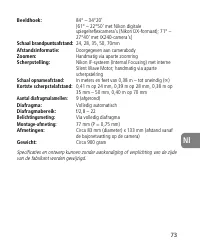
73 Nl Beeldhoek: 84° – 34°20' [61° – 22°50' met Nikon digitalespiegelreflexcamera's (Nikon DX-formaat); 71° –27°40' met IX240-camera's] Schaal brandpuntsafstand: 24, 28, 35, 50, 70mm Afstandsinformatie: Doorgegeven aan camerabody Zoomen: Handmatig via aparte zoomring Scherpstelling: Nikon IF-systeem...
Page 74 - Note sulle operazioni di sicurezza; ATTENZIONE; Non smontare
74 It Note sulle operazioni di sicurezza ATTENZIONE Non smontare Toccando le parti interne della fotocamera o dell’obiettivo si potrebbero causare deiguasti. Le riparazioni devono essere eseguite solamente da tecnici qualificati. Qualora,in caso di caduta o di qualsiasi altro incidente, la fotocamer...
Page 75 - Scala delle distanze
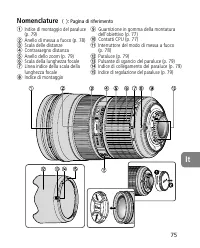
75 It Nomenclature ( ): Pagina di riferimento 1 Indice di montaggio del paraluce(p. 79) 2 Anello di messa a fuoco (p. 78) 3 Scala delle distanze 4 Contrassegno distanza 5 Anello dello zoom (p. 79) 6 Scala della lunghezza focale 7 Linea indice della scala dellalunghezza focale 8 Indice di montaggio 9...
Page 76 - Fotocamere utilizzabili e funzioni disponibili; Caratteristiche principali; Fotocamere
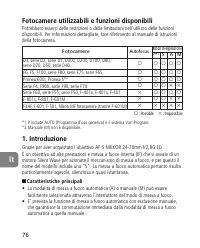
76 It Fotocamere utilizzabili e funzioni disponibili Potrebbero esserci delle restrizioni o delle limitazioni nell’utilizzo delle funzionidisponibili. Per informazioni dettagliate, fare riferimento al manuale di istruzionidella fotocamera. *1 P include AUTO (Programma d’uso generico) e il sistema Va...
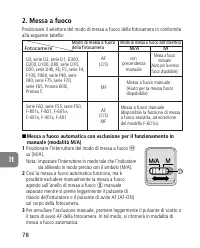
Page 78 - Messa a fuoco automatica con esclusione per il funzionamento in; Posizionare l’interruttore del modo di messa a fuoco; Modo di messa a fuoco dell’obiettivo
78 It 2. Messa a fuoco Posizionare il selettore del modo di messa a fuoco della fotocamera in conformitàalla seguente tabella: ■ Messa a fuoco automatica con esclusione per il funzionamento in manuale (modalità M/A) 1 Posizionare l’interruttore del modo di messa a fuoco " su [M/A].Nota: impostar...
Page 81 - Schermi di messa a fuoco consigliati; fate riferimento alle rispettive colonne delle versioni B e E.; Cura e manutenzione dell’obiettivo; l’obiettivo, causare incendi o problemi di intossicazione.; Schermo
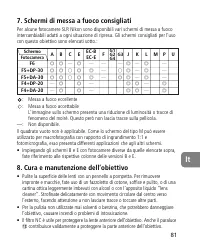
81 It 7. Schermi di messa a fuoco consigliati Per alcune fotocamere SLR Nikon sono disponibili vari schermi di messa a fuocointercambiabili adatti a ogni situazione di ripresa. Gli schermi consigliati per l’usocon questo obiettivo sono elencati sotto.: : Messa a fuoco eccellente: Messa a fuoco accet...
Page 82 - ossidazioni potrebbe danneggiarlo in modo irreparabile.; Accessori in dotazione; • Altri filtri a vite da 77 mm; Accessori non utilizzabil; Tipo di obiettivo
82 It • Prima di porre l’obiettivo nell’astuccio o in borsa, montate entrambi i coperchi protettivi. • Se rimane a lungo inutilizzato, riponetelo in un ambiente fresco e ventilato per prevenire la formazione di muffe. Tenetelo inoltre lontano dal sole o da agentichimici come canfora o naftalina. • N...
Page 84 - Ck; 安全操作注意事項
84 Ck 安全操作注意事項 警告 勿自行拆卸 觸動相機或鏡頭的內部零件可能會導致受傷 - 修理只能由有資格的維 修技師進行 - 如果由於掉落或其它事故導致相機或鏡頭拆散﹐在切斷 產品電源和(或)取出電池後﹐請將產品送至尼康授權的維修中心進行檢查 - 發生故障時立刻關閉電源 如果您發現相機或鏡頭冒煙或發出異味時﹐請立刻取出電池﹐注意避免燃燒 - 若繼續使用可能導致受傷 - 請在取出電池或切斷電源後﹐將 器材送到尼康授權的維修中心進行檢查維修 - 勿在易燃氣體環境中使用相機或鏡頭 如果在易燃氣體環境中使用電子設備﹐可能會導致爆炸或火災 - 勿通過鏡頭或取景器觀看太陽 通過鏡頭或取景器觀看太陽或其...
Page 85 - 名稱
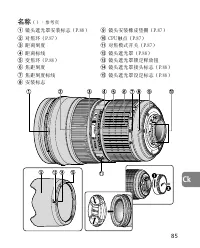
85 Ck 名稱 ():參考頁 1 鏡頭遮光罩安裝標誌(P.88) 2 對焦環(P.87) 3 距離刻度 4 距離標線 5 變焦環(P.88) 6 焦距刻度 7 焦距刻度標線 8 安裝標誌 9 鏡頭安裝橡皮墊圈(P.87) ! CPU觸點(P.87) " 對焦模式開關(P.87) # 鏡頭遮光罩(P.88) $ 鏡頭遮光罩鎖定釋放鈕 % 鏡頭遮光罩接頭標誌(P.88) & 鏡頭遮光罩設定標誌(P.88)
Page 86 - 適用的相機及可用的功能; 主要特色; A M
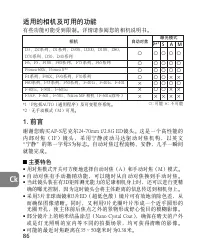
86 Ck 適用的相機及可用的功能 有些功能可能受到限制 - 詳情請參閱您的相機說明書 - *1:P包括AUTO(通用程序)及可變程序系統 - *2:無手動模式(M)可用 - 1. 前言 謝謝您購買AF-S尼克爾24-70mm f/2.8G ED鏡頭 - 這是一個高性能的 內 部 對 焦 ( I F ) 鏡 頭 ﹐ 採 用 寧 靜 波 動 馬 達 驅 動 對 焦 機 構 ﹐ 以 英 文 “寧靜”的第一字母S為標誌 - 自動對焦過程流暢﹑安靜﹐幾乎一瞬間 就能完成 - ■ 主要特色 • 用對焦模式開關可方便地選擇自動對焦(A)和手動對焦(M)模式 - • 自動對焦有手動撤銷功能﹐可以隨時從自動對...
Page 87 - 注意事項
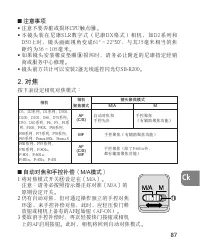
■ 注意事項 • 注意不要弄臟或損壞CPU觸點 ! - • 本 鏡 頭 裝 在 尼 康 S L R 數 字 式 ( 尼 康 D X 格 式 ) 相 機 ﹐ 如 D 2 系 列 和D50上時﹐鏡頭畫面視角變成61 ° ∼22 ° 5 0 ' ﹐與其35毫米相當的焦 距約為36∼105毫米 - • 如果鏡頭安裝橡皮墊圈 9 損壞時﹐請務必讓附近的尼康指定經銷 商或服務中心修理 - • 鏡頭前方共計可以安裝2盞無線遙控閃光燈SB-R200 - 2. 對焦 按下表設定相機對焦模式: ■ 自動對焦和手控補償(M/A模式) 1 將對焦模式開關 " 設定在〔M/A〕 - 注意:請務必按照指示器正好對...
Page 89 - Pronea S: 在任何焦距和拍攝距離下都會存在背景暈映
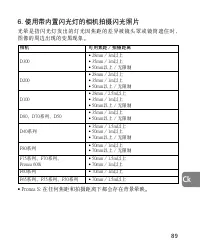
89 Ck 6. 使用帶內置閃光燈的相機拍攝閃光照片 光暈是指閃光燈發出的燈光因焦距的差異被鏡頭罩或鏡筒遮住時﹐圖像的周邊出現的變黑現象 - • Pronea S: 在任何焦距和拍攝距離下都會存在背景暈映 - 相機 可用焦距∕拍攝距離 • 28mm∕3m以上 D300 • 35mm∕1m以上 • 50mm以上∕無限制 • 2 8mm∕2m以上 D200 • 35mm∕1m以上 • 50mm以上∕無限制 • 28mm∕2.5m以上 D100 • 35mm∕1m以上 • 50mm以上∕無限制 D80﹑D70系列﹑D50 • 35mm∕1m以上 • 50mm以上∕無限制 • 35mm∕1.5m以上 ...
Page 90 - 各種聚焦屏可通用於尼康SLR相機的任何相應的攝影場景; 最佳聚焦; 使用B和E聚焦屏時,請參閱B和E的聚焦屏一欄; 聚焦屏
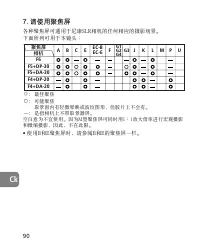
90 Ck 7. 請使用聚焦屏 各種聚焦屏可通用於尼康SLR相機的任何相應的攝影場景 - 下面所列可用於本鏡頭: ◎: 最佳聚焦 ○: 可能聚焦取景窗內有輕微暈映或波紋圖形﹐但膠片上不會有 - —— : 是指相機上不帶取景器屏 - 空白意為不宜使用 - 因為M型聚焦屏可同時用1:1放大倍率進行宏觀攝影 和微縮攝影﹐因此﹐不在此限 - • 使用B和E聚焦屏時﹐請參閱B和E的聚焦屏一欄 - 聚焦屏 相機 F5+DP-30 G1 G2 G4 G3 B C E EC-B EC-E F J K L M P U F4+DP-20 F4+DA-20 F5+DA-30 A F6
Page 94 - Ch; 警告
94 Ch 安全操作注意事項 警告 勿自行拆卸 觸動相機或鏡頭的內部零件可能會導致受傷。修理只能由有資格的維修技師進行。如果由於掉落或其它事故導致相機或鏡頭拆散,在切斷產品電源和(或)取出電池後,請將產品送至尼康授權的維修中心進行檢查。 發生故障時立刻關閉電源 如果您發現相機或鏡頭冒煙或發出異味時,請立刻取出電池,注意避免燃燒。若繼續使用可能導致受傷。請在取出電池或切斷電源後,將器材送到尼康授權的維修中心進行檢查維修。 勿在易燃氣體環境中使用相機或鏡頭 如果在易燃氣體環境中使用電子設備,可能會導致爆炸或火災。 勿通過鏡頭或取景器觀看太陽 通過鏡頭或取景器觀看太陽或其它強光,可能會導致永久性的視...
Page 95 - 距離刻度; 鏡頭遮光罩鎖定釋放鈕
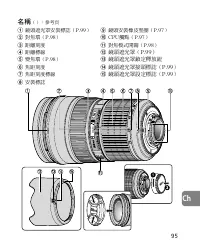
95 Ch 名稱 ():參考頁 1 鏡頭遮光罩安裝標誌(P.99) 2 對焦環(P.98) 3 距離刻度 4 距離標線 5 變焦環(P.98) 6 焦距刻度 7 焦距刻度標線 8 安裝標誌 9 鏡頭安裝橡皮墊圈(P.97) ! CPU觸點(P.97) " 對焦模式開關(P.98) # 鏡頭遮光罩(P.99) $ 鏡頭遮光罩鎖定釋放鈕 % 鏡頭遮光罩接頭標誌(P.99) & 鏡頭遮光罩設定標誌(P.99)
Page 96 - 有些功能可能受到限制。詳情請參閱您的相機說明書。; 自動對焦有手動撤銷功能,可以隨時從自動對焦換到手動對焦。
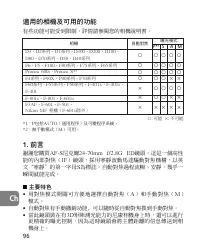
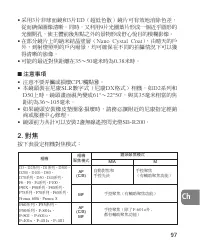
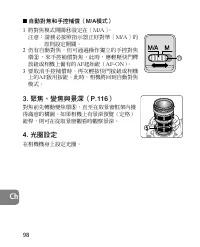
96 Ch 適用的相機及可用的功能 有些功能可能受到限制。詳情請參閱您的相機說明書。 *1:P包括AUTO(通用程序)及可變程序系統。*2:無手動模式(M)可用。 1. 前言 謝謝您購買AF-S尼克爾24-70mm f/2.8G ED鏡頭。這是一個高性能的內部對焦(IF)鏡頭,採用寧靜波動馬達驅動對焦機構,以英文“寧靜”的第一字母S為標誌。自動對焦過程流暢、安靜,幾乎一瞬間就能完成。 ■ 主要特色 • 用對焦模式開關可方便地選擇自動對焦(A)和手動對焦(M)模式。 • 自動對焦有手動撤銷功能﹐可以隨時從自動對焦換到手動對焦。 • 當此鏡頭裝在有3D矩陣測光能力的尼康相機身上時,還可以進行更精確...
Page 99 - 安裝鏡頭遮光罩(圖A)
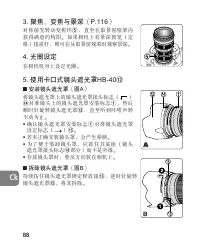
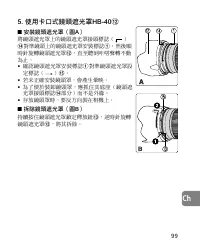
99 Ch 5. 使用卡口式鏡頭遮光罩HB-40 # ■ 安裝鏡頭遮光罩(圖A) 將鏡頭遮光罩上的鏡頭遮光罩接頭標誌( ) % 對準鏡頭上的鏡頭遮光罩安裝標誌 1 ,然後順 時針旋轉鏡頭遮光罩 # ,直至聽到 咔 嗒聲轉不動 為止。 • 確認鏡頭遮光罩安裝標誌 1 對準鏡頭遮光罩設 定標誌( ) & 。 • 若未正確安裝鏡頭罩,會產生暈映。 • 為了便於裝卸鏡頭罩,應抓住其底座(鏡頭遮光罩接頭標誌 % 部分)而不是外緣。 • 存放鏡頭罩時,要反方向裝在相機上。 ■ 拆除鏡頭遮光罩(圖B) 持續按住鏡頭遮光罩鎖定釋放鈕 $ ,逆時針旋轉 鏡頭遮光罩 # ,將其拆除。 ) ) *
Page 100 - Pronea S: 在任何焦距和拍攝距離下都會存在背景暈映。
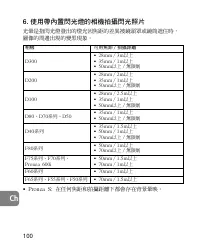
100 Ch 6. 使用帶內置閃光燈的相機拍攝閃光照片 光暈是指閃光燈發出的燈光因焦距的差異被鏡頭罩或鏡筒遮住時,圖像的周邊出現的變黑現象。 • Pronea S: 在任何焦距和拍攝距離下都會存在背景暈映。 相機 可用焦距∕拍攝距離 • 28mm∕3m以上 D300 • 35mm∕1m以上 • 50mm以上∕無限制 • 28mm∕2m以上 D200 • 35mm∕1m以上 • 50mm以上∕無限制 • 28mm∕2.5m以上 D100 • 35mm∕1m以上 • 50mm以上∕無限制 D80、D70系列、D50 • 35mm∕1m以上 • 50mm以上∕無限制 • 35mm∕1.5m以上 D4...
Page 101 - 使用B和E聚焦屏時,請參閱B和E的聚焦屏一欄。
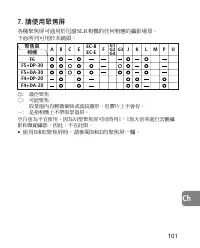
101 Ch 聚焦屏 相機 F5+DP-30 G1 G2 G4 G3 B C E EC-B EC-E F J K L M P U F4+DP-20 F4+DA-20 F5+DA-30 A F6 7. 請使用聚焦屏 各種聚焦屏可通用於尼康SLR相機的任何相應的攝影場景。下面所列可用於本鏡頭: ◎: 最佳聚焦○: 可能聚焦 取景窗內有輕微暈映或波紋圖形,但膠片上不會有。 —: 是指相機上不帶取景器屏。空白意為不宜使用。因為M型聚焦屏可同時用1:1放大倍率進行宏觀攝影和微縮攝影,因此,不在此限。 • 使用B和E聚焦屏時,請參閱B和E的聚焦屏一欄。
Page 104 - Kr; 안전상의 주의 사항; 기호 표시 예
104 Kr 안전상의 주의 사항 사용하기 전에 ‘안전상의 주의 사항’을 자세히 읽고 올바르게 사용하십시오.이‘안전상의 주의 사항’에는 제품을 안전하고 올바르게 사용하게 함으로써 사용자와 다른 사람들의 부상 또는 재산상의 손해를 사전에 방지하기 위한 중요한 내용이 기재되어 있습니다. 읽은 후에는 반드시 사용하시는 분이 언제라도쉽게 찾아볼 수 있는 장소에 보관해 주십시오. 표시에 관하여 각 표시의 의미는 다음과 같습니다. 이 표시를 무시하고 잘못된 방법으로 취급을 하면 사람이 사망 또는 부상을 입을 위험이 있는 내용을 의미합니다. 이 ...
Page 106 - 각부의 명칭
106 Kr 각부의 명칭 ( ): 참조 페이지 1 렌즈 후드 마운팅 표시선 (p. 110) 2 포커스 링 (p. 109) 3 거리계 4 거리 표시선 5 줌 링 (p. 110) 6 초점 거리계 7 초점 거리 표시선 8 마운팅 9 렌즈 마운트 고무 개스킷개스킷 (p. 108) ! CPU 접점 (p. 108) " 포커스 모드 스위치 (p. 109) # 렌즈 후드 (p. 110) $ 렌즈 후드 고정 해제 버튼 (p. 110) % 렌즈 후드 어태치먼트 표시선(p. 110) & 렌즈 후드 설치 표시선 (p. 110)
Page 107 - 카메라별 사용 가능 기능; ▒주요 특징
107 Kr 카메라별 사용 가능 기능 각 카메라에 따라서 사용 가능한 기능에 제한이 있습니다. 보다 상세한 내용은 사용하는 카메라의 사용 설명서를 참조하시기 바랍니다. *1 P에는 오토(범용 프로그램)와 멀티 프로그램 시스템이 포함됩니다.*2 수동(M)은 사용할 수 없습니다. 1. 서론 AF-S NIKKOR 24-70mm f/2.8G ED 렌즈를 구입해 주셔서감사합니다. 이 렌즈는 고급형 IF(internal focusing) 렌즈로 모델명의‘S’ 는 포커싱 메커니즘에 SWM(초음파 모터)가 채용되어 있음을 의미합니다. 따라서 오토...
Page 108 - ▒중요
108 Kr • 매뉴얼 오버라이드 기능을 사용하는 오토 포커싱이 가능해 오토 포커싱에서 실시간으로 매뉴얼 포커싱으로 전환이 가능합니다. • 피사체의 거리 정보가 렌즈에서 카메라 본체로 전송되므로 3D 멀티 패턴 측광이 가능한 니콘 카메라에 장착할 경우 보다정교한 노출 조정이 가능합니다. • 3개의 비구면 렌즈와 3개의 ED(초저분산) 렌즈의 구성으로 윤 곽이 선명하고 컬러 프린징 현상이 없는 촬영이 가능합니다. 또한 거의 완벽한 원형 조리개가 구현되는9매 날개 조리개의 채용으로 피사체의 전후에 있는 초점이 맞지 않는 이미지는 적절히...
Page 109 - 포커스 모드 스위치
109 Kr 2. 포커싱 아래 표에 따라 사용하는 카메라의 포커스 모드 셀렉터를 설정해주십시오. 매뉴얼 오버라이드를 사용한 오토 포커스(M/A 모드) 1 포커스 모드 스위치 " 를 [M/A]로 맞춥니다. 주의 : 눈금이 정확히 [M/A]에 맞도록 스위치 를 맞춰 주십시오. 2 오토 포커스 기능을 사용하면서도 카메라의셔터 릴리즈 버튼 또는 AF 스타트(AF-ON)버튼을 가볍게 누른 상태에서 포커스 링 2 를 사용해 매뉴얼 포커스 오버라이드(보조 조정) 기능을 사용할 수 있습니다. 3 매뉴얼 오버라이드 기능의 사용을 취소하려면 ...
Page 111 - 카메라 내장 플래시를 사용한 플래시 사진 촬영; •프로네아 S: 모든 초점 거리와 촬영 거리에서 비네팅 현상이 발
111 Kr 6. 카메라 내장 플래시를 사용한 플래시 사진 촬영 비네팅 현상은 초점 거리 또는 촬영 거리에 따라 플래시에서 조사되는 빛이 렌즈 후드 또는 경통에 의해 방해되어 이미지의 모서리나 외곽 부분이 어두워지는 현상입니다. •프로네아 S: 모든 초점 거리와 촬영 거리에서 비네팅 현상이 발 생합니다. 이 렌즈의 사용을 권장하지 않습니다. 카메라 가능 초점 거리 / 촬영 거리 • 28mm / 3m 이상 D300 • 35mm / 1m 이상 • 50mm 이상 / 제한 없음 • 28mm / 2m 이상 D200 • 35mm / 1m 이상...
Page 112 - 공란은‘사용 불가’
112 Kr 7. 권장 포커싱 스크린 일부 Nikon SLR카메라의 경우에는 사진을 촬영하는 상황에 따라호환 가능한 다양한 포커싱 스크린을 사용할 수 있습니다. 이 렌즈와의 사용을 위해서 권장하는 것은 다음과 같습니다. : 우수한 포커싱: 허용 가능한 포커싱 뷰파인더에 약간의 비네팅(Vignetting)이나 모아레(Moire)현상이 나타나지만, 촬영 결과에는 영향이 없습니다. — : 사용 불가 공란은‘사용 불가’ 를 의미합니다. M 타입의 스크린은 1:1의 확대 배율의 매크로 촬영과 마이크로 촬영에 모두 사용할 수 있어 여타스크린과...
Page 114 - 카메라 본체에 표시
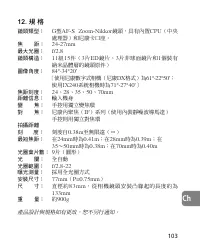
114 Kr 12. 사양 렌즈 타입: G-타입 AF-S Zoom-Nikkor 렌즈(내장CPU, 니콘 바요네트 마운트) 초점 거리: 24mm–70mm 최대 조리개: f/2.8 렌즈 구성: 1 1군 15매(ED 글래스 3매, 3매의 비구면렌즈와 1매의 나노 크리스탈 코팅 처리 렌즈) 화각: 84° –34°20' [니콘 디지털 SLR (니콘 DX 포맷) 카메라의 경우 61° –22°50', IX240 시스템 카메 라의 경우 71° –27° 40'] 초점 거리계: 24, 28, 35, 50, 70mm 거리 정보: 카메라 본체에 표시 줌 조...
Page 119 - Depth of field
■ Depth of field (ft.) Focused distance Depth of field Reproduction ratio f/2.8 f/4 f/5.6 f/8 f/11 f/16 f/22 [f = 24mm] 1 ft. 5 -6/16 in. 1 ft. 5 -3/16 in. 1 ft. 4 -15/16 in. 1 ft. 4 -7/16 in. 1 ft. 3 -15/16 in. 1 ft. 3 -6/16 in. 1 ft. 2 -10/16 in. 1.5 ——————— 1/12.43 1 ft. 6 -12/16 in. 1 ft. 6 -15/...
Page 122 - NIKON CORPORATION
NIKON CORPORATION FUJI BLDG., 2-3, MARUNOUCHI 3-CHOME, CHIYODA-KU,TOKYO 100-8331, JAPAN 使用説明書の内容が破損などによって判読できなくなったときは、ニコンサービス機関にて新しい使用説明書をお求めください(有料)。 No reproduction in any form of this manual, in whole or in part (except for briefquotation in critical articles or reviews), may be made without writ...