Moen 900-006 - User Manual
A user manual for the Moen Flo Smart Water Monitor & Shutoff system covers its installation, setup, and basic operation as part of a smart water management solution. The document highlights essential topics such as device integration via smartphone apps, including app pairing and Wi-Fi connectivity requirements, alongside detailed physical installation procedures like pipe cutting, adapter use, and union nut tightening. It also addresses safety considerations, including electrical setup (e.g., GFCI outlets) and pressure-flow dynamics through labeled diagrams. While multilingual support is noted, the core focus remains on ensuring proper functionality for leak detection and water flow monitoring.
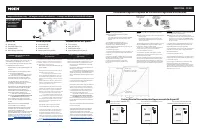
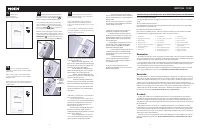
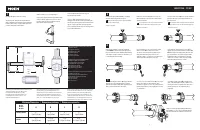
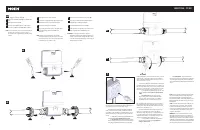
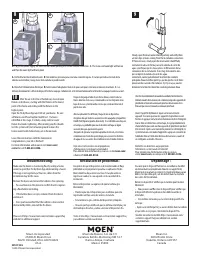
Table of Contents:
- Page 1 – Installation Support and Registration Information
- Page 2 – Smart Water Device Installation Guidelines and Data
- Page 3 – Smart Water Device Setup Procedures
- Page 4 – Physical System Installation Steps and Dimensions
- Page 5 – Component Assembly and Electrical Installation
- Page 6 – Final Testing and Troubleshooting
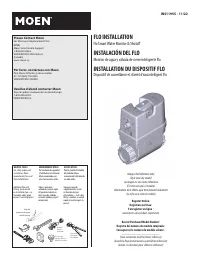
Please Contact Moen
For Missing or Replacement Parts
(USA)
Moen Smart Home Support
1-844-633-8356
WWW.MOEN.COM/contact
(Canada)
www.moen.ca
Por favor, contáctese con Moen
Para Piezas faltantes o de recambio
011 52 (800) 718-4345
WWW.MOEN.COM.MX
Veuillez d’abord contacter Moen
Pour les pièces manquantes ou de rechange
1-800-465-6130
WWW.MOEN.CA
HELPFUL TOOLS
For safety and ease of
installation, Moen
recommends the use of
these helpful tools.
HERRAMIENTAS ÚTILES
Por cuestiones de seguridad
y facilidad en la instalación,
Moen recomienda usar
estas herramientas útiles.
OUTILS UTILES
Pour la sécurité et la facilité
d’installation, Moen
recommande l’utilisation de
ces outils utiles.
Register Online:
Regístrese en línea:
S’enregistrer en ligne :
www.moen.com/product-registration
Record Purchased Model Number:
Registro del número de modelo comprado:
Consigner ici le numéro du modèle acheté :
_______________________
(Save instruction sheet for future reference)
(Guarde la hoja de instrucciones para futura referencia)
(Garder ces directives pour référence ultérieure)
INS11955 - 11/22
FLO INSTALLATION
Flo Smart Water Monitor & Shutoff
INSTALACIÓN DEL FLO
Monitor de agua y válvula de cierre inteligente Flo
INSTALLATION DU DISPOSITIF FLO
Dispositif de surveillance et d’arrêt d’eau intelligent Flo
Thread seal tape
Cinta para sellar roscas
Ruban pour joints filetés
Pipe Cutter
Cortatubos
Coupe-tuyau
Channel-Lock
Pinza ajustable
Pince multiprise
Additional Pipe and
Fittings (varies based
on installation type - i.e.,
threaded, solder, quick
connect, and crimp/press).
Tubos y accesorios
adicionales (varían según
el tipo de instalación,es
decir, roscada, soldada,
conexión rápida y engast/
compresión).
Tuyaux et raccords
supplémentaires (varie
en fonction du type
d’installation – c’est à dire,
fileté, à soudure, à raccord
rapide et à sertissage/à la
presse).
Image is for Reference only
(Style varies by model)
La imagen es sólo como referencia
(El estilo varía por el modelo)
L’illustration n’est offerte qu’à titre indicatif seulement
(Le style varie selon le modèle)
Crimp Tool
Herramienta de engaste
Outil de sertissage
"Loading the manual" means you need to wait until the file loads and becomes available for online reading. Some manuals are very large, and the time they take to appear depends on your internet speed.
Was this manual helpful?
About this manual
- Brand
- Moen
- Model
- 900-006
- Document type
- User Manual
- Category
- Security System
- Language(s)
- English, Spanish, French
- Pages
- 6
- File size
- 2.3 MB
- Format
Summary
Instructions for installing the device, identification of necessary tools, contact information for missing parts, and product registration procedures.
Installation guidelines, diagrams, a parts list, installation requirements, component labeling, pairing instructions with the mobile application, and pressure versus flow charts.
Step-by-step instructions for setting up the device via a smartphone application, establishing Wi-Fi connectivity, and necessary safety precautions prior to installation.
Ask a question
Related manuals
More Moen Security Systems models
Other Moen appliances
 Moen 200-0564 Manual
 Moen 1222 Manual
 Moen 2290 Manual
 Moen 2300 Manual
 Moen 2353 Manual
 Moen 2500 Manual
 Moen 2500 Series Manual
 Moen 2590 Manual
 Moen 2594 Manual
- Moen 2600 Manual
 Moen 2982 Manual
 Moen 3330 Series Manual
 Moen 3861PW Manual
 Moen 3868 Manual
 Moen 4500 Manual
 Moen 4551BN Manual
 Moen 4560 Manual
 Moen 4570 Manual