Page 2 - Contents; Settings mode
Contents 2 Warning and Safety instructions ............................................................................... 5 Caring for the environment ......................................................................................... 13 Installation .............................................
Page 4 - UK Conformity declaration
Contents 4 UK Conformity declaration ......................................................................................... 57 Copyrights and licences .............................................................................................. 58
Page 5 - Warning and Safety instructions; Correct application; It must only be used as a domestic appliance to store deep frozen
Warning and Safety instructions 5 This refrigeration appliance complies with current safetyrequirements. Inappropriate use can, however, lead to personalinjury and material damage. Please read the operating and installation instructions carefullybefore using the refrigeration appliance for the first...
Page 6 - Safety with children
Warning and Safety instructions 6 This refrigeration appliance is not suitable for storing and keeping cool medicines, blood plasma, laboratory preparations or similarsubstances or products that are subject to the Medical DeviceDirective. Incorrect use of the refrigeration appliance for suchpurpos...
Page 7 - Warning: fire hazard/flammable materials. This symbol is on the
Warning and Safety instructions 7 Warning: fire hazard/flammable materials. This symbol is on the compressor and indicates flammable materials. Do not remove thissticker.The refrigerant inside the appliance (details on the data plate) isenvironmentally friendly but flammable.The use of this refrig...
Page 9 - Proper installation
Warning and Safety instructions 9 While the appliance is under warranty, repairs should only be undertaken by a Miele authorised service technician. Otherwise thewarranty is invalidated. Faulty components must only be replaced with genuine Miele original spare parts. Miele can only guarantee the...
Page 10 - Accessories and spare parts
Warning and Safety instructions 10 Danger of injury and damage to the appliance. Do not store cans or bottles containing carbonated drinks or liquids which could freeze inthe freezer zone. Otherwise they could burst. Danger of injury and damage to the appliance. When cooling drinks quickly in th...
Page 11 - Transport
Warning and Safety instructions 11 Sharp edged or pointed objects will damage the evaporator, causing irreversible damage to the appliance. Do not use sharp edgedor pointed objects to - remove frost and ice,- separate frozen food or remove ice trays. Do not place electric heaters or candles in t...
Page 12 - Risk of fire due to escaping oil or refrigerant!; Symbol on the compressor (depending on model); The oil in the compressor can be fatal if swallowed or if it
Warning and Safety instructions 12 Risk of fire due to escaping oil or refrigerant! The refrigerant and oil inside the appliance are flammable. In highenough concentrations, escaping refrigerant or oil may ignite if theycome into contact with an external heat source.During disposal, make sure that...
Page 13 - Caring for the environment; Disposing of your old appliance
Caring for the environment 13 Disposing of the packagingmaterial The packaging material is used forhandling and protects the appliancefrom transport damage. The packagingmaterial used is selected from materialswhich are environmentally friendly fordisposal and can generally be recycled.Recycling the...
Page 14 - Installation; Installation site; Risk of damage and danger of
Installation *INSTALLATION* 14 Installation site Risk of damage and danger of injury due to the refrigerationappliance tipping over.This refrigeration appliance is veryheavy and can tip forwards when theappliance door is open.Keep the appliance door(s) closeduntil the refrigeration appliance hasbe...
Page 16 - Climate range; SN; Ventilation; Risk of fire and damage due to; Changing the door hinging; Danger of injury and damage to
Installation *INSTALLATION* 16 Climate range This refrigeration appliance is designedfor use within specific ambienttemperatures (climate range). Do notuse in ambient temperatures for whichit is not designed.A lower ambient temperature leads tothe compressor switching off for longerperiods. This can...
Page 17 - Furniture door panel; Horizontal and vertical gaps; Gap; Fit a spacer between the housing
Installation *INSTALLATION* 17 Do not change the hinging if thisrefrigeration appliance is going to beinstalled side by side with anotherrefrigeration appliance. Furniture door panel Horizontal and vertical gaps Depending on the style of kitchenfurniture, the thickness and edge radiusof the furnitur...
Page 18 - Weight of the furniture door; If the furniture door panel is too
Installation *INSTALLATION* 18 Weight of the furniture door If the furniture door panel is too heavy, this can cause damage.Fitting a furniture door panel which isheavier than the maximum permittedweight could damage the hinges. Thiscan cause subsequent functionalproblems. The maximum permissible ...
Page 19 - Building-in dimensions; Installation in a tall unit/side view; All dimensions are given in mm.; Niche height
Installation *INSTALLATION* 19 Building-in dimensions Installation in a tall unit/side view All dimensions are given in mm. * The declared energy consumption was calculated in a 560 mm deep niche. Therefrigeration appliance is fully functional in a 550 mm niche but the energyconsumption will be slig...
Page 20 - Connections and ventilation
Installation *INSTALLATION* 20 Connections and ventilation All dimensions are given in mm. The specified ventilation cross-sections must be adhered to in order to ensure thecorrect functioning of the refrigeration appliance. a View from the front b Mains connection cable, length = 2200 mm c Ventilat...
Page 21 - Electrical connection; Risk of fire from overheating.; Connecting the refrigeration appliance
Installation *INSTALLATION* 21 Electrical connection The refrigeration appliance must only beconnected to an earthed socket usingthe mains connection cable supplied.The socket must be easily accessibleafter the refrigeration appliance hasbeen installed. If the socket is not easilyaccessible, ensure ...
Page 22 - Saving energy
Saving energy 22 How to save energy: Installation site The refrigeration appliance has to cool more often at higherambient temperatures and consumes more energy in theprocess. Therefore, you should: - Install the refrigeration appliance in a well-ventilated room. - Do not install the refrigeration a...
Page 23 - Guide to the appliance; Display
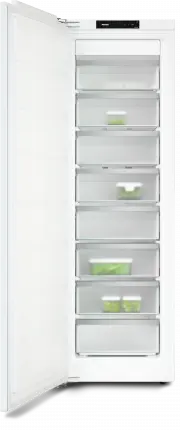
Guide to the appliance 23 FNS 7040 ..., 7140 ... This drawing is for illustration purposes only. a Display b Freezer drawers c Soft-close mechanism (SoftClose)
Page 26 - Control panel with start display; OK
Guide to the appliance 26 Control panel with start display -18 °C OK < > 1 2 3 4 a Temperature display for freezer section b Sensor controls for selecting a setting c OK sensor control for confirming a selection and entering Settings mode d Display for Miele@home connection status (only ...
Page 27 - App
Guide to the appliance 27 Set up the Miele@home function for the first time, activate and deactivate WiFi or reset the network configuration (see “Selecting further settings”) App / Switch the keypad tone on or off On / Change the volume of the alarms and buzzers or switchthem off enti...
Page 28 - Selecting the desired function in Settings mode
Guide to the appliance 28 Selecting the desired function in Settings mode Touch the OK sensor control on the control panel. will appear in the display. Use the or sensor control to scroll to the symbol. Touch OK . Select the function you want using the or sensor control....
Page 29 - Accessories supplied; Ice cube tray; Optional accessories; Multi-purpose microfibre cloth
Guide to the appliance 29 Accessories supplied Ice cube tray Optional accessories A range of useful Miele accessories andcare products are available for yourappliance. Optional accessories can be orderedfrom the Miele webshop. They canalso be ordered from the MieleCustomer Service Department (seeend...
Page 30 - Switching on and off; Before using for the first time
Switching on and off 30 Before using for the first time Remove all packaging material andprotective film. Clean the inside of the appliance andthe accessories (see “Cleaning andcare”). Connecting the refrigeration appliance Connect the refrigeration appliance tothe electricity supply as descri...
Page 31 - The correct temperature; Temperature display; maximum; Setting the temperature; Possible temperature settings
The correct temperature 31 It is very important to set the correcttemperature to ensure the shelf life offood. Reducing the temperature reducesthe growth rate of microorganisms.Food does not spoil as quickly.To freeze fresh food, a temperature of -18 °C is required. This will prolong the shelf life ...
Page 32 - Using Super freeze; SuperFreeze
Using Super freeze 32 SuperFreeze When switched on, the SuperFreezefunction can be used to rapidly reduce the temperature in the freezer section to its lowest setting (depending on the ambienttemperature). The refrigerationappliance will work at full power andlower the temperature. Select this...
Page 33 - Selecting further settings; Party mode
Selecting further settings 33 Explanation of the differentsettings Only the settings that require furtherexplanation are described below. The door alarm and other warnings areautomatically suppressed when youare in Settings mode . Party mode The Party mode function is recommended if you wis...
Page 35 - Availability of the WiFi connection
Selecting further settings 35 Miele@home Your refrigeration appliance isequipped with an integrated WiFimodule.Networking is deactivated at thefactory. To use this feature, you will need: - A WiFi network- The Miele app- A Miele user account You can create a user account via the Miele app. The Miele...
Page 36 - Resetting the network configuration
Selecting further settings 36 Touch OK . If the WiFi is deactivated, the symbol will appear in the display. To reactivate the WiFi connection,touch OK . If the WiFi is activated, the symbol and a dot appear in the upper corner ofthe display . When the WiFi connection is active, the s...
Page 37 - Information
Selecting further settings 37 Touch the OK sensor control on the control panel. Miele will appear initially in the display, followed by the start screen. Touch OK . In Settings mode , use the or sensor control to scroll to the symbol. Touch OK . After demo mode has been switc...
Page 38 - Temperature and door alarm; Temperature alarm
Temperature and door alarm 38 Health risk caused by decomposing food.If the temperature in the freezerremains above -18 °C for a long time,the frozen food can start to defrost.This will reduce the storage life of thefood.Check whether the frozen food hasstarted to defrost. If it has, check thatthe...
Page 39 - Door alarm; will appear in; Switching the door alarm off early; Touch
Temperature and door alarm 39 Door alarm The refrigeration appliance is fittedwith a door alarm to avoid increasedenergy consumption and foodbecoming warm if the door is leftopen. If the appliance door is left open for alonger period of time, will appear in the temperature display. An alarm wil...
Page 40 - Freezing and storing food; Freezing fresh food; Maximum freezing capacity; Storing frozen food; Before placing food in the freezer
Freezing and storing food 40 Freezing fresh food Health risk caused by decomposing food.If the temperature in the freezerremains above -18 °C for a long time,the frozen food can start to defrost.This will reduce the storage life of thefood.Check whether the frozen food hasstarted to defrost. If it...
Page 41 - Placing frozen food in the freezer; If the food is too heavy, this can; – Freezing small amounts of food; freezer drawers so that it
Freezing and storing food 41 Expel as much air as possible fromthe packaging and close it tightly. Make a note of the contents and thedate of freezing on the packaging. Placing frozen food in the freezer If the food is too heavy, this can cause damage.Loading food which is too heavy cancause d...
Page 42 - Storage time for frozen food; Food group; Ice cream; Cooling drinks quickly; not left in; Using accessories; Making ice cubes; Ice cubes can be removed easily
Freezing and storing food 42 Storage time for frozen food Food group Storage time(Months) Ice cream 2 to 6 Bread, baked goods 2 to 6 Cheese 2 to 4 Fish, oily 1 to 2 Fish, lean 1 to 5 Sausage, ham 1 to 3 Game, pork 1 to 12 Poultry, beef 2 to 10 Vegetables, fruit 6 to 18 Herbs 6 to 10 The storage time...
Page 43 - Cleaning and care; Defrosting; Risk of damage due to moisture; Cleaning agents; do not use the following:; ammonia, acids or chlorides
Cleaning and care 43 Defrosting The appliance is equipped with aNoFrost system. The refrigerationappliance defrosts automatically.The moisture generated in the appliancecollects on the condenser and isautomatically defrosted and dissipatedfrom time to time.This automatic defrosting systemenables the...
Page 44 - interior
Cleaning and care 44 - Sharp metal scrapers We recommend using a clean spongeand lukewarm water with a littlewashing-up liquid to clean the surfacesof the appliance. Preparing the refrigerationappliance for cleaning Switch the refrigeration appliance off. appears in the display and the cooling ...
Page 45 - Cleaning the door seal
Cleaning and care 45 Push in and lower the glass shelf. Place the drawer on the guide rails atan angle. Push in and lower the drawer. Cleaning the door seal Risk of damage as a result of incorrect cleaning.If you treat the door seal with oils orgrease, it can become porous.Do not use any oil...
Page 46 - Problem solving guide; Problem
Problem solving guide 46 Many malfunctions and faults that can occur in daily operation can be easilyremedied. You can save time and money in many cases, as you do not need to callthe Miele Customer Service Department.Information to help you rectify faults yourself can be found at www.miele.com/serv...
Page 48 - Other problems
Problem solving guide 48 Problem Cause and remedy Ice or condensation hasbuilt up inside the refri-geration appliance. Theappliance door may notclose correctly. The door seal has come out of its groove. Check that the door seal is correctly positioned inthe groove. The door seal is damaged. Chec...
Page 49 - Display warnings; Message; is lit up on the display
Problem solving guide 49 Display warnings Message Cause and remedy lights up in thedisplay. The refri-geration appli-ance does not getcold, although theappliance con-trols are working. Demo mode has been activated. Touch OK . Miele will appear initially in the display, followed by the start scre...
Page 51 - Tap
Problem solving guide 51 Message Cause and remedy lights up red in the display and an alarmalso sounds. Indication of an interruption to the power supply: thetemperature in the refrigeration appliance over the lastfew days or hours has risen too high because of apower cut or interruption to the...
Page 53 - Noises
Noises 53 The refrigeration appliance is producing various noises during operation. If the cooling performance is low, the refrigeration appliance will conserve energybut operate for longer. The volume will be lower. Food will be chilled faster if the cooling performance is high. The volume will be ...
Page 55 - Service; Contact in the event of a fault; Warranty
Service 55 Information to help you rectify faultsyourself and about Miele spare partscan be found at www.miele.com/service. Contact in the event of a fault In the event of a fault which you cannotremedy yourself, please contact yourMiele dealer or Miele Customer Service. You can book a Miele Custome...
Page 56 - EU Conformity declaration
EU Conformity declaration 56 Miele hereby declares that this freezercomplies with Directive 2014/53/EU. The complete text of the EU declarationof conformity is available from one ofthe following internet addresses: - Products, Download from www.miele.ie - For service, information, operating instruct...
Page 57 - manuals and enter the name of the product or the serial number; Statement of Compliance; Paul Wright
UK Conformity declaration 57 Miele hereby declares that this fridge-freezer complies with UK Radio EquipmentRegulations 2017, as amended. The complete text of the UK declaration of conformity is available from one of thefollowing internet addresses: - Products, Download from www.miele.co.uk- For ser...
Page 58 - Copyrights and licences
Copyrights and licences 58 For the purpose of operating and controlling the communication module, Mieleuses proprietary or third-party software that is not covered by open sourcelicensing terms. This software/these software components are protected bycopyright. The copyrights held by Miele and third...
Page 59 - United Kingdom
United Kingdom Miele Co. Ltd., Fairacres, Marcham Road, Abingdon, Oxon, OX14 1TWTel: 0330 160 6600, Internet: www.miele.co.uk, E-mail: [email protected] Australia Miele Australia Pty. Ltd.ACN 005 635 398ABN 96 005 635 398Level 4, 141 Camberwell RoadHawthorn East, VIC 3123Tel: 1300 464 353E-mail: [em...


 Miele WWD380 WCS PWash&Steam&9kg User Manual
 Miele W 1614 Manual
 Miele G 5266 SCVi SFP Active Plus User Manual
 Miele Classic C1 Turbo Team PowerLine - SBAN0 User Manual
![Miele PDR 307 [EL]](https://manualsarea.com/img/product/thumbs/48/ba/fd/bafde84806e8abc8b420f34eaf8fcd6e.webp) Miele PDR 307 [EL] User Manual
Miele PDR 307 [EL] User Manual Miele F 1911 Vi Manual
![Miele PDR 908 [EL MAR 3N AC 400V 50-60Hz]](https://manualsarea.com/img/product/thumbs/48/05/b7/05b705998b251f92b271e908423e1ecb.webp) Miele PDR 908 [EL MAR 3N AC 400V 50-60Hz] Installation Manual
Miele PDR 908 [EL MAR 3N AC 400V 50-60Hz] Installation Manual Miele K 9757 iD Manual
 Miele FN 4322 D-1 User Manual
 Miele FN 12420 S Manual
 Miele FN 12827 S Manual
 Miele FN 14827 S ed Manual
 Miele FNS 4382 D User Manual
 Miele FNS 7140 C User Manual
 Miele FNS 7740 D User Manual
 Miele FNS 7774 D User Manual
 Miele FNS 7794 D L User Manual
 Miele FNS 7794 E User Manual
 Miele FNUS 7040 D User Manual
 Miele G 595 SC Manual