Lutron PJ2-3BRL-GIV-F01 - User Manual
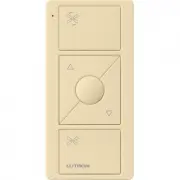
Lutron PJ2-3BRL-GIV-F01 Remote Control – User Manual, read for free online in PDF format. We hope this helps you resolve any issues you may have. If you have further questions, please contact us through the contact form.

®
Troubleshooting
Symptoms
Possible Causes
Light does not
respond to Pico
R
wireless controller
• The dimmer/switch failed to pair with Pico
R
wireless control; see
Set-Up
.
• The dimmer/switch has already received and responded to a command or is already at the light setting the Pico
R
wireless control is sending.
• The Pico
R
wireless control is outside the 30 ft (9 m) operating range.
• The battery in the Pico
R
wireless control is low.
• The battery in the Pico
R
wireless control is installed incorrectly.
When in set-up mode
the LEDs on the
dimmer/switch fl ash
when trying to setup
with the Pico
R
wireless
controller or sensor.
• The maximum number of Pico
R
wireless controls or sensors have been paired with the dimmer/switch. More Pico
R
wireless controls or sensors can not be added. See
Un-pairing a Pico
R
Wireless Control
.
Important Notes
Please Read Before Installing
1. This install guide provides simple setup instructions for Maestro
Wireless
R
systems only. If you are using your Pico
R
wireless
control with any other Lutron
R
system, please refer to the system
setup guide. If you no longer have your system setup guide,
please download the latest version by following the links at
www.lutron.com/pico
2.
The Pico
R
wireless control uses one (1) CR2032 battery (pre-installed).
DO NOT
use rechargeable batteries. Using improper batteries could
damage the Pico
R
wireless control.
DO NOT
dispose of the battery
in normal household waste. Please recycle, take to a proper battery
disposal facility, or contact your local waste disposal provider regarding
local restrictions on the disposal or recycling of batteries.
Warning: Risk of fi re, explosion and burns. May result in
serious injury or death. DO NOT
recharge, disassemble,
crush, puncture, heat above 212 °F (100 °C) or incinerate the
battery. The battery in this device contains Perchlorate
Material - special handling may apply. For more information
visit
www.dtsc.ca.gov/hazardouswaste/perchlorate
3.
The Pico
R
wireless control must be paired with dimmer(s) /switch(es)
before it can communicate.
4.
Up to 10 Pico
R
wireless controls can be confi gured to work together in
a Maestro Wireless
R
system.
5.
The range of the Pico
R
wireless control is 30 ft (9 m). Performance is
highly dependent on a variety of complex factors such as:
)
Distance between system components
)
Geometry of the building structure
)
Construction of walls separating system components
)
Electrical equipment located near system components
6.
Clean Pico
R
wireless control with a soft damp cloth only.
DO NOT
use any chemical cleaners.
7.
DO NOT
paint the Pico
R
wireless controller.
8.
DO NOT
mount the Pico
R
wireless controller to a metal surface.
Set-Up
(for Maestro Wireless
R
systems only)
To communicate with other systems or devices, including
Radio RA
R
2, QS sensor module (QSM), Quantum
R
, Homeworks
R
QS,
Serena Shades, and Sivoia
R
QS, refer to the system setup guides.
See www.lutron.com/pico for more information.
Important:
Set up a Pico
R
wireless control to a dimmer / switch
before use.
1.
Press and hold the dimmer/switch tap button
(Figure 1)
for
approximately 6 seconds. Once the LED(s) start to blink slowly,
release the tap button.
2.
Press and hold the
OFF
button on the Pico
R
wireless controller
(Figure 2)
for approximately 6 seconds.
3.
Once the dimmer/switch pairs with the Pico
R
wireless control, the
LED(s) on the dimmer/switch and the load will fl ash 3 times and it will
exit Set-Up mode.
4.
Repeat steps 1 to 3 to pair multiple Pico
R
wireless controls with a
single dimmer / switch. Repeat steps 1 to 3 to pair a single Pico
R
wireless control with multiple dimmers / switches.
5.
Pressing the
Preset
button (3B and 3BRL models only) on a Pico
R
wireless control will cause all dimmers to go to the favorite light
settings. Switches can be confi gured to turn
ON
or
OFF
. To save a
favorite light setting, adjust all the dimmers/switches controlled by
a Pico
R
wireless control to the desired light setting. Then press and
hold the
Preset
button on the Pico
R
wireless control for 6 seconds
until all LEDs on the dimmers/switches fl ash several times.
Wireless Control of Multiple Switches
If multiple wireless dimmers/switches are paired with the same Pico
R
wireless control, they will perform as follows:
)
Pressing the
ON
button on the Pico
R
wireless control will cause all
dimmers/switches to turn ON fully.
)
Pressing the
OFF
button on the Pico
R
wireless control will cause all
dimmers/switches to turn OFF completely.
)
Pressing the
Raise
button (2BRL and 3BRL models only) on a Pico
R
wireless control will cause all dimmers to turn
ON
and gradually increase
in intensity.
)
Pressing the
Lower
button (2BRL and 3BRL models only) on a Pico
R
wireless control will cause all dimmers to gradually decrease in intensity.
The dimmers will not turn off and will remain at low end.
)
Pressing the
Preset
button (3B and 3BRL models only) on a Pico
R
wireless control will cause all dimmers to return to the favorite light
settings. Switches can be confi gured to go to
ON
or
OFF
.
(See Step 5 in
Set-Up
)
Un-pairing a Pico
R
Wireless Control
(for Maestro Wireless
R
systems only)
To un-pair a previously paired Pico
R
wireless control from your system,
tap the
OFF
button
(Figure 2)
on the Pico
R
wireless control three
times, on the third tap hold for 6 seconds and then tap three more
times. This will remove all dimmers/switches it was previously paired
with.
Replacing the Battery in a Pico
R
Wireless Controller
1.
Place a fl athead screwdriver into
the slot at the bottom of the Pico
R
wireless control. Twist to open.
DO NOT
press buttons without
back enclosure on.
2.
Slide the battery out, toward the top
of the Pico
R
wireless control.
3.
Slide a new battery underneath the
contact strap, with the (-) terminal
toward the front of the Pico
R
wireless
control.
4.
Replace the back enclosure.
5.
Confi rm proper installation by turning the receiving device on and off
using the Pico
R
wireless control.
Lutron,
)
, Pico, RadioRA, Quantum, HomeWorks, Sivoia, and Maestro Wireless are registered trademarks and RadioRA 2 is a trademark of Lutron Electronics Co., Inc.
© 2013 Lutron Electronics Co., Inc.
Lutron Electronics Co., Inc.
7200 Suter Road Coopersburg, PA 18036-1299
Pico
®
Wireless
Control
3 V
-
10 mA
Mounting
accessories
sold separately.
For a complete
listing of Pico
R
wireless mounting
accessories,
please visit
www.lutron.com/pico
English
PJ2-3B
PJ2-3BRL
PJ2-2B
PJ2-2BRL
Operation
Preset Button
(3B & 3BRL models only)
Tap Once:
Devices go to preset levels.
Press and Hold:
To save new preset level, press and
hold for 6 seconds.
OFF Button
Lights dim to off; shades/draperies go to close limit.
ON Button
Lights brighten to full intensity;
shades / draperies go to open limit.
Raise Button
(2BRL & 3BRL models only)
Lights increase in intensity; shades/draperies move toward
open limit.
Lower Button
(2BRL & 3BRL models only)
Lights decrease in intensity; shades/draperies move toward
close limit.
Indicator LED
Flashes to indicate a button press or
when unit is in programming mode.
Technical Assistance www.lutron.com
World Headquarters
For questions concerning the installation or operation of this product, call
the Lutron Technical Support Center. Please provide exact model number
when calling.
TEL +1.610.282.3800
FAX +1.610.282.1243
Toll Free 1.888.LUTRON1
USA, Canada, Caribbean
1.800.523.9466
Mexico
+1.888.235.2910
Central/South America
+1.610.282.6701
Figure 1
Figure 2
European Headquarters
United Kingdom
Lutron EA Ltd.
TEL: +44.(0)20.7702.0657
FAX: +44.(0)20.7480.6899
Technical Support: +44.
(0)20.7680.4481
Freephone: 0800.282.107
www.lutron.com/europe
Asian Headquarters
Singapore
TEL +65.6220.4666
FAX +65.6220.4333
Asia Technical Hotlines
Northern China 10.800.712.1536
Southern China 10.800.120.1536
Hong Kong 800.901.849
India +91.11.4051.4300
Indonesia 001.803.011.3994
Japan +81.3.5575.8411
Macau 0800.401
Singapore 800.120.4491
Taiwan 00.801.137.737
Thailand 001.800.120.665853
Other countries +65.6220.4666
P/N 040400 Rev. A 09/2013
"Loading the manual" means you need to wait until the file loads and becomes available for online reading. Some manuals are very large, and the time they take to appear depends on your internet speed.


