Page 2 - Contents; Unattended Operation
Contents Unattended Operation 2 Important Installation Instructions 3 Power 3 Important Safety Instructions 4 Connect With Your Smartphone 5 Test the Wi-Fi® Signal Strength 5 Programming 7 Remote Control 7 Wireless Keyless Entry 7 HomeLink® 7 To Erase the Memory 7 Camera 8 Set Up the Camera 8 Operat...
Page 3 - Important Installation Instructions; IMPORTANT INSTALLATION INSTRUCTIONS; SAVE THESE; Power; Option A - Typical Wiring; Option B - Permanent Wiring
Important Installation Instructions IMPORTANT INSTALLATION INSTRUCTIONS To reduce the risk of SEVERE INJURY or DEATH: 1. READ AND FOLLOW ALL INSTALLATION WARNINGS ANDINSTRUCTIONS. 2. Install garage door opener ONLY on properly balanced andlubricated garage door. An improperly balanced door may NOTre...
Page 4 - Important Safety Instructions; IMPORTANT SAFETY INSTRUCTIONS; To reduce the risk of SEVERE INJURY or DEATH:
Important Safety Instructions IMPORTANT SAFETY INSTRUCTIONS To reduce the risk of SEVERE INJURY or DEATH: 1. READ AND FOLLOW ALL WARNINGS AND INSTRUCTIONS. 2. ALWAYS keep remote controls out of reach of children. NEVERpermit children to operate or play with garage door control pushbuttons or remote...
Page 5 - Connect With Your Smartphone; Signal Strength
Connect With Your Smartphone You will need: • Wi-Fi® enabled smartphone, tablet or laptop • Broadband Internet Connection • Wi-Fi® signal in the garage (2.4 GHz, 802.11b/g/n required) • Password for your home network (router's main account, not guest network) Test the Wi-Fi ® Signal Strength Make su...
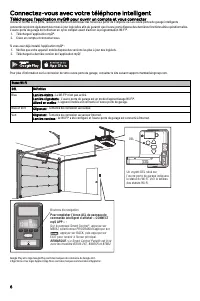
Page 6 - Download the myQ
Connect With Your Smartphone Download the myQ ® App to Set Up an Account and Connect Open and close your door, get alerts and set schedules from anywhere. Connected smart garage door openers also receive software updates toensure the opener has the latest operational features.The garage door opener ...
Page 7 - Programming; Remote Control
Programming Remote Control Pre-programmed remote control included, no need to program theremote. To add or reprogram a remote control, follow the instructions below. Program Using the Garage Door Opener LEARN Button 1. Press and release the LEARN Button on the garage door opener. 2. Press and hold t...
Page 8 - Set Up the Camera
Camera Set Up the Camera Models 84505R, 84504R, and 87504-267 1. Download the myQ® app and setup your account if you haven't already, see page 6. 2. Follow the instructions in the app to setup and use the camera. The camera powers up when it is opened and powers down when closed. An LED on the camer...
Page 9 - Operation; To Open the Door Manually; Battery Backup
Operation To Open the Door Manually To prevent possible SERIOUS INJURY or DEATH from a fallinggarage door: • If possible, use emergency release handle to disengagetrolley ONLY when garage door is CLOSED. Weak or brokensprings or unbalanced door could result in an open doorfalling rapidly and/or unex...
Page 10 - Door Controls; Automatic Garage Door Lock
Operation Door Controls Smart Control Panel® 880LMW - Models87504-267 and 87802 Tip : To stop the Smart Control Panel LCD from displaying "CONNECT myQ APP": On the Smart Control Panel ® , press MENU, select PROGRAM and press , press BACK, then press EXIT to return to the main screen. Push Ba...
Page 11 - The Protector System
Operation The Protector System ® (Safety Reversing Sensors) Be sure power is NOT connected to the garage door openerBEFORE installing the safety reversing sensor.To prevent SERIOUS INJURY or DEATH from closing garage door: • Correctly connect and align the safety reversing sensor.This required safet...
Page 12 - Adjustment; Introduction; Programming Buttons
Adjustment Introduction Without a properly installed safety reversal system, persons(particularly small children) could be SERIOUSLY INJURED orKILLED by a closing garage door. • Incorrect adjustment of garage door travel limits willinterfere with proper operation of safety reversal system. • After A...
Page 13 - - Automatic Force Set Up
Adjustment 1 - Program the Travel Without a properly installed safety reversal system, persons (particularly small children) could be SERIOUSLY INJURED or KILLED by a closinggarage door. • Incorrect adjustment of garage door travel limits will interfere with proper operation of safety reversal syste...
Page 14 - - Test the Safety Reversal System
Adjustment 3 - Test the Safety Reversal System Without a properly installed safety reversal system, persons(particularly small children) could be SERIOUSLY INJURED orKILLED by a closing garage door. • Safety reversal system MUST be tested every month. • After ANY adjustments are made, the safety rev...
Page 15 - Maintenance; Every Month; The Remote Control Battery; Troubleshooting
Maintenance Every Month • Manually operate door. If it is unbalanced or binding, call atrained door systems technician. • Check to be sure door opens and closes fully. Adjust if necessary,page 13. • Test the safety reversal system. Adjust if necessary, page 1. Every Year • Oil door rollers, bearings...
Page 16 - Automatic Garage Door Opener Safety & Maintenance Guide; Garage Door Opener Safety – An Automatic Decision; Garage Door Openers are Not Toys
Automatic Garage Door Opener Safety & Maintenance Guide Garage Door Opener Safety – An Automatic Decision A garage door is the largest moving object in the home. An improperly adjusted garage door and opener can exert deadly force when thedoor closes – which could lead to entrapment of children ...
Page 17 - Routine Maintenance Can Prevent Tragedies
Routine Maintenance Can Prevent Tragedies Make monthly inspection and testing of your garage door and opener system a part of your regular routine. Review your owner’s manual for boththe door and door opener. If you don’t have the owner’s manuals, contact the manufacturer(s) and request a copy for y...
Page 20 - LIFTMASTER® LIMITED WARRANTY
Repair Parts To see repair parts or accessories for your garage door opener, identify the model number on the end panel of the opener and visitsupport.chamberlaingroup.com to download or print the installation manual. Warranty LIFTMASTER® LIMITED WARRANTY LiftMaster® (“Seller”) warrants to the first...
Page 21 - GUIDE D’UTILISATION; USAGE RÉSIDENTIEL UNIQUEMENT
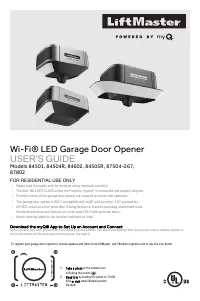
Ouvre-porte de garage Wi-Fi® à DEL GUIDE D’UTILISATION Modèles 84501, 84602, 84504R, 84505R, 87504-267, 87802 USAGE RÉSIDENTIEL UNIQUEMENT • Veuillez lire attentivement ce guide et les documents relatifs à la sécurité ci-joints! • La porte NE SE FERME PAS tant que le Protector System® n’est pas conn...
Page 22 - Sommaire; Numéro de série myQ®; AVERTISSEMENT; ATTENTION; Fonctionnement sans surveillance
Sommaire Fonctionnement sans surveillance 2 Instructions d’installation importantes 3 Alimentation 3 Consignes de sécurité importantes 4 Connectez-vous avec votre téléphone intelligent 5 Testez la force du signal the Wi-Fi® 5 Programmation 7 Télécommande 7 Entrée sans clé sans fil 7 HomeLink® 7 Pour...
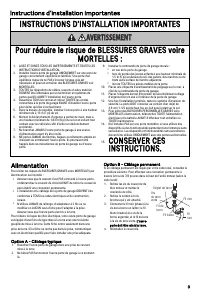
Page 23 - Instructions d’installation importantes; INSTRUCTIONS D’INSTALLATION IMPORTANTES; Pour réduire le risque de BLESSURES GRAVES voire; CONSERVER CES; Alimentation; Option A - Câblage typique
Instructions d’installation importantes INSTRUCTIONS D’INSTALLATION IMPORTANTES AVERTISSEMENT Pour réduire le risque de BLESSURES GRAVES voire MORTELLES : 1. LISEZ ET SUIVEZ TOUS LES AVERTISSEMENTS ET TOUTES LESINSTRUCTIONS D’INSTALLATION. 2. Installez l’ouvre-porte de garage UNIQUEMENT sur une por...
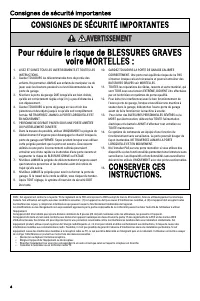
Page 24 - Consignes de sécurité importantes; CONSIGNES DE SÉCURITÉ IMPORTANTES; Pour réduire le risque de BLESSURES GRAVES
Consignes de sécurité importantes CONSIGNES DE SÉCURITÉ IMPORTANTES AVERTISSEMENT Pour réduire le risque de BLESSURES GRAVES voire MORTELLES : 1. LISEZ ET SUIVEZ TOUS LES AVERTISSEMENTS ET TOUTES LESINSTRUCTIONS. 2. Gardez TOUJOURS les télécommandes hors de portée desenfants. Ne permettez JAMAIS au...
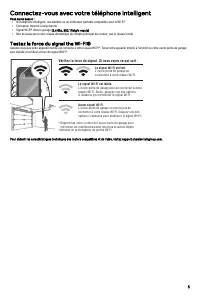
Page 25 - Connectez-vous avec votre téléphone intelligent; Testez la force du signal the Wi-Fi®
Connectez-vous avec votre téléphone intelligent Vous aurez besoin : • Un téléphone intelligent, une tablette ou un ordinateur portable compatible avec le Wi-Fi® • Connexion Internet à large bande • Signal Wi-Fi® dans le garage (2,4 Ghz, 802,11b/g/n requis) • Mot de passe pour votre réseau domestiq...
Page 27 - Programmation; Télécommande
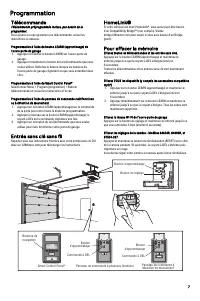
Programmation Télécommande Télécommande préprogrammée incluse, pas besoin de laprogrammer. Pour ajouter ou reprogrammer une télécommande, suivez lesinstructions ci-dessous. Programmation à l’aide du bouton LEARN (apprentissage) del’ouvre-porte de garage 1. Appuyez et relâchez le bouton LEARN sur l’o...
Page 28 - Configuration de la caméra
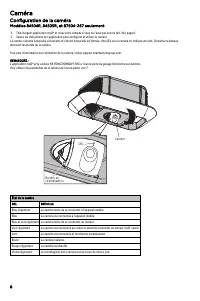
Caméra Configuration de la caméra Modèles 84504R, 84505R, et 87504-267 seulement 1. Téléchargez l’application myQ® et créez votre compte si vous ne l’avez pas encore fait. Voir page 6. 2. Suivez les instructions de l’application pour configurer et utiliser la caméra. La caméra s’allume lorsqu’elle e...
Page 29 - Fonctionnement; Pour ouvrir la porte manuellement; Batterie de secours
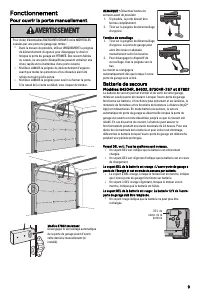
Fonctionnement Pour ouvrir la porte manuellement AVERTISSEMENT Pour éviter d’éventuelles BLESSURES GRAVES voire MORTELLEScausées par une porte de garage qui tombe : • Dans la mesure du possible, utilisez UNIQUEMENT la poignéede déclenchement d’urgence pour désengager le chariotlorsque la porte du g...
Page 30 - Commandes de porte
Fonctionnement Commandes de porte Smart Control Panel® 880LMW - Modèles87504-267 et 87802 Suggestion : Pour empêcher l’écran ACL du Smart Control Pannel d’afficher « CONNECT myQ APP » :Sur le panneau Smart Control ® , appuyez sur MENU, sélectionnez PROGRAM et appuyez sur , appuyez sur BACK, puis app...
Page 31 - Protector System® (capteurs d’inversion de sécurité)
Fonctionnement Protector System® (capteurs d’inversion de sécurité) AVERTISSEMENT Vérifiez que l’alimentation n’est PAS connectée à l’ouvre-porte degarage AVANT d’installer le capteur d’inversion de sécurité.Pour éviter des BLESSURES GRAVES voire MORTELLES enfermant la porte de garage : • Raccordez...
Page 32 - Réglage; Bouton de programmation
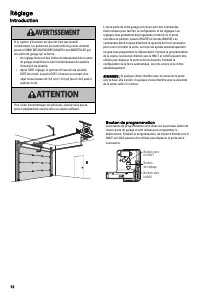
Réglage Introduction AVERTISSEMENT Si le capteur d’inversion de sécurité n’est pas installécorrectement, les personnes (en particulier les jeunes enfants)peuvent SUBIR DES BLESSURES GRAVES voire MORTELLES parune porte de garage qui se ferme. • Un réglage incorrect des limites de déplacement de la po...
Page 33 - - Programmez le déplacement; - Réglage de la force automatique
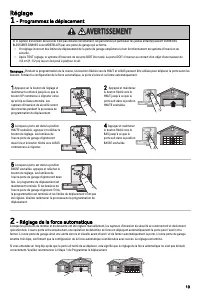
Réglage 1 - Programmez le déplacement AVERTISSEMENT Si le capteur d’inversion de sécurité n’est pas installé correctement, les personnes (en particulier les jeunes enfants) peuvent SUBIR DESBLESSURES GRAVES voire MORTELLES par une porte de garage qui se ferme. • Un réglage incorrect des limites de d...
Page 34 - - Testez le système d’inversion de; - Testez le Protector System
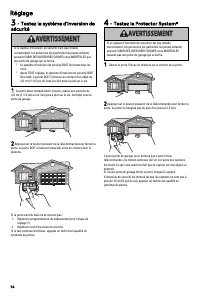
Réglage 3 - Testez le système d’inversion de sécurité AVERTISSEMENT Si le capteur d’inversion de sécurité n’est pas installécorrectement, les personnes (en particulier les jeunes enfants)peuvent SUBIR DES BLESSURES GRAVES voire MORTELLES parune porte de garage qui se ferme. • Le système d’inversion ...
Page 35 - Tous les mois; Pile de la télécommande; Dépannage
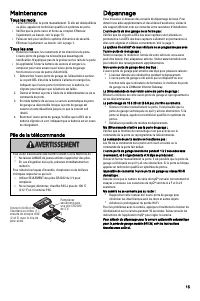
Maintenance Tous les mois • Faites fonctionner la porte manuellement. Si elle est déséquilibréeou pliée, appelez un technicien qualifié en systèmes de porte. • Vérifiez que la porte ouvre et ferme au complet. Effectuezl’ajustement, au besoin, voir la page 13. • Faites un test pour vérifier le systèm...
Page 36 - Sécurité de l’ouvre-porte de garage – Une décision automatique; L’ouvre-porte de garage n’est pas un jouet.
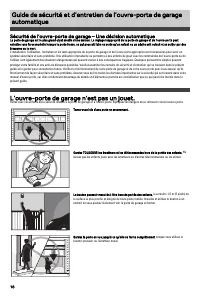
Guide de sécurité et d’entretien de l’ouvre-porte de garageautomatique Sécurité de l’ouvre-porte de garage – Une décision automatique La porte de garage est le plus grand objet mobile d’une maison. Le réglage inapproprié de la porte de garage et de l’ouvre-porte peutentraîner une force mortelle lors...
Page 37 - L’entretien de routine peut éviter des tragédies
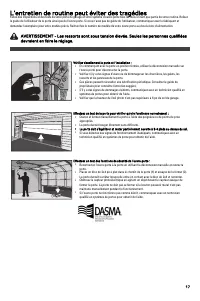
L’entretien de routine peut éviter des tragédies Faites des inspections et des tests de votre porte de garage et votre système d’ouvre-porte tous les mois en tant que partie de votre routine. Relisezle guide de l’utilisateur de la porte ainsi que de l’ouvre-porte. Si vous n’avez pas de guide de l’ut...
Page 40 - GARANTIE LIMITÉE LIFTMASTER®
Pièces détachées Si vous désirez voir les pièces détachées de votre ouvre-porte de garage, identifiez le numéro de modèle sur le panneau d’extrémité de l’ouvre-porteet visitez le site support.chamberlaingroup.com pour télécharger ou imprimer le manuel d’installation. Garantie GARANTIE LIMITÉE LIFTMA...