Page 2 - Contents; my Q®Serial Number; Unattended Operation
Contents Unattended Operation 2 Important Installation Instructions 3 Power 3 Important Safety Instructions 4 Connect With Your Smartphone 5 Test the Wi-Fi® Signal Strength 5 Programming 7 Remote Control 7 Wireless Keyless Entry 7 To Erase the Memory 7 Operation 8 To Open the Door Manually 8 Battery...
Page 3 - Important Installation Instructions; IMPORTANT INSTALLATION INSTRUCTIONS; SAVE THESE; Pow er; Option A - Ty pical Wiring; Option B - Permanent Wiring
Important Installation Instructions IMPORTANT INSTALLATION INSTRUCTIONS To reduce the risk of SEVERE INJURY or DEATH: 1. READ AND FOLLOW ALL INSTALLATION WARNINGS ANDINSTRUCTIONS. 2. Install garage door opener ONLY on properly balanced andlubricated garage door. An improperly balanced door may NOTre...
Page 4 - Important Safety Instructions; IMPORTANT SAFETY INSTRUCTIONS; To reduce the risk of SEVERE INJURY or DEATH:
Important Safety Instructions IMPORTANT SAFETY INSTRUCTIONS To reduce the risk of SEVERE INJURY or DEATH: 1. READ AND FOLLOW ALL WARNINGS AND INSTRUCTIONS. 2. ALWAYS keep remote controls out of reach of children. NEVERpermit children to operate or play with garage door control pushbuttons or remote...
Page 5 - Connect With Y our Smartphone; Test the Wi-Fi®Signal Strength
Connect With Y our Smartphone You will need: • Wi-Fi® enabled smartphone, tablet or laptop • Broadband Internet Connection • Wi-Fi® signal in the garage (2.4 GHz, 802.11b/g/n required) • Password for your home network (router's main account, not guest network) Test the Wi-Fi®Signal Strength Make sur...
Page 6 - Dow nload the my Q®App to Set Up an Account and Connect
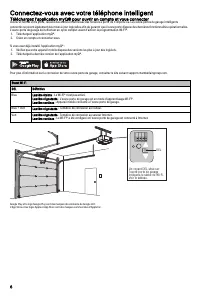
Connect With Y our Smartphone Dow nload the my Q®App to Set Up an Account and Connect Open and close your door, get alerts and set schedules from anywhere. Connected smart garage door openers also receive software updates toensure the opener has the latest operational features.The garage door opener...
Page 7 - Programming; Remote Control; OR; Wireless K ey less Entry
Programming Remote Control Below are the steps to program a new or existing remote control. Testremote control before reprogramming. 1. Press and release the LEARN Button on thegarage door opener. 2. Press and hold the button on the remotecontrol that you wish to use. Release thebutton when the gara...
Page 8 - Operation; To Open the Door Manually
Operation To prevent possible SERIOUS INJURY or DEATH from a fallinggarage door: • If possible, use emergency release handle to disengagetrolley ONLY when garage door is CLOSED. Weak or brokensprings or unbalanced door could result in an open doorfalling rapidly and/or unexpectedly. • NEVER use emer...
Page 9 - Door Control
Operation Battery Back up (Model 81602 only ) The battery backup allows access in and out of your garage when the poweris out. When the garage door opener is operating on battery power, thegarage door opener will run slower and the lights, Timer-to-Close, and remoteclose features (myQ® App) are disa...
Page 10 - The Protector Sy stem
Operation The Protector Sy stem ® (Safety Reversing Sensors) Be sure power is NOT connected to the garage door openerBEFORE installing the safety reversing sensor.To prevent SERIOUS INJURY or DEATH from closing garage door: • Correctly connect and align the safety reversing sensor.This required safe...
Page 11 - Adjustment; Introduction; Programming Buttons
Adjustment Introduction Without a properly installed safety reversal system, persons(particularly small children) could be SERIOUSLY INJURED orKILLED by a closing garage door. • Incorrect adjustment of garage door travel limits willinterfere with proper operation of safety reversal system. • After A...
Page 12 - - Automatic Force Set Up
Adjustment 1 - Program the Travel Without a properly installed safety reversal system, persons (particularly small children) could be SERIOUSLY INJURED or KILLED by a closinggarage door. • Incorrect adjustment of garage door travel limits will interfere with proper operation of safety reversal syste...
Page 13 - - Test the Safety Reversal
Adjustment 3 - Test the Safety Reversal Sy stem Without a properly installed safety reversal system, persons(particularly small children) could be SERIOUSLY INJURED orKILLED by a closing garage door. • Safety reversal system MUST be tested every month. • After ANY adjustments are made, the safety re...
Page 14 - Maintenance; Every Month; The Remote Control Battery; Troubleshooting
Maintenance Every Month • Manually operate door. If it is unbalanced or binding, call atrained door systems technician. • Check to be sure door opens and closes fully. Adjust if necessary,page 12. • Test the safety reversal system. Adjust if necessary, page 13. Every Y ear • Oil door rollers, bearin...
Page 15 - LIFTMASTER®LIMITED WARRANTY
Repair Parts To see repair parts for your garage door opener, identify the model number on the end panel of the opener and visit support.chamberlaingroup.comto download or print the installation manual. Warranty LIFTMASTER®LIMITED WARRANTY LiftMaster® (“Seller”) warrants to the first retail purchase...
Page 16 - Automatic Garage Door Opener Safety & Maintenance Guide; Garage Door Opener Safety – An Automatic Decision; Garage Door Openers are Not Toy s
Automatic Garage Door Opener Safety & Maintenance Guide Garage Door Opener Safety – An Automatic Decision A garage door is the largest moving object in the home. An improperly adjusted garage door and opener can exert deadly force when thedoor closes – which could lead to entrapment of children ...
Page 17 - Routine Maintenance Can Prevent Tragedies
Routine Maintenance Can Prevent Tragedies Make monthly inspection and testing of your garage door and opener system a part of your regular routine. Review your owner’s manual for boththe door and door opener. If you don’t have the owner’s manuals, contact the manufacturer(s) and request a copy for y...
Page 21 - GUIDE D’UTILISATION
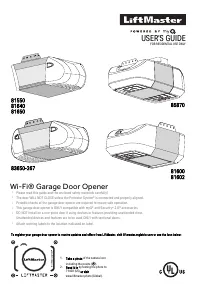
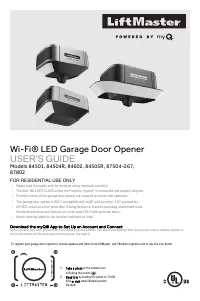
GUIDE D’UTILISATION USAGE RÉSIDENTIEL UNIQUEMENT 8155 0 8164 0 8165 0 8587 0 8365 0 -267 8160 0 8160 2 Ouvre-porte de garage Wi-Fi® • Veuillez lire attentivement ce guide et les documents relatifs à la sécurité ci-joints! • La porte NE SE FERME PAS tant que le Protector System® n’est pas connecté et...
Page 22 - Contenu; Numéro de série myQ®; AVERTISSEMENT; ATTENTION; Fonctionnement
Contenu Fonctionnement sans surveillance 2 Instructions d’installation importantes 3 Alimentation 3 Consignes de sécurité importantes 4 Connectez-vous avec votre téléphone intelligent 5 Testez la force du signal the Wi-Fi® 5 Programmation 7 Télécommande 7 Entrée sans clé sans fil 7 Pour effacer la m...
Page 23 - Instructions d’installation importantes; INSTRUCTIONS D’INSTALLATION IMPORTANTES; Pour réduire le risque de BLESSURES GRAVES voire; CONSERVER CES; Alimentation; Option A - Câblage typique
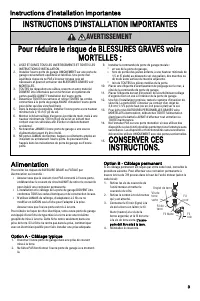
Instructions d’installation importantes INSTRUCTIONS D’INSTALLATION IMPORTANTES AVERTISSEMENT Pour réduire le risque de BLESSURES GRAVES voire MORTELLES : 1. LISEZ ET SUIVEZ TOUS LES AVERTISSEMENTS ET TOUTES LESINSTRUCTIONS D’INSTALLATION. 2. Installez l’ouvre-porte de garage UNIQUEMENT sur une por...
Page 24 - Consignes de sécurité importantes; CONSIGNES DE SÉCURITÉ IMPORTANTES
Consignes de sécurité importantes CONSIGNES DE SÉCURITÉ IMPORTANTES AVERTISSEMENT Pour réduire le risque de BLESSURES GRAVES voire MORTELLES : 1. LISEZ ET SUIVEZ TOUS LES AVERTISSEMENTS ET TOUTES LESINSTRUCTIONS. 2. Gardez TOUJOURS les télécommandes hors de portée desenfants. Ne permettez JAMAIS au...
Page 25 - Connectez-vous avec votre téléphone intelligent; Testez la force du signal the Wi-Fi®
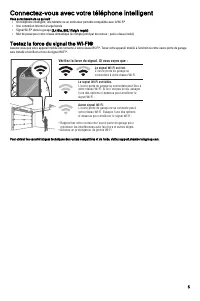
Connectez-vous avec votre téléphone intelligent Vous aurez besoin de ce qui suit : • Un téléphone intelligent, une tablette ou un ordinateur portable compatible avec le Wi-Fi® • Une connexion Internet à large bande • Signal Wi-Fi® dans le garage (2,4 Ghz, 802,11b/g/n requis) • Mot de passe pour vo...
Page 27 - Programmation; Télécommande; OU; Entrée sans clé sans fil
Programmation Télécommande Vous trouverez ci-dessous les étapes à suivre pour programmer unenouvelle télécommande ou une télécommande existante. Testez toutetélécommande avant de la reprogrammer. 1. Appuyez et relâchez le bouton LEARN surl’ouvre-porte de garage. 2. Appuyez et maintenez le bouton de ...
Page 28 - Ouvrir la porte manuellement
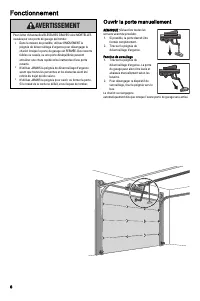
Fonctionnement AVERTISSEMENT Pour éviter d’éventuelles BLESSURES GRAVES voire MORTELLEScausées par une porte de garage qui tombe : • Dans la mesure du possible, utilisez UNIQUEMENT lapoignée de déverrouillage d’urgence pour désengager lechariot lorsque la porte du garage est FERMÉE. Des ressortsfai...
Page 29 - Batterie; Commande de porte
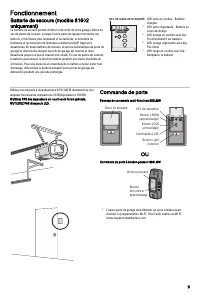
Fonctionnement Batterie de secours (modèle 81602 uniquement) La batterie de secours permet d’entrer et de sortir de votre garage, même en cas de panne de courant. Lorsque l’ouvre-porte de garage fonctionne sur batterie, il fonctionne plus lentement et les lumières, la minuterie de fermeture et les f...
Page 30 - Le Protector System® (capteurs d’inversion de sécurité)
Fonctionnement Le Protector System® (capteurs d’inversion de sécurité) AVERTISSEMENT Vérifiez que l’alimentation n’est PAS connectée à l’ouvre-porte degarage AVANT d’installer le capteur d’inversion de sécurité.Pour éviter des BLESSURES GRAVES voire MORTELLES enfermant la porte de garage : • Raccor...
Page 31 - Ajustements; Bouton de programmation
Ajustements Introduction AVERTISSEMENT Si le capteur d’inversion de sécurité n’est pas correctementinstallé, les personnes (en particulier les jeunes enfants) peuventSUBIR DES BLESSURES GRAVES ou FATALES par une porte degarage qui se ferme. • Un réglage incorrect des limites de déplacement de la por...
Page 32 - - Programer le déplacement
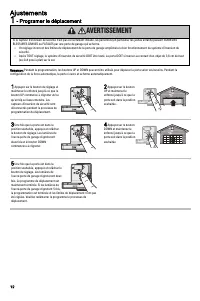
Ajustements 1 - Programer le déplacement AVERTISSEMENT Si le capteur d’inversion de sécurité n’est pas correctement installé, les personnes (en particulier les jeunes enfants) peuvent SUBIR DESBLESSURES GRAVES ou FATALES par une porte de garage qui se ferme. • Un réglage incorrect des limites de dép...
Page 33 - - Réglage de la force automatique
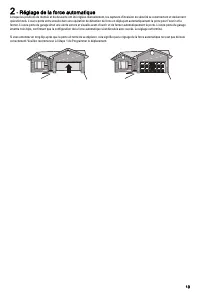
2 - Réglage de la force automatique Lorsque les positions de montée et de descente ont été réglées manuellement, les capteurs d’inversion de sécurité se reconnectent et deviennentopérationnels. L’ouvre-porte entre ensuite dans une opération de détection de force en déplaçant automatiquement la porte...
Page 34 - - Tester le système d’inversion de; - Tester le Protector System
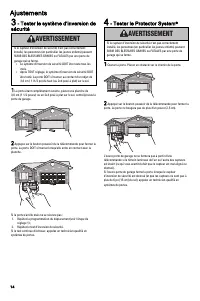
Ajustements 3 - Tester le système d’inversion de sécurité AVERTISSEMENT Si le capteur d’inversion de sécurité n’est pas correctementinstallé, les personnes (en particulier les jeunes enfants) peuventSUBIR DES BLESSURES GRAVES ou FATALES par une porte degarage qui se ferme. • Le système d’inversion d...
Page 35 - Tous les mois; Batterie de la télécommande
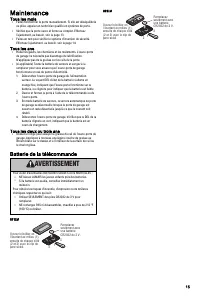
Maintenance Tous les mois • Faites fonctionner la porte manuellement. Si elle est déséquilibrée ou pliée, appelez un technicien qualifié en systèmes de porte. • Vérifiez que la porte ouvre et ferme au complet. Effectuez l’ajustement, au besoin, voir la page 13. • Faites un test pour vérifier le syst...
Page 36 - Dépannage
Dépannage Vous trouverez ci-dessous des conseils de dépannage de base. Pour obtenir une aide supplémentaire et des vidéos d’assistance, visitez le site support.liftmster.com ou contactez votre revendeur d’installation. L’ouvre-porte de mon garage ne se ferme pas :Vérifiez que les voyants à DEL des d...
Page 37 - GARANTIE LIMITÉE LIFTMASTER®
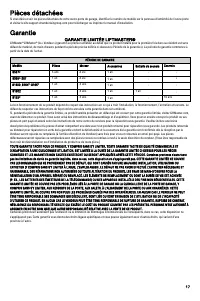
Pièces détachées Si vous désirez voir les pièces détachées de votre ouvre-porte de garage, identifiez le numéro de modèle sur le panneau d’extrémité de l’ouvre-porteet visitez le site support.chamberlaingroup.com pour télécharger ou imprimer le manuel d’installation. Garantie GARANTIE LIMITÉE LIFTMA...
Page 38 - Sécurité de l’ouvre-porte de garage – Une décision automatique; L’ouvre-porte de garage n’est pas un jouet.
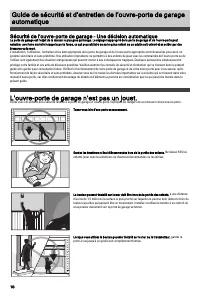
Guide de sécurité et d’entretien de l’ouvre-porte de garageautomatique Sécurité de l’ouvre-porte de garage – Une décision automatique La porte de garage est l’objet de la maison le plus gros qui bouge. Le réglage inapproprié de la porte de garage et de l’ouvre-porte peutentraîner une force mortelle ...
Page 39 - L’entretien de routine peut éviter des tragédies
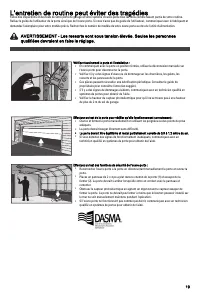
L’entretien de routine peut éviter des tragédies Faites des inspections et des tests de votre porte de garage et votre système d’ouvre-porte tous les mois comme faisant partie de votre routine.Relisez le guide de l’utilisateur de la porte ainsi que de l’ouvre-porte. Si vous n’avez pas de guide de l’...
Page 41 - GUÍA DEL USUARIO; Abrepuertas de garaje Wi-Fi®
GUÍA DEL USUARIO SÓLO PARA USO RESIDENCIAL 8155 0 8164 0 8165 0 8587 0 8365 0 -267 8160 0 8160 2 Abrepuertas de garaje Wi-Fi® • ¡Lea con atención esta guía y el material de seguridad adjunto! • La puerta NO SE CERRARÁ a menos que el Protector System® esté conectado y bien alineado. • Se requieren ve...
Page 42 - Contenido; Número de serie del myQ®; ADVERTENCIA; PRECAUCIÓN; Funcionamiento
Contenido Funcionamiento sin supervisión 2 Instrucciones importantes de instalación 3 Alimentación 3 Instrucciones de seguridad importantes 4 Conéctelo con su smartphone 5 No llega la señal de Wi-Fi® 5 Programación 7 Control remoto 7 Ingreso inalámbrico sin llave 7 Borrar la memoria 7 Funcionamiento...
Page 43 - Instrucciones importantes de instalación; INSTRUCCIONES IMPORTANTES DE INSTALACIÓN; Para reducir el riesgo de LESIÓN GRAVE o MUERTE:; GUARDE ESTAS; Alimentación; Opción A: Cableado típico
Instrucciones importantes de instalación INSTRUCCIONES IMPORTANTES DE INSTALACIÓN ADVERTENCIA Para reducir el riesgo de LESIÓN GRAVE o MUERTE: 1. LEA Y SIGA TODAS LAS ADVERTENCIAS E INSTRUCCIONES DEINSTALACIÓN. 2. Instale el abrepuertas de garaje SOLO sobre una puerta bienbalanceada y lubricada. Una...
Page 44 - Instrucciones de seguridad importantes; INSTRUCCIONES IMPORTANTES DE SEGURIDAD; Para reducir el riesgo de LESIÓN GRAVE o
Instrucciones de seguridad importantes INSTRUCCIONES IMPORTANTES DE SEGURIDAD ADVERTENCIA Para reducir el riesgo de LESIÓN GRAVE o MUERTE: 1. LEA Y SIGA TODAS LAS ADVERTENCIAS E INSTRUCCIONES. 2. SIEMPRE mantenga los controles remotos fuera del alcance delos niños. NUNCA permita que los niños operen...
Page 45 - Conéctelo con su smartphone; No llega la señal de Wi-Fi®
Conéctelo con su smartphone Necesitará: • Wi-Fi® habilitado en un smartphone, una tablet o una laptop • Conexión a Internet de banda ancha • Señal Wi-Fi® en el garaje (se requiere 2.4 GHz, 802.11b/g/n) • Contraseña para su internet doméstica (la cuenta principal del enrutador, no la red de invitados...
Page 47 - Programación; Control remoto; Ingreso inalámbrico sin llave
Programación Control remoto A continuación se indican los pasos para programar un controlremoto nuevo o existente. Pruebe el control remoto antes dereprogramar. 1. Mantenga presionado el botón LEARN(APRENDER) en el abrepuertas de garaje. 2. Mantenga presionado el botón del controlremoto con el que d...
Page 48 - Abrir la puerta manualmente
Funcionamiento ADVERTENCIA Para evitar posibles LESIONES GRAVES o la MUERTE por la caídade la puerta de garaje: • Si es posible, use la palanca de liberación de emergenciapara desenganchar el carro SOLO cuando la puerta delgaraje esté CERRADA. Los resortes débiles o rotos o unapuerta no balanceada p...
Page 49 - Batería; Control de la puerta
Funcionamiento Batería de respaldo (solo para el modelo 81602) La batería de respaldo le permite entrar y salir del garaje cuando no hay electricidad. Cuando el abrepuertas de garaje está operando con la potencia de la batería, funcionará más lentamente y las luces, el temporizador para cerrar y las...
Page 50 - El sistema Protector System® (sensores de inversión de seguridad)
Funcionamiento El sistema Protector System® (sensores de inversión de seguridad) ADVERTENCIA Asegúrese de que la alimentación NO esté conectada alabrepuertas de garaje ANTES de instalar el sensor de inversiónde seguridad.Para evitar posibles LESIONES GRAVES o la MUERTE por el cierrede la puerta de g...
Page 51 - Ajuste; Introducción; Botones de programación
Ajuste Introducción ADVERTENCIA Sin un sistema de inversión de seguridad correctamenteinstalado, las personas (en particular, los niños pequeños)podrían sufrir GRAVES LESIONES o MUERTE como consecuenciadel cierre de la puerta del garaje. • Un ajuste incorrecto de los límites de recorrido de la puert...
Page 52 - - Programar el recorrido
Ajuste 1 - Programar el recorrido ADVERTENCIA Sin un sistema de inversión de seguridad correctamente instalado, las personas (en particular, los niños pequeños) podrían sufrir GRAVESLESIONES o MUERTE como consecuencia del cierre de la puerta del garaje. • Un ajuste incorrecto de los límites de recor...
Page 53 - - Configuración de fuerza automática
2 - Configuración de fuerza automática Una vez establecidas manualmente las posiciones de subida y bajada, los sensores de inversión de seguridad se reconectarán y se tornaránoperacionales. Seguidamente, el abrepuertas ingresará en una operación de detección de fuerza al mover la puerta automáticame...
Page 54 - - Probar el sistema de inversión; - Probar el sistema Protector
Ajuste 3 - Probar el sistema de inversión de seguridad ADVERTENCIA Sin un sistema de inversión de seguridad correctamenteinstalado, las personas (en particular, los niños pequeños)podrían sufrir GRAVES LESIONES o MUERTE como consecuenciadel cierre de la puerta del garaje. • El sistema de inversión d...
Page 55 - Mantenimiento; Mensual; La batería del control remoto
Mantenimiento Mensual • Opere la puerta manualmente. Si no está balanceada o estáatascada, llame a un técnico capacitado en sistemas de puertas. • • Verifique que la puerta se abra y cierre completamente. Ajústela si es necesario, página 13.Pruebe el sistema de inversión de seguridad. Ajústela si es...
Page 57 - GARANTÍA LIMITADA DE LIFTMASTER®
Piezas de repuesto Para ver repuestos de reparación para su abrepuertas de garaje, identifique el número de modelo en el panel extremo del abrepuertas y visitesupport.chamberlaingroup.com para descargar o imprimir el manual de instalación. Garantía GARANTÍA LIMITADA DE LIFTMASTER® LiftMaster® ("...
Page 58 - Seguridad del abrepuertas de garaje: una solución automática; Los abrepuertas de garaje no son juguetes
Guía de seguridad y mantenimiento del abrepuertas degaraje automático Seguridad del abrepuertas de garaje: una solución automática Una puerta de garaje es el objeto móvil más grande de la casa. Una puerta de garaje y un abrepuertas mal ajustados pueden ejercer una fuerzaletal cuando la puerta se cie...
Page 59 - El mantenimiento de rutina puede prevenir tragedias
El mantenimiento de rutina puede prevenir tragedias Haga que la inspección y prueba mensual de la puerta de su garaje y el sistema de apertura sean parte de su rutina habitual. Revise el manual delpropietario tanto para la puerta como para el abrepuertas. Si no tiene los manuales del propietario, co...