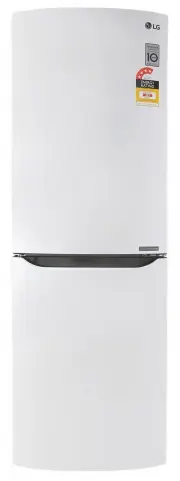
Page 3 - Table of Contents
Introduction Connection Operation Foodstuff Storage Smart Diagnosis Care and Maintenance To Reverse the Doors Table of Contents RegistrationImportant Safety InstructionIdentification of Parts InstallationStarting Control panel General InformationDuring Move Before switching on refrigerator operation...
Page 4 - Registration; Date of Purchase; Important Safety Instruction; BASIC SAFETY PRECAUTIONS; This guide contains many important safety messages.; DANGER; Introduction
4 Registration Introduction The model and serial number are found on the rear ofthis unit. This number is unique to this unit and notavailable to others. You should record requestedinformation here and retain this guide as a permanentrecord of your purchase. Staple your receipt here. Date of Purchas...
Page 5 - When connecting the power; • Using several devices at one outlet; Do not extend or modify the length of the power
Introduction 5 To reduce the risk of fire, electric shock, or injury topersons when using your product, basic safetyprecautions should be followed, including thefollowing. Read all instructions before using thisappliance. 1. When connecting the power A dedicated outlet should be used. • Using severa...
Page 6 - • It may cause electric shock or injury.
Introduction 6 Important Safety Instruction Do not pull out the cord or touch the power plugwith wet hands. • It may cause electric shock or injury. Remove water or dust from the power plug andinsert it with the ends of the pins securely connected. Dust, water or an unsecure connection to the power ...
Page 7 - They can cause an explosion or fire.
Introduction 7 Do not install the fridge-freezer in an outdoor sheltered area or where it can be exposed to humidity or wet weathering or direct sunlight. Water penetration and deterioration to insulation of electric parts may cause electric shock or fire. Do not store inflammable materials such as ...
Page 8 - It may cause electric shock or injury.
Introduction 8 It may cause fire. If fridge has been submerged in water , do not plug in or turn it on. This may cause electric shock or fire. It should be checked by a qualified person before plugging it in. Do not spray water on the inside or outside fridge surface, and DO NOT clean the refrigerat...
Page 9 - When disposing the fridge-freezer, remove the
Introduction 9 If any strange smell or smoke is detected fromthe fridge-freezer, disconnect the power plugimmediately and contact an LG Authorised Service Centre. Do not allow any person except qualified technicians to repair, disassemble, or alter the refrigerator. Not doing so could cause a malfun...
Page 10 - When you want to dispose the fridge-freezer,; It may cause frostbite.; Do not put bottles or cans in the freezer.; The power outlet should be easily accessible in
Introduction 10 Do not put hands or other objects into the rear service panel for any reason. Doing so can cause serious injury, malfunction, fire and electric shock. When you want to dispose the fridge-freezer, contact your local council. They may be able to assist you with the disposal. Violating ...
Page 11 - Do not insert the hands into the bottom of the; CAUTION
Introduction 11 Do not install the fridge-freezer in a wet place ora place which water or rain splashes such as an outdoor sheltered area. Deterioration of the insulation of electricparts may cause electric leakage or electric shock. Do not insert the hands into the bottom of the fridge-freezer. The...
Page 12 - Always grip plug firmly and pull straight; Precaution
Introduction 12 • This fridge-freezer must be properly installed andlocated in accordance with the InstallationInstruction before it is used. • Never unplug your fridge-freezer by pulling on thepower cord. Always grip plug firmly and pull straight out from the outlet. • When moving your appliance aw...
Page 14 - It may cause electric shock or fire.
Introduction • If the wall socket is loose, do not insert the powerplug. It may cause electric shock or fire. • Never unplug your refrigerator by pulling on thepower cord. Always grip plug firmly and pull itstraight out from the outlet. You may disconnect a wire and cause a short circuit. • Do not u...
Page 16 - Identification of Parts; Note
Introduction Identification of Parts Note If you find some parts or accessories missing from your unit, they may be parts only used in other models. 16 Universal section (not in all models) Section for dairy products (not in all models) Egg tray Door baskets Separator for bottles (not in all models)...
Page 17 - Installation; Connection; • To ensure proper air circulation around the fridge -freezer,
17 This appliance is intended to be used in household and similar applications such as staff kitchen areas , offices and other working environments; and by clients in hotels, motels and other residential type environments; bed and breakfast type environments; it is not intended for mobile or commerc...
Page 18 - NOTE
18 Connection Figure 1. Installation of limit stops Figure 2. Installation of refrigerator to wall The limit stops are located in the door basket of the refrigeration compartment. They should be installed to get higher operational efficiency of the refrigerator. forward backward NOTE
Page 19 - Operation; CONTROL PANEL
Operation 19 CONTROL PANEL External light-emitting-diode (LED) display Express Freeze/ Economy mode Economy mode Temperature control in freezing compartment Temperature control in refrigeration compartment LED display lock button Door alarm on/off button Internal display Express Freeze Temperature c...
Page 20 - TEMPERATURE CONTROL
20 Operation The initial temperature in the refrigeration and freezing compartments is 3 °C and -20 °C, respectively. If you wish, you can change it by pushing the temperature control button of the appropriate compartment. TEMPERATURE CONTROL Internal LED display External LED display Temperature ind...
Page 21 - ECO MODE; DOOR ALARM
Operation 21 ECO MODE Economy Mode minimises power consumption by setting the Fridge and Freezer temperatures to the target temperatures used is the Australian/ New Zealand refrigerator performance standard AS/NZS 4474.1. Turning down the temperatures to a cooler setting uses more electricity and in...
Page 22 - REMOVAL AND INSTALLATION OF DETACHABLE GLASS SHELF
22 Operation 1 SELF-TEST The display has a self-test function. If the refrigerator has a failure, the buttons become inoperative and the indicator shows the error code. In this case, do not switch off the power and immediately contact an authorised Service provider. If you switch off the refrigerato...
Page 23 - REMOVAL AND INSTALLATION OF DRAWERS IN FREEZING
23 Operation Always empty the drawers before removing them. To remove any drawer of the freezing compartment, proceed as follows: 1. Pull the drawer all the way out as far as it will go. 2. Raise it at the front and continue to pull it out. To install any drawer back into the freezing compartment, p...
Page 24 - FOODSTUFF STORAGE; Storing Food; Do not store food which goes bad easily at low; • If it is necessary to quickly freeze fresh food items, place
FOODSTUFF STORAGE Storing Food Storing Food • Do not store food which goes bad easily at low temperature, such as banana, and melon. • Allow hot food to cool prior to storing. Placing hot food in the fridge-freezer could spoil other food, and lead to higher electric bills. • When storing the food, u...
Page 25 - Power Failure; General Information; Anti Condensation; Pipe; Care and Maintenance; DURING MOVE; BEFORE SWITCHING ON; REFRIGERATOR OPERATION
Power Failure General Information • 1~2 hour power failure does no harm to the stored foods. Try to avoid opening and closing the door too frequently. Anti Condensation Pipe • The Anti-Condensation pipe is installed around the front side of fridge-freezer as well as on the partition between fridge c...
Page 26 - Before Cleaning; Cleaning; Interior
Before Cleaning Cleaning Be sure to unplug the power. Interior As above. After Cleaning Check that the power cord is not damaged, power plughas not overheated, and that the power plug is firmlyinserted into the outlet. Be sure to dry the appliance with a cloth after washingit with water.Do not use a...
Page 27 - Problem; Trouble Shooting
Trouble Shooting Problem Fridge-Freezer does not operate Before calling for service, check this list. It may save you both time and expense.This list includes common occurrences that are not the result of defective workmanship or materials in this appliance. Possible Causes • Power plug may be unplu...
Page 28 - TO REVERSE THE DOORS
28 How to Reverse the Doors Unscrew the screw of the upper hinge cover to remove the hinge cover and disconnect the connection cable (only for models with an external display). Unscrew the bolts fixing the upper hinge and carefully remove the door from the middle hinge . Remove the blank . 1. 1 1 2 ...
Page 30 - Using Smart Diagnosis; SMART DIAGNOSIS
SMART DIAGNOSIS(Option) 3 Hold the mouthpiece of your phone in front of the speaker that is located on the right hinge of the refrigerator door, when instructed to do so by the call center. 4 Press and hold the Freezer Temperature button for three seconds while continuing to hold your phone to the s...