Page 2 - Safety Information; CAUTION
1 Getting Started Getting Started 2 Getting S tar ted 1 Safety Information CAUTION RISK OF ELECTRIC SHOCK DO NOT OPEN CAUTION: TO REDUCE THE RISK OF ELECTRIC SHOCK DO NOT REMOVE COVER (OR BACK) NO USER-SERVICEABLE PARTS INSIDE REFER SERVICING TO QUALIFIED SERVICE PERSONNEL. This lightning flash with...
Page 4 - LG Bluetooth Remote
Getting Started 4 Getting S tar ted 1 LG Bluetooth Remote You can control this player with your iPhone or Android phone via Bluetooth. This player and your phone must be connected to Bluetooth. Visit “ Apple App Store” or “Google Android Market (Google Play Store)” . And use this QR code to search f...
Page 5 - Table of Contents; Getting Started
Table of Contents 5 1 2 3 4 Table of Contents 1 Getting Started 2 Safety Information 4 LG Bluetooth Remote 6 Unique Features 6 Accessories7 Playable file Requirement 8 Remote Control 10 Front Panel10 Rear Panel11 Connecting the AC adapter 2 Operating 12 Basic Operations 12 – iPod/iPhone/iPad Operati...
Page 6 - Unique Features; USB Direct Recording; Portable In; Time Sync; Bluetooth®; AirPlay®; Accessories
Getting Started 6 Getting S tar ted 1 Unique Features USB Direct Recording Records music to your USB device. Portable In Listens to music from your portable device. (MP3, Notebook, etc) Timer Sets alarm which go off at desired time. Time Sync Sets your unit’s clock automatically by using your Blueto...
Page 7 - Playable file; requirement; Compatible USB Devices
Getting Started 7 Getting S tar ted 1 Playable file Requirement MP3/ WMA/FLAC music file requirement MP3/ WMA/FLAC file compatibility with this unit is limited as follows : y Sampling frequency : MP3 : within 8 to 48 kHz WMA : within 8 to 48 kHz FLAC : within 8 to 96 kHz(USB), within 8 to 48 kHz(CD)...
Page 8 - Remote Control
Getting Started 8 Getting S tar ted 1 • • • • • • • • • . a • • • • • • • • • • 1 (Power) : Switches the unit ON or OFF. (Insert/Eject) : Inserts or ejects a disc from a slot loader. VOL +/- : Adjusts speaker volume. FUNCTION : Selects the function and input source. PRESET/FOLDER W / S : - Searches ...
Page 9 - Battery Installation; Caution
Getting Started 9 Getting S tar ted 1 Battery Installation You have two ways to open the battery compartment.1. Turn the battery compartment counterclockwise by using a coin or your finger. Then take a battery compartment out. If you have long nails, do not open the battery compartment by using your...
Page 10 - Front Panel
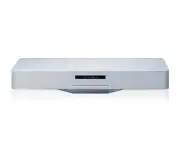
Getting Started 10 Getting S tar ted 1 Front Panel a Speaker b 1 / ! (Power ON/OFF) Switches the unit ON or OFF. F (Function) Selects the function and input source. T (Play/Pause) - Starts and pauses playback. - Selects Stereo/Mono. I (Stop) Stops playback. -/+ ( Volume) Adjusts volume level. R (Ins...
Page 11 - Connecting the AC
Getting Started 11 Getting S tar ted 1 Precautions in using the touch buttons y Use the touch buttons with clean and dry hands. - In a humid environment, wipe out any moisture on the touch buttons before using. y Do not press the touch buttons hard to make it work. - If you apply too much strength, ...
Page 12 - Basic Operations
2 Operating Operating 12 Oper ating 2 Basic Operations iPod/iPhone/iPad Operation You can enjoy the sound with your iPod/iPhone/iPad. For details about iPod/iPhone/iPad, refer to the iPod/iPhone/iPad User Guide.1. Connect iPod/iPhone/iPad to the USB port by using the iPod/iPhone/iPad’s cable. If you...
Page 13 - Android device Operation; Note
Operating 13 Oper ating 2 y If iPod/iPhone/iPad operation has an error, check these problems as follows; - Your iPod/iPhone/iPad is not connected firmly. - This unit recognizes your iPod/iPhone/ iPad as an unknown device. - Your iPod/iPhone/iPad is exceptionally low in power. / The battery needs to ...
Page 15 - USB Operation; CD Operation
Operating 15 Oper ating 2 USB Operation Connect the USB port of USB Memory (or MP3 player, etc.) to the USB port on the unit. Removing the USB Device from the unit 1. Choose a different function/mode or press I ENTER on the remote control or I on the unit twice in a row. 2. Remove the USB device fro...
Page 16 - Listening to music from your; Listening to music with your
Operating 16 Oper ating 2 Listening to music from your portable device The unit can be used to play the music from many types of portable device. (Portable cable is not supplied as an accessory with this unit.) 1. Connect the portable device to the PORT. IN connector of the unit. 2. Turn the power o...
Page 17 - Other Operation; Programmed Playback; Selecting a folder and an
Operating 17 Oper ating 2 Other Operation Programmed Playback The program function enables you to store your favourite tracks/files from any disc or USB device.A program can contain 20 tracks/files.1. Insert a CD or connect USB and wait for it to be loaded. 2. Press PROGRAM/MEMORY on the remote cont...
Page 19 - Sound adjustment; Setting the sound mode; Radio Operation; Antenna Connection
Operating 19 Oper ating 2 Sound adjustment Setting the sound mode This system has a number of pre-set sound fields. You can select a desired sound mode by using SOUND EFFECT on the remote control. The displayed items for the Equalizer may be different depending on sound sources and effects. On Displ...
Page 20 - Listening to the radio; Improving poor FM reception; Deleting all the saved stations
Operating 20 Oper ating 2 Listening to the radio 1. Press FUNCTION on the remote control until FM appears in the display window. The last received station is tuned in. 2. Auto tuning : Press and hold TUNING-/+ for about 2 seconds until the frequency indication starts changing, then release. Scanning...
Page 21 - Setting the Clock; Setting the clock by pressing the
Operating 21 Oper ating 2 Setting the Clock You have three ways to set the clock. Setting the clock by pressing the buttons 1. Turn the unit on.2. Press and hold CLOCK . 3. Choose time mode by pressing Y/U . - 12:00 (for an AM and PM display) or 0:00 (for a 24 hour display) 4. Press I ENTER or SET t...
Page 22 - Using your player as an alarm; Advanced Operation; Recording on USB; Pausing recording; To select recording bit rate
Operating 22 Oper ating 2 Using your player as an alarm clock 1. Turn the unit on.2. Press and hold TIMER to set the alarm function. 3. Alarm sound sources will blink. While each of sound sources blink, select the one you want by pressing I ENTER or SET . 4. “ON TIME” will blink. This is your desire...
Page 23 - Using a Bluetooth; About Bluetooth; Bluetooth Profiles
Operating 23 Oper ating 2 y You can check the recording percentage rate for the USB record on the display window during the recording. (AUDIO CD, MP3/ WMA/ FLAC CD Only) y During recording MP3/ WMA/ FLAC, there is no sound. y When you stop recording during playback, the file that has been recorded a...
Page 24 - Listening to music of a
Operating 24 Oper ating 2 Listening to music of a Bluetooth device Before you start the pairing procedure, make sure the Bluetooth feature is turned on in to your Bluetooth device. Refer to your Bluetooth device’s user guide. Once a pairing operation is performed, it does not need to be performed ag...
Page 25 - Using LG Bluetooth
Operating 25 Oper ating 2 Using LG Bluetooth Remote app About LG Bluetooth Remote app LG Bluetooth Remote app bring a suite of new features to your unit. To enjoy more features, you are recommended to download and install free “ LG Bluetooth Remote”. Install “ LG Bluetooth Remote app” through “ Appl...
Page 27 - Using AirPlay; Air Direct
Operating 27 Oper ating 2 Using AirPlay Apple AirPlay technology enables you to play your iTunes music library, hosted on a Mac, PC, iPhone, iPod touch, or iPad on any AirPlay-enabled device connected to the Wi-Fi network. To stream audio wirelessly by AirPlay, you need : Wi-Fi Sharing Air Direct We...
Page 28 - Connecting your Wi-Fi device; Option 2 : Using Air Direct without
Operating 28 Oper ating 2 Connecting your Wi-Fi device to Wi-Fi network Option 1 : Using Wi-Fi Sharing Make sure that you set security mode to WPA-TKIP or WPA2-AES to connect the network more quickly. , Note 1. Connect your iPod touch/iPhone/iPad to the network. 2. Press FUNCTION on the remote contr...
Page 29 - Using Air Direct with Security mode; Option 3 : Using Webpage
Operating 29 Oper ating 2 Using Air Direct with Security mode 5. Launch Apple Safari browser or Microsoft Internet Explorer browser on your iPod touch/iPhone/iPad or PC/MAC. 6 Type in “192.168.1.1” at the browser address bar and confirm. 7. Set security mode and insert password. - Hexadecimal (0-9, ...
Page 31 - Streaming audio from your; Stream from your iPod touch/
Operating 31 Oper ating 2 Streaming audio from your iTunes music library to this unit Make sure that your iTunes host device is connected to the same Wi-Fi network as this unit. Your iTunes device can be an iPod touch/iPhone/iPad installed with iOS 4.3.3 (or later) or a Wi-Fi enabled PC/Mac installe...
Page 33 - Troubleshooting; Problem
3 Troubleshooting Troubleshooting 33 Trouble shoo ting 3 Troubleshooting Problem Correction No Power. y Plug in the power cord. y Check the condition by operating other electronic devices. No sound. Press F and check the selected function. The unit does not start playback. y Insert a playable disc. ...
Page 34 - Trademarks and
4 Appendix Appendix 34 Appendix 4 Trademarks and Licenses “Made for iPod,” “Made for iPhone,” and “Made for iPad” mean that an electronic accessory has been designed to connect specifically to iPod, iPhone, or iPad, respectively, and has been certified by the developer to meet Apple performance stan...
Page 35 - Specifications
Appendix 35 Appendix 4 Specifications General AC adapter requirements DC IN 18 V 0 2.67 A, 100 - 240 V ~ 50 - 60 Hz Power consumption Refer to the main label. Dimensions ( W x H x D) 520 x 87 x 180 mm Net Weight (Approx.) 3.7 kg Operating temperature 5 °C to 35 °C (41 °F to 95 °F) Operating humidity...
Page 36 - Maintenance; Notes on Discs; Handling the Unit
Appendix 36 Appendix 4 Maintenance Notes on Discs Handling Discs Never stick paper or tape on the disc. Storing Discs After playing, store the disc in its case. Do not expose the disc to direct sunlight or sources of heat and never leave it in a parked car exposed to direct sunlight. Cleaning Discs ...


 LG 2 Manual
 LG 3 Manual
 LG 4 42 2P PQ Q1 10 0* ** * 5 50 0P PQ Q1 10 0* ** * 4 42 2P PQ Q1 11 1* ** * 5 50 0P PQ Q1 11 1* ** * 4 42 2P PQ Q2 20 0* ** * 5 50 0P PQ Q2 20 0* ** * 4 42 2P PQ Q3 30 0* ** * 5 50 0P PQ Q3 30 0* ** * Manual
 LG 10 Manual
 LG 14HK701G-WP User Manual
 LG 14HQ701G-BP User Manual
 LG 15LC1R Manual
 LG 15LC1RB User Manual
 LG 15LS766A0UA User Manual