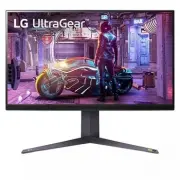
Page 2 - TABLE OF CONTENTS; OPEN SOURCE SOFTWARE; How to Use the Joystick Button
2 ENGLISH 2 TABLE OF CONTENTS LICENSE .......................................3 OPEN SOURCE SOFTWARE NOTICE INFORMATION ..............4 ASSEMBLING AND PREPARING 4 -Supported Drivers and Software ......................... 5 -Product and Button Description........................... 5 How to Use the Jo...
Page 3 - LICENSE
3 ENGLISH LICENSE Each model has different licenses. Visit www.lg.com for more information on the license. The terms HDMI and HDMI High-Definition Multimedia Interface, and the HDMI Logo are trademarks or registered trademarks of HDMI Licensing Administrator, Inc. The SuperSpeed USB Trident logo is ...
Page 4 - CAUTION
4 ENGLISH OPEN SOURCE SOFTWARE NOTICE INFORMATION To obtain the source code under GPL, LGPL, MPL, and other open source licenses, that is contained in this product, please visit http://opensource.lge.com . In addition to the source code, all referred license terms, warranty disclaimers and copyright...
Page 5 - Supported Drivers and Software; Product and Button Description
5 ENGLISH Supported Drivers and Software You can download and install the latest version from the LGE website ( www.lg.com ). Drivers and Software Installation Priority Monitor Driver Recommended OnScreen Control Recommended LG Calibration Studio Optional Product and Button Description Joystick Butt...
Page 6 - Moving and Lifting the Monitor
6 ENGLISH How to Use the Joystick Button You can easily control the functions of the monitor by pressing the joystick button or moving it left/right/up/down with your finger. Basic Functions Power on Press the joystick button once with your finger to turn on the monitor. Power off Press and hold the...
Page 7 - Installing on a Table
7 ENGLISH Installing on a Table • Lift the monitor and place it on the table in an upright position. Place the monitor at least 100 mm (3.94 inches) away from the wall to ensure sufficient ventilation. 100 mm (3.94 inches) 100 mm (3.94 inches) 100 mm (3.94 inches) 100 mm (3.94 inches) CAUTION • Avoi...
Page 8 - Adjusting the Stand Height; WARNING
8 ENGLISH CAUTION • Unplug the power cord before moving or installing the monitor. There is risk of electric shock. • Make sure to use the power cord that is provided in the product package and connect it to a grounded power outlet. • If you need another power cord, please contact your local dealer ...
Page 9 - Adjusting the Angle
9 ENGLISH Adjusting the Angle 1 Place the monitor mounted on the stand base in an upright position. 2 Adjust the angle of the screen. The angle of the screen can be adjusted forward or backward from -5° to 15° for a comfortable viewing experience. WARNING • To avoid injury to the fingers when adjust...
Page 10 - Pivot Feature
10 ENGLISH Pivot Feature The pivot feature allows the monitor to rotate 90° clockwise. Head Stand WARNING • To avoid scratching the stand base, make sure that when rotating the monitor using the pivot feature, the stand does not make contact with the monitor. • When using the Pivot function, do not ...
Page 11 - Using the Kensington Lock; NOTE
11 ENGLISH 4 Complete the installation by rotating the monitor 90° as shown below. WARNING • Be careful as you may injure your finger by jamming it between the head and the desk. NOTE • Auto Pivot feature of the display is not supported. • The screen can be rotated easily using the screen pivot shor...
Page 12 - Installing the Wall Mount Plate; Installing on the Wall
12 ENGLISH Installing the Wall Mount Plate This monitor meets the specifications for the wall mount plate or other compatible devices. 1 Place the screen face down. To protect the monitor panel (screen), cover the surface with a soft cloth or the monitor protection pad included in the product packag...
Page 14 - USING THE MONITOR
14 ENGLISH • Use the wall mounting bracket and screws that conform to VESA standards. Damage caused by the use or misuse of inappropriate components will not be covered by the product warranty. • When measured from the back of the monitor, the length of each installed screw must be 8 mm (0.3 inches)...
Page 15 - Connecting to a PC; HDMI Connection; DisplayPort Connection
15 ENGLISH Connecting to a PC • This monitor supports the *Plug and Play feature. * Plug and Play: A feature that allows you to add a device to your computer without having to reconfigure anything or install any manual drivers. HDMI Connection Transmits digital video and audio signals from your PC t...
Page 16 - Connecting AV Devices; Connecting Peripherals; USB Device connection
16 ENGLISH Connecting AV Devices HDMI Connection HDMI transmits digital video and audio signals from your AV device to the monitor. NOTE • Using a DVI to HDMI / DP (DisplayPort) to HDMI cable may cause compatibility issues. • Use a certified cable with the HDMI logo attached. If you do not use a cer...
Page 17 - Connecting Headphones
17 ENGLISH Connecting Headphones Connect peripherals to the monitor via the headphones port. NOTE • Peripheral devices are sold separately. • If you use angled earphones, it may cause a problem with connecting another external device to the monitor. Therefore, it is recommended to use straight earph...
Page 18 - USER SETTINGS; Activating the Main Menu
18 ENGLISH USER SETTINGS NOTE • Your monitor’s OSD (On Screen Display) may differ slightly from that shown in this manual. • When Beep Guide is activated, pressing the joystick button will take you to Settings right away. Activating the Main Menu 1 Press the joystick button on the bottom of the moni...
Page 19 - Main Menu Features
19 ENGLISH Main Menu Features Power Off Input Game Mode Settings Exit Main Menu Description Input Sets input mode. Power Off Turns off the monitor. Settings Configures the screen settings. Game Mode Sets the game mode for gaming. Exit Exits the main menu.
Page 20 - User Settings; Menu Settings
20 ENGLISH User Settings Menu Settings 1 To view the OSD menu, press the joystick button at the bottom of the monitor and then enter the Settings . 2 Configure the options by moving the joystick up/down/left/right. 3 To return to the upper menu or set other menu items, move the joystick to or pressi...
Page 32 - TROUBLESHOOTING
32 ENGLISH TROUBLESHOOTING Nothing is displayed on the screen. Is the monitor's power cord plugged in? • Check if the power cord is correctly plugged into the power outlet. Is the power LED on? • Check the power cable connection and press the power button. Is the power on and the power LED displayin...
Page 36 - PRODUCT SPECIFICATION
36 ENGLISH PRODUCT SPECIFICATION LCD Screen Color Depth HDMI 8-bit/10-bit color is supported. DP (DisplayPort) 10-bit color is supported. Resolution Max Resolution 2560 x 1440 @ 260 Hz (HDMI/DisplayPort: Overclock-On) Recommended Resolution 2560 x 1440 @ 240 Hz (HDMI/DisplayPort) Power Sources Power...
Page 38 - Factory Support Mode
38 ENGLISH Factory Support Mode (Preset Mode, HDMI/ DisplayPort PC) Preset Mode Horizontal Frequency (kHz) Vertical Frequency (Hz) Polarity (H/V) Remarks 640 x 480 31.469 59.94 -/- 800 x 600 37.879 60.317 +/+ 1024 x 768 48.363 60 -/- 1920 x 1080 66.587 59.934 +/- 2560 x 1440 88.79 59.95 +/- 2560 x 1...
Page 40 - Power LED
40 ENGLISH Power LED Mode LED Color On Mode Red (For a few seconds) Sleep Mode (Standby Mode) Off Off Mode Off
Page 41 - Beep Guide
41 ENGLISH Beep Guide Menu Location Game Mode 1 Game Mode - Gamer1 1 1 Game Mode - Gamer2 1 2 Game Mode - FPS 1 3 Game Mode - RTS 1 4 Game Mode - Vivid 1 5 Game Mode - Reader 1 6 Game Mode - HDR Effect 1 7 Game Mode - sRGB 1 8 Game Mode - Calibration 1 1 9 Game Mode - Calibration 2 1 10 Game Adjust ...