Page 2 - English; Learning more; Legal notices
English Learning more Getting support Read this guide carefully before using your smartphone. To learn more information about your Lenovo smartphone and obtain the latest smartphone manuals, go to: http://support.lenovo.com/ . For support on network service and billing, contact your wireless network...
Page 3 - Technical specifications
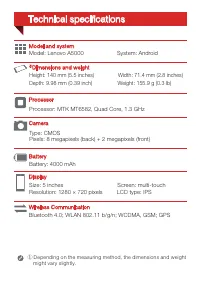
Type: CMOSPixels: 8 megapixels (back) + 2 megapixels (front) Processor: MTK MT6582, Quad Core, 1.3 GHz Size: 5 inches Screen: multi-touch Resolution: 1280 × 720 pixels LCD type: IPS Model: Lenovo A5000 System: Android Battery: 4000 mAh Height: 140 mm (5.5 inches) Width: 71.4 mm (2.8 inches) Depth: 9...
Page 4 - First glance
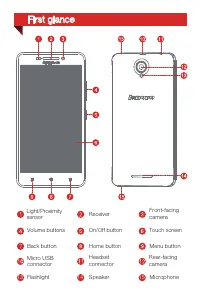
Back button Micro USBconnector Home button Rear-facingcamera Light/Proximity sensor Volume buttons Headsetconnector Menu button Touch screen On/Off button Front-facingcamera Speaker Microphone Receiver Flashlight 13 14 15 First glance
Page 5 - Preparing your smartphone
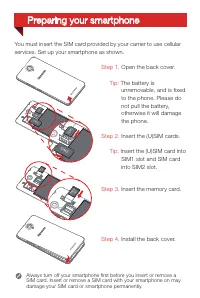
You must insert the SIM card provided by your carrier to use cellularservices. Set up your smartphone as shown. Step 1. Open the back cover. Tip: The battery is unremovable, and is fixed to the phone. Please do not pull the battery, otherwise it will damage the phone. Step 2. Insert the (U)SIM cards...
Page 6 - Charging the battery
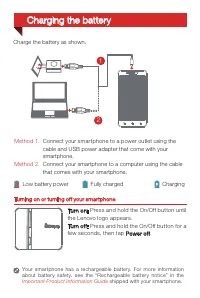
Turning on or turning off your smartphone Turn on: Press and hold the On/Off button until the Lenovo logo appears.Turn of f: Press and hold the On/Off button for a few seconds, then tap Power of f . Your smar tphone has a rechargeable batter y. For more information about batter y safety, see the “Re...
Page 7 - Русский; Дополнительная
Русский Дополнительная информация Поддержка Внимательно прочитайте это руководство перед использованием смартфона. Чтобы получить дополнительную информацию о смартфоне Lenovo, а также новейшие руководства по его использованию, посетите веб-сайт по адресу: http://support.lenovo.com/ . Для получения и...
Page 8 - Технические характеристики
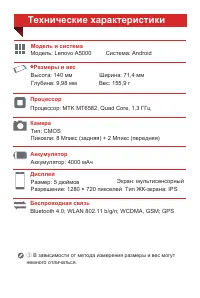
Тип: CMOS Пиксели: 8 Мпикс (задняя) + 2 Мпикс (передняя) Процессор: MTK MT6582, Quad Core, 1,3 ГГц Размер: 5 дюймов Экран: мультисенсорный Разрешение: 1280 × 720 пикселей Тип ЖК-экрана: IPS Модель: Lenovo A5000 Система: Android Bluetooth 4.0; WLAN 802.11 b/g/n; WCDMA, GSM; GPS Аккумулятор: 4000 мАч ...
Page 9 - Общий вид
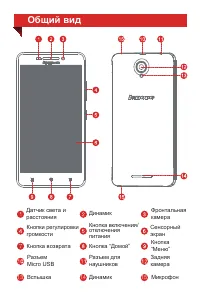
Общий вид 13 14 15 Фронтальная камера ДинамикКнопка включения/ отключения питания Датчик света и расстояния Кнопки регулировки громкости Кнопка “Домой” Сенсорный экран Кнопка возврата Вспышка Кнопка “Меню” Задняя камера Динамик Разъем для наушников Разъем Micro USB Микрофон
Page 10 - Подготовка смартфона
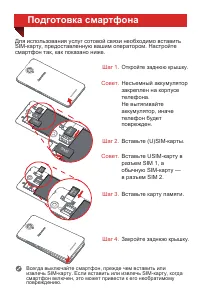
Шаг 1. Откройте заднюю крышку. Шаг 2. Совет. Совет. Вставьте USIM-карту в разъем SIM 1, а обычную SIM-карту — в разъем SIM 2. Несъемный аккумулятор закреплен на корпусе телефона. Не вытягивайте аккумулятор, иначе телефон будет поврежден. Шаг 3. Вставьте карту памяти. Шаг 4. Закройте заднюю крышку. П...
Page 11 - Включение и выключение смартфона; Зарядка аккумулятора; Выключить питание
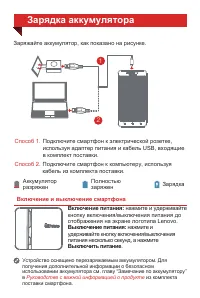
Включение и выключение смартфона Включение питания: нажмите и удерживайте кнопку включения/выключения питания до отображения на экране логотипа Lenovo. Заряжайте аккумулятор, как показано на рисунке. Способ 1. Способ 2. Подключите смартфон к электрической розетке, используя адаптер питания и кабель ...
Page 12 - Қазақша; Қосымша
Қазақша Қосымша мəліметтер Қолдау алу Смартфонды пайдаланбай тұрып осы нұсқаулықты мұқият оқып шығыңыз . Lenovo смартфоны туралы қосымша мəліметтерді жəне смартфонның ең соңғы нұсқаулықтарын алу үшін мына сайтқа өтіңіз: http://support.lenovo.com/. Желілік қызмет жəне есеп шығару бойынша қолдау үшін ...
Page 13 - Техникалық сипаттамалары
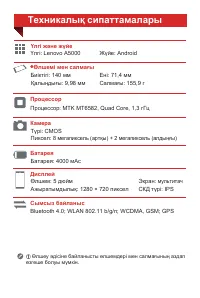
Түрі: CMOS Пиксел: 8 мегапиксель (артқы) + 2 мегапиксель (алдыңғы) Процессор: MTK MT6582, Quad Core, 1,3 гГц Өлшем: 5 дюйм Экран: мультитач Ажыратымдылық: 1280 × 720 пиксел СКД түрі: IPS Үлгі: Lenovo A5000 Жүйе: Android Bluetooth 4.0; WLAN 802.11 b/g/n; WCDMA, GSM; GPS Батарея: 4000 мАс Биіктігі: 14...
Page 14 - Бірінші танысу
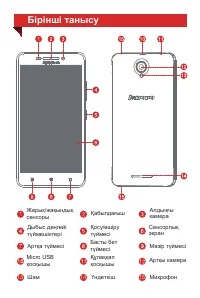
13 14 15 Бірінші танысу Алдыңғы камера Қабылдағыш Қосу/өшіру түймесі Жарық/жақындық сенсоры Дыбыс деңгейі түймешіктері Басты бет түймесі Сенсорлық экран Артқа түймесі Шам Мəзір түймесі Артқы камера Үндеткіш Құлаққап қосқышы Micro USB қосқышы Микрофон
Page 15 - Смартфонды дайындау
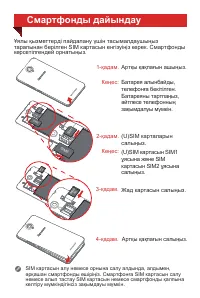
1-қадам. Артқы қақпағын ашыңыз. 2-қадам. Кеңес: (U)SIM картасын SIM1 ұясына жəне SIM картасын SIM2 ұясына салыңыз. Кеңес: Батарея алынбайды, телефонға бекітілген. Батареяны тартпаңыз, əйтпесе телефонның зақымдалуы мүмкін. 3-қадам. Жад картасын салыңыз. 4-қадам. Артқы қақпағын салыңыз. Смартфонды дай...
Page 16 - Смартфонды қосу немесе өшіру; Батареяны зарядтау; «Қуатты өшіру»
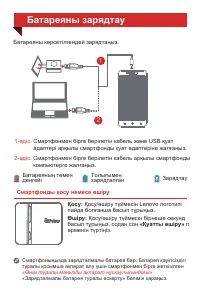
Смартфонды қосу немесе өшіру Қосу: Қосу/өшіру түймесін Lenovo логотипі пайда болғанша басып тұрыңыз. Смартфоныңызда зарядталмалы батарея бар. Батарея қауіпсіздігі туралы қосымша ақпарат алу үшін смартфонмен бірге жеткізілген «Өнім туралы маңызды ақпарат нұсқаулығындағы» «Зарядталмалы батарея туралы ...