Page 3 - Front view
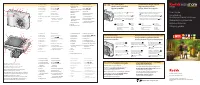
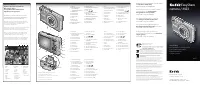
Product features i Front view Bottom view 1 Jog Dial (for selecting camera modes) 7 Video out (for TV connection) 2 Microphone 8 DC-In (5V) ,for optional AC adapter 3 Self-Timer/Video light 9 Lens/Lens cover 4 Viewfinder lens 10 Neck strap post 5 Light sensor 11 Flash unit 6 USB Port 1 Tripod socket...
Page 4 - Back view
Product features ii Back view 1 Zoom (Wide Angle/Telephoto) /Magnifier 10 On/Off button /power light 2 Camera modes 11 Speaker 3 Camera screen (LCD) 12 Flash button 4 Share button 13 Shutter button 5 Review button 14 Jog dial (for selecting camera modes) 6 Menu button 15 OK button (press in) 7 Delet...
Page 5 - Table of contents
iii Table of contents 1 1 Getting started ........................................................................... 1 Package contents .............................................................................. 1Installing the software first ........................................................
Page 7 - Getting started; Package contents; Installing the software first
1 1 Getting started Package contents * Do not discard! The custom insert is necessary for use with the optional Kodak EasyShare camera dock or printer dock. The LS753 camera does not fit the universal insert included with the docks. Not shown: User’s guide (may be provided on a CD), Start Here! guid...
Page 8 - Charging the battery; Loading the battery
Getting started 2 Charging the battery Charge the Li-Ion rechargeable battery before first use. 1 Insert the battery into the charger. 2 Insert the plug that matches your electrical outlet. 3 Plug the charger into the outlet. 4 Remove the battery and unplug the charger when the light turns green. Ch...
Page 9 - Important battery information; Battery life
Getting started 3 Important battery information Battery life Your camera box contains a Kodak EasyShare Li-Ion rechargeable battery. Actual battery life may vary based on usage. Use only a Kodak EasyShare Li-Ion rechargeable battery (KLIC-5000). Not all manufacturers’ 3.7V Li-Ion rechargeable batter...
Page 10 - Battery Safety and Handling; Turning the camera on and off; Changing the display
Getting started 4 Battery Safety and Handling ■ Do not allow batteries to touch metal objects, including coins. Otherwise, a battery may short circuit, discharge energy, become hot, or leak. ■ For rechargeable battery disposal information, visit the Rechargeable Battery Recycling Corporation Web sit...
Page 11 - Setting the date and time
Getting started 5 Setting the date and time Setting the date & time, first time The Date and Time have been reset message appears the first time you turn on the camera or if the battery is removed for an extended period of time. 1 SET DATE & TIME is highlighted. Press the OK button. (Select ...
Page 12 - Checking camera and picture status; Capture modes; Review screen
Getting started 6 Checking camera and picture status The icons that appear on the camera screen indicate the active camera and picture settings. Press to turn the status information on and off. If is displayed in the status area, press the Flash button to display additional settings. Capture modes O...
Page 14 - Taking pictures and videos; Taking a picture; halfway; Taking a video
8 2 Taking pictures and videos Taking a picture 1 Use the viewfinder or camera screen to frame your subject. (Press the OK button to turn off the camera screen. See page 11 ). 2 Press and hold the Shutter button halfway to set the exposure and focus. 3 When the ready light turns green, continue pres...
Page 15 - Camera modes
Taking pictures and videos 9 Camera modes Use this mode For Auto General picture-taking. Automatically sets exposure, focus, and flash. Portrait Full-frame portraits of people. Subject is sharp and the background is indistinct. Automatically fires a low-level fill flash for softening shadows. Zoom t...
Page 17 - Using the camera screen as a viewfinder; Using the auto-focus framing marks; halfway and hold
Taking pictures and videos 11 Using the camera screen as a viewfinder 1 Frame your subject in the camera screen. For more about auto-focus framing marks, see page 11 . 2 Press the Shutter button halfway and hold to set the exposure and focus. When the framing marks change color, press the Shutter bu...
Page 18 - completely down; Reviewing the picture or video just taken
Taking pictures and videos 12 2 Press the Shutter button completely down to take the picture. 3 If the camera is not focusing on the desired subject (or if the framing marks disappear and the Ready light blinks orange), release your finger, recompose the scene, and go to Step 1. NOTE: Framing marks ...
Page 19 - Using optical zoom; Using advanced digital zoom
Taking pictures and videos 13 Using optical zoom Use optical zoom to get up to 2.8X closer to your subject. You can change optical zoom before (but not during) video recording. 1 Use the viewfinder or camera screen to frame your subject. 2 Press the zoom lever toward Telephoto (T) to zoom in. Press ...
Page 20 - Using the flash; Turning on the flash
Taking pictures and videos 14 Using the flash Use the flash when you take pictures at night, indoors, or outdoors in heavy shadows. Turning on the flash Flash range Wide Angle 2–10 ft (0.6–3.0 m) Telephoto 2–6 ft (0.6–1.8 m) Flash Mode Flash Fires Auto When the lighting conditions require it. Off Ne...
Page 21 - Flash settings in each mode
Taking pictures and videos 15 Flash settings in each mode NOTE: * When you change to Red-eye in these modes, it remains until you change it. All other flash settings return to the default when you exit the mode or turn off the camera. Capture mode Default setting Available settings Auto Auto* Auto, ...
Page 22 - Changing picture-taking settings
Taking pictures and videos 16 Changing picture-taking settings You can change settings to get the best results from your camera. 1 Press the Menu button. (Some settings are unavailable in some modes.) 2 Press to highlight the setting you wish to change, then press the OK button. 3 Choose an option, ...
Page 26 - Customizing your camera
Taking pictures and videos 20 Customizing your camera Use Setup to customize your camera settings. 1 In any mode, press the Menu button. 2 Press to highlight Setup , then press the OK button. 3 Press to highlight the setting you wish to change, then press the OK button. 4 Choose an option, then pres...
Page 28 - Putting yourself in the picture; Putting yourself in the video
Taking pictures and videos 22 Putting yourself in the picture Use the Self-Timer to create a 10-second delay between the time you press the Shutter button and the time the picture or video is taken. 1 Place the camera on a flat surface or tripod. 2 In any Still mode, press the Menu button. 3 Highlig...
Page 29 - Pre-tagging for album names; First—on your computer; Third—transfer to your computer
Taking pictures and videos 23 Pre-tagging for album names Use the Set Album (Still or Video) feature to pre-select album names before you take pictures or videos. Then, all the pictures or videos you take are tagged with those album names. First—on your computer Use Kodak EasyShare software (V 3.0 o...
Page 30 - Viewing single pictures and videos; Viewing pictures and videos without extending the lens; Viewing multiple pictures and videos
24 3 Reviewing pictures and videos Press the Review button to view and work with your pictures and videos. To save battery power, purchase a 5-volt AC adapter or place your camera in the optional Kodak EasyShare camera dock or printer dock. (Visit www.kodak.com/go/ls753accessories. ) Viewing single ...
Page 31 - Playing a video; Changing optional review settings
Reviewing pictures and videos 25 Playing a video 1 Press the Review button. 2 Press to locate a video. (In Multi-up view, highlight a video, then press the OK button.) 3 Press the OK button to play or pause a video. ■ To adjust the volume, press . ■ To rewind the video, press during playback. ■ To r...
Page 32 - Magnifying pictures
Reviewing pictures and videos 26 Magnifying pictures 1 Press the Review button, then locate a picture. 2 Repeatedly press the Zoom lever to Telephoto (T) to increase the magnification up to 8X or to Wide (W) to decrease it. ■ To see different parts of the picture, press . ■ To redisplay the picture ...
Page 33 - Tagging pictures and videos for albums; Running a slide show; Starting the slide show
Reviewing pictures and videos 27 Tagging pictures and videos for albums Use the Album feature in Review mode to tag the pictures and videos in your camera with album names. First—on your computer Use Kodak EasyShare software (V 3.0 or higher) to create album names on your computer, then copy up to 3...
Page 34 - Changing the slide show display interval; Running a continuous slide show loop
Reviewing pictures and videos 28 2 Press to highlight Slide Show , then press the OK button. 3 Press to highlight Begin Show, then press the OK button. Each picture and video is displayed once, in the order in which you took them. To cancel the Slide Show, press the OK button. Changing the slide sho...
Page 35 - Copying pictures and videos; from; Viewing picture and video information
Reviewing pictures and videos 29 Copying pictures and videos You can copy pictures and videos from a card to internal memory or from internal memory to a card. Before you copy, make sure that: ■ A card is inserted in the camera. ■ The camera’s picture storage location is set to the location from whi...
Page 36 - Installing the software; Minimum system requirements
30 4 Installing the software Minimum system requirements NOTE: Mac OS 8.6 and 9.x do not support the Share button functions, including Favorites. Mac OS X version 10.2.3 x or 10.3 is recommended for full functionality. To download EasyShare software for Mac OS 8.6 and 9.x, visit www.kodak.com/go/ls7...
Page 37 - Install the software; connecting the camera or
Installing the software 31 Install the software CAUTION:Install Kodak EasyShare software before connecting the camera or optional dock to the computer. Failure to do so may cause the software to load incorrectly. 1 Close all software applications that are open on your computer (including anti-virus ...
Page 38 - not
32 5 Sharing pictures and videos NOTE: Tags remain until removed. If a tagged picture/video is copied, the tag is not copied. In a burst series, only the last picture is tagged during Quickview. Pictures Videos Print ( page 33 ) ✔ Email ( page 34 ) ✔ ✔ Favorites ( page 35 ) for easy organization on ...
Page 39 - Tagging pictures for printing; Printing tagged pictures
Sharing pictures and videos 33 Tagging pictures for printing 1 Press the Share button. Press to locate a picture. 2 Press to highlight Print , then press the OK button.* 3 Press to select the number of copies (0–99). Zero removes the tag for that picture. The Print icon appears in the status area. T...
Page 40 - Tagging pictures and videos for emailing; Third—transfer and email
Sharing pictures and videos 34 Tagging pictures and videos for emailing First—on your computer Use Kodak EasyShare software to create an email address book on your computer. Then, copy up to 32 email addresses to the camera’s internal memory. For details, click the Help button in the Kodak EasyShare...
Page 41 - Tagging pictures as favorites; Share your favorite pictures in 4 easy steps:
Sharing pictures and videos 35 Tagging pictures as favorites You can store your favorite pictures in the Favorites section of your camera’s internal memory, then share them with friends and family. Favorites are loaded into your camera after you transfer pictures to your computer. Favorites are appr...
Page 42 - Optional settings; Printing and emailing favorites
Sharing pictures and videos 36 Optional settings In Favorites mode, press the Menu button to access optional settings. NOTE: Favorites are cropped slightly to the 3:2 format. To prevent cropping, take pictures with the Picture Quality set to Best (3:2) (see page 17 ). Removing all favorites from you...
Page 43 - connecting the; Also available for transferring
37 6 Transferring and printing pictures CAUTION:Install Kodak EasyShare software before connecting the camera or optional dock to the computer. Failure to do so may cause the software to load incorrectly. Transferring pictures and videos with the USB cable 1 Turn off the camera. 2 Plug the labeled e...
Page 44 - Printing pictures from your computer; Printing from an optional SD/MMC card
Transferring and printing pictures 38 Printing pictures from your computer For details on printing pictures from your computer, click the Help button in the Kodak EasyShare software. Ordering prints online Kodak EasyShare print service (provided by Ofoto, Inc. at www.ofoto.com ) is one of the many o...
Page 45 - Troubleshooting; Camera problems
39 7 Troubleshooting When you have questions about your camera, start here. Additional technical information is available in the ReadMe file located on the Kodak EasyShare software CD. For updates to Troubleshooting information, see www.kodak.com/go/ls753support . Camera problems If... Try one or mo...
Page 46 - Computer/connectivity problems
Troubleshooting 40 Computer/connectivity problems You cannot take a picture ■ Turn the camera off, then on again. ■ Press the Shutter button all the way ( page 8 ). ■ Battery is exhausted. Recharge the battery or insert a new one ( page 2 ). ■ Wait until the ready light is green before attempting to...
Page 47 - Picture quality problems
Troubleshooting 41 Picture quality problems Slide Show does not run on an external video device ■ Adjust the camera Video Out setting (NTSC or PAL, page 20 ). ■ Make sure the external device settings are correct (see the device’s user’s guide). If... Try one or more of the following The picture is t...
Page 48 - Camera ready light status
Troubleshooting 42 Camera ready light status Status Cause Ready light glows steady green. Shutter button is pressed halfway down. Focus and exposure are set. Ready light blinks green. Picture is being processed and saved to the camera. Pictures are being transferred to computer; camera is connected....
Page 49 - Camera power light status; Still having problems?
Troubleshooting 43 Camera power light status Still having problems? Visit www.kodak.com/go/ls753support , or see Chapter 8, Getting help. Status Cause Power light blinks blue. Camera is starting up or shutting down. Power light glows steady blue. Camera is on; ready to take a picture or video. Power...
Page 50 - Getting help; Helpful links; Before you call
44 8 Getting help Helpful links Software help Click the Help button in the Kodak EasyShare software. Telephone customer support If you have questions concerning the operation of the software or camera, you may speak with a customer support representative. Before you call Have the camera, camera dock...
Page 52 - Appendix; Camera specifications
46 9 Appendix Camera specifications For more specifications, visit www.kodak.com/go/ls753support . LS753 zoom digital camera specifications CCD CCD 1/2.5 in. CCD, 4:3 aspect ratio Output image size (image quality mode) Best 2560 x 1920 (5 M) pixels Best (3:2) 2560 x 1706 (4.4 M) pixels Better 2048 x...
Page 55 - Storage capacities; Picture storage capacity
Appendix 49 Tips, safety, maintenance ■ If the camera has been subjected to inclement weather or you suspect water has gotten inside the camera, turn off the camera and remove the batteries and card. Allow all components to air-dry for at least 24 hours before using the camera again. ■ Blow gently o...
Page 56 - Video storage capacity; Power-saving features
Appendix 50 Video storage capacity *Videos stored in Favorites reduce capacity in internal memory. Power-saving features Upgrading your software and firmware Download the latest versions of the software included on the Kodak EasyShare software CD and the camera firmware (the software that runs on th...
Page 57 - Regulatory compliance; FCC compliance and advisory; DOC Class B Compliance—; Observation des normes-Class B—
Appendix 51 Regulatory compliance FCC compliance and advisory This equipment has been tested and found to comply with the limits for a Class B digital device, pursuant to Part 15 of the FCC Rules. These limits are designed to provide reasonable protection against harmful interference in a residentia...
Page 58 - VCCI Class B ITE
Appendix 52 VCCI Class B ITE English translation: This is a Class B product based on the standard of the Voluntary Control Council for Interference from Information Technology Equipment (VCCI). If this is used near a radio or television receiver in a domestic environment, it may cause radio interfer...
Page 59 - Index; Numerics
53 Index 1 Numerics 4-way controller , ii A A/V out , 28 about camera firmware , 21 picture, video , 29 AC adapter , 3 accessories , 3 , 7 , 37 , 38 , 44 action shots burst , 16 sport mode , 10 advanced digital zoom , 13 albums, tagging pictures for , 23 , 27 auto flash , 14 focus framing marks , 11...