KitchenAid KOES527PSS - Manual

KitchenAid KOES527PSS Oven – Manual, read for free online in PDF format. We hope this helps you resolve any issues you may have. If you have further questions, please contact us through the contact form.
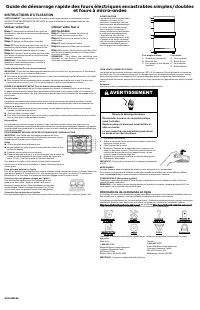

W11618058A
BUILT-IN ELECTRIC SINGLE/DOUBLE OVEN & MICROWAVE OVEN
COMBINATION QUICK START GUIDE
OPERATING INSTRUCTIONS
WARNING:
To reduce the risk of fire, electric shock, or injury to persons, read the IMPORTANT SAFETY
INSTRUCTIONS, located in your appliance's Owner's Manual, before operating this appliance.
Using Your Oven
Step 1.
Select oven function (for double ovens,
select cavity then select function)
Step 2.
Set the temperature
Step 3.
Press Start
Step 4.
Place food inside the oven once set
temperature is reached. Close the oven door.
Step 5.
(Optional) Enter time to cook
Step 6.
The Cancel button can be used to cancel
the function during or after cook time.
NOTE:
For more detailed instructions on specific
functions, see the online Control Guide.
Using your Microwave Oven
Step 1.
Place food inside the microwave oven.
Close the oven door.
Step 2.
Select microwave function
Step 3.
Enter time to cook
Step 4.
Press Start
Step 5.
The Cancel button can be used to cancel
the function during or after cook time.
NOTE:
For more detailed instructions on specific
functions, see the online Control Guide.
ALUMINUM FOIL (For Ovens Only)
IMPORTANT:
To avoid permanent damage to the oven bottom finish, do not line the oven bottom with any type
of foil or liner.
�
For best cooking results, do not cover entire rack with foil because air must be able to move freely.
�
To catch spills, place foil on rack below dish. Make sure foil is at least 1/2" (1.3 cm) larger than the dish and
that it is turned up at the edges.
ALUMINIUM FOIL AND METAL (For Microwave Ovens Only)
Always use oven mitts or pot holders when removing dishes from the microwave oven.
Aluminum foil and some metal can be used in the microwave oven. If not used properly, arcing (a blue flash of
light) can occur and cause damage to the microwave oven.
OK for Use
Racks and bakeware supplied with the microwave oven (on some models), aluminum foil for shielding, and
approved meat thermometers may be used with the following guidelines:
�
To avoid damage to the microwave oven, do not allow aluminum foil or metal to touch the inside cavity walls,
ceiling or floor.
�
Always use the turntable.
�
To avoid damage to the microwave oven, do not allow contact with another metal object during microwave
cooking.
Do Not Use
Metal cookware and bakeware, gold, silver, pewter, non-approved meat thermometers, skewers, twist ties, foil
liners such as sandwich wrappers, staples and objects with gold or silver trim or a metallic glaze should not be
used in the microwave oven.
POSITIONING RACKS AND BAKEWARE
IMPORTANT:
To avoid permanent damage to the porcelain finish, do not
place food or bakeware directly on the oven door or bottom.
Racks
�
Position racks before turning on the oven.
�
Do not position racks with bakeware on them.
�
Make sure racks are level.
�
Place food so it will not rise into the broil element. Allow at least 1/2"
(1.3 cm) between pans and the broil element.
To move a rack, pull it out to the stop position, raise the front edge, and
then lift it out. Use the following illustration as a guide for positioning
racks.
Broiling Patties on 1 Rack
For hamburger patties to have a well-seared exterior and a rare interior, use a flat rack in position 6. Side 1
should cook for approximately 3 minutes. Side 2 should cook for approximately 3 to 4 minutes. Expect a
moderate degree of smoke when broiling.
Baking Layer Cakes on 2 Racks
For best results when baking cakes on two racks, use rack
positions 2 and 5 with the Bake function. Place the cakes on
the racks as shown. Keep at least 2" (5.0 cm) of space
between the front of the racks and the front of the cakes.
Baking Cookies on 2 Racks
For best results when baking cookies on two racks, use rack positions 2 and 5.
OVEN VENT(S)
The oven vent(s) should not be
blocked or covered since they allow
the inlet of fresh air into the cooling
system. Also, the bottom vent
should not be blocked or covered
since it allows the inlet of fresh air
into the cooling system and the
outlet of hot air from the cooling
system. Blocking or covering vents
will cause poor air circulation,
affecting cooking, cleaning, and
cooling results.
A
B
C
E
F
D
G
Single and Double Oven
A. Control panel
B. Oven Vent
C. Single oven or upper
double oven
Double Oven
D. Upper oven
E. Oven Vent
F. Lower oven
G. Bottom vent
OVEN LIGHTS
The oven lights are 120 V, 40 W maximum halogen bulbs. They will come on when the oven door is opened. On
double oven models, both upper and lower lights will come on when either door is opened. The oven lights will
not work during the Self-Cleaning cycle.
When the door is closed, touch the appropriate Oven Light keypad to turn on the oven light.
To Replace:
Before replacing the bulb, make sure the oven is off and cool.
WARNING
Electrical Shock Hazard
Disconnect power before servicing.
Replace all parts and panels before operating.
Failure to do so can result in death or electrical
shock.
1.
Disconnect power.
2.
Remove glass light cover by grasping the front edge and pulling
away from oven.
3.
Remove bulb from socket.
4.
Replace bulb, using tissue or wearing cotton gloves to handle
bulb. To avoid damage to or decreasing the life of the new bulb,
do not touch bulb with bare fingers.
5.
Replace bulb cover by snapping back into wall.
6.
Reconnect power.
IMPORTANT:
Do not use lamps rated higher than 40 W.
SABBATH MODE:
The Sabbath Mode sets the oven to remain on in a bake setting until disabled.
For guidance on usage and a complete list of models with Sabbath Mode, visit
www.star-k.org
or contact us as
per the information given below.
WI-FI CONNECT (On Some Models)
Download the KitchenAid
®
App from the app store on your mobile phone. Follow the instructions in the app.
NOTE:
For further information on connecting your appliance to your home Wi-Fi network, read the online
Control Guide.
Online Ordering Information
For detailed installation instruction and maintenance information, winter storage, and transportation tips, please
see the Owner’s Manual included with your machine.
For information on any of the following items, a full cycle guide, warranty, detailed product dimensions, or for
complete instructions for use and installation, please visit
https://www.kitchenaid.com/service-and-support
, or
in Canada
https://www.kitchenaid.ca/service-and-support
. This may save you the cost of a service call.
However, if you need to contact us, use the information listed below for the appropriate region.
United States:
1–800–253–1301
KitchenAid Brand Home Appliances
Customer eXperience Center
553 Benson Road
Benton Harbor, MI 49022–2692
Canada:
1–800–807–6777
KitchenAid Brand Home Appliances
Customer eXperience Centre
200–6750 Century Ave.
Mississauga, Ontario L5N 0B7
IMPORTANT:
Retain this guide for future use.
"Loading the manual" means you need to wait until the file loads and becomes available for online reading. Some manuals are very large, and the time they take to appear depends on your internet speed.
Was this manual helpful?
About this manual
- Brand
- KitchenAid
- Model
- KOES527PSS
- Document type
- Manual
- Category
- Oven
- Language(s)
- English, Spanish, French
- Pages
- 3
- File size
- 1010.3 KB
- Format
Other Manuals for KitchenAid KOES527PSS
Ask a question
Related manuals
Popular KitchenAid Ovens


More KitchenAid Ovens models
 KitchenAid KODE900HSS Manual
 KitchenAid KOEC530PBS Manual
- KitchenAid KOEC530PSS Manual
 KitchenAid KOED527PSS Manual
 KitchenAid KOSC504PPS Manual
 KitchenAid KOSE500ESS User Manual
 KitchenAid KOSE507ESS Manual
 KitchenAid KOSE900HSS Manual
 KitchenAid KOCE500EBS Manual
 KitchenAid KOCE500ESS Manual
 KitchenAid KOCE900HBS Installation Manual
 KitchenAid KODE300ESS User Manual