Kensington 64325 - User Manual
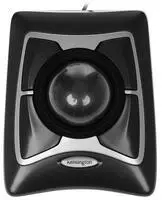
This quick start guide helps you set up and use the Kensington Expert Mouse Wired Trackball. It covers the device's key features, including DiamondEye optical technology, four customizable buttons, a scroll ring, and a wrist rest.
The guide provides system requirements, step-by-step setup instructions, and details on downloading the TrackballWorks software. It also includes important health warnings, troubleshooting steps, cleaning tips, and technical support information.

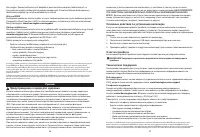
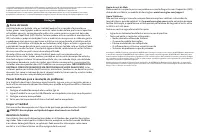
Table of Contents:
- Page 1 – Product Overview, Registration, and Support
- Page 2 – Features and Setup Steps
- Page 3 – Health Warning and Troubleshooting (English, French)
- Page 4 – Cleaning, Support, and German Warning
- Page 5 – Dutch and Italian Health Warnings
- Page 6 – Italian and Spanish Troubleshooting
- Page 7 – Spanish Support, Hungarian Troubleshooting, Czech Warning
- Page 8 – Czech and Polish Troubleshooting
- Page 9 – Polish Support and Russian Troubleshooting
- Page 10 – Portuguese Troubleshooting and Support
kensington.com/register
Australia 1300 881 931 Hong Kong 00852 2823 5130 Polska 22 570 18 00
Belgie / Belgique 02 401 2395 Hungary 06 20 9430 612 Portugal 800855802
Brasil 14 3235 4003 Ireland 01 431 1395 Россия 007 495 933 5163
Canada 1 800 268 3447 Italia 02 3604 7030 Schweiz / Suisse 044 580 6667
中国 400 0684 219 Japan +81 04-7129-2135 Singapore +65-6776-0195
Denmark 80 250966 México 55 15 00 57 00 Sweden 08 5033 6577
Deutschland 0692 222 3654 Nederland 010 713 1882 United Kingdom 0203 364 5390
Espana 911 146 754 New Zealand 0800 539 2673 United States 1 800 535 4242
Finland 0800 9 15697 Norway 80017520 International Toll +31 53 484 9135
France 01 7671 0404 Österreich 0800 677 873
www.kensington.com/support
FC ☐ CE K
R-R-KCP-M01398
正号号:M01398
Kensington Computer Products Group
朝号:Kensington Computer Products Group
Kensington Computer Products Group
A Division of ACCO Brands
1500 Fashion Island Blvd, 3rd Floor
San Mateo, CA 94404
ACCO Brands Europe
A Division of ACCO Brands Europe
Oxford House, Oxford Road
Aylesbury, Buckinghamshire,
HP21 2UZ United Kingdom
ACCO Brands Canada
7381 Bramalea Rd
Mississauga, ON L5S 1C4
Canada
ACCO Brands Australia-
Kensington
2 Coronation Avenue
NSW 2148
Australia
Importer:
LEITZ ACCO Brands GmbH & Co KG
Siemenstrasse 64
70469 Stuttgart, Germany
Importador:
Importado por ACCO Mexicana
S.A. de C.V.
Circuito de la Industria Norte # 6,
Ferna Mexico Cp. 52204
R.F.C. AM64029-W1W3
Distributor:
Esstelle Polska Sp. z o.o.,
ul. Przemyslowa 11A,
26-900 Kielce
26-900 Kielce
26-900 Kielce
Dovozce/Dovozca:
Esstelle s.r.o., Lužná 818,
142 00 Praha 18,
Czech republic
Foglalmaza:
Esstelle Kft, Vaci ut 76. torny i.
emelét.
1133 Budapest, Magyaryorszag
Εταιρεία:
Esstelle Polaia S. z o. o., 1. Przemyslowa 11A,
26-900 Kielce
26-900 Kielce
26-900 Kielce
Товарный знак:
ООО "Сенсер", Россия, 12504
Москва, 3- улица Фокина, д. 18,
Цеадам, дом 2, строение 1, к. А, Адрес:
Товарный знак
Товарный знак
Товарный знак
Сроокорпорации не ограничен.
Сроокорпорации не ограничен.
Сроокорпорации не ограничен.
アココラーズ・ソリューションズ株式会社
广州市天河区天河北路183号1-14F
7-164-8721
Tel: (86-20) 322-3-2
http://www.kensington.acco.com
E-MAIL: [email protected]
K64325 901-4167-03
Kensington
Expert Mouse®
Wired Trackball
QUICK START GUIDE GYORSKALAUZ
GUIDE DE DEMARRAGE RAPIDE PŘÍRUČKA ZACÍNÁMĚ
KURZANLEITUNG SZYBKI START
SNELSTARTGIDS КРАТКОЕ РУКОВОДСТВО
GUIDA RAPIDA ПОЛЬЗОВАТЕЛЯ
GUÍA RÁPIDA MANUAL DE INÍCIO RÁPIDO
Register Now! Regisztáljon most!
Enregistrer maintenant ! Zaregistrujte se nyní!
Jetzt registrieren! Zarejestruj się!
Nu registreren 3арегистрироваться!
Registrar ahora Registe-se agora!
register.kensington.com
"Loading the manual" means you need to wait until the file loads and becomes available for online reading. Some manuals are very large, and the time they take to appear depends on your internet speed.
Was this manual helpful?
Helpful for 3 of 3 readers
About this manual
- Brand
- Kensington
- Model
- 64325
- Document type
- User Manual
- Category
- Computer Mouse
- Language(s)
- German, English, Spanish, French, Italian, Dutch, Polish, Russian, Swedish
- Pages
- 10
- File size
- 1 MB
- Format
Summary
Covers product identification, registration link, global support phone numbers, certifications, and manufacturer details.
Describes DiamondEye technology, customizable buttons, scroll ring, and wrist rest. Lists system requirements and guides software download and USB connection.
Includes a repetitive stress injury warning. Provides troubleshooting steps, cleaning instructions, and support details in English and French.
Tips
- To ensure optimal performance, regularly clean the trackball ball and rollers.
- Use the TrackballWorks software to customize button functions.
- Always use the device on a clean, flat surface.
- If experiencing issues, try the troubleshooting steps before contacting support.
- Register your product for easier warranty and support.


