Page 2 - Jabra PRO; Quick Start Guide
Page 5 - Languages; Package contents
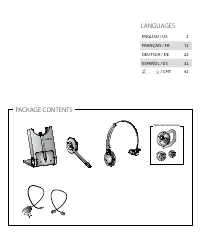
Languages ENGLISH / US 2 FRANçAIS / FR 12 DEUTSCH / DE 22 ESPAñOL / ES 32 繁體中文 / CHT 42 Package contents Optional accessories
Page 6 - Jabra Pro 920 Headset
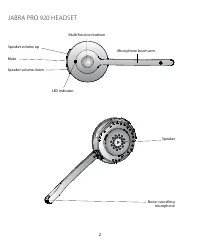
2 Jabra Pro 920 Headset Speaker Noise-cancelling microphone Speaker volume down Speaker volume up Mute Microphone boom arm Multi-function buttton LED indicator
Page 7 - icon event
3 US Jabra Pro 920 base 1 Mute indicator Audio link indicator Battery indicator Power adapter port Telephone port Handset port Clear dial tone switch AUX port Microphone volume controls Foldable base stand icon event Battery charging (slow flash) Full batteryMedium batteryLow battery Very low batter...
Page 8 - setuP; steP 1: at tacH tHe Headband
4 setuP steP 1: at tacH tHe Headband 1. Align the headset and the headband wearing-style attachment, as illustrated, and press firmly together until they click into place (snap-to-click). 2. Rotate the microphone boom arm for left or right ear use.3. Adjust the length of the headband to fit snug aga...
Page 9 - steP 2: unfoLd tHe base
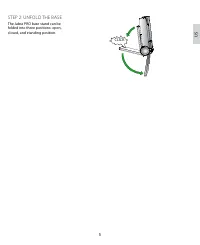
5 US steP 2: unfoLd tHe base The Jabra PRO base stand can be folded into three positions: open, closed, and standing position. CLICK
Page 10 - steP 3: seLect and connect to a desk PHone; refer t; or
6 steP 3: seLect and connect to a desk PHone Select which desk phone you are connecting to from the following 4 options: option 1desk phone with Headset port This type of desk phone has a dedicated headset port (usually at the back of the phone). These phones typically have a button on the front pan...
Page 13 - steP 6: configure tHe sound
9 US steP 6: configure tHe sound 1 Put on the headset, or tap the headset multi-function button if the headset is currently undocked. 2 Get a dial tone by either pressing the headset button on the desk phone, or by lifting the desk phone handset. If there is no dial tone, check that all cables are c...
Page 14 - How to make a caLL
10 How to make a caLL option 1 desk phone with headset port option 2 desk phone with Jabra link option 3 desk phone with gn1000 remote handset lifter option 4 desk phone with-out headset port did You know? The Jabra PRO 920 has advanced settings that you can quickly and easily configure yourself. Re...
Page 16 - micro-casQue Jabra Pro 920
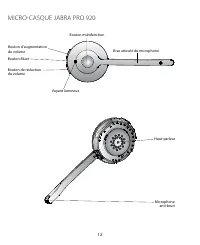
12 micro-casQue Jabra Pro 920 Haut-parleur Microphone anti-bruit Bouton de réduction du volume Bouton d’augmentation du volume Bouton Muet Bras articulé du microphone Bouton multifonction Voyant lumineux
Page 17 - base du Jabra Pro 920; icône Événement
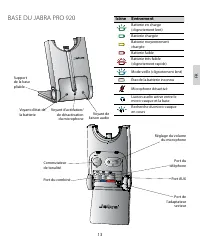
FR 13 base du Jabra Pro 920 1 Voyant d’activation/ de désactivation du microphone Voyant de liaison audio Voyant d’état de la batterie Port de l’adaptateur secteur Port du téléphone Port du combiné Commutateur de tonalité Port AUX Réglage du volume du microphone Support de la base pliable icône Évén...
Page 18 - configuration
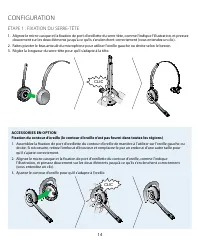
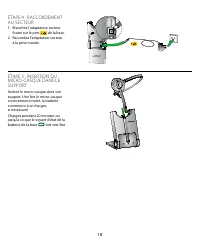
14 configuration ÉtaPe 1 : fiXation du serre-tÊte 1. Alignez le micro-casque et la fixation de port d’oreillette du serre-tête, comme l’indique l’illustration, et pressez doucement sur les deux éléments jusqu’à ce qu’ils s’enclenchent correctement (vous entendez un clic). 2. Faites pivoter le bras a...
Page 20 - ÉtaPe 3 : sÉLection et conneXion à un tÉLÉPHone fiXe; ou
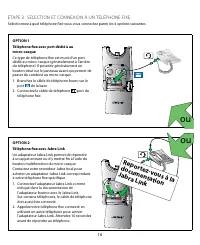
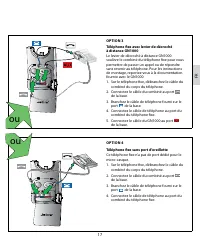
16 ÉtaPe 3 : sÉLection et conneXion à un tÉLÉPHone fiXe Sélectionnez à quel téléphone fixe vous vous connectez parmi les 4 options suivantes : option 1téléphone fixe avec port dédié à au micro-casque Ce type de téléphone fixe est muni d’un port dédié au micro-casque (généralement à l’arrière du télé...
Page 23 - ÉtaPe 6 : configuration du son
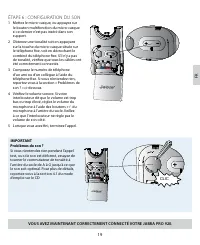
FR 19 ÉtaPe 6 : configuration du son 1 Mettez le micro-casque, ou appuyez sur le bouton multifonction du micro-casque si ce dernier n’est pas inséré dans son support. 2 Obtenez une tonalité soit en appuyant sur la touche du micro-casque située sur le téléphone fixe, soit en décrochant le combiné du ...
Page 24 - comment Passer un aPPeL
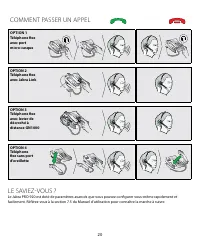
20 comment Passer un aPPeL option 1 téléphone fixe avec port micro-casque option 2 téléphone fixe avec Jabra link option 3 téléphone fixe avec levier de décroché à distance gn1000 option 4 téléphone fixe sans port d’oreillette Le savieZ-vous ? Le Jabra PRO 920 est doté de paramètres avancés que vous...
Page 26 - darsteLLung des Jabra Pro 920 Headsets
22 darsteLLung des Jabra Pro 920 Headsets Lautsprecher Mikrofon mit Geräuschunterdrückung Lautsprecher leiser Lautsprecher lauter Stummschaltung Mikrofonarm Multifunktionstaste LED-Anzeige
Page 27 - Jabra Pro 920 basisstation; symbol ereignis
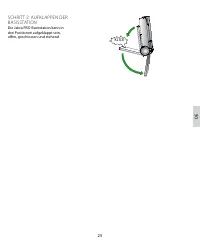
DE 23 Jabra Pro 920 basisstation 1 Stummschaltungsanzeige Audioverbindungsanzeige Akkuanzeige Netzteilanschluss Telefonkabelan- schluss Höreranschluss Umschalter für Freizeichen AUX-Anschluss Mikrofon- Lautstärkeregelung Faltbare Basisstation symbol ereignis Akku wird geladen (blinkt langsam)Akku vo...
Page 28 - scHrit t 1: befestigen des ÜberkoPfbÜgeLs
24 setuP (einricHtung) scHrit t 1: befestigen des ÜberkoPfbÜgeLs 1. Richten Sie Headset und Überkopfbügel wie abgebildet aus und drücken Sie sie fest zusammen, bis sie mit einem Klicken einrasten. 2. Drehen Sie den Mikrofonarm wie zur Nutzung des Headsets am linken oder rechten Ohr erforderlich.3. P...
Page 30 - scHrit t 3: auswäHLen und anscHLiessen an ein tiscHteLefon; oder
26 scHrit t 3: auswäHLen und anscHLiessen an ein tiscHteLefon Wählen Sie aus den folgenden vier Optionen das Tischtelefon aus, das Sie anschließen möchten: option 1tischtelefon mit Headsetanschluss Tischtelefone dieses Typs besitzen einen gesonderten Anschluss für ein Headset (in der Regel auf der G...
Page 33 - scHrit t 6: konfigurieren der kLangeigenscHaften
DE 29 scHrit t 6: konfigurieren der kLangeigenscHaften 1 Legen Sie das Headset an oder tippen Sie auf die Multifunktionstaste, falls das Headset aktuell angedockt ist. 2 Drücken Sie die Headsettaste an Ihrem Tischtelefon oder heben Sie den Hörer Ihres Tischtelefons ab, um ein Freizeichen zu erhalten...
Page 36 - auricuLar Jabra Pro 920
32 auricuLar Jabra Pro 920 Altavoz Micrófono con reducción de ruidos Bajar volumen del altavoz Subir volumen del altavoz Activar el modo de silencio Brazo articulado del micrófono Botón multifunción Indicador LED
Page 38 - configuración; Paso 1: coLocación deL auricuLar
34 configuración Paso 1: coLocación deL auricuLar 1. Alinee el auricular y la diadema para la cabeza, tal como se ve en la ilustración, y presione con fuerza hasta que encajen correctamente (oirá un clic). 2. Gire el brazo articulado del micrófono según sea necesario para usarlo en la oreja izquierd...
Page 39 - Paso 2: desPLiegue La base
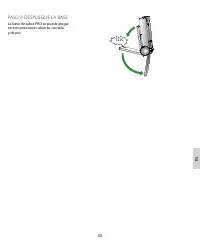
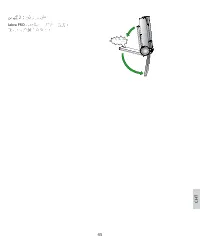
ES 35 Paso 2: desPLiegue La base La base de Jabra PRO se puede plegar en tres posiciones: abierta, cerrada y de pie. CLIC
Page 40 - Paso 3: seLeccionar Y conectar a un teLÉfono de escritorio; o bien
36 Paso 3: seLeccionar Y conectar a un teLÉfono de escritorio Seleccione el teléfono de escritorio al que se está conectando entre las 4 opciones siguientes: opción 1teléfono de escritorio con puerto para auriculares Este tipo de teléfonos cuenta con un puerto dedicado para auriculares (suele estar ...
Page 43 - Paso 6: configurar eL sonido
ES 39 Paso 6: configurar eL sonido 1 Colóquese el auricular, o pulse dos veces el botón multifunción del auricular si no está acoplado en ese momento. 2 Obtenga un tono de marcación presionando el botón del auricular en el teléfono de escritorio, o descolgando el microteléfono del teléfono de escrit...
Page 44 - cómo Hacer una LLamada
40 cómo Hacer una LLamada opción 1 teléfono con puerto para auricular opción 2 teléfono de escritorio con Jabra link opción 3 teléfono de escritorio con descolgador remoto de microteléfono gn1000 opción 4 teléfono de escritorio sin puerto para auriculares ¿Lo sabÍa? Jabra PRO 920 cuenta con ajustes ...
Page 46 - 耳機
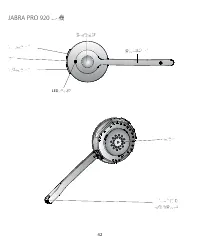
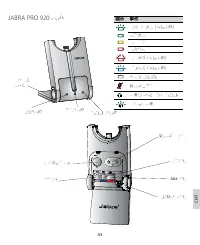
42 Jabra Pro 920 耳機 揚聲器 帶噪音消除 功能的麥克風 調低揚聲器音量 調高揚聲器音量 靜音 麥克風延伸臂 多功能按鈕 LED 指示燈
Page 47 - 基座; 圖示
CHT 43 Jabra Pro 920 基座 1 靜音指示燈 音頻連結指示燈 電池指示燈 電源變壓器插孔 電話插孔 話筒插孔 清晰撥號音開關 AUX 插孔 麥克風音量控制 可摺疊式 基座架 圖示 事件 電池正在充電(慢速閃爍) 完全充電 電量中等 電力不足 電量極低(快速閃爍) 睡眠模式(慢速閃爍) 不明的電池狀態 麥克風已靜音 耳機與基座之間存在音頻連結 正在搜尋耳機
Page 48 - 安裝; 步驟
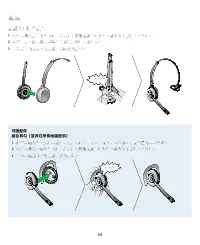
44 安裝 步驟 1 :組合頭帶 1. 對準耳機與頭帶附件(如圖所示),然後按緊直到附件卡緊入位(聽到卡嗒聲)。 2. 視乎需要,旋轉麥克風延伸臂以便用於左耳或右耳。 3. 調節頭帶的長度,使它緊貼環繞您的頭部。 卡嗒聲 可選配件組合耳勾(並非在所有地區提供) 1. 組合耳勾附件,供左耳或右耳使用。如有需要,可取下耳塞並以尺寸最合適的耳塞替換。 2. 對準耳機與耳勾附件(如圖所示),然後按緊直到附件卡緊入位(聽到卡嗒聲)。 3. 調整耳勾形狀,令其緊貼您的耳朵。 卡嗒聲
Page 50 - 請參閱; 或是
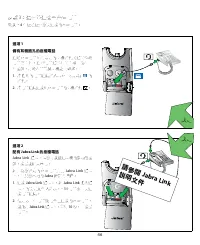
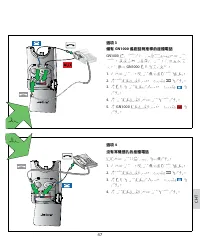
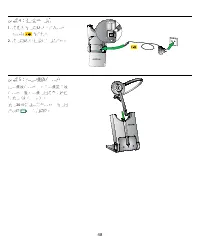
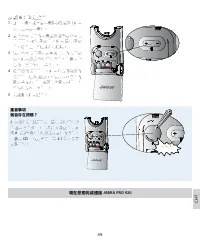
46 步驟 3 :選擇並連接至座檯電話 從以下 4 個選項選擇您要連接的座檯電話: 選項 1 備有耳機插孔的座檯電話 這類座檯電話備有專用的耳機插孔(通常位於電話背面)。這些電話通常在前面板上設有一個按鈕,用於在話筒及耳機之間切換。 1. 將隨附的電話纜線插入基座上標示為 的 插孔。 2. 將電話纜線連接到座檯電話的耳機插孔 。 選項 2 配有 Jabra link 的座檯電話 Jabra Link 適配器讓您可以透過耳機的多功能按 鈕,接聽或結束來電。 如需為您指定的座檯電話購買 Jabra Link 適配 器,請與您本地的 Jabra 經銷商聯絡。 1. 連接 Jabra Link 適配器...
Page 54 - 如何撥打電話; 您知道嗎?
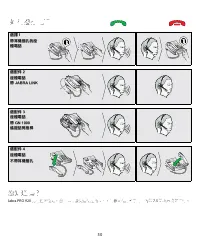
50 如何撥打電話 選擇 1 帶耳機插孔的座檯電話 選配件 2座檯電話帶 Jabra Link 選配件 3座檯電話帶 Gn 1000 遙距話筒推桿 選配件 4座檯電話不帶耳機插孔 您知道嗎? Jabra PRO 920 具有進階設定,您自己可以快速便捷的配置。請參閱使用者手冊中的第 7.5 節內容瞭解詳情。