Page 2 - English
English 1. Check phone compatibility . . . . . . . . . . . . . . . . . . . . . . . . . . . . . . . . . . . . . . . . . . . 4 2. Charge JABRA ® FreeSpeak ™ 250 . . . . . . . . . . . . . . . . . . . . . . . . . . . . . . . . . . . . . . . . 4 3. Read the glossary . . . . . . . . . . . . . . . . . . . ...
Page 3 - Check phone compatibility; Charge JABRA FreeSpeak 250
4 5 1 Blue Indicator Light 2 Multi-Function Button 3 Volume Control Button 4 Charging Cradle 5 MiniGel ™ 4 5 3 2 1 4 5. Unplug the AC adapter from the charging cradle. 6. Remove the headset from the charging cradle. You are now ready to “pair” JABRA FreeSpeak 250 to your mobile phone. If the headset...
Page 4 - Turning headset on/off; “Pair” to your Bluetooth phone
6 7 IMPORTANT: If pairing was successful, the blue indicator light will briefly flash rapidly before going back to flashing every 3 seconds. If unsuccessful, the light remains solid,and you’ll need to reattempt pairing (see steps 3–5 above). * If you have a Bluetooth phone that supports the hands-fr...
Page 5 - Answering a call; Resetting the headset
8 9 Ending a call 8 Call-waiting* 10 Making a call 7 FreeSpeak 250 is ready to wear onthe right ear. If you prefer the left,gently rotate the MiniGel 180°. For optimal performance, wearFreeSpeak 250 and your Bluetoothphone on the same side of yourbody. In general, you will getbetter performance when...
Page 6 - Tips for Nokia Bluetooth phones
13 3. Set your Bluetooth phone to “discover” the headset by following your phone’sinstruction guide. Typically, the stepsinvolve going to a “setup”,“connect”, or“Bluetooth” menu on your phone andthen selecting the option to “discover”a Bluetooth device*. 4. Your phone will find the “JABRA 250” heads...
Page 7 - Frequently asked questions; Storage of headset; Certification and safety approvals
13 12 Frequently asked questions 14 1. How far away from my phone will my JABRA FreeSpeak 250 work? The operating range is typically up to 30 feet. 2. Will JABRA FreeSpeak 250 work with my cordless phone at home? FreeSpeak 250 is not designed for use with cordless phones. 3. Will JABRA FreeSpeak 250...
Page 9 - Français; rançais
Français 1. Vérifier la compatibilité du téléphone . . . . . . . . . . . . . . . . . . . . . . . . . . . . . . . . . 18 2. Charger le JABRA ® FreeSpeak ™ 250 . . . . . . . . . . . . . . . . . . . . . . . . . . . . . . . . . . . . 18 3. Lire le glossaire . . . . . . . . . . . . . . . . . . . . . . . ...
Page 10 - Vérifier la compatibilité du téléphone; Charger le JABRA FreeSpeak 250; Lire le glossaire
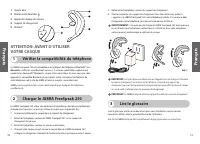
18 19 F rançais F rançais 1 Voyant bleu 2 Bouton multi-fonctions 3 Bouton de réglage du volume 4 Support de chargement 5 MiniGel ™ 4 5 3 2 1 4 Vérifier la compatibilité du téléphone 1 ATTENTION: AVANT D’UTILISER VOTRE CASQUE Le JABRA FreeSpeak 250 est compatible avec la plupart des téléphones Blueto...
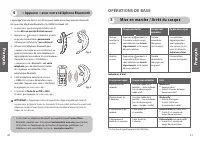
Page 11 - « Appairer » avec votre téléphone Bluetooth; Mise en marche / Arrêt du casque
20 21 F rançais F rançais IMPORTANT: si l’appairage a réussi, le voyant bleu clignote rapidement, avant de recommencer à clignoter toutes les 3 secondes. Si la procédure a échoué, le voyant resteallumé en continu et vous devrez recommencer la procédure d’appairage (voir lesétapes 3 à 5 ci-dessus). *...
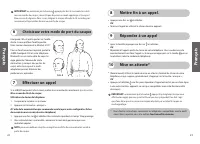
Page 12 - Effectuer un appel; Choisissez votre mode de port du casque; Mettre fin à un appel.; Répondre à un appel
22 23 F rançais F rançais Effectuer un appel 7 FreeSpeak 250 est prêt-à-porter sur l'oreilledroite. Si vous préférez l’oreille gauche,faites tourner doucement le MiniGel à 180°. Pour un fonctionnement optimal, portez leJABRA FreeSpeak 250 et votre téléphoneBluetooth sur un même côté du corps. Enrègl...
Page 13 - Astuces pour les téléphones Nokia Bluetooth; Réinitialisation du casque.
24 25 F rançais F rançais Si le casque ne répond pas ou si le voyant bleu ne s’éteint pas après l’appairage, ilse peut que vous deviez REINITIALISER votre casque. 1. Insérez complètement le casque dans le support de chargement. 2. Branchez l’adaptateur secteur du JABRA FreeSpeak 250 sur le support d...
Page 14 - Questions fréquemment posées
26 27 F rançais F rançais Questions fréquemment posées 14 1. Jusqu’à quelle distance de mon téléphone le JABRA FreeSpeak 250 peut-il fonctionner ?Le diamètre de fonctionnement est en principe de 10 mètres (30 pieds). 2. Le JABRA FreeSpeak 250 fonctionnera-t-il chez moi avec mon téléphone sans fil ? ...
Page 15 - Rangement du casque; Certification et exigences de sécurité; Garantie et Remplacement des pièces
28 29 F rançais F rançais Rangement du casque 16 1. Mettez toujours le JABRA FreeSpeak 250 hors tension avant de le ranger et protégez-le bien. 2. Évitez de l’exposer à une forte température (supérieure à 60°C), par exemple dans un véhicule non ombragé ou directement au soleil. (Une exposition à de ...
Page 16 - Glossaire
30 F rançais Glossaire 19 1 Bluetooth est une technologie radio développée pour connecter des périphériques,tels que des téléphones mobiles et des casques, sans fil ni cordon, sur une courtedistance d’environ 10 mètres (30 pieds). De plus amples informations sontdisponibles sur le site : www.bluetoo...
Page 17 - Español
32 F rançais Español 1. Compruebe la compatibilidad del teléfono . . . . . . . . . . . . . . . . . . . . . . . . . . . . 34 2. Cargue el JABRA ® FreeSpeak ™ 250 . . . . . . . . . . . . . . . . . . . . . . . . . . . . . . . . . . . . . 34 3. Lea el glosario . . . . . . . . . . . . . . . . . . . . . ....
Page 18 - Compruebe la compatibilidad del teléfono; ESPERE: ANTES DE USAR SU AURICULAR; Cargue el JABRA FreeSpeak 250; Lea el glosario
1 Indicador azul 2 Botón multifunción 3 Botón de control de volumen 4 Cargador / soporte 5 MiniGel ™ 4 5 3 2 1 4 Compruebe la compatibilidad del teléfono 1 ESPERE: ANTES DE USAR SU AURICULAR El JABRA FreeSpeak 250 es compatible con la mayoría de los teléfonos Bluetooth 1 ( ver Glosario ) que sean co...
Page 19 - Encender/apagar el auricular
IMPORTANTE: Si el “emparejamiento” se realizó con éxito, el indicador azul parpadeará breve y rápidamente antes de volver al parpadeo normal, cada 3 segundos. Si no huboéxito, el indicador seguirá encendido de forma continua, y usted tendrá que intentar el“emparejamiento” de nuevo (ver los pasos 3–5...
Page 20 - Cómo hacer una llamada; Cómo terminar una llamada
Español Cómo hacer una llamada 7 El FreeSpeak 250 viene preparado parallevarse en la oreja derecha. Si ustedprefiere la izquierda, gire el MiniGelcuidadosamente un ángulo de 180°. Para obtener un rendimiento óptimo,lleve el JABRA FreeSpeak 250 y suteléfono Bluetooth en el mismo lado desu cuerpo. En ...
Page 21 - Consejos para teléfonos Bluetooth Nokia; Cómo reiniciar el auricular
Consejos para teléfonos Bluetooth Nokia 12 Funciones avanzadas (para teléfonosBluetooth con perfil manos libres) 13 (tales como las series Nokia 6310 y 8910) Asegúrese de que el teléfono permite que el auricular se conecte sin autorización. Parahacer esto, debe ajustar la configuración de su teléfon...
Page 22 - Preguntas frecuentes
Preguntas frecuentes 14 1. ¿A qué distancia de mi teléfono funcionará mi JABRA FreeSpeak 250? El alcance operativo es típicamente de hasta 10 metros. 2. ¿Funcionará el JABRA FreeSpeak 250 con el teléfono inalámbrico que tengo en casa?El JABRA FreeSpeak 250 no está diseñado para funcionar con teléfon...
Page 23 - Cómo almacenar el auricular; Certificaciones y homologaciones de seguridad; Garantía y sustitución de piezas
1. Guarde siempre el JABRA FreeSpeak 250 apagado y en un lugar seguro. 2. Evite guardarlo en lugares en los que se alcanzan temperaturas elevadas (por encima de los 60°C / 134°F) – tales como un vehículo caldeado o a la luz del sol. (El almacenamientoa altas temperaturas puede reducir el rendimiento...
Page 24 - Glosario
Español 5 El Modo activo es cuando el auricular tiene una llamada activa en progreso.FreeSpeak pasará del modo de espera al modo activo cuando usted reciba o hagauna llamada. Cuando FreeSpeak está en modo activo, el indicador azul parpadearácada segundo. 6 El Modo de espera es cuando el auricular es...