IDEAL 61-744 - User Manual
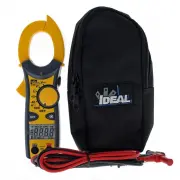
This user manual covers the Ideal 600V clamp meter, focusing on its essential operational features, safety protocols, and technical specifications. The document emphasizes critical safety measures–such as preventing electric shock by avoiding damaged equipment, using certified test leads, and maintaining proper environmental conditions–to ensure safe use in electrical testing. Key functional aspects include non-contact voltage detection, automatic/manual ranging, continuity verification, and overload protection for AC/DC measurements. Additionally, it outlines maintenance requirements like battery replacement and storage guidelines while detailing measurement accuracy, warranty terms, and compliance with safety standards.


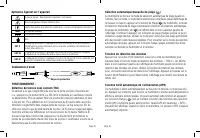
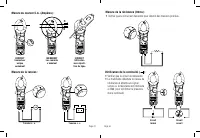
Table of Contents:
- Page 1 – Safety Guidelines for Clamp Meter Operation
- Page 2 – Clamp Meter Safety Features and Component Identification
- Page 3 – Multimeter Operational Modes and Safety Symbols
- Page 4 – Measurement Procedures for Clamp Meter
- Page 5 – Clamp Meter Technical Specifications and Maintenance
- Page 6 – Tester Technical Specifications and Warranty
- Page 7 – Safety Warnings and Operational Precautions
- Page 8 – Clamp Meter Components and Safety Procedures
- Page 9 – Multimeter Operational Functions
- Page 10 – Measurement Instructions for Voltage and Continuity
- Page 11 – Multimeter Maintenance and Specifications
- Page 12 – AC Converter Measurement Ranges and Warranty
- Page 13 – Critical Safety Instructions for Clamp Meter
- Page 14 – Clamp Meter Component Diagrams and Specifications
- Page 15 – Multimeter Features and Safety Symbols
- Page 16 – Measurement Instructions for Clamp Meter
- Page 17 – Multimeter Technical Specifications and Maintenance
- Page 18 – Tester Specifications and Warranty Summary
#61-744
#61-746
600 AAC Clamp Meter
Instruction Manual
OFF
K
HOLD
NCV
AC
DC
V
Ω
m
M
A
APO
600
Ω
40
A
V
V
CLAMP
CAT.III
600V
600A
NCV
OFF
V
Ω
V
True RMS
40
A
600
A
M
HOLD
DC
K
AC
m
Ω
V
APO
CAT.III
600V
600A
CLAMP
61-744
61-746
CAT.III
600V
V
/
Ω
COM
CAT.III
600V
V
/
Ω
COM
Page 1
Register your product and access more information at www.idealindustries.com
Read First: Safety Information
Understand and follow operating instructions carefully. Use the meter, test leads
and all accessories only as specified in this manual; otherwise, the protection
provided by the meter can be impaired.
WARNING
To avoid possible electric shock, personal injury or death, follow these
guidelines:
• Do not use if meter appears damaged. Visually inspect the meter to ensure case
and jaws are not cracked.
• Inspect and replace test leads if insulation is damaged, metal is exposed, or
probes are cracked. Pay particular attention to the insulation surrounding the
connectors.
• To preserve the safety rating of this product, use only test leads with a minimum
rating of CAT III 600V. Do not use improvised connections that could present a safety
hazard.
• Note that the measurement category and voltage rating of combinations of
the meter, the test leads, and the accessories is the lowest of the individual
components.
• Do not use meter if it operates abnormally as protection maybe impaired.
• Do not use during electrical storms or in wet weather.
• Do not use around explosive gas, dust, vapor, amperage or in damp or wet
environments.
• Do not apply more than the rated voltage or amperage.
• Remove the test leads from the input jacks before measuring current.
• Replace battery as soon as battery indicator appears to avoid false readings.
• Remove the test leads from the meter prior to removing battery cover.
• Do not use without the battery and battery cover properly installed.
• Do not attempt to repair this unit as it has no user-serviceable parts.
• Use the proper terminals, functions and range for your measurements.
• Never ground yourself when taking electrical measurements.
• Connect the black common lead to ground or neutral before applying the red test
lead to potential voltage. Disconnect the red test lead from the voltage first.
• Keep fingers behind the guard rings of the probe tips.
• Hold the clamp behind the tactile barrier.
Page 2
"Loading the manual" means you need to wait until the file loads and becomes available for online reading. Some manuals are very large, and the time they take to appear depends on your internet speed.
Was this manual helpful?
Helpful for 3 of 3 readers
About this manual
- Brand
- IDEAL
- Model
- 61-744
- Document type
- User Manual
- Category
- Multimeter
- Language(s)
- English, Spanish, French
- Pages
- 18
- File size
- 1.7 MB
- Format
Summary
Critical safety information covering guidelines to prevent electric shock, personal injury, damage prevention, proper handling procedures, and inspection requirements.
Safety precautions, features like non-contact voltage measurement and ranging modes, component identification, safety symbols, and labeled diagrams of the meter parts.
Explanation of multimeter features including auto/manual ranging, data hold, auto power off, non-contact voltage operation, and associated safety category symbols.


