Page 2 - Table of contents
2 Table of contents Table of contents ......................................................................................................................................... 2 Important safety precautions ................................................................................................
Page 3 - Important safety precautions
3 Important safety precautions Warning Please unplug the power cord from the AC outlet and contact our service personnel to repair under the fol-lowing conditions: · Any obvious abnormality appears in the product, such as smoky, peculiar smell or strange sound. · When a liquid has been spilled or ot...
Page 6 - Controls and connection; Rear panel
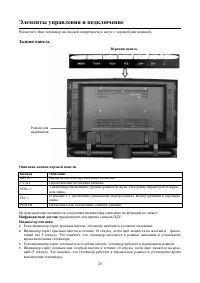
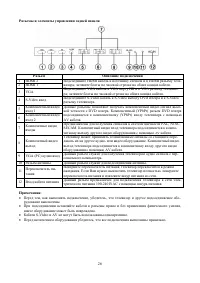
6 Controls and connection Place your LCD TV on a flat surface in a well-ventilated location. Rear panel Top panel Earphone terminal Top panel button description Button Description MENU Open the menu or switch among the menus. TV/AV To switch among the signal source. VOL-/+ Decrease/increase the soun...
Page 10 - OSD operations; Picture; Sound
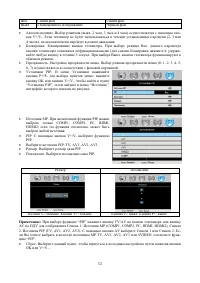
10 OSD operations Note: In this manual the OSD (On Screen Display) may be different from your TV’s because it is just an ex- ample to help you with the TV operation. In the following contents, press MENU button to enter the menu; press P+/P- buttons or CH+/CH- buttons toselect an item. The highlight...
Page 14 - Other Operations
14 Other Operations Turning on/off the TV Turning on 1. Connect the power input port on TV with AC power cable, and then connect it with AС power supply, turn on the AC switch of the TV, the indicator turns red, TV enters into standby mode. 2. In standby mode, press POWER button on TV or on the RC t...
Page 15 - Picture Mode Selection
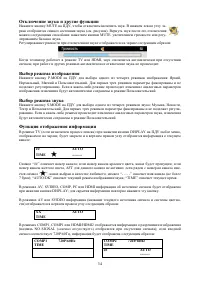
15 any of the following operation is made: pressing MUTE button, adjusting the TV’s volume or adjusting thesound “Balance”. Switching to stereo or bilingual, the mute mode can be quitted, but you cannot quit themute mode by reducing the volume.The icon displayed on the lower left position is as the ...
Page 16 - Sleeping Function; Standby Function When No Signal Input
16 PIP function is “OFF” PIP function is “ON” “##” is the number of current PIP channel. “- - - -” is the name of the PIP channel (at most 7 letters), if thechannel name is not changed, “----” will be displayed, “AUTO/DK” is the current PIP TV color/sound mode.“XX” means the name of current signal C...
Page 17 - Recall Function
17 System will power downPress OK to cancel Xx “xx” is the remained number which indicates you with how many seconds the TV will enter into standbymode. The value will be deducted to 0 from 30. At this time, you can press MENU, EXIT, OK on the RC toquit the standby mode, which the TV will carry out ...
Page 18 - Troubleshooting
18 Troubleshooting Before calling a technician, please check the following items to see whether you can easily diagnose and fixthe encountered symptoms on your own. Symptoms Possible Cause Correction No picture, no sound,and no indicator light The power cord is not plugged in.Contrast, sharpness, co...
Page 19 - The causes of interference
19 The causes of interference Incorporated in your TV receiver are the most up-to-date devices to eliminate interference. Local radiationhowever, can create disturbances, which visibly affect your picture. Proper installations, a good aerial areyour best safeguards against these disturbances. · RF I...
Page 20 - Specifications
20 Specifications Items H-LCD3700 Size (diagonal) 37” (94 cm) Brightness 500 (cd/m 2 ) Contrast 1000:1 Angle of view 176°/176° High speed response 8 ms LCD panel items Resolution 1366 x 768 Color system PAL, NTSC, SECAM Sound system DK, I, BG, M NICAM Stereo 2 x 5 W YPbPr input format 480i, 480P, 57...
Page 21 - Содержание
21 Содержание Содержание...............................................................................................................................................21 Предупреждения и меры безопасности...................................................................................................
Page 22 - Предупреждения и меры безопасности
22 Предупреждения и меры безопасности Пожалуйста, извлеките шнур питания из розетки и свяжитесь с сервисной службой в следую- щих случаях: · Если в изделии имеются явные неисправности, например, из него идет дым, чувствуется специ-фический запах или слышен непонятный звук. · Если внутрь изделия попа...
Page 25 - Элементы управления и подключение; Задняя панель
25 Элементы управления и подключение Разместите Ваш телевизор на плоской поверхности в месте с хорошей вентиляцией. Задняя панель Верхняя панель Разъем длянаушников Описание кнопок верхней панели Кнопка Описание MENU Вызов меню или переключение подменю. TV/AV Переключение источника сигнала. VOL-/+ У...
Page 29 - Операции с экранным меню; Изображение; Звук
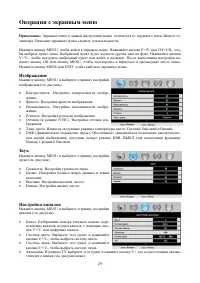
29 Операции с экранным меню Примечание: Экранное меню в данной инструкции может отличаться от экранного меню Вашего те- левизора. Описание экранного меню служить для наглядности. Нажмите кнопку MENU, чтобы войти в экранное меню. Нажимайте кнопки P+/P- или CH+/CH-, что-бы выбрать пункт меню. Выбранны...
Page 33 - Другие операции; Включение/выключение телевизора; Режим ожидания
33 Другие операции Включение/выключение телевизора Включение 1. Подсоедините телевизор к сети электропитания с помощью шнура питания. Нажмите переключа- тель питания на панели телевизора. Индикатор загорится красным цветом. Телевизор перейдет врежим ожидания. 2. в режиме ожидания нажмите кнопку POWE...
Page 35 - Спящий режим
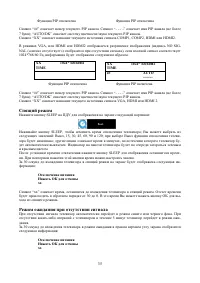
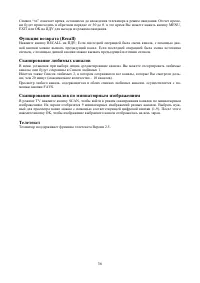
35 Функция PIP отключена Функция PIP отключена Символ “##” означает номер текущего PIP канала. Символ “- - - -” означает имя PIP канала (не более7 букв); “AUTO/DK” означает систему цветности/звука текущего PIP канала.Символ “XX” означает название текущего источника сигнала COMP1, COMP2, HDMI или HDM...
Page 37 - Возможные неисправности и их устранение
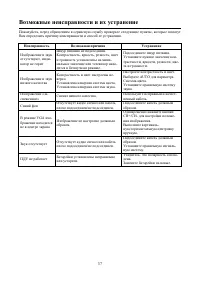
37 Возможные неисправности и их устранение Пожалуйста, перед обращением в сервисную службу проверьте следующие пункты, которые помогутВам определить причину неисправности и способ ее устранения. Неисправность Возможная причина Устранение Изображение и звукотсутствуют, инди-катор не горит Шнур питани...
Page 38 - Источники помех
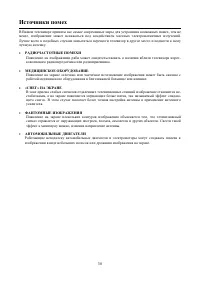
38 Источники помех В Вашем телевизоре приняты все самые современные меры для устранения возможных помех , тем неменее, изображение может искажаться под воздействием местных электромагнитных излучений.Лучше всего в подобных случаях попытаться перенести телевизор в другое место и подвести к немулучшую...
Page 39 - Технические характеристики
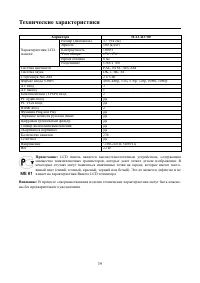
39 Технические характеристики Характера H-LCD3700 Размер (диагональ) 37” (94 см) Яркость 500 (кд/м²) Контрастность 1000:1 Угол обзора 176°/176° Время отклика 8 мс Характеристики LCD панели Разрешение 1366 x 768 Система цветности PAL, NTSC, SECAM Система звука DK, I, BG, M Стереозвук NICAM 2 x 5 Вт Ф...