Page 2 - the manual for reference in the future.
2 3 Table of contents Table of contents Dear customer! Thank you for purchasing our product. For safety, it is strongly recommended to read this manual carefully before connecting, operating and/or adjusting the product and keep the manual for reference in the future. Table of contents Before you st...
Page 3 - ID3 Tag function; General information; Handling compact discs; Table of contents
OSD (On Screen Display) functionZooming in/outPBC (Playback Control) (for VCD only)Changing angle (for DVD only)Selecting audio language (for DVD only)Selecting subtitle language (for DVD)Selecting sound channel (for VCD only)Menu navigation (for DVD only) ID3 Tag function General information Handli...
Page 4 - Before your start; Utilization of the product
4 Before your start If you want to dispose this product, do not mix it with general household waste. There is a separate collection system for used electronic products in accordance with legislation that requires proper treatment, recovery and recycling. Please contact your local authorities for the...
Page 5 - Installation/Connection; Installation
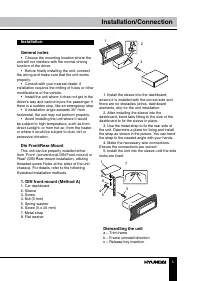
5 Installation/Connection Installation General notes • Choose the mounting location where the unit will not interfere with the normal driving function of the driver. • Before finally installing the unit, connect the wiring and make sure that the unit works properly. • Consult with your nearest deale...
Page 6 - Trim frame installation
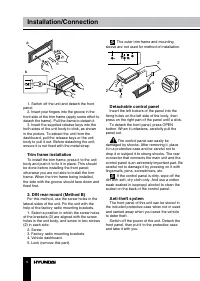
6 Installation/Connection в б а 1. Switch off the unit and detach the front panel. 2. Insert your fingers into the groove in the front side of the trim frame (apply some effort to detach the frame). Pull the frame to detach it. 3. Insert the supplied release keys into the both sides of the unit body...
Page 7 - Connection; Location; Connector A
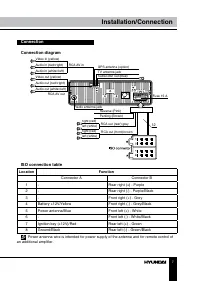
7 Installation/Connection Connection Connection diagram ISO connection table Location Function Connector A Connector B 1 - Rear right (+) - Purple 2 - Rear right (-) - Purple/Black 3 - Front right (+) - Grey 4 Battery +12V/Yellow Front right (-) - Grey/Black 5 Power antenna/Blue Front left (+) - Whi...
Page 8 - Using the ISO Connector; If your car is equipped with the ISO; Parking wire connection
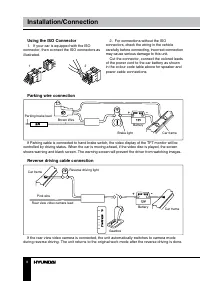
8 9 Installation/Connection Operation Using the ISO Connector 1. If your car is equipped with the ISO connector, then connect the ISO connectors as illustrated. 1 2 2. For connections without the ISO connectors, check the wiring in the vehicle carefully before connecting, incorrect connection may ca...
Page 9 - Control elements; button; Inner panel
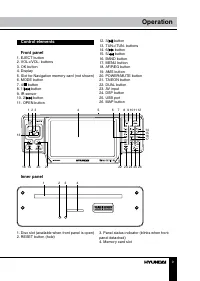
8 9 Installation/Connection Operation Control elements Front panel 1. EJECT button2. VOL+/VOL- buttons3. OK button4. Display5. Slot for Navigation memory card (not shown)6. MODE button7. 4/ button8. 1/ button 9. IR sensor10. 2/ button 11. OPEN button 1 2 3 4 5 6 7 8 9 1011 12 13 14 15 16 17 18 19 20...
Page 10 - Operation; Remote controller
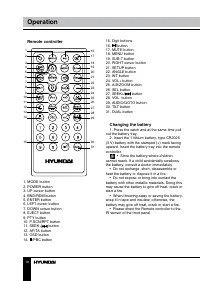
10 Operation Remote controller 1 2 345678 9 10 16 17 1819202122232425262728 30 29 31 11121314 15 1. MODE button2. POWER button3. UP cursor button4. BND/RDM button5. ENTER button6. LEFT cursor button7. DOWN cursor button8. EJECT button9. PTY button10. P.SCN/RPT button11. SEEK-/ button 12. AF/TA butto...
Page 11 - General operations
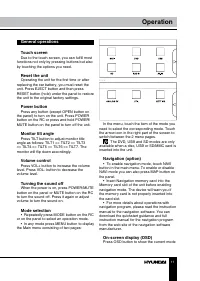
11 Operation - - - In the menu, touch the item of the mode you need to select the corresponding mode. Touch the arrow icon in the right part of the screen to switch between the 2 menu pages. The DVD, USB and SD modes are only available when a disc, USB or SD/MMC card is inserted into the unit. Navig...
Page 12 - Setting the sound characteristics
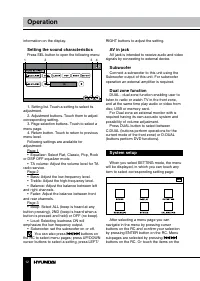
12 13 Operation Operation information on the display. Setting the sound characteristics Press SEL button to open the following menu: 1 2 3 4 1. Setting list. Touch a setting to select its adjustment. 2. Adjustment buttons. Touch them to adjust corresponding setting. 3. Page selection buttons. Touch ...
Page 14 - Utilities
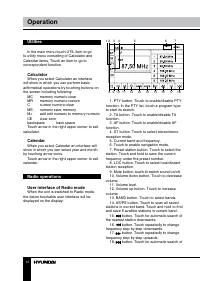
14 Operation Utilities In the main menu touch UTIL item to go to utility menu consisting of Calculator and Calendar items. Touch an item to go to correspondent function. Calculator When you select Calculator an interface will show in which you can perform basic arithmetical operations by touching bu...
Page 15 - Band selection
15 Operation the nearest station upwards. Band selection Select the RADIO mode. Press BAND button on the panel or BND/RDM button on the RC to select the desired band: FM1, FM2, FM3, AM1 (MW1), AM2 (MW2). Manual/automatic tuning • Manual tuning: press TUN-/TUN+ buttons on the panel or SEEK-/ and SEEK...
Page 16 - TV tuner operations
16 Operation the needed PTY type by pressing the icon in the touchable screen or pressing the corresponding number buttons on the RC. When PTY search is on, and the selected type matches, PTY information is displayed. If PTY code is different or not available, PTY NONE icon will blinks, PTY engaging...
Page 17 - DVD touch interface
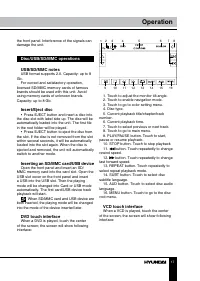
17 Operation the front panel. Interference of the signals can damage the unit. Disc/USB/SD/MMC operations USB/SD/MMC notes USB format supports 2.0. Capacity: up to 8 Gb. For correct and satisfactory operation, licensed SD/MMC memory cards of famous brands should be used with this unit. Avoid using m...
Page 18 - Color setting
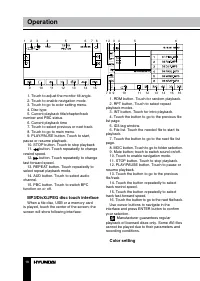
18 Operation 3 2 1 7 4 5 6 8 9 10 11 12 13 14 15 1. Touch to adjust the monitor tilt angle.2. Touch to enable navigation mode.3. Touch to go to color setting menu.4. Disc type5. Current playback title/chapter/track number and PBC status 6. Current playback time7. Touch to select previous or next tra...
Page 19 - DVD setup
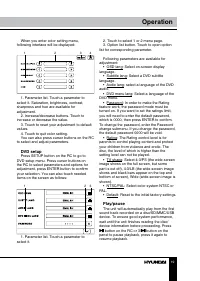
19 Operation When you enter color setting menu, following interface will be displayed: 1 2 3 4 1. Parameter list. Touch a parameter to select it. Saturation, brightness, contrast, sharpness and hue are available for adjustment. 2. Increase/decrease buttons. Touch to increase or decrease the value. 3...
Page 21 - Selecting audio language
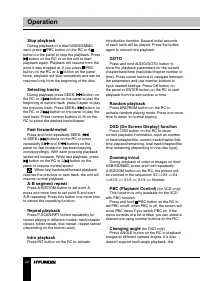
20 21 Operation Operation function will not work. Selecting audio language (for DVD only) During DVD disc playback, press AUDIO/ GOTO button on the RC repeatedly to select the audio language to listen. This function will not work if a disc does not support multi-language audio. Selecting subtitle la...
Page 23 - Troubleshooting; Symptom
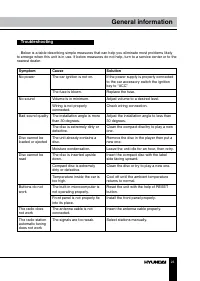
22 23 General information General information Troubleshooting Below is a table describing simple measures that can help you eliminate most problems likely to emerge when this unit is in use. If below measures do not help, turn to a service center or to the nearest dealer. Symptom Cause Solution No p...
Page 24 - Specifications
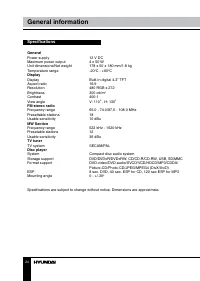
24 25 General information Содержание Specifications General Power supply 12 V DC Maximum power output 4 x 50 W Unit dimensions/Net weight 178 x 50 x 180 mm/1.8 kg Temperature range -20 0 C - +60 0 C Display Display Built-in digital 4.3” TFT Aspect ratio 16:9 Resolution 480 RGB x 272 Brightness 300 c...
Page 25 - Уважаемый покупатель!; Установка/Подключение
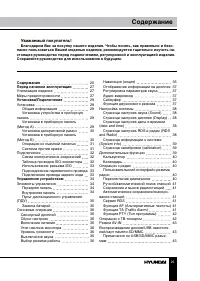
24 25 General information Содержание Уважаемый покупатель! Благодарим Вас за покупку нашего изделия. Чтобы понять, как правильно и безо- пасно пользоваться Вашей моделью изделия, рекомендуется тщательно изучить на-стоящее руководство перед подключением, регулировкой и эксплуатацией изделия. Сохраняй...
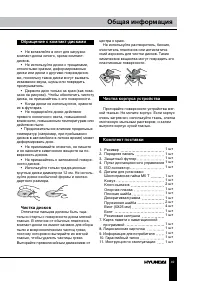
Page 26 - накопителя; Общая информация; Обращение с компакт-дисками
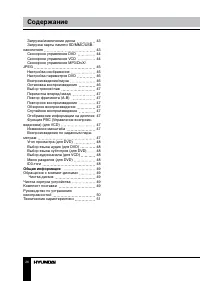
26 27 Содержание Перед началом эксплуатации Загрузка/извлечение дискаЗагрузка карты памяти SD/MMC/USB- накопителя Сенсорное управление DVDСенсорное управление VCDСенсорное управление MP3/DivX/ JPEG Настройка изображенияНастройка параметров DVDВоспроизведение/паузаОстановка воспроизведенияВыбор треко...
Page 27 - Утилизация изделия
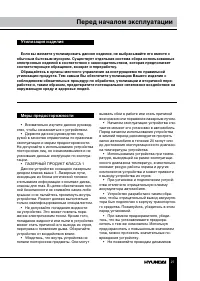
26 27 Содержание Перед началом эксплуатации Если вы желаете утилизировать данное изделие, не выбрасывайте его вместе с обычным бытовым мусором. Существует отдельная система сбора использованных электронных изделий в соответствии с законодательством, которая предполагает соответствующее обращение, во...
Page 28 - • Убедитесь, что источник питания и
28 29 Перед началом эксплуатации Установка/Подключение соприкасаться друг с другом или с корпу-сом автомобиля после включения устрой-ства. В противном случае усилитель может быть перегружен или выйти из строя. • Убедитесь, что источник питания и антенна отключены, если Вы не будете пользоваться устр...
Page 29 - Установка; Установка устройства
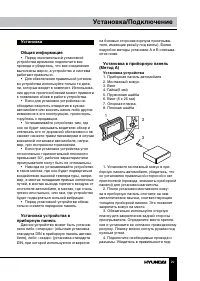
28 29 Перед началом эксплуатации Установка/Подключение Установка Общая информация • Перед окончательной установкой устройства временно подключите все провода и убедитесь, что все соединения выполнены верно, а устройство и система работают правильно. • Для обеспечения правильной установ- ки устройств...
Page 30 - Снятие устройства; Установка декоративной рамки
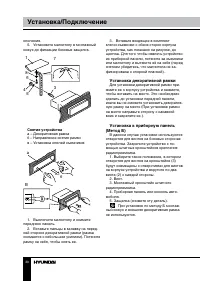
30 31 Установка/Подключение Установка/Подключение ключения. 5. Установите магнитолу в монтажный кожух до фиксации боковых защелок. 3 5 4 6 8 1 7 Снятие устройства а – Декоративная рамкаб – Направление снятия рамкив – Установка ключей съемников B б а 1. Выключите магнитолу и снимите переднюю панель. ...
Page 31 - Операции со съемной панелью
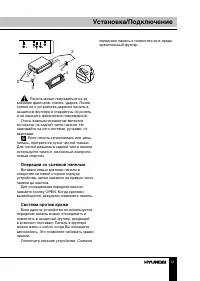
30 31 Установка/Подключение Установка/Подключение 2 2 5 5 4 3 Панель может повредиться из-за внешних факторов: тряски, ударов. После снятия ее с устройства держите панель в защитном футляре и старайтесь не ронять и не наносить физических повреждений. Очень важным элементом является коннектор на задн...
Page 32 - Подключение; Таблица проводов ISO-коннектора; Номер; Разъем A
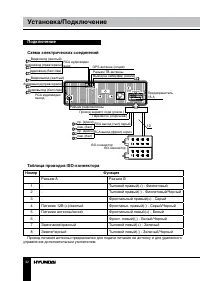
32 33 Установка/Подключение Установка/Подключение Подключение Схема электрических соединений Видеовыход (желтый) Видеовход (желтый) Аудиовыход (прав=красн) Аудиовход (прав=красн) RCA аудиовидео выход RCA аудиовидео вход Аудиовыход (бел=лев) Аудиовход (бел=лев) Разъем радиоантенны Выход на сабвуфер (...
Page 33 - Использование разъема ISO; Для подключений без разъемов ISO; Подключение парковочного провода
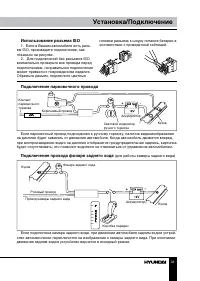
32 33 Установка/Подключение Установка/Подключение Использование разъема ISO 1. Если в Вашем автомобиле есть разъ- ем ISO, произведите подключение, как показано на рисунке. 2. Для подключений без разъемов ISO внимательно проверьте все провода перед подключением, неправильное подключение может привест...
Page 34 - Элементы управления
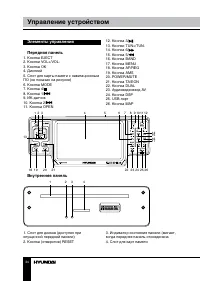
34 35 Управление устройством Управление устройством Элементы управления Передняя панель 1. Кнопка EJECT2. Кнопки VOL+/VOL-3. Кнопка OK4. Дисплей5. Слот для карты памяти с навигационным ПО (не показан на рисунке)6. Кнопка MODE7. Кнопка 4/8. Кнопка 1/9. ИК-датчик10. Кнопка 2/11. Кнопка OPEN 1 2 3 4 5 ...
Page 35 - Пульт дистанционного управления
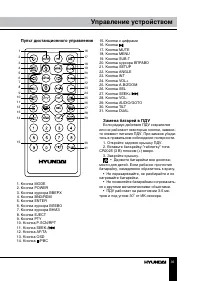
34 35 Управление устройством Управление устройством Пульт дистанционного управления 1 2 345678 9 10 16 17 1819202122232425262728 30 29 31 11121314 15 1. Кнопка MODE2. Кнопка POWER3. Кнопка курсора ВВЕРХ4. Кнопка BND/RDM5. Кнопка ENTER6. Кнопка курсора ВЛЕВО7. Кнопка курсора ВНИЗ8. Кнопка EJECT9. Кно...
Page 36 - Основные операции
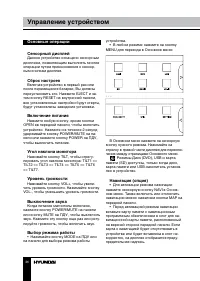
36 37 Управление устройством Управление устройством Основные операции Сенсорный дисплей Данное устройство оснащено сенсорным дисплеем, позволяющим выполнять многие операции путем прикосновения к сенсор-ным кнопкам дисплея. Сброс настроек Включая устройство в первый раз или после перемещения батареи,...
Page 37 - Отображение информации на
36 37 Управление устройством Управление устройством • Более подробно операции с навига- ционной программой описаны в пользо-вательском руководстве к навигационной программе. Электронную версию краткой инструкции и полного руководства поль-зователя к программе навигации можно скачать на сайте произво...
Page 38 - Настройка системы
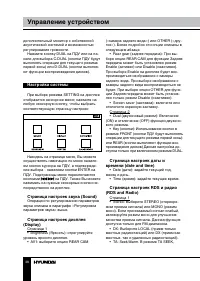
38 39 Управление устройством Управление устройством дополнительный монитор с собственной акустической системой и возможностью регулирования громкости. Нажмите кнопку DUAL на ПДУ или на па- нели для выбора C-DUAL (кнопки ПДУ будут выполнять операции для текущего режима первой зоны) или D-DUAL (кнопки...
Page 39 - Страница информации о системе; В данном меню Вам доступна информа-; Дополнительные функции; В Основном меню нажмите сенсорную
38 39 Управление устройством Управление устройством устройство будет искать станции передаю-щие информацию о дорожном движении; в режиме TA ALARM, поиск не идет, но когда произойдет происшествие или чрезвычай-ная ситуация на дорогах, то устройство акти-вирует систему передачи этой информации. Страни...
Page 40 - Калькулятор; Переключение диапазонов
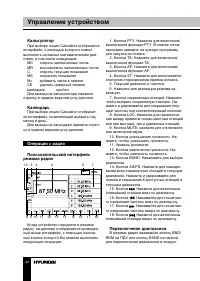
40 41 Управление устройством Управление устройством Калькулятор При выборе опции Calculator отобразится интерфейс, с помощью которого можно выполнять основные математические дей-ствия, в том числе следующие: MC стереть запомненные числа MR восстановить запомненные числа C стереть текущие показания M...
Page 42 - Операции с ТВ-тюнером
42 43 Управление устройством Управление устройством Если принимается станция с информаци- ей TP, но без информации TA, индикатор TP отображается статично, а индикатор TA ми-гает; при приеме как информации TP, так и TA, оба индикатора отображаются статично. Если устройство находится в режиме другого ...
Page 43 - Воспроизведение дисков/USB
42 43 Управление устройством Управление устройством MANUAL PROGRAM (ручная настройка программ) • Storage: выберите номер, под которым будет сохранен найденный канал. • System: выберите ТВ-систему (SECAM/ PAL). • Audio: выберите систему звука (Audio1/ Audio2/Audio3). • Channel: выберите номер канала....
Page 44 - Сенсорное управление DVD
44 45 Управление устройством Управление устройством Сенсорное управление DVD После загрузки DVD-диска на дисплее отобразится следующий интерфейс: 1 2 3 4 5 6 7 8 9 10 11 12 13 14 15 16 1. Нажимайте, чтобы отрегулировать угол наклона монитора. 2. Нажмите для включения режима на- вигации. 3. Нажмите д...
Page 45 - JPEG
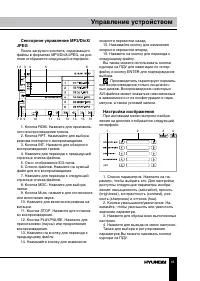
44 45 Управление устройством Управление устройством Сенсорное управление MP3/DivX/ JPEG После загрузки носителя, содержащего файлы в форматах MP3/DivX/JPEG, на дис-плее отобразится следующий интерфейс: 1 2 3 4 5 6 7 8 9 10 11 12 13 14 15 16 1. Кнопка RDM. Нажмите для произволь- ного воспроизведения ...
Page 46 - Настройка параметров DVD
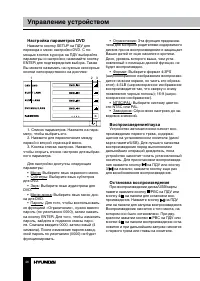
46 47 Управление устройством Управление устройством Настройка параметров DVD Нажмите кнопку SETUP на ПДУ для перехода к меню настройки DVD. С по-мощью кнопок курсора на ПДУ выбирайте параметры и настройки; нажимайте кнопку ENTER для подтверждения выбора. Также Вы можете нажимать на нужные сенсорные ...
Page 50 - Руководство по устранению; Неисправность
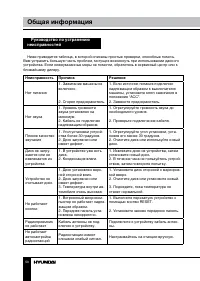
50 51 Общая информация Общая информация Руководство по устранению неисправностей Ниже приводится таблица, в которой описаны простые проверки, способные помочь Вам устранить большую часть проблем, могущих возникнуть при использовании данного устройства. Если нижеуказанные меры не помогли, обратитесь ...
Page 51 - Технические характеристики; Общие
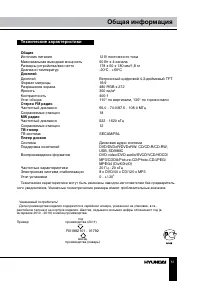
50 51 Общая информация Общая информация Технические характеристики Общие Источник питания 12 В постоянного тока Максимальная выходная мощность 50 Вт х 4 канала Размеры устройства/вес нетто 178 х 50 х 180 мм/1,8 кг Диапазон температур -20 0 С - +60 0 С Дисплей Дисплей Встроенный цифровой 4,3-дюймовый...