Page 2 - HyperX Cloud II Headset
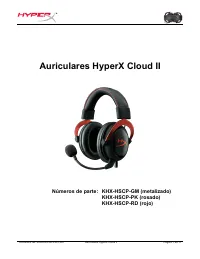
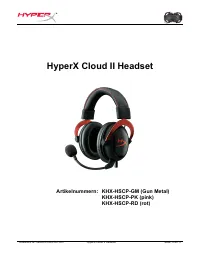
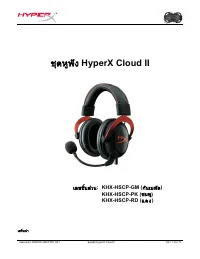
Document No. 480KHX-HSCP001.A01 HyperX Cloud II Headset Page 1 of 1 1 HyperX Cloud II Headset Part Numbers: KHX-HSCP-GM (Gun Metal) KHX-HSCP-PK (Pink) KHX-HSCP-RD (Red)
Page 3 - Introduction
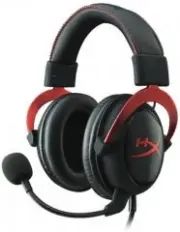
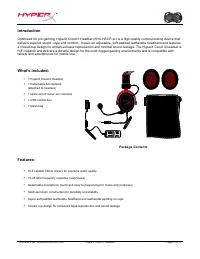
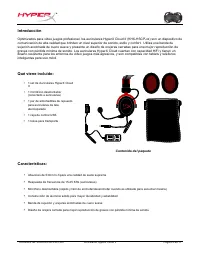
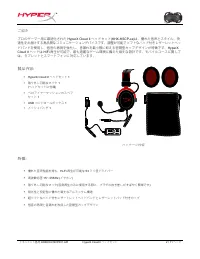
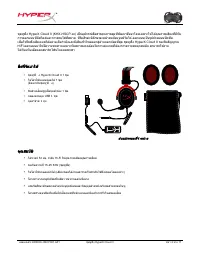
Document No. 480KHX-HSCP001.A01 HyperX Cloud II Headset Page 2 of 1 1 Introduction Optimized for pro-gaming, HyperX Cloud II Headset (KHX-HSCP-xx) is a high-quality communicating device that delivers superior sound, style and comfort. It uses an adjustable, soft-padded leatherette headband and featu...
Page 4 - Technical Specifications:; Headset
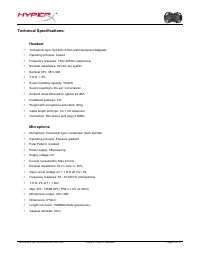
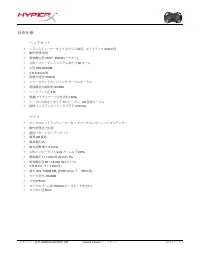
Document No. 480KHX-HSCP001.A01 HyperX Cloud II Headset Page 3 of 1 1 Technical Specifications: Headset • Transducer type: Dynamic 53mm with Neodynium Magnets • Operating principle: Closed • Frequency response: 15Hz-25KHz (earphones) • Nominal impedance: 60 ohm per system • Nominal SPL: 98+/-3dB • T...
Page 5 - Overview; Aluminum arm to adjust headband
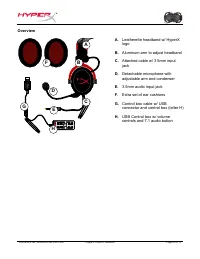
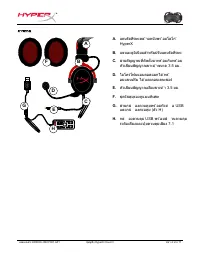
Document No. 480KHX-HSCP001.A01 HyperX Cloud II Headset Page 4 of 1 1 Overview D + + -‐ -‐ 7. 1 G H A B F C E A. Leatherette headband w/ HyperXlogo B. Aluminum arm to adjust headband C. Attached cable w/ 3.5mm inputjack D. Detachable microphone withadjustable arm and condenser E. 3.5mm audio input...
Page 6 - Usage (Direct Connect) with No Control Box
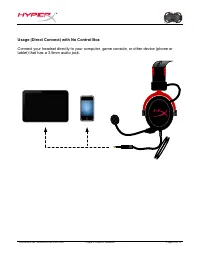
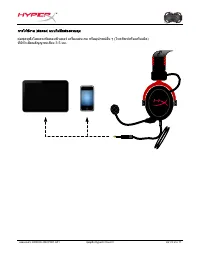
Document No. 480KHX-HSCP001.A01 HyperX Cloud II Headset Page 5 of 1 1 Usage (Direct Connect) with No Control Box Connect your headset directly to your computer, game console, or other device (phone or tablet) that has a 3.5mm audio jack.
Page 8 - Open up Control Panel and select; Sound
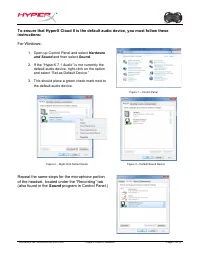
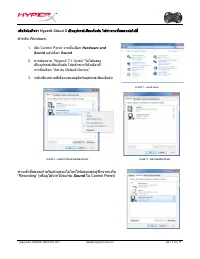
Document No. 480KHX-HSCP001.A01 HyperX Cloud II Headset Page 7 of 11 To ensure that HyperX Cloud II is the default audio device, you must follow these instructions: For Windows: 1. Open up Control Panel and select Hardware and Sound and then select Sound . 2. If the “ HyperX 7.1 Audio” is not curren...
Page 9 - System Preferences
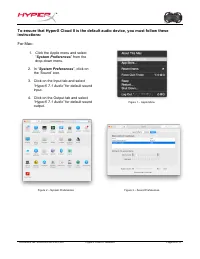
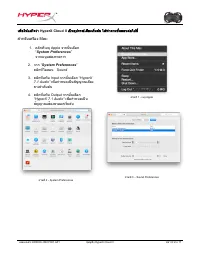
Document No. 480KHX-HSCP001.A01 HyperX Cloud II Headset Page 8 of 11 To ensure that HyperX Cloud II is the default audio device, you must follow these instructions: For Mac: 1. Click the Apple menu and select “ System Preferences ” from the drop-down menu. 2. In “ System Preferences ”, click on the ...
Page 10 - For optimal use with PlayStation; Navigate to the Settings Menu and select it.; PlayStation 4
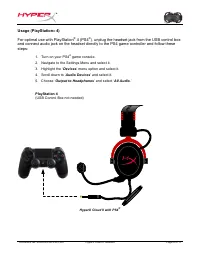
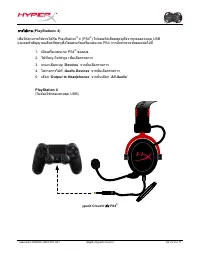
Document No. 480KHX-HSCP001.A01 HyperX Cloud II Headset Page 9 of 11 Usage (PlayStation ® 4) For optimal use with PlayStation ® 4 (PS4 ® ), unplug the headset jack from the USB control box and connect audio jack on the headset directly to the PS4 game controller and follow these steps: 1. Turn on yo...
Page 11 - To use the HyperX Cloud II headset with Xbox; Xbox One, requires controller adapter
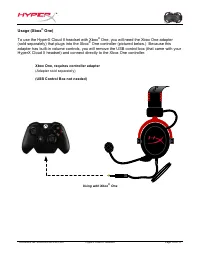
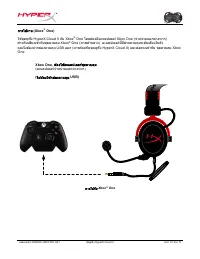
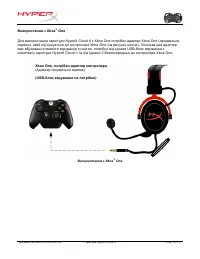
Document No. 480KHX-HSCP001.A01 HyperX Cloud II Headset Page 10 of 1 1 Usage (Xbox ® One) To use the HyperX Cloud II headset with Xbox ® One, you will need the Xbox One adapter (sold separately) that plugs into the Xbox ® One controller (pictured below.) Because this adapter has built-in volume cont...
Page 12 - Usage with Mobile Device (Phone or Tablet)
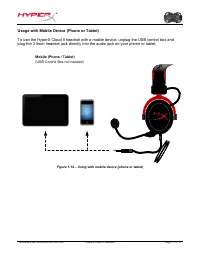
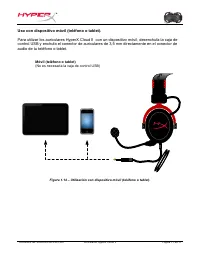
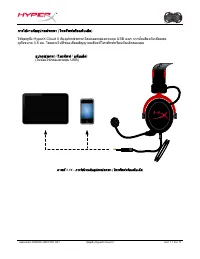
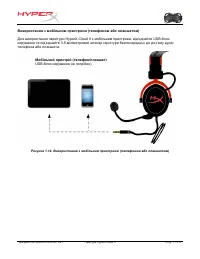
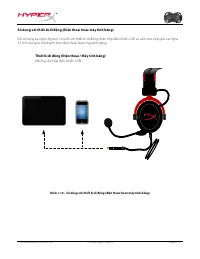
Document No. 480KHX-HSCP001.A01 HyperX Cloud II Headset Page 11 of 1 1 Usage with Mobile Device (Phone or Tablet) To use the HyperX Cloud II headset with a mobile device, unplug the USB control box and plug the 3.5mm headset jack directly into the audio jack on your phone or tablet. Mobile (Phone / ...
Page 13 - Auriculares HyperX Cloud II
Document No. 480KHX-HSCP001.A01 Auriculares HyperX Cloud II Página 1 de 11 Auriculares HyperX Cloud II Números de parte: KHX-HSCP-GM (metalizado) KHX-HSCP-PK (rosado) KHX-HSCP-RD (rojo)
Page 14 - Introducción
Document No. 480KHX-HSCP001.A01 Auriculares HyperX Cloud II Página 2 de 1 1 Introducción Optimizados para video juegos profesional, los auriculares HyperX Cloud II (KHX-HSCP-xx) son un dispositivo de comunicación de alta calidad que brindan un nivel superior de sonido, estilo y confort. Utiliza una ...
Page 15 - Especificaciones técnicas:; Auriculares
Document No. 480KHX-HSCP001.A01 Auriculares HyperX Cloud II Página 3 de 1 1 Especificaciones técnicas: Auriculares • Tipo de transductor: Dinámico 53mm con magnetos de neodinio • Principio operativo: Cerrado • Respuesta de frecuencia: 15Hz-25KHz (auriculares) • Impedancia nominal 60 ohmios por siste...
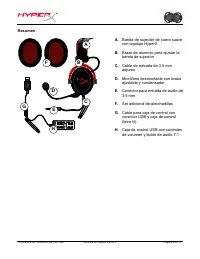
Page 16 - Resumen; Set adicional de almohadillas
Document No. 480KHX-HSCP001.A01 Auriculares HyperX Cloud II Página 4 de 1 1 Resumen D + + -‐ -‐ 7. 1 G H A B F C E A. Banda de sujeción de cuero suavecon logotipo HyperX B. Brazo de aluminio para ajustar labanda de sujeción C. Cable de entrada de 3,5 mmadjunto D. Micrófono desmontable con brazoaju...
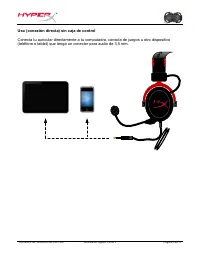
Page 17 - Uso (conexión directa) sin caja de control
Document No. 480KHX-HSCP001.A01 Auriculares HyperX Cloud II Página 5 de 1 1 Uso (conexión directa) sin caja de control Conecta tu auricular directamente a tu computadra, consola de juegos u otro dispositivo (teléfono o tablet) que tenga un conector para audio de 3,5 mm.
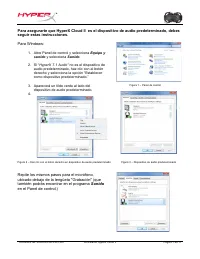
Page 19 - Abre Panel de control y selecciona; Sonido
Document No. 480KHX-HSCP001.A01 Auriculares HyperX Cloud II Página 7 de 1 1 Para asegurarte que HyperX Cloud II es el dispositivo de audio predeterminado, debes seguir estas instrucciones. Para Windows: 1. Abre Panel de control y selecciona Equipo y sonido y selecciona Sonido . 2. Si “ HyperX 7.1 Au...
Page 20 - Preferencias del sistema
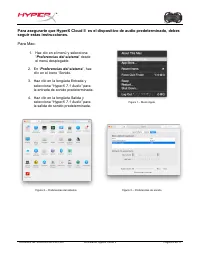
Document No. 480KHX-HSCP001.A01 Auriculares HyperX Cloud II Página 8 de 1 1 Para asegurarte que HyperX Cloud II es el dispositivo de audio predeterminado, debes seguir estas instrucciones. Para Mac: 1. Haz clic en el menú y selecciona “ Preferencias del sistema ” desde el menú desplegable. 2. En “ P...
Page 21 - Para uso opcional con PlayStation; Enciende tu consola de juego PS4; (No es necesaria la caja de control USB)
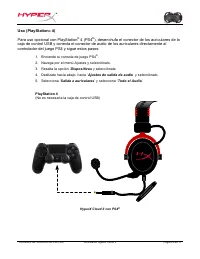
Document No. 480KHX-HSCP001.A01 Auriculares HyperX Cloud II Página 9 de 1 1 Uso (PlayStation ® 4) Para uso opcional con PlayStation ® 4 (PS4 ® ), desenchufa el conector de los auriculares de la caja de control USB y conecta el conector de audio de los auriculares directamente al controlador del jueg...
Page 22 - Para utilizar con los auriculares HyperX Cloud II con Xbox; Xbox One requiere un adaptador para el controlador
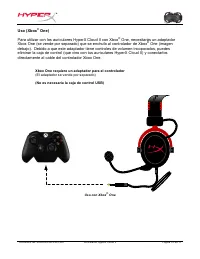
Document No. 480KHX-HSCP001.A01 Auriculares HyperX Cloud II Página 10 de 1 1 Uso (Xbox ® One) Para utilizar con los auriculares HyperX Cloud II con Xbox ® One, necesitarás un adaptador Xbox One (se vende por separado) que se enchufa al controlador de Xbox ® One (imagen debajo). Debido a que este ada...
Page 25 - Einführung
Dokument Nr. 480KHX-HSCP001.A01 HyperX Cloud II Headset Seite 2 von 1 1 Einführung Das für Pro-Gaming optimierte HyperX Cloud II Headset (KHX-HSCP-xx) ist ein hochwertiges Kommunikationsgerät, das Klang, Optik und Komfort auf überragendem Niveau bietet. Es verfügt über einen anpassbaren, weich gepol...
Page 26 - Kopfhörer
Dokument Nr. 480KHX-HSCP001.A01 HyperX Cloud II Headset Seite 3 von 1 1 Technische Daten: Kopfhörer • Wandlertyp: Dynamisch, Ø 53 mm mit Neodym-Magneten • Funktionsweise: geschlossen • Frequenzbereich: 15 Hz–25 kHz (Kopfhörer) • Nennwiderstand: 60 Ohm pro System • Nennschalldruck: 98 +/- 3 dB • Klir...
Page 27 - Übersicht; Kunstlederbügel mit HyperX Logo
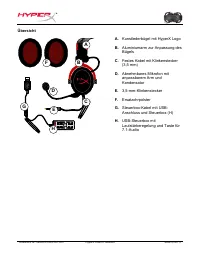
Dokument Nr. 480KHX-HSCP001.A01 HyperX Cloud II Headset Seite 4 von 1 1 Übersicht D + + -‐ -‐ 7. 1 G H A B F C E A. Kunstlederbügel mit HyperX Logo B. Aluminiumarm zur Anpassung desBügels C. Festes Kabel mit Klinkenstecker(3,5 mm) D. Abnehmbares Mikrofon mitanpassbarem Arm undKondensator E. 3,5-mm...
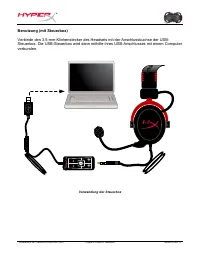
Page 28 - Benutzung (Direktverbindung) ohne Steuerbox
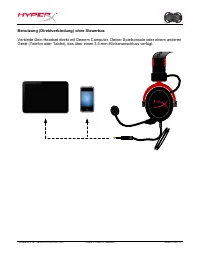
Dokument Nr. 480KHX-HSCP001.A01 HyperX Cloud II Headset Seite 5 von 1 1 Benutzung (Direktverbindung) ohne Steuerbox Verbinde Dein Headset direkt mit Deinem Computer, Deiner Spielkonsole oder einem anderen Gerät (Telefon oder Tablet), das über einen 3,5-mm-Klinkenanschluss verfügt.
Page 30 - Öffne die Systemsteuerung und wähle erst; „Sound“
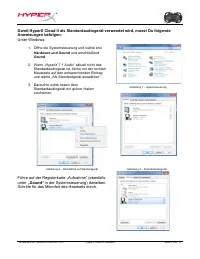
Dokument Nr. 480KHX-HSCP001.A01 HyperX Cloud II Headset Seite 7 von 1 1 Damit HyperX Cloud II als Standardaudiogerät verwendet wird, musst Du folgende Anweisungen befolgen: Unter Windows: 1. Öffne die Systemsteuerung und wähle erst Hardware und Sound und anschließend Sound . 2. Wenn „ HyperX 7.1 Aud...
Page 31 - Systemeinstellungen
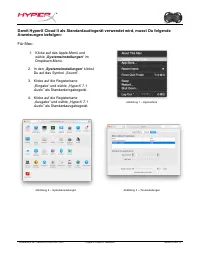
Dokument Nr. 480KHX-HSCP001.A01 HyperX Cloud II Headset Seite 8 von 1 1 Damit HyperX Cloud II als Standardaudiogerät verwendet wird, musst Du folgende Anweisungen befolgen: Für Mac: 1. Klicke auf das Apple-Menü und wähle „ Systemeinstellungen “ im Dropdown-Menü. 2. In den „ Systemeinstellungen “ kli...
Page 32 - Benutzung (PlayStation; Für eine optimale Verwendung mit der PlayStation; Navigiere zum Menü „Einstellungen“ und öffne es.
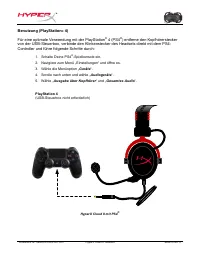
Dokument Nr. 480KHX-HSCP001.A01 HyperX Cloud II Headset Seite 9 von 1 1 Benutzung (PlayStation ® 4) Für eine optimale Verwendung mit der PlayStation ® 4 (PS4 ® ) entferne den Kopfhörerstecker von der USB-Steuerbox, verbinde den Klinkenstecker des Headsets direkt mit dem PS4-Controller und führe folg...
Page 33 - Um das HyperX Cloud II Headset mit der Xbox
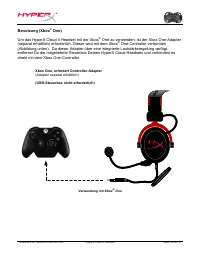
Dokument Nr. 480KHX-HSCP001.A01 HyperX Cloud II Headset Seite 10 von 1 1 Benutzung (Xbox ® One) Um das HyperX Cloud II Headset mit der Xbox ® One zu verwenden, ist der Xbox One-Adapter (separat erhältlich) erforderlich. Dieser wird mit dem Xbox ® One-Controller verbunden (Abbildung unten). Da dieser...
Page 34 - Verwendung mit Mobilgerät (Telefon oder Tablet)
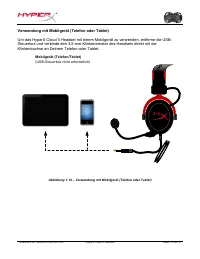
Dokument Nr. 480KHX-HSCP001.A01 HyperX Cloud II Headset Seite 11 von 1 1 Verwendung mit Mobilgerät (Telefon oder Tablet) Um das HyperX Cloud II Headset mit einem Mobilgerät zu verwenden, entferne die USB-Steuerbox und verbinde den 3,5-mm-Klinkenstecker des Headsets direkt mit der Klinkenbuchse an De...
Page 35 - Casque-micro HyperX Cloud II
Document No. 480KHX-HSCP001.A01 Casque-micro HyperX Cloud II Page 1 sur 1 1 Casque-micro HyperX Cloud II Références : KHX-HSCP-GM (bronze) KHX-HSCP-PK (rose) KHX-HSCP-RD (rouge)
Page 37 - Caractéristiques techniques :; Casque avec micro
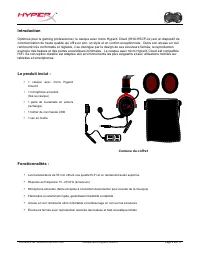
Document No. 480KHX-HSCP001.A01 Casque-micro HyperX Cloud II Page 3 sur 1 1 Caractéristiques techniques : Casque avec micro • Type de transducteur : Dynamique Ø 53mm avec aimants Neodynium • Principe d'utilisation : Fermé • Réponse en fréquence : 15Hz-25KHz (écouteurs) • Impédance nominale : 60 ohm ...
Page 38 - Présentation; Arceau en cuir avec logo HyperX
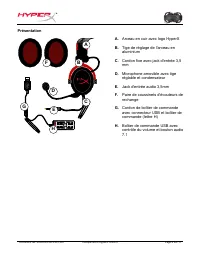
Document No. 480KHX-HSCP001.A01 Casque-micro HyperX Cloud II Page 4 sur 1 1 Présentation D + + -‐ -‐ 7. 1 G H A B F C E A. Arceau en cuir avec logo HyperX B. Tige de réglage de l'arceau enaluminium C. Cordon fixe avec jack d'entrée 3,5mm D. Microphone amovible avec tigeréglable et condensateur E. ...
Page 39 - Utilisation sans boîtier de commande (Connexion directe)
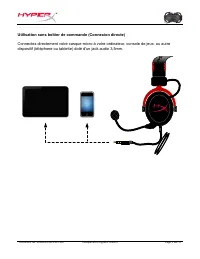
Document No. 480KHX-HSCP001.A01 Casque-micro HyperX Cloud II Page 5 sur 1 1 Utilisation sans boîtier de commande (Connexion directe) Connectez directement votre casque-micro à votre ordinateur, console de jeux, ou autre dispositif (téléphone ou tablette) doté d'un jack audio 3,5mm.
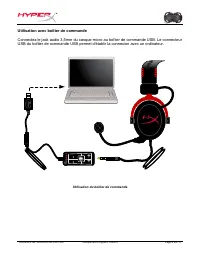
Page 40 - Utilisation avec boîtier de commande
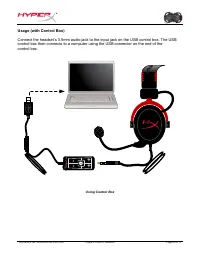
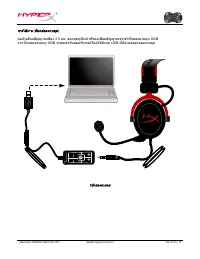
Document No. 480KHX-HSCP001.A01 Casque-micro HyperX Cloud II Page 6 sur 1 1 Utilisation avec boîtier de commande Connectez le jack audio 3,5mm du casque-micro au boîtier de commande USB. Le connecteur USB du boîtier de commande USB permet d'établir la connexion avec un ordinateur. + + - - 7.1 Utilis...
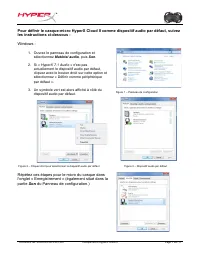
Page 41 - Ouvrez le panneau de configuration et; Son
Document No. 480KHX-HSCP001.A01 Casque-micro HyperX Cloud II Page 7 sur 1 1 Pour définir le casque-micro HyperX Cloud II comme dispositif audio par défaut, suivez les instructions ci-dessous : Windows : 1. Ouvrez le panneau de configuration et sélectionnez Matériel audio , puis Son . 2. Si « HyperX ...
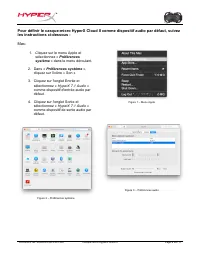
Page 42 - Cliquez sur le menu Apple et
Document No. 480KHX-HSCP001.A01 Casque-micro HyperX Cloud II Page 8 sur 1 1 Pour définir le casque-micro HyperX Cloud II comme dispositif audio par défaut, suivez les instructions ci-dessous : Mac: 1. Cliquez sur le menu Apple et sélectionnez « Préférences système » dans le menu déroulant. 2. Dans «...
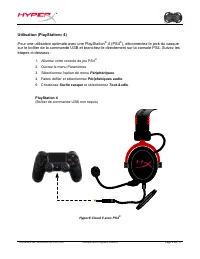
Page 43 - Utilisation (PlayStation; Pour une utilisation optimale avec une PlayStation; Allumez votre console de jeu PS4
Document No. 480KHX-HSCP001.A01 Casque-micro HyperX Cloud II Page 9 sur 1 1 Utilisation (PlayStation ® 4) Pour une utilisation optimale avec une PlayStation ® 4 (PS4 ® ), déconnectez le jack du casque sur le boîtier de la commande USB et branchez-le directement sur la console PS4. Suivez les étapes ...
Page 44 - Pour utiliser le casque-micro HyperX Cloud II avec une Xbox; Xbox One, Adaptateur de contrôleur requis
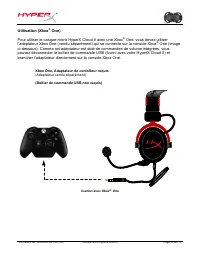
Document No. 480KHX-HSCP001.A01 Casque-micro HyperX Cloud II Page 10 sur 1 1 Utilisation (Xbox ® One) Pour utiliser le casque-micro HyperX Cloud II avec une Xbox ® One, vous devez utiliser l'adaptateur Xbox One (vendu séparément) qui se connecte sur la console Xbox ® One (image ci-dessous). Comme ce...
Page 45 - Utilisation avec un dispositif mobile (téléphone ou tablette)
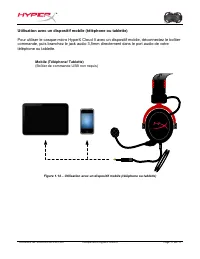
Document No. 480KHX-HSCP001.A01 Casque-micro HyperX Cloud II Page 11 sur 1 1 Utilisation avec un dispositif mobile (téléphone ou tablette) Pour utiliser le casque-micro HyperX Cloud II avec un dispositif mobile, déconnectez le boîtier commande, puis branchez le jack audio 3,5mm directement dans le p...
Page 46 - Cuffie HyperX Cloud II
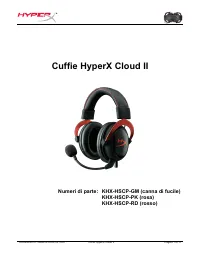
Documento N.: 480KHX-HSCP001.A01 Cuffie HyperX Cloud II Pagina 1 di 1 1 Cuffie HyperX Cloud II Numeri di parte: KHX-HSCP-GM (canna di fucile) KHX-HSCP-PK (rosa) KHX-HSCP-RD (rosso)
Page 47 - Introduzione
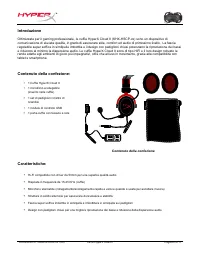
Documento N.: 480KHX-HSCP001.A01 Cuffie HyperX Cloud II Pagina 2 di 1 1 Introduzione Ottimizzate per il gaming professionale, le cuffie HyperX Cloud II (KHX-HSCP-xx) sono un dispositivo di comunicazione di elevata qualità, in grado di assicurare stile, comfort ed audio di primissimo livello. La fasc...
Page 48 - Specifiche tecniche:; Cuffie
Documento N.: 480KHX-HSCP001.A01 Cuffie HyperX Cloud II Pagina 3 di 1 1 Specifiche tecniche: Cuffie • Tipo di trasduttore: Dinamico da 53mm con magneti al neodimio • Principio di funzionamento: chiuso • Risposta in frequenza: 15Hz-25KHz (cuffie) • Impedenza nominale: 60 ohm per sistema • SPL nominal...
Page 49 - Descrizione generale; Cavo con jack da 3,5mm
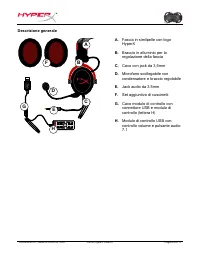
Documento N.: 480KHX-HSCP001.A01 Cuffie HyperX Cloud II Pagina 4 di 1 1 Descrizione generale D + + -‐ -‐ 7. 1 G H A B F C E A. Fascia in similpelle con logoHyperX B. Braccio in alluminio per laregolazione della fascia C. Cavo con jack da 3,5mm D. Microfono scollegabile concondensatore e braccio re...
Page 50 - Utilizzo (collegamento diretto) senza modulo di controllo
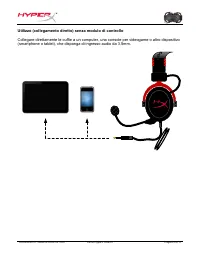
Documento N.: 480KHX-HSCP001.A01 Cuffie HyperX Cloud II Pagina 5 di 1 1 Utilizzo (collegamento diretto) senza modulo di controllo Collegare direttamente le cuffie a un computer, una console per videogame o altro dispositivo (smartphone o tablet), che disponga di ingresso audio da 3,5mm.
Page 51 - Utilizzo con modulo di controllo
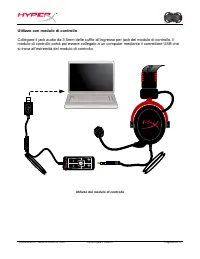
Documento N.: 480KHX-HSCP001.A01 Cuffie HyperX Cloud II Pagina 6 di 1 1 Utilizzo con modulo di controllo Collegare il jack audio da 3,5mm delle cuffie all’ingresso per jack del modulo di controllo. Il modulo di controllo potrà poi essere collegato a un computer mediante il connettore USB che si trov...
Page 52 - Aprire il Pannello di controllo e selezionare; Audio
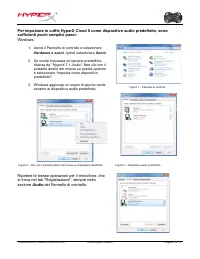
Documento N.: 480KHX-HSCP001.A01 Cuffie HyperX Cloud II Pagina 7 di 1 1 Per impostare le cuffie HyperX Cloud II come dispositivo audio predefinito, sono sufficienti pochi semplici passi: Windows: 1. Aprire il Pannello di controllo e selezionare Hardware e suoni , quindi selezionare Suoni . 2. Se ris...
Page 53 - Fare clic sul menu Apple e
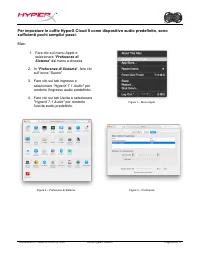
Documento N.: 480KHX-HSCP001.A01 Cuffie HyperX Cloud II Pagina 8 di 1 1 Per impostare le cuffie HyperX Cloud II come dispositivo audio predefinito, sono sufficienti pochi semplici passi: Mac: 1. Fare clic sul menu Apple e selezionare " Preferenze di Sistema " dal menu a discesa. 2. In " ...
Page 54 - Utilizzo con PlayStation; Per un impiego ottimale con la console PlayStation; Accendere la console PS4; (Modulo di controllo USB non necessario)
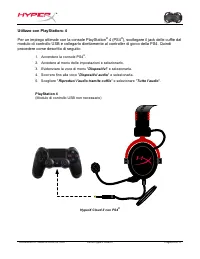
Documento N.: 480KHX-HSCP001.A01 Cuffie HyperX Cloud II Pagina 9 di 1 1 Utilizzo con PlayStation ® 4 Per un impiego ottimale con la console PlayStation ® 4 (PS4 ® ), scollegare il jack delle cuffie dal modulo di controllo USB e collegarlo direttamente al controller di gioco della PS4. Quindi procede...
Page 55 - Per utilizzare la cuffie HyperX Cloud II con la console Xbox; Xbox One, richiede adattatore per controller
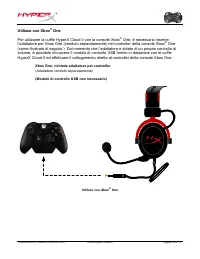
Documento N.: 480KHX-HSCP001.A01 Cuffie HyperX Cloud II Pagina 10 di 1 1 Utilizzo con Xbox ® One Per utilizzare la cuffie HyperX Cloud II con la console Xbox ® One, è necessario inserire l’adattatore per Xbox One (venduto separatamente) nel controller della console Xbox ® One (come illustrato di seg...
Page 56 - Utilizzo con dispositivo mobile (Smartphone o Tablet)
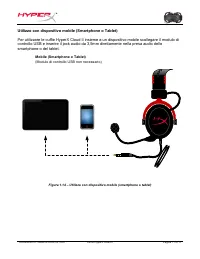
Documento N.: 480KHX-HSCP001.A01 Cuffie HyperX Cloud II Pagina 11 di 1 1 Utilizzo con dispositivo mobile (Smartphone o Tablet) Per utilizzare le cuffie HyperX Cloud II insieme a un dispositivo mobile scollegare il modulo di controllo USB e inserire il jack audio da 3,5mm direttamente nella presa aud...
Page 57 - Headset HyperX Cloud II
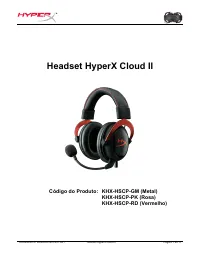
Documento Nº 480KHX-HSCP001.A01 Headset HyperX Cloud II Página 1 do 1 1 Headset HyperX Cloud II Código do Produto: KHX-HSCP-GM (Metal) KHX-HSCP-PK (Rosa) KHX-HSCP-RD (Vermelho)
Page 58 - Introdução
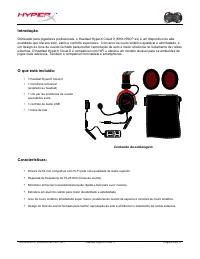
Documento Nº 480KHX-HSCP001.A01 Headset HyperX Cloud II Página 2 do 1 1 Introdução Otimizado para jogadores profissionais, o Headset HyperX Cloud II (KHX-HSCP-xx) é um dispositivo de alta qualidade que oferece som, estilo e conforto superiores. Com arco de couro sintético ajustável e almofadado, e u...
Page 59 - Especificações técnicas:
Documento Nº 480KHX-HSCP001.A01 Headset HyperX Cloud II Página 3 do 1 1 Especificações técnicas: Headset • Tipo de transdutor: Dinâmico 53 mm com ímãs de neodímio • Princípio operacional: Fechado • Resposta de frequência: 15Hz-25KHz (fones de ouvido) • Impedância nominal: 60 ohm por sistema • SPL no...
Page 60 - Visão geral; Par de protetores de ouvido extra
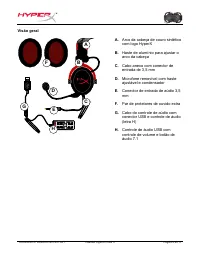
Documento Nº 480KHX-HSCP001.A01 Headset HyperX Cloud II Página 4 do 1 1 Visão geral D + + -‐ -‐ 7. 1 G H A B F C E A. Arco da cabeça de couro sintéticocom logo HyperX B. Haste de alumínio para ajustar oarco da cabeça C. Cabo anexo com conector deentrada de 3,5 mm D. Microfone removível com hasteaj...
Page 61 - Uso (Conexão Direta) sem o controle de áudio
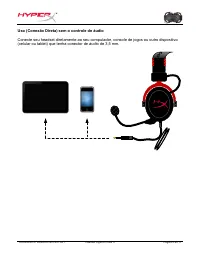
Documento Nº 480KHX-HSCP001.A01 Headset HyperX Cloud II Página 5 do 1 1 Uso (Conexão Direta) sem o controle de áudio Conecte seu headset diretamente ao seu computador, console de jogos ou outro dispositivo (celular ou tablet) que tenha conector de áudio de 3,5 mm.
Page 63 - Sons e; Áudio
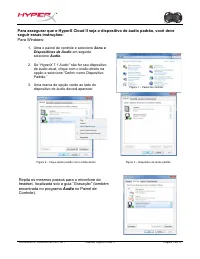
Documento Nº 480KHX-HSCP001.A01 Headset HyperX Cloud II Página 7 do 1 1 Para assegurar que o HyperX Cloud II seja o dispositivo de áudio padrão, você deve seguir essas instruções: Para Windows: 1. Abra o painel de controle e selecione Sons e Dispositivos de Áudio em seguida selecione Áudio . 2. Se “...
Page 64 - Preferências do Sistema
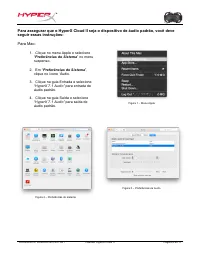
Documento Nº 480KHX-HSCP001.A01 Headset HyperX Cloud II Página 8 do 1 1 Para assegurar que o HyperX Cloud II seja o dispositivo de áudio padrão, você deve seguir essas instruções: Para Mac: 1. Clique no menu Apple e selecione “ Preferências do Sistema ” no menu suspenso. 2. Em “ Preferências do Sist...
Page 65 - Para uso com o PlayStation; Ligue seu console de jogos PS4; (O controle de áudio USB não é necessário)
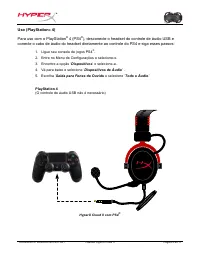
Documento Nº 480KHX-HSCP001.A01 Headset HyperX Cloud II Página 9 do 1 1 Uso (PlayStation ® 4) Para uso com o PlayStation ® 4 (PS4 ® ), desconecte o headset do controle de áudio USB e conecte o cabo de áudio do headset diretamente ao controle do PS4 e siga esses passos: 1. Ligue seu console de jogos ...
Page 66 - Para usar o headset HyperX Cloud II com Xbox; Xbox One, requer adaptador para o controle
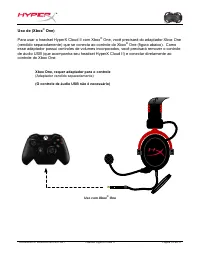
Documento Nº 480KHX-HSCP001.A01 Headset HyperX Cloud II Página 10 do 1 1 Uso de (Xbox ® One) Para usar o headset HyperX Cloud II com Xbox ® One, você precisará do adaptador Xbox One (vendido separadamente) que se conecta ao controle do Xbox ® One (figura abaixo). Como esse adaptador possui controles...
Page 67 - Uso com Dispositivo Móvel (Celular ou Tablet)
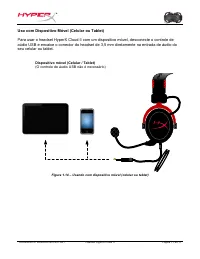
Documento Nº 480KHX-HSCP001.A01 Headset HyperX Cloud II Página 11 do 1 1 Uso com Dispositivo Móvel (Celular ou Tablet) Para usar o headset HyperX Cloud II com um dispositivo móvel, desconecte o controle de aúdio USB e encaixe o conector do headset de 3,5 mm diretamente na entrada de áudio do seu cel...
Page 68 - Zestaw s
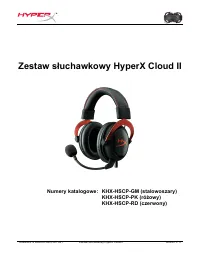
Dokument nr 480KHX-HSCP001.A01 Zestaw s ł uchawkowy HyperX Cloud II Strona 1 z 1 1 Zestaw s ł uchawkowy HyperX Cloud II Numery katalogowe: KHX-HSCP-GM (stalowoszary) KHX-HSCP-PK (ró ż owy) KHX-HSCP-RD (czerwony)
Page 69 - Wprowadzenie
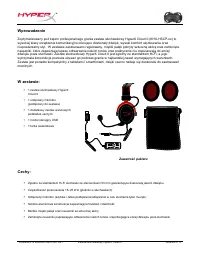
Dokument nr 480KHX-HSCP001.A01 Zestaw s ł uchawkowy HyperX Cloud II Strona 2 z 1 1 Wprowadzenie Zoptymalizowany pod k ą tem profesjonalnego grania zestaw s ł uchawkowy HyperX Cloud II (KHX-HSCP-xx) to wysokiej klasy urz ą dzenie komunikacyjne oferuj ą ce doskona ł y d ź wi ę k, wysoki komfort u ż yt...
Page 71 - Przegl
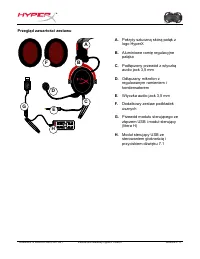
Dokument nr 480KHX-HSCP001.A01 Zestaw s ł uchawkowy HyperX Cloud II Strona 4 z 1 1 Przegl ą d zawarto ś ci zestawu D + + -‐ -‐ 7. 1 G H A B F C E A. Pokryty sztuczn ą skór ą pa łą k z logo HyperX B. Aluminiowe rami ę regulacyjne pa łą ka C. Pod łą czony przewód z wtyczk ą audio jack 3,5 mm D. Od ł...
Page 72 - Pod
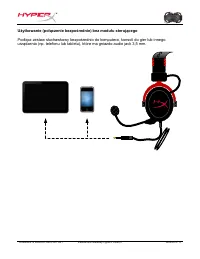
Dokument nr 480KHX-HSCP001.A01 Zestaw s ł uchawkowy HyperX Cloud II Strona 5 z 1 1 U ż ytkowanie (po łą czenie bezpo ś rednie) bez modu ł u steruj ą cego Pod łą cz zestaw s ł uchawkowy bezpo ś rednio do komputera, konsoli do gier lub innego urz ą dzenia (np. telefonu lub tabletu), które ma gniazdo a...
Page 73 - em steruj
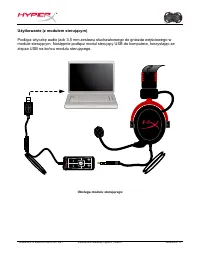
Dokument nr 480KHX-HSCP001.A01 Zestaw s ł uchawkowy HyperX Cloud II Strona 6 z 1 1 U ż ytkowanie (z modu ł em steruj ą cym) Pod łą cz wtyczk ę audio jack 3,5 mm zestawu s ł uchawkowego do gniazda wej ś ciowego w module steruj ą cym. Nast ę pnie pod łą cz modu ł steruj ą cy USB do komputera, korzysta...
Page 74 - Powtórz te same czynno
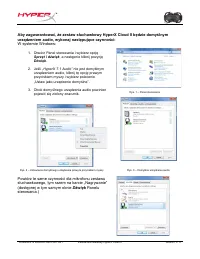
Dokument nr 480KHX-HSCP001.A01 Zestaw s ł uchawkowy HyperX Cloud II Strona 7 z 1 1 Aby zagwarantowa ć , ż e zestaw s ł uchawkowy HyperX Cloud II b ę dzie domy ś lnym urz ą dzeniem audio, wykonaj nast ę puj ą ce czynno ś ci: W systemie Windows: 1. Otwórz Panel sterowania i wybierz opcj ę Sprz ę t i d...
Page 76 - PlayStation
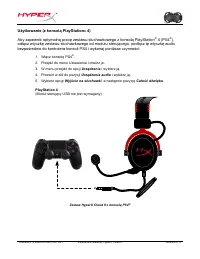
Dokument nr 480KHX-HSCP001.A01 Zestaw s ł uchawkowy HyperX Cloud II Strona 9 z 1 1 U ż ytkowanie (z konsol ą PlayStation ® 4) Aby zapewni ć optymaln ą prac ę zestawu s ł uchawkowego z konsol ą PlayStation ® 4 (PS4 ® ), od łą cz wtyczk ę zestawu s ł uchawkowego od modu ł u steruj ą cego, pod łą cz t ...
Page 77 - Xbox; Konsola Xbox One, wymagany adapter kontrolera
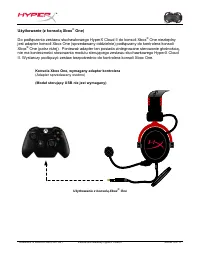
Dokument nr 480KHX-HSCP001.A01 Zestaw s ł uchawkowy HyperX Cloud II Strona 10 z 1 1 U ż ytkowanie (z konsol ą Xbox ® One) Do pod łą czenia zestawu s ł uchawkowego HyperX Cloud II do konsoli Xbox ® One niezb ę dny jest adapter konsoli Xbox One (sprzedawany oddzielnie) pod łą czany do kontrolera konso...
Page 78 - Urz; steruj
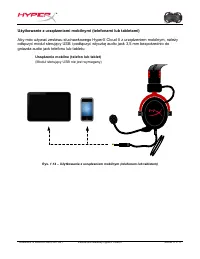
Dokument nr 480KHX-HSCP001.A01 Zestaw s ł uchawkowy HyperX Cloud II Strona 11 z 1 1 U ż ytkowanie z urz ą dzeniami mobilnymi (telefonami lub tabletami) Aby móc u ż ywa ć zestawu s ł uchawkowego HyperX Cloud II z urz ą dzeniem mobilnym, nale ż y od łą czy ć modu ł steruj ą cy USB i pod łą czy ć wtycz...
Page 79 - Гарнитура; Номера
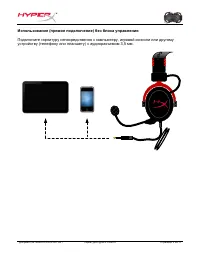
Документ № 480KHX-HSCP001.A01 Гарнитура HyperX Cloud II Страница 1 из 1 1 Гарнитура HyperX Cloud II Номера : KHX-HSCP-GM ( красно - серый ) KHX-HSCP-PK ( розовый ) KHX-HSCP-RD ( красный )
Page 80 - Введение; Комплект; Функции
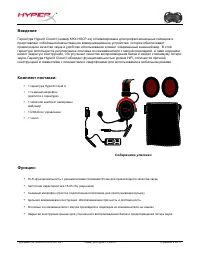
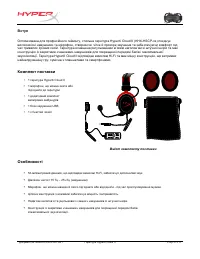
Документ № 480KHX-HSCP001.A01 Гарнитура HyperX Cloud II Страница 2 из 1 1 Введение Гарнитура HyperX Cloud II ( номер KHX-HSCP-xx) оптимизирована для профессиональных геймеров и представляет собой высококачественное коммуникационное устройство , которое обеспечивает превосходное качество звука и удоб...
Page 81 - Технические
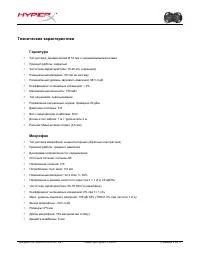
Документ № 480KHX-HSCP001.A01 Гарнитура HyperX Cloud II Страница 3 из 1 1 Технические характеристики Гарнитура • Тип датчика : динамический Ø 53 мм с неодимовыми магнитами • Принцип работы : закрытый • Частотная характеристика : 15-25 кГц ( наушники ) • Номинальный импеданс : 60 Ом на систему • Номи...
Page 82 - Обзор; HyperX
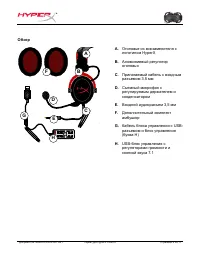
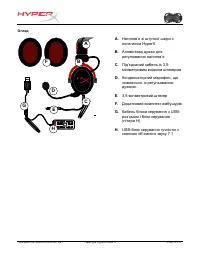
Документ № 480KHX-HSCP001.A01 Гарнитура HyperX Cloud II Страница 4 из 1 1 Обзор D + + -‐ -‐ 7. 1 G H A B F C E A. Оголовье из кожзаменителя с логотипом HyperX B. Алюминиевый регулятор оголовья C. Прилагаемый кабель с входным разъемом 3,5 мм D. Съемный микрофон с регулируемым держателем и конденсат...
Page 85 - Оборудование; Звук
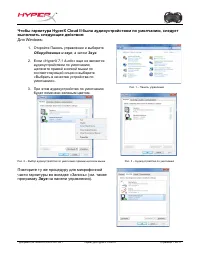
Документ № 480KHX-HSCP001.A01 Гарнитура HyperX Cloud II Страница 7 из 1 1 Чтобы гарнитура HyperX Cloud II была аудиоустройством по умолчанию , следует выполнить следующие действия : Для Windows: 1. Откройте Панель управления и выберите Оборудование и звук , а затем Звук . 2. Если « HyperX 7.1 Audio»...
Page 86 - Для
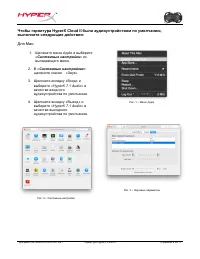
Документ № 480KHX-HSCP001.A01 Гарнитура HyperX Cloud II Страница 8 из 1 1 Чтобы гарнитура HyperX Cloud II была аудиоустройством по умолчанию , выполните следующие действия : Для Mac: 1. Щелкните меню Apple и выберите « Системные настройки » из выпадающего меню . 2. В « Системных настройках » щелкнит...
Page 88 - адаптер
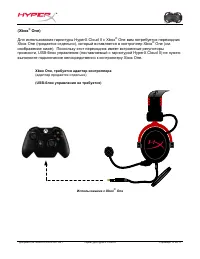
Документ № 480KHX-HSCP001.A01 Гарнитура HyperX Cloud II Страница 10 из 1 1 (Xbox ® One) Для использования гарнитуры HyperX Cloud II с Xbox ® One вам потребуется переходник Xbox One ( продается отдельно ), который вставляется в контроллер Xbox ® One ( см . изображение ниже ). Поскольку этот переходни...
Page 89 - Мобильное; блок
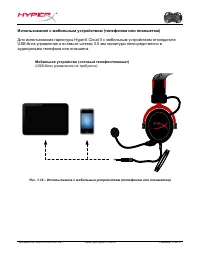
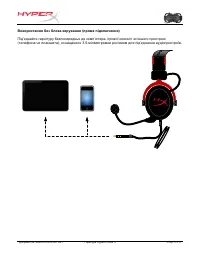
Документ № 480KHX-HSCP001.A01 Гарнитура HyperX Cloud II Страница 11 из 1 1 Использование с мобильным устройством ( телефоном или планшетом ) Для использования гарнитуры HyperX Cloud II с мобильным устройством отсоедините USB- блок управления и вставьте штекер 3,5 мм гарнитуры непосредственно в аудио...
Page 90 - HyperX Cloud II Kulaklık
Belge No. 480KHX-HSCP001.A01 HyperX Cloud II Kulaklık Sayfa 1 / 1 1 HyperX Cloud II Kulaklık Parça Numaraları: KHX-HSCP-GM (Top Metali) KHX-HSCP-PK (Pembe) KHX-HSCP-RD (Kırmızı)
Page 91 - Giri
Belge No. 480KHX-HSCP001.A01 HyperX Cloud II Kulaklık Sayfa 2 / 1 1 Giri ş Profesyonel oyunlar için optimize edilmi ş HyperX Cloud II Kulaklık (KHX-HSCP-xx) üstün ses, tarz ve konfor sunan yüksek kaliteli bir ileti ş im cihazıdır. Bu üründe ayarlanabilir, yumu ş ak yastıklı suni deri kafa bandı kull...
Page 92 - Kulaklık; Mikrofon
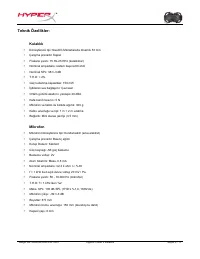
Belge No. 480KHX-HSCP001.A01 HyperX Cloud II Kulaklık Sayfa 3 / 1 1 Teknik Özellikler: Kulaklık • Dönü ş türücü tipi: Neodim Mıknatıslarla dinamik 53 mm • Çalı ş ma prensibi: Kapalı • Frekans yanıtı: 15 Hz-25 KHz (kulaklıklar) • Nominal empedans: sistem ba ş ına 60 ohm • Nominal SPL: 98+/-3 dB • T.H...
Page 93 - Genel Özellikler
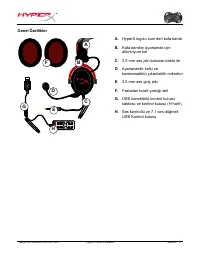
Belge No. 480KHX-HSCP001.A01 HyperX Cloud II Kulaklık Sayfa 4 / 1 1 Genel Özellikler D + + -‐ -‐ 7. 1 G H A B F C E A. HyperX logolu suni deri kafa bandı B. Kafa bandını ayarlamak içinalüminyum kol C. 3,5 mm ses jakı bulunan kablo ile D. Ayarlanabilir kollu vekondansatörlü çıkarılabilir mikrofon E...
Page 94 - Kontrol Kutusu Olmadan Kullanım (Do; Kulaklı
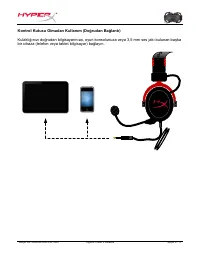
Belge No. 480KHX-HSCP001.A01 HyperX Cloud II Kulaklık Sayfa 5 / 1 1 Kontrol Kutusu Olmadan Kullanım (Do ğ rudan Ba ğ lantı) Kulaklı ğ ınızı do ğ rudan bilgisayarınıza, oyun konsolunuza veya 3,5 mm ses jakı bulunan ba ş ka bir cihaza (telefon veya tablet bilgisayar) ba ğ layın.
Page 96 - HyperX Cloud II'nin varsayılan ses aygıtı oldu; Donanım ve Ses; ın mikrofon bölümü için tekrarlayın (Denetim
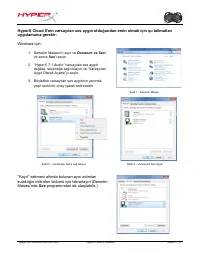
Belge No. 480KHX-HSCP001.A01 HyperX Cloud II Kulaklık Sayfa 7 / 1 1 HyperX Cloud II'nin varsayılan ses aygıtı oldu ğ undan emin olmak için ş u talimatları uygulamanız gerekir: Windows için: 1. Denetim Masası'nı açın ve Donanım ve Ses 'i ve sonra Ses 'i seçin. 2. “ HyperX 7.1 Audio” varsayılan ses ay...
Page 97 - Sistem Tercihleri
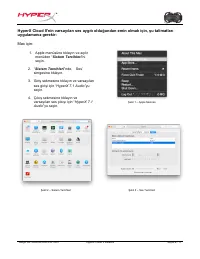
Belge No. 480KHX-HSCP001.A01 HyperX Cloud II Kulaklık Sayfa 8 / 1 1 HyperX Cloud II'nin varsayılan ses aygıtı oldu ğ undan emin olmak için, ş u talimatları uygulamanız gerekir: Mac için: 1. Apple menüsüne tıklayın ve açılır menüden “ Sistem Tercihleri ”ni seçin. 2. “ Sistem Tercihleri ”nde, Ses’ sim...
Page 98 - Kullanım (PlayStation; oyun konsolunuzu açın.; ile
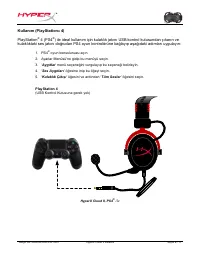
Belge No. 480KHX-HSCP001.A01 HyperX Cloud II Kulaklık Sayfa 9 / 1 1 Kullanım (PlayStation ® 4) PlayStation ® 4 (PS4 ® ) ile ideal kullanım için kulaklık jakını USB kontrol kutusundan çıkarın ve kulaklıktaki ses jakını do ğ rudan PS4 oyun kontrolörüne ba ğ layıp a ş a ğ ıdaki adımları uygulayın: 1. P...
Page 99 - Xbox One, kontrolör adaptörü gerekir; ile Kullanım
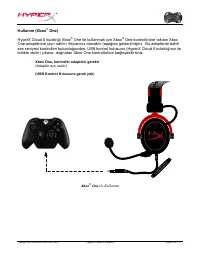
Belge No. 480KHX-HSCP001.A01 HyperX Cloud II Kulaklık Sayfa 10 / 1 1 Kullanım (Xbox ® One) HyperX Cloud II kulaklı ğ ı Xbox ® One ile kullanmak için Xbox ® One kontrolörüne takılan Xbox One adaptörüne (ayrı satılır) ihtiyacınız olacaktır (a ş a ğ ıda gösterilmi ş tir). Bu adaptörde dahili ses seviye...
Page 100 - Mobil Cihaz (Telefon veya Tablet Bilgisayar) ile Kullanım; HyperX Cloud kulaklı
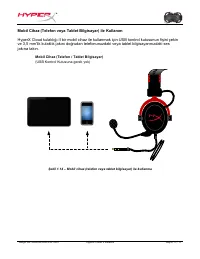
Belge No. 480KHX-HSCP001.A01 HyperX Cloud II Kulaklık Sayfa 11 / 1 1 Mobil Cihaz (Telefon veya Tablet Bilgisayar) ile Kullanım HyperX Cloud kulaklı ğ ı II bir mobil cihaz ile kullanmak için USB kontrol kutusunun fi ş ini çekin ve 3,5 mm'lik kulaklık jakını do ğ rudan telefonunuzdaki veya tablet bilg...
Page 101 - ヘッドセット; 製品番号
ドキュメント番号 480KHX-HSCP001.A01 HyperX Cloud II ヘッドセット 1 / 1 1 ページ HyperX Cloud II ヘッドセット 製品番号 : KHX-HSCP-GM ( ガンメタル ) KHX-HSCP-PK ( ピンク ) KHX-HSCP-RD ( レッド )
Page 102 - ご紹介; 製品内容; パッケージ内容; 特徴
ドキュメント番号 480KHX-HSCP001.A01 HyperX Cloud II ヘッドセット 2 / 1 1 ページ ご紹介 プロのゲーマー用に最適化された HyperX Cloud II ヘッドセット (KHX-HSCP-xx) は、優れた音声とスタイル、快 適性をお届けする高品質なコミュニケーションデバイスです。調整が可能でソフトなパッド付きレザーレットヘッドバンドを使用し、低音の再現を強化し、音漏れを最小限に抑える密閉型カップデザインが特徴です。 HyperX Cloud II ヘッドは HiFi 再生が可能で、最も過酷なゲーム環境に備えた頑丈な設計です。モバイルユースに関して ...
Page 103 - 技術仕様
ドキュメント番号 480KHX-HSCP001.A01 HyperX Cloud II ヘッドセット 3 / 1 1 ページ 技術仕様 : ヘッドセット • トランスデューサータイプ : ネオジム磁石、ダイナミック 53mm 径 • 動作原理 : 密閉 • 周波数応答 :15Hz 〜 25KHz ( イヤホン ) • 公称インピーダンス : システムあたり 60 オーム • 公称 SPL:98±3dB • T.H.D:2% 未満 • 耐電力特性 :150mW • イヤーサウンドカップリング : サーカムオーラル • 周囲騒音の減衰 : 約 20 dBA • ヘッドバンド圧 :5 N • 重量 ...
Page 104 - 概要
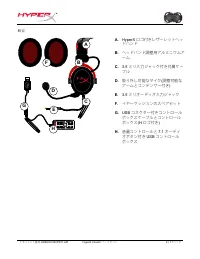
ドキュメント番号 480KHX-HSCP001.A01 HyperX Cloud II ヘッドセット 4 / 1 1 ページ 概要 D + + -‐ -‐ 7. 1 G H A B F C E A. HyperX ロゴ付きレザーレットヘッ ドハンド B. ヘッドバンド調整用アルミニウムアーム C. 3.5 ミリ入力ジャック付き付属ケー ブル D. 取り外し可能なマイク ( 調整可能な ア ームとコンデンサー付き ) E. 3.5 ミリオーディオ入力ジャック F. イヤークッションのスペアセット G. USB コネクター付きコントロール ボックスケーブルとコントロールボックス (H ロゴ付き...
Page 105 - コントロールボックスを使用しない場合
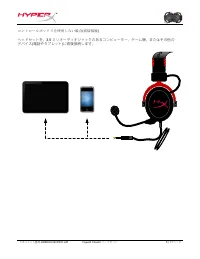
ドキュメント番号 480KHX-HSCP001.A01 HyperX Cloud II ヘッドセット 5 / 1 1 ページ コントロールボックスを使用しない場合 ( 直接接続 ) ヘッドセットを、 3.5 ミリオーディオジャックのあるコンピューター、ゲーム機、またはその他の デバイス ( 電話やタブレット ) に直接接続します。
Page 106 - コントロールボックスを使用する場合; コントロールボックスの使用
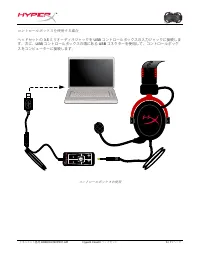
ドキュメント番号 480KHX-HSCP001.A01 HyperX Cloud II ヘッドセット 6 / 1 1 ページ コントロールボックスを使用する場合 ヘッドセットの 3.5 ミリオーディオジャックを USB コントロールボックスの入力ジャックに接続しま す。次に、 USB コントロールボックスの端にある USB コネクターを使用して、コントロールボック スをコンピューターに接続します。 + + - - 7.1 コントロールボックスの使用
Page 107 - 確実に; を既定のオーディオデバイスにするには、以下の説明に従ってください; Windows; ハードウェア; サウンド
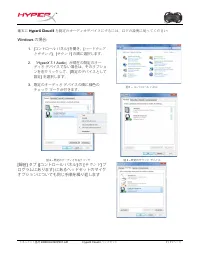
ドキュメント番号 480KHX-HSCP001.A01 HyperX Cloud II ヘッドセット 7 / 1 1 ページ 確実に HyperX Cloud II を既定のオーディオデバイスにするには、以下の説明に従ってください : Windows の場合 : 1. [ コントロール パネル ] を開き、 [ ハードウェア とサウンド ] 、 [ サウンド ] の順に選択します。 2. 「 HyperX 7.1 Audio 」が現在の既定のオー ディオ デバイスでない場合は、そのオプショ ンを右クリックして、 [ 既定のデバイスとして 設定 ] を選択します。 3. 既定のオーディオ デバイ...
Page 108 - Mac; システム環境設
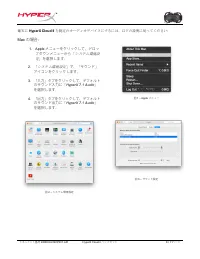
ドキュメント番号 480KHX-HSCP001.A01 HyperX Cloud II ヘッドセット 8 / 1 1 ページ 確実に HyperX Cloud II を既定のオーディオデバイスにするには、以下の説明に従ってください : Mac の場合 : 1. Apple メニューをクリックして、ドロッ プダウンメニューから「 システム環境設 定 」を選択します。 2. 「 システム環境設定 」で、「サウンド」 アイコンをクリックします。 3. 「入力」タブをクリックして、デフォルトのサウンド入力に「 HyperX 7.1 Audio 」 を選択します。 4. 「出力」タブをクリックして、デフ...
Page 109 - の使用; 周辺機器
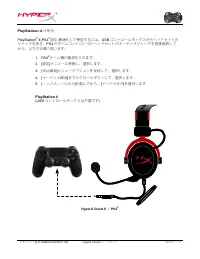
ドキュメント番号 480KHX-HSCP001.A01 HyperX Cloud II ヘッドセット 9 / 1 1 ページ PlayStation ® 4 の使用 PlayStation ® 4(PS4 ® ) 用に最適化して使用するには、 USB コントロールボックスからヘッドセットの ジャックを抜き、 PS4 のゲームコントローラにヘッドセットのオーディオジャックを直接接続して から、以下の手順に従います : 1. PS4 ® ゲーム機の電源を入れます。 2. [ 設定 ] メニューに移動し、選択します。 3. [ 周辺機器 ] メニューオプションを反転して、選択します。 4. [ オー...
Page 110 - Xbox One; には、コントローラーのアダプターが必要です; との使用
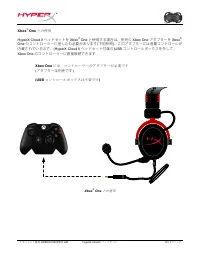
ドキュメント番号 480KHX-HSCP001.A01 HyperX Cloud II ヘッドセット 10 / 1 1 ページ Xbox ® One との使用 HyperX Cloud II ヘッドセットを Xbox ® One と使用する場合は、別売の Xbox One アダプターを Xbox ® One のコントローラーに差し込む必要があります ( 下図参照 ) 。このアダプターには音量コントロールが 内蔵されているので、 (HyperX Cloud II ヘッドセット付属の )USB コントロールボックスを外して、 Xbox One のコントローラーに直接接続できます。 Xbox One...
Page 111 - モバイルデバイス
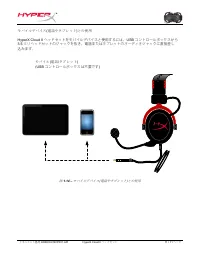
ドキュメント番号 480KHX-HSCP001.A01 HyperX Cloud II ヘッドセット 11 / 1 1 ページ モバイルデバイス ( 電話やタブレット ) との使用 HyperX Cloud II ヘッドセットをモバイルデバイスと使用するには、 USB コントロールボックスから 3.5 ミリヘッドセットのジャックを抜き、電話またはタブレットのオーディオジャックに直接差し 込みます。 モバイル ( 電話 / タブレット ) (USB コントロールボックスは不要です ) 図 1.14 – モバイルデバイス ( 電話やタブレット ) との使用
Page 112 - ชุดหูฟัง; กันเมทัล; แ ด ง
เลขเอกสาร 480KHX-HSCP001.A01 ชุดหูฟัง HyperX Cloud II หน ้า 1 จาก 1 1 ชุดหูฟัง HyperX Cloud II เลขช ิ&นส่วน : KHX-HSCP-GM ( กันเมทัล ) KHX-HSCP-PK ( ชมพู ) KHX-HSCP-RD ( แ ด ง ) เกริ%นนํา
Page 113 - คุณสมบัต ิ
เลขเอกสาร 480KHX-HSCP001.A01 ชุดหูฟัง HyperX Cloud II หน ้า 2 จาก 1 1 ชุดหูฟัง HyperX Cloud II (KHX-HSCP-xx) เป็นอุปกรณ์สื-อสารคุณภาพสูงที-พัฒนาข ึ:นมาโดยเฉพาะให ้ได ้คุณภาพเสียงที-ดีกับ การออกแบบ ที#มีสไตล์และการสวมใส่ที#สบาย ที#รัดศีรษะมีลักษณะคล ้ายหนังบุนุ่มปรับได ้ ออกแบบเป็นรูปถ ้วยแบบปิดท ึบ ...
Page 114 - รายละเอียดทางเทคนิค; ไ ม โ ค ร โ ฟ น
เลขเอกสาร 480KHX-HSCP001.A01 ชุดหูฟัง HyperX Cloud II หน ้า 3 จาก 1 1 รายละเอียดทางเทคนิค : ชุดหูฟัง • ปร ะเภททรานสด ิวเซอร์ : 53 มม . แบบไดนาม ิคพร ้อมแม่เหล็กนีโอดีเนียม • หลักการทํางาน : แบบปิด • ความถี' : 15Hz-25KHz ( ชุดหูฟัง ) • พิกัดความต ้านทาน : 60 โอห์มต่อชุด • SPL พิกัด : 98+/-3dB • T.H.D...
Page 115 - ภ า พ ร ว ม; แถบรัดศีรษะคล
เลขเอกสาร 480KHX-HSCP001.A01 ชุดหูฟัง HyperX Cloud II หน ้า 4 จาก 1 1 ภ า พ ร ว ม D + + -‐ -‐ 7. 1 G H A B F C E A. แถบรัดศีรษะคล ้ายหนังพร ้อมโลโก ้ HyperX B. แขนอะลูมิเนียมสําหรับปรับแถ บรัดศีรษะ C. สายสัญญาณที)ติดตั-งมาพร ้อมกันพร ้อม หัวเสียบสัญญาณขาเข ้าขนาด 3.5 มม . D. ไมโครโฟนแบบถอดแยกได ้พ...
Page 116 - การใ◌ ้ช ้งาน
เลขเอกสาร 480KHX-HSCP001.A01 ชุดหูฟัง HyperX Cloud II หน ้า 5 จาก 1 1 การใ◌ ้ช ้งาน ( ต่อตรง ) แบบไม่มีกล่องควบคุม ต่อชุดหูฟังโดยตรงกับคอมพ ิวเตอร์ เครื%องเล่นเกม หรืออุปกรณ์อื*น ๆ ( โทรศั พท์หรือแท็บเล็ต ) ที#มีหัวเสียบสัญญาณเสียง 3.5 มม .
Page 117 - การใช ้งาน
เลขเอกสาร 480KHX-HSCP001.A01 ชุดหูฟัง HyperX Cloud II หน ้า 6 จาก 1 1 การใช ้งาน ( กับกล่องควบคุม ) ต่อหัวเสียบสัญญาณเสียง 3.5 มม . ของชุดหูฟังเข ้าที0ช่องเสียบสัญญาณขาเข ้าที0กล่องควบคุม USB จากนั&นกล่องควบคุม USB จะต่อเข ้ากับคอมพ ิ วเตอร์โดยใช ้หัวต่อ USB ที#ปลายของกล่องควบคุม + + - - 7.1 ใช ...
Page 118 - เป็นอุปกรณ์เสียงเริ0มต ้น; สําหรับ; เปิด; ทวนซํ&าขั &นตอนสําหรับส่วนของไมโครโฟนของชุดหูฟังจากแท็บ
เลขเอกสาร 480KHX-HSCP001.A01 ชุดหูฟัง HyperX Cloud II หน ้า 7 จาก 1 1 เพื$อให ้แน่ใจว่า HyperX Cloud II เป็นอุปกรณ์เสียงเริ0มต ้น ให ้ทําตามขั +นตอนต่อไปนี+ สําหรับ Windows: 1. เปิด Control Panel จากนั&นเลือก Hardware and Sound แล ้วเลือก Sound 2. หากข ้อความ " HyperX 7.1 Audio" ไม่ได ้แ...
Page 120 - ไม่ต ้องใช ้กล่องควบคุม
เลขเอกสาร 480KHX-HSCP001.A01 ชุดหูฟัง HyperX Cloud II หน ้า 9 จาก 1 1 การใช ้งาน (PlayStation ® 4) เพื$อให ้สามารถใช ้งานได ้กับ PlayStation ® 4 (PS4 ® ) ให ้ถอดหัวเสียบชุดหูฟังจากกล่องควบคุม USB และต่อหัวสัญญาณเสียงที3ชุดหูฟังโดยตรงกับเครื3องเล่นเกม PS4 จากนั&นทําตามขั &นตอนต่อไปนี& 1. ...
Page 123 - Гарнітура
Документ № 480KHX-HSCP001.A01 Гарнітура HyperX Cloud II Стор . 1 з 1 1 Гарнітура HyperX Cloud II Номери моделей : KHX-HSCP-GM ( воронована сталь ) KHX-HSCP-PK ( рожевий ) KHX-HSCP-RD ( червоний )
Page 124 - Вступ; Особливості
Документ № 480KHX-HSCP001.A01 Гарнітура HyperX Cloud II Стор . 2 з 1 1 Вступ Оптимізована для професійного геймінгу , стильна гарнітура HyperX Cloud II (KHX-HSCP-xx) поєднує високоякісні навушники та мікрофон , створюючи чітке й прозоре звучання та забезпечуючи комфорт під час тривалих ігрових сесій...
Page 125 - Технічні
Документ № 480KHX-HSCP001.A01 Гарнітура HyperX Cloud II Стор . 3 з 1 1 Технічні характеристики Гарнітура • Тип випромінювача : динамічний , діаметр 53 мм , з неодимовими магнітами • Принцип роботи : закритий • Діапазон частот : 15 – 25 000 Гц ( навушники ) • Номінальний імпеданс : 60 Ом на систему •...
Page 126 - Огляд
Документ № 480KHX-HSCP001.A01 Гарнітура HyperX Cloud II Стор . 4 з 1 1 Огляд D + + -‐ -‐ 7. 1 G H A B F C E A. Наголов ’ я зі штучної шкіри з логотипом HyperX B. Алюмінієва дужка для регулювання наголов ’ я C. Під ’ єднаний кабель із 3,5- міліметровим вхідним штекером D. Конденсаторний мікрофон , ...
Page 128 - Використання
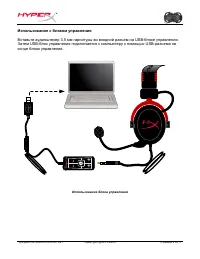
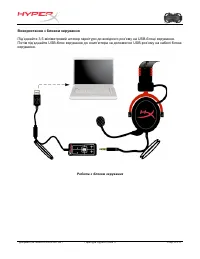
Документ № 480KHX-HSCP001.A01 Гарнітура HyperX Cloud II Стор . 6 з 1 1 Використання з блоком керування Під ’ єднайте 3,5- міліметровий штекер гарнітури до вихідного роз ’ єму на USB- блоці керування . Потім під ’ єднайте USB- блок керування до комп ’ ютера за допомогою USB- роз ’ єму на кабелі блока...
Page 129 - Hardware and
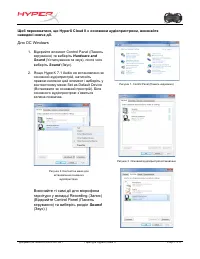
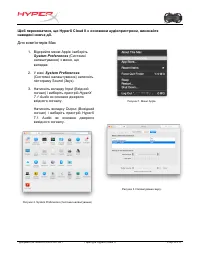
Документ № 480KHX-HSCP001.A01 Гарнітура HyperX Cloud II Стор . 7 з 1 1 Щоб переконатися , що HyperX Cloud II є основним аудіопристроєм , виконайте наведені нижче дії . Для ОС Windows 1. Відкрийте елемент Control Panel ( Панель керування ) та виберіть Hardware and Sound ( Устаткування та звук ), післ...
Page 131 - Devices
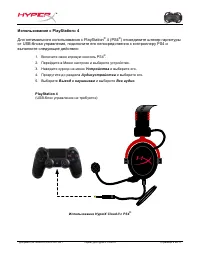
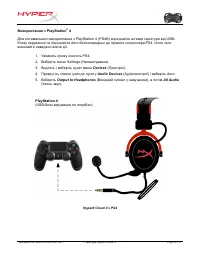
Документ № 480KHX-HSCP001.A01 Гарнітура HyperX Cloud II Стор . 9 з 1 1 Використання з PlayStation ® 4 Для оптимального використання з PlayStation 4 (PS4®) від ’ єднайте штекер гарнітури від USB- блоку керування та під ’ єднайте його безпосередньо до ігрового контролера PS4, після чого виконайте наве...
Page 134 - Tai nghe HyperX Cloud II; Mã s
S ố tài li ệ u 480KHX-HSCP001.A01 Tai nghe HyperX Cloud II Trang1 /1 1 Tai nghe HyperX Cloud II Mã s ả n ph ẩ m: KHX-HSCP-GM (Xám t ố i) KHX-HSCP-PK (H ồ ng) KHX-HSCP-RD ( Đỏ )
Page 135 - Gi; tai nghe bao g; Đặ
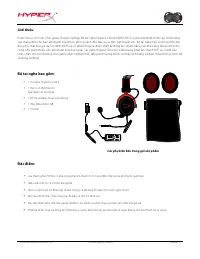
S ố tài li ệ u 480KHX-HSCP001.A01 Tai nghe HyperX Cloud II Trang2 /1 1 Gi ớ i thi ệ u Đượ c t ố i ư u cho vi ệ c ch ơ i game chuyên nghi ệ p, B ộ tai nghe HyperX Cloud II (KHX-HSCP-xx) là m ộ t thi ế t b ị liên l ạ c ch ấ t l ượ ng cao mang đế n cho b ạ n âm thanh tuy ệ t h ả o, phong cách độ c đ áo...
Page 136 - Thông s; Tai nghe
S ố tài li ệ u 480KHX-HSCP001.A01 Tai nghe HyperX Cloud II Trang3 /1 1 Thông s ố k ỹ thu ậ t: Tai nghe • Lo ạ i b ộ bi ế n n ă ng: độ ng Ø 53mm v ơ ́ i nam châm đấ t hi ế m • Nguyên t ắ c ho ạ t độ ng: Đ óng • Đ áp tuy ế n t ầ n s ố : 15Hz-25KHz (tai nghe) • Tr ở kháng danh ngh ĩ a: 60 ohm m ỗ i h ệ...
Page 137 - Khái quát
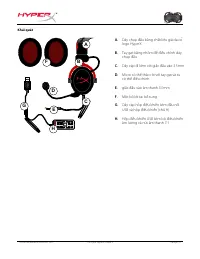
S ố tài li ệ u 480KHX-HSCP001.A01 Tai nghe HyperX Cloud II Trang4 /1 1 Khái quát D + + -‐ -‐ 7. 1 G H A B F C E A. Dây ch ụ p đầ u b ằ ng ch ấ t li ệ u gi ả da co ́ logo HyperX B. Tay g ạ t b ằ ng nhôm để đ i ề u ch ỉ nh dây ch ụ p đầ u C. Dây cáp đ i kèm v ớ i gi ắ c đầ u vào 3.5mm D. Micro có th...
Page 138 - t n
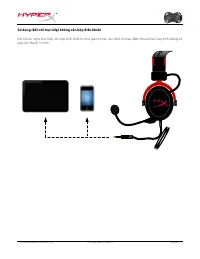
S ố tài li ệ u 480KHX-HSCP001.A01 Tai nghe HyperX Cloud II Trang5 /1 1 S ử d ụ ng (k ế t n ố i tr ự c ti ế p) không c ầ n h ộ p đ i ề u khi ể n K ế t n ố i tai nghe tr ự c ti ế p v ớ i máy tính, thi ế t b ị ch ơ i game ho ặ c các thi ế t b ị khác ( đ i ệ n tho ạ i ho ặ c máy tính b ả ng) có gi ắ c â...
Page 139 - i H; đầ
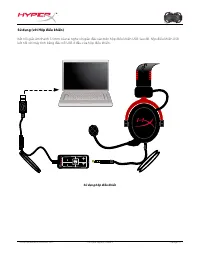
S ố tài li ệ u 480KHX-HSCP001.A01 Tai nghe HyperX Cloud II Trang6 /1 1 S ử d ụ ng (v ớ i H ộ p đ i ề u khi ể n) K ế t n ố i gi ắ c âm thanh 3.5mm c ủ a tai nghe v ớ i gi ắ c đầ u vào trên h ộ p đ i ề u khi ể n USB. Sau đ ó, h ộ p đ i ề u khi ể n USB k ế t n ố i v ớ i máy tính b ằ ng đầ u n ố i USB ở...
Page 140 - Hardware and Sound (Ph
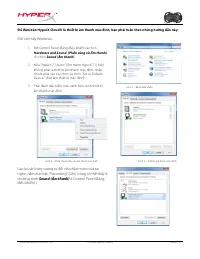
S ố tài li ệ u 480KHX-HSCP001.A01 Tai nghe HyperX Cloud II Trang7 /1 1 Để đả m b ả o HyperX Cloud II là thi ế t b ị âm thanh m ặ c đị nh, b ạ n ph ả i tuân theo nh ữ ng h ướ ng d ẫ n này: Đố i v ớ i máy Windows: 1. M ở Control Panel (B ả ng đ i ề u khi ể n) và ch ọ n Hardware and Sound (Ph ầ n c ứ n...
Page 141 - Đố
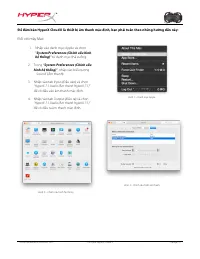
S ố tài li ệ u 480KHX-HSCP001.A01 Tai nghe HyperX Cloud II Trang8 /1 1 Để đả m b ả o HyperX Cloud II là thi ế t b ị âm thanh m ặ c đị nh, b ạ n ph ả i tuân theo nh ữ ng h ướ ng d ẫ n này: Đố i v ớ i máy Mac: 1. Nh ấ p vào danh mu ̣ c Apple và ch ọ n “ System Preferences (Ch ỉ nh c ấ u hình h ệ th ố ...
Page 142 - Để
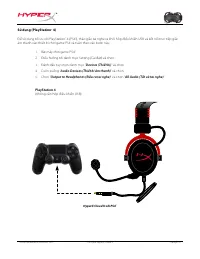
S ố tài li ệ u 480KHX-HSCP001.A01 Tai nghe HyperX Cloud II Trang9 /1 1 S ử d ụ ng (PlayStation ® 4) Để s ử d ụ ng t ố i ư u v ớ i PlayStation ® 4 (PS4 ® ), tháo gi ắ c tai nghe ra kh ỏ i h ộ p đ i ề u khi ể n USB và k ế t n ố i tr ự c ti ế p gi ắ c âm thanh vào thi ế t b ị ch ơ i game PS4 và tuân th...
Page 144 - độ
S ố tài li ệ u 480KHX-HSCP001.A01 Tai nghe HyperX Cloud II Trang11 /1 1 S ử d ụ ng v ớ i thi ế t b ị di độ ng ( Đ i ệ n tho ạ i ho ặ c máy tính b ả ng) Để s ử d ụ ng tai nghe HyperX Cloud II v ớ i thi ế t b ị di độ ng, tháo h ộ p đ i ề u khi ể n USB và c ắ m tr ự c ti ế p gi ắ c tai nghe 3.5mm vào g...
Page 145 - 产品型号:
⽂文档编号: 480KHX-HSCP001.A01 HyperX Cloud II ⽿耳机 第 1 页 1 1 HyperX Cloud II ⽿耳机 产品型号: KHX-HSCP-GM (青铜⾊色) KHX-HSCP-PK (粉红⾊色) KHX-HSCP-RD (红⾊色)
Page 146 - 简介; 包装清单:; 包装内容; 产品特性:
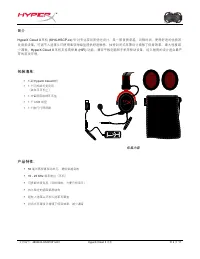
⽂文档编号: 480KHX-HSCP001.A01 HyperX Cloud II ⽿耳机 第 2 页 1 1 简介 HyperX Cloud II ⽿耳机 (KHX-HSCP-xx) 针对专业游戏⽽而优化设计,是⼀一款⾳音质卓越、风格时尚、使⽤用舒适的优质游 戏⾳音频设备。可调节⼈人造⾰革头环使⽤用柔软海绵垫提供舒适触感,独特封闭式⽿耳罩设计增强了低⾳音效果,最⼤大程度减少漏⾳音。 HyperX Cloud II ⽿耳机⽀支持⾼高保真 (HiFi) 功能,兼容平板电脑和⼿手机等移动设备,经久耐⽤用的设计适合最严 苛的游戏环境。 包装清单: • 1 副 HyperX Cloud II 机 • ...
Page 147 - 技术规格:; 耳耳机
⽂文档编号: 480KHX-HSCP001.A01 HyperX Cloud II ⽿耳机 第 3 页 1 1 技术规格: ⽿耳机 • 发⾳音单元换能器类型: 53 毫⽶米钕磁铁单元动圈 • ⼯工作原理:封闭式 • 频率响应: 15Hz-25KHz (⽿耳机) • 额定阻抗:每套系统 60 欧姆 • 额定声压级: 98+/-3 dB • 总谐波失真率( T.H.D ): <2% • 功率处理容量: 150mW • 机⽿耳声耦合⽅方式:⽿耳罩式 • 环境噪⾳音衰减:约 20 dBA • 头环压⼒力: 5 N • 重量(含麦克风和线缆): 320g • 线缆长度与类型: 1 ⽶米 + 2 ⽶...
Page 148 - 概览; 带 HyperX 标志的人人造革革头环
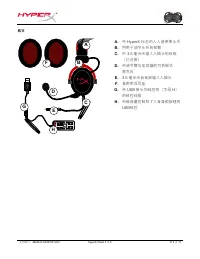
⽂文档编号: 480KHX-HSCP001.A01 HyperX Cloud II ⽿耳机 第 4 页 1 1 概览 D + + -‐ -‐ 7. 1 G H A B F C E A. 带 HyperX 标志的人人造革革头环 B. 用用于调节头环的铝臂 C. 带 3.5 毫米米输入入插头的线缆(已连接) D. 带调节臂与电容器的可拆卸式麦克风 E. 3.5 毫米米音音频输入入插头 F. 备用用耳耳垫 G. 带 USB 接头和线控的(字母 H)的线控线缆 H. 带音音量控制和 7.1 音音频按钮的USB线控
Page 149 - 不用用线控(直接连接)的使用用方方法; 将耳耳机直接连接到有
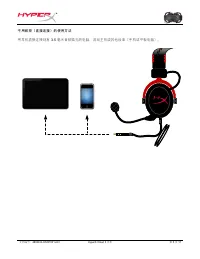
⽂文档编号: 480KHX-HSCP001.A01 HyperX Cloud II ⽿耳机 第 5 页 1 1 不⽤用线控(直接连接)的使⽤用⽅方法 将⽿耳机直接连接到有 3.5 毫⽶米⾳音频插孔的电脑、游戏主机或其他设备(⼿手机或平板电脑)。
Page 150 - 使用用方方法(配合线控); USB
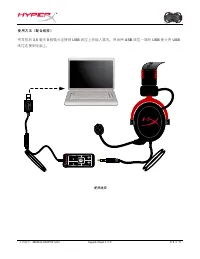
⽂文档编号: 480KHX-HSCP001.A01 HyperX Cloud II ⽿耳机 第 6 页 11 使⽤用⽅方法(配合线控) 将⽿耳机的 3.5 毫⽶米⾳音频插头连接到 USB 线控上的输⼊入插孔。然后⽤用 USB 线控⼀一端的 USB 接头将 USB 线控连接到电脑上。 + + - - 7.1 使⽤用线控
Page 151 - 要确保; 用用于; 打开“控制面面板”,选择“; 硬件和声音音; 然后选择“; 如果“; 对“录音音”选项卡(也位于“控制面面板”的“; 声音音; 程序中)下耳耳机的麦克风部分,重复以上步骤。
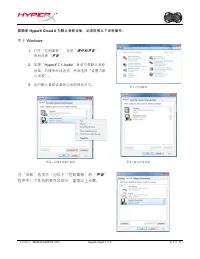
⽂文档编号: 480KHX-HSCP001.A01 HyperX Cloud II ⽿耳机 第 7 页 1 1 要确保 HyperX Cloud II 为默认⾳音频设备,必须按照以下说明操作: ⽤用于 Windows : 1. 打开“控制⾯面板”,选择“ 硬件和声⾳音 ”, 然后选择“ 声⾳音 ”。 2. 如果“ HyperX 7.1 Audio ”⽬目前不是默认⾳音频 设备,右键单击该选项,然后选择“设置为默认设备”。 3. 此时默认⾳音频设备旁应出现绿⾊色对勾。 图 1 - 控制⾯面板 图 2 – 右键单击默认⾳音频 图 3 – 默认声⾳音设备 对“录⾳音”选项卡(也位于“控制⾯面板”的“...
Page 153 - 使用用方方法; 连接
⽂文档编号: 480KHX-HSCP001.A01 HyperX Cloud II ⽿耳机 第 9 页 1 1 使⽤用⽅方法 (PlayStation ® 4 ) 配合 PlayStation ® 4 (PS4 ® ) 使⽤用时,为了取得最佳使⽤用效果,请将⽿耳机插头从 USB 线控上拔下,将⽿耳 机的⾳音频插头直接连接到 PS4 游戏控制器,然后按以下步骤操作: 1. 打开 PS4 ® 游戏机。 2. 导航⾄至“ Settings Menu ”(设置菜单)并选中。 3. 突出显⽰示 “ Devices ” (设备)菜单选项并选中。 4. 向下滚动到 “ Audio Devices ” (⾳音...
Page 155 - 用用于移动设备(手手机或平板电脑)
⽂文档编号: 480KHX-HSCP001.A01 HyperX Cloud II ⽿耳机 第 11 页 1 1 ⽤用于移动设备(⼿手机或平板电脑) 要将 HyperX Cloud II ⽿耳机⽤用于移动设备,请拔下 USB 线控,将 3.5 毫⽶米⽿耳机插头直接连接到⽿耳机或平 板电脑的⾳音频插孔。 移动设备(⼿手机/平板电脑) (⽆无需 USB 线控) 图 1.14 - ⽤用于移动设备(⼿手机或平板电脑)
Page 156 - 耳機; 產品型號:
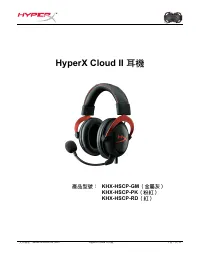
文件編號: 480KHX-HSCP001.A01 HyperX Cloud II 耳機 1 頁,共 1 1 HyperX Cloud II 耳機 產品型號: KHX-HSCP-GM (金屬灰) KHX-HSCP-PK (粉紅) KHX-HSCP-RD (紅)
Page 157 - 介紹; 本產品包含:; 包裝內容物; 產品特色:
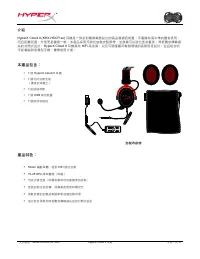
文件編號: 480KHX-HSCP001.A01 HyperX Cloud II 耳機 2 頁,共 1 1 介紹 HyperX Cloud II (KHX-HSCP-xx) 耳機是一款針對職業電競設計的高品質通訊裝置,不僅擁有高水準的聲音表現, 而且配戴舒適,外型更是獨樹一格。本產品採用可調式加墊皮製頭帶,並具備可以強化低音重現,降低聲音傳輸損失的封閉式設計。 HyperX Cloud II 耳機具有 HiFi 高音質,以及可適應嚴苛電競環境的高耐用度設計,並且相容於 平板電腦和智慧型手機,攜帶使用方便。 本產品包含: • 1 個 HyperX Cloud II 耳機 • 1 個可拆式麥克風 ...
Page 158 - 技術規格:
文件編號: 480KHX-HSCP001.A01 HyperX Cloud II 耳機 3 頁,共 1 1 技術規格: 耳機 • 傳感器類型:動態 53mm (釹磁鐵) • 作業原理:封閉式 • 頻率響應: 15Hz-25KHz (耳機) • 額定阻抗: 60 ohm (各系統) • 額定聲壓級: 98+/-3dB • T.H.D : < 2% • 功率處理: 150mW • 耳機型式:耳罩式 • 阻絕環境噪音:約 20 dBA • 頭帶壓力: 5 N • 重量(含耳機與纜線): 320g • 纜線長度和類型: 1m + 2m 延長 • 連接孔:迷你立體聲插座插頭( 3.5mm ) 麥克...
Page 159 - 總覽
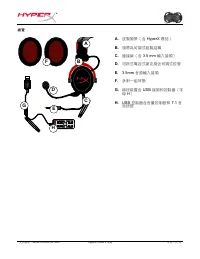
文件編號: 480KHX-HSCP001.A01 HyperX Cloud II 耳機 4 頁,共 1 1 總覽 D + + -‐ -‐ 7. 1 G H A B F C E A. 皮製頭帶(含 HyperX 標誌) B. 頭帶為可調式鋁製結構 C. 連接線(含 3.5 mm 輸入接頭) D. 可拆式電容式麥克風含可調式蛇管 E. 3.5mm 音源輸入接頭 F. 多附一組耳墊 G. 線控裝置含 USB 接頭和控制器(字 母 H ) H. USB 控制器含音量控制鈕和 7.1 音 效按鈕
Page 160 - 使用方式(直接連接,無控制器)
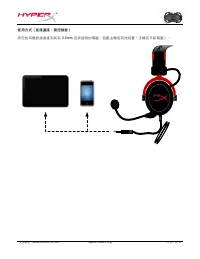
文件編號: 480KHX-HSCP001.A01 HyperX Cloud II 耳機 5 頁,共 1 1 使用方式(直接連接,無控制器) 將您的耳機直接連接到具有 3.5mm 音源接頭的電腦、遊戲主機或其他裝置(手機或平板電腦)。
Page 161 - 使用方式(含控制器); 使用控制器
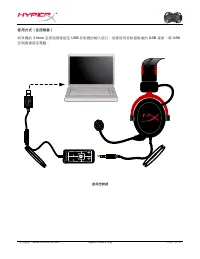
文件編號: 480KHX-HSCP001.A01 HyperX Cloud II 耳機 6 頁,共 1 1 使用方式(含控制器) 將耳機的 3.5mm 音源插頭連接至 USB 控制器的輸入插孔。接著使用控制器尾端的 USB 接頭,將 USB 控制器連接至電腦。 + + - - 7.1 使用控制器
Page 162 - 為了確保; 為預設的音效裝置,請您依照以下指示設定:; 硬體和音效; 音效
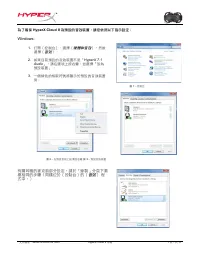
文件編號: 480KHX-HSCP001.A01 HyperX Cloud II 耳機 7 頁,共 1 1 為了確保 HyperX Cloud II 為預設的音效裝置,請您依照以下指示設定: Windows: 1. 打開〔[控制台〕],選擇〔[ 硬體和音效 〕],然後 選擇〔[ 音效 〕]。 2. 如果目前預設的音效裝置不是「 HyperX 7.1 Audio 」,請在選項上按右鍵,並選擇「設為 預設裝置」 。 3. 一個綠色的核取符號將顯示於預設的音效裝置旁。 圖 1 -控制台 圖 2 -在預設音效上按滑鼠右鍵 圖 3 -預設音效裝置 有關耳機的麥克風部分設定,請於「錄製」分頁下重複相同的步...
Page 163 - 系統偏好設定
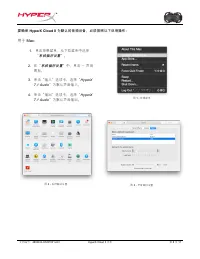
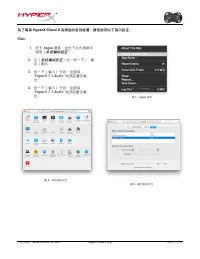
文件編號: 480KHX-HSCP001.A01 HyperX Cloud II 耳機 8 頁,共 1 1 為了確保 HyperX Cloud II 為預設的音效裝置,請您依照以下指示設定: Mac: 1. 按下 Apple 選單,並於下拉式選單中 選取〔[ 系統偏好設定 〕]。 2. 在〔[ 系統偏好設定 〕]中,按一下〔[ 聲 音〕]圖示。 3. 按一下〔[輸入〕]分頁,並選取 “ HyperX 7.1 Audio” 為預設聲音輸 出。 4. 按一下〔[輸入〕]分頁,並選取 “ HyperX 7.1 Audio” 為預設聲音輸 出。 圖 2 -系統偏好設定 圖 1 - Apple 選單 圖...
Page 164 - 使用方式(; 〔[裝置〕]
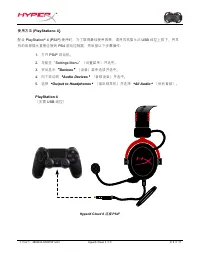
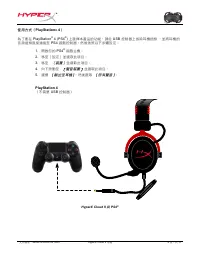
文件編號: 480KHX-HSCP001.A01 HyperX Cloud II 耳機 9 頁,共 1 1 使用方式( PlayStation ® 4 ) 為了要在 PlayStation ® 4 (PS4 ® ) 上發揮本產品的功能,請從 USB 控制器上拔除耳機插頭 ,並將耳機的 音源插頭直接連接至 PS4 遊戲控制器,然後依照以下步驟設定: 1. 開啟您的 PS4 ® 遊戲主機。 2. 移至〔[設定〕]並選取此項目。 3. 移至 〔[裝置〕] 並選取此項目。 4. 向下滑動至 〔[ 聲音裝置 〕] 並選取此項目。 5. 選擇 [ 輸出至耳機 ] ,然後選取 [ 所有聲音 ] 。 Play...
Page 165 - ,需要控制器轉接器; 控制器); 使用於
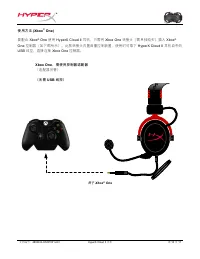
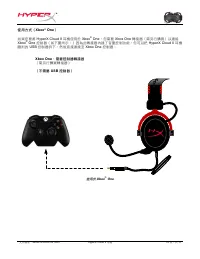
文件編號: 480KHX-HSCP001.A01 HyperX Cloud II 耳機 10 頁,共 1 1 使用方式( Xbox ® One ) 如果您要將 HyperX Cloud II 耳機使用於 Xbox ® One ,您需要 Xbox One 轉接器(需另行購買)以連接 Xbox ® One 控制器(如下圖所示。)因為此轉接器內建了音量控制功能,您可以把 HyperX Cloud II 耳機 隨附的 USB 控制器拆下,然後直接連接至 Xbox One 控制器。 Xbox One ,需要控制器轉接器 (需另行購買轉接器) (不需要 USB 控制器) 使用於 Xbox ® One
Page 166 - 使用於行動裝置(手機或平板電腦); 使用於行動裝置(電話或平板電腦)
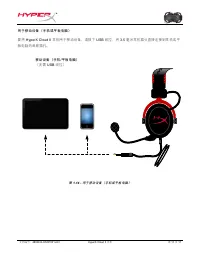
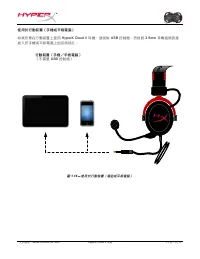
文件編號: 480KHX-HSCP001.A01 HyperX Cloud II 耳機 11 頁,共 1 1 使用於行動裝置(手機或平板電腦) 如果您要在行動裝置上使用 HyperX Cloud II 耳機,請拔除 USB 控制器,然後將 3.5mm 耳機插頭直接 插入您手機或平板電腦上的音源插孔。 行動裝置(手機/平板電腦) (不需要 USB 控制器) 圖 1.14 - 使用於行動裝置(電話或平板電腦)