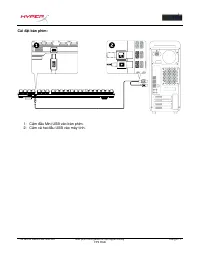
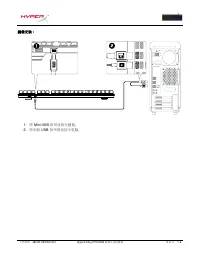
Page 2 - HyperX Alloy FPS RGB Mechanical; Part Numbers
Document No. 480HX-KB1002.A01 HyperX Alloy FPS RGB Mechanical Gaming Keyboard Page 1 of 6 HyperX Alloy FPS RGB Mechanical Gaming Keyboard Part Numbers HX-KB1SS2-US HX-KB1SS2-UK HX-KB1SS2-RU HX-KB1SS2-NO HX-KB1SS2-LA HX-KB1SS2-FR HX-KB1SS2-DE
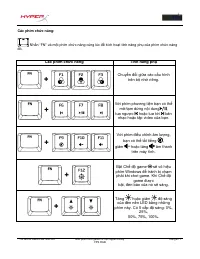
Page 6 - Function Keys
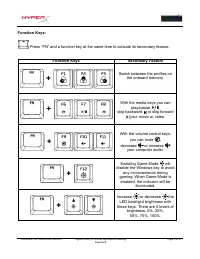
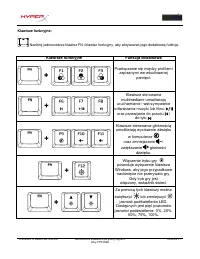
Document No. 480HX-KB1002.A01 HyperX Alloy FPS RGB Mechanical Gaming Keyboard Page 5 of 6 Function Keys: Press “FN” and a function key at the same time to activate its secondary feature. Function Keys Secondary Feature Switch between the profiles on the onboard memory. With the media keys you can pl...
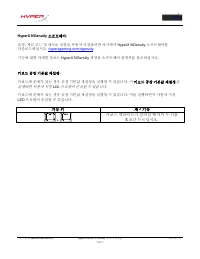
Page 7 - Keyboard factory reset:; Press both keys for 5 seconds until the
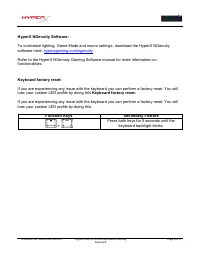
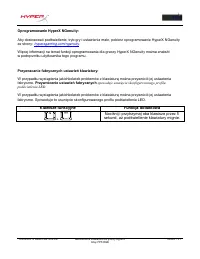
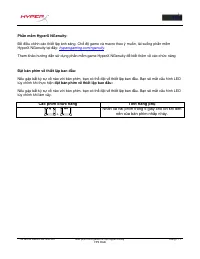
Document No. 480HX-KB1002.A01 HyperX Alloy FPS RGB Mechanical Gaming Keyboard Page 6 of 6 HyperX NGenuity Software: To customize lighting, Game Mode and macro settings, download the HyperX NGenuity software here: hyperxgaming.com/ngenuity . Refer to the HyperX NGenuity Gaming Software manual for mor...
Page 8 - Teclado mecánico para videojuegos; Números de pieza
N.º de documento 480HX-KB1002.A01 Teclado mecánico para videojuegos HyperX Alloy FPS RGB Página 1 de 7 Teclado mecánico para videojuegos HyperX Alloy FPS RGB Números de pieza HX-KB1SS2-US HX-KB1SS2-UK HX-KB1SS2-RU HX-KB1SS2-NO HX-KB1SS2-LA HX-KB1SS2-FR HX-KB1SS2-DE
Page 10 - Descripción general del teclado:; G- Puerto USB posterior = Puerto de carga USB para teléfono móvil.
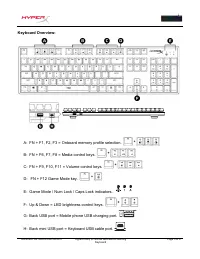
N.º de documento 480HX-KB1002.A01 Teclado mecánico para videojuegos HyperX Alloy FPS RGB Página 3 de 7 Descripción general del teclado: A- FN + F1, F2, F3 = Selección del perfil de la memoria incorporada. B- FN + F6, F7, F8 = Teclas de control multimedia. C- FN + F9, F10, F11 = Teclas de control del...
Page 11 - H- Puerto mini USB posterior = Puerto de cable USB del teclado.
N.º de documento 480HX-KB1002.A01 Teclado mecánico para videojuegos HyperX Alloy FPS RGB Página 4 de 7 H- Puerto mini USB posterior = Puerto de cable USB del teclado.
Page 13 - Teclas de función
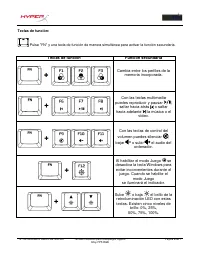
N.º de documento 480HX-KB1002.A01 Teclado mecánico para videojuegos HyperX Alloy FPS RGB Página 6 de 7 Teclas de función: Pulsa "FN" y una tecla de función de manera simultánea para activar la función secundaria. Teclas de función Función secundaria Cambia entre los perfiles de la memoria in...
Page 14 - Pulsa ambas teclas durante 5 segundos hasta
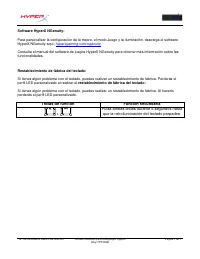
N.º de documento 480HX-KB1002.A01 Teclado mecánico para videojuegos HyperX Alloy FPS RGB Página 7 de 7 Software HyperX NGenuity: Para personalizar la configuración de la macro, el modo Juego y la iluminación, descarga el software HyperX NGenuity aquí: hyperxgaming.com/ngenuity . Consulta el manual d...
Page 15 - HyperX Alloy FPS RGB Mechanische; Artikelnummern
Dokument Nr. 480HX-KB1002.A01 HyperX Alloy FPS RGB Mechanische Gaming-Tastatur Seite 1 von 6 HyperX Alloy FPS RGB Mechanische Gaming-Tastatur Artikelnummern HX-KB1SS2-US HX-KB1SS2-UK HX-KB1SS2-RU HX-KB1SS2-NO HX-KB1SS2-LA HX-KB1SS2-FR HX-KB1SS2-DE
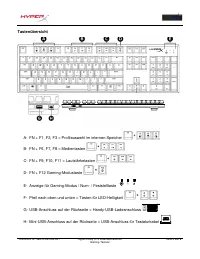
Page 17 - Tastenübersicht
Dokument Nr. 480HX-KB1002.A01 HyperX Alloy FPS RGB Mechanische Gaming-Tastatur Seite 3 von 6 Tastenübersicht A- FN + F1, F2, F3 = Profilauswahl im internen Speicher B- FN + F6, F7, F8 = Medientasten C- FN + F9, F10, F11 = Lautstärketasten D- FN + F12 Gaming-Modustaste E- Anzeige für Gaming-Modus / N...
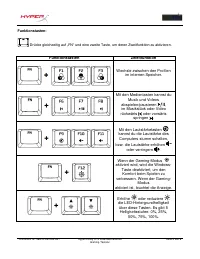
Page 19 - Funktionstasten
Dokument Nr. 480HX-KB1002.A01 HyperX Alloy FPS RGB Mechanische Gaming-Tastatur Seite 5 von 6 Funktionstasten: Drücke gleichzeitig auf „FN“ und eine zweite Taste, um deren Zweitfunktion zu aktivieren. Funktionstasten Zweitfunktion Wechsle zwischen den Profilen im internen Speicher. Mit den Medientast...
Page 20 - Drücke beide Tasten 5 Sekunden lang, bis die
Dokument Nr. 480HX-KB1002.A01 HyperX Alloy FPS RGB Mechanische Gaming-Tastatur Seite 6 von 6 HyperX NGenuity Software: Um die Beleuchtung, den Gaming-Modus und die Macro-Einstellungen anzupassen, kannst du die HyperX NGenuity-Software hier herunterladen: hyperxgaming.com/ngenuity . Weitere Infos übe...
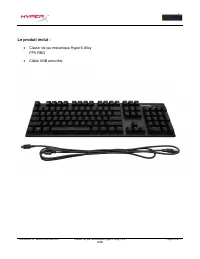
Page 21 - Clavier de jeu mécanique HyperX; Références produits
Document N° 480HX-KB1002.A01 Clavier de jeu mécanique HyperX Alloy FPS RGB Page 1 sur 7 Clavier de jeu mécanique HyperX Alloy FPS RGB Références produits HX-KB1SS2-US HX-KB1SS2-UK HX-KB1SS2-RU HX-KB1SS2-NO HX-KB1SS2-LA HX-KB1SS2-FR HX-KB1SS2-DE
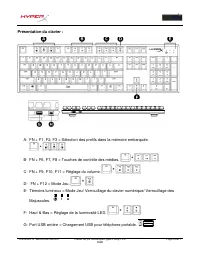
Page 23 - Présentation du clavier :; G- Port USB arrière = Chargement USB pour téléphone portable.
Document N° 480HX-KB1002.A01 Clavier de jeu mécanique HyperX Alloy FPS RGB Page 3 sur 7 Présentation du clavier : A- FN + F1, F2, F3 = Sélection des profils dans la mémoire embarquée. B- FN + F6, F7, F8 = Touches de contrôle des médias. C- FN + F9, F10, F11 = Réglage du volume. D- FN + F12 = Mode Je...
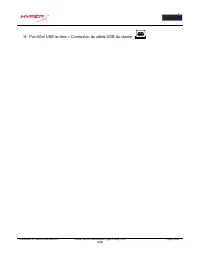
Page 24 - H- Port Mini USB arrière = Connexion du câble USB du clavier.
Document N° 480HX-KB1002.A01 Clavier de jeu mécanique HyperX Alloy FPS RGB Page 4 sur 7 H- Port Mini USB arrière = Connexion du câble USB du clavier.
Page 26 - Touches de fonction
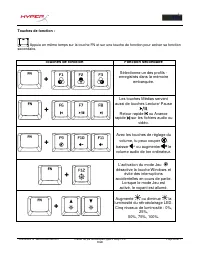
Document N° 480HX-KB1002.A01 Clavier de jeu mécanique HyperX Alloy FPS RGB Page 6 sur 7 Touches de fonction : Appuie en même temps sur la touche FN et sur une touche de fonction pour activer sa fonction secondaire. Touches de fonction Fonction secondaire Sélectionne un des profils - enregistrés dans...
Page 27 - rétroéclairage du clavier clignote.
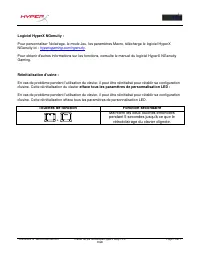
Document N° 480HX-KB1002.A01 Clavier de jeu mécanique HyperX Alloy FPS RGB Page 7 sur 7 Logiciel HyperX NGenuity : Pour personnaliser l'éclairage, le mode Jeu, les paramètres Macro, télécharge le logiciel HyperX NGenuity ici : hyperxgaming.com/ngenuity . Pour obtenir d'autres informations sur les fo...
Page 28 - Tastiera meccanica per il gaming; Numeri di parte
Documento N. 480HX-KB1002.A01 Tastiera meccanica per il gaming HyperX Alloy FPS RGB Pagina 1 di 6 Tastiera meccanica per il gaming HyperX Alloy FPS RGB Numeri di parte HX-KB1SS2-US HX-KB1SS2-UK HX-KB1SS2-RU HX-KB1SS2-NO HX-KB1SS2-LA HX-KB1SS2-FR HX-KB1SS2-DE
Page 29 - Contenuto della confezione:
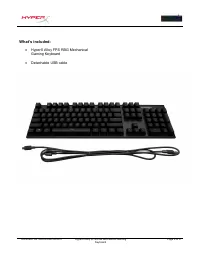
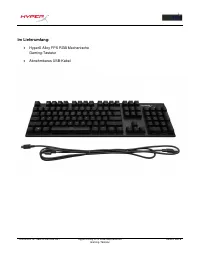
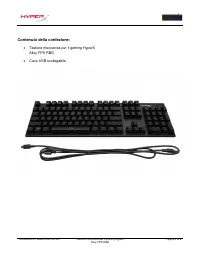
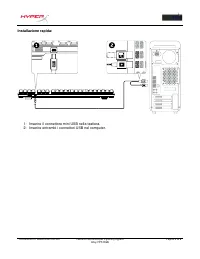
Documento N. 480HX-KB1002.A01 Tastiera meccanica per il gaming HyperX Alloy FPS RGB Pagina 2 di 6 Contenuto della confezione: Tastiera meccanica per il gaming HyperX Alloy FPS RBG Cavo USB scollegabile
Page 30 - Descrizione generale della tastiera:; G- Porta USB posteriore = porta USB per la ricarica di smartphone.
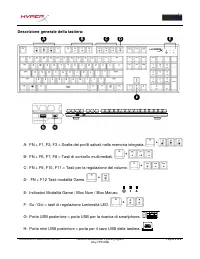
Documento N. 480HX-KB1002.A01 Tastiera meccanica per il gaming HyperX Alloy FPS RGB Pagina 3 di 6 Descrizione generale della tastiera: A- FN + F1, F2, F3 = Scelta dei profili salvati nella memoria integrata. B- FN + F6, F7, F8 = Tasti di controllo multimediali. C- FN + F9, F10, F11 = Tasti per la re...
Page 32 - Tasti funzione
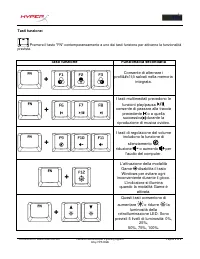
Documento N. 480HX-KB1002.A01 Tastiera meccanica per il gaming HyperX Alloy FPS RGB Pagina 5 di 6 Tasti funzione: Premere il tasto "FN" contemporaneamente a uno dei tasti funzione per attivarne la funzionalità prevista. Tasti funzione Funzionalità secondaria Consente di alternare i profi&...
Page 33 - Premere entrambi i tasti per 5 secondi fino a
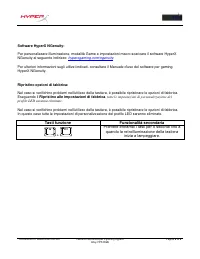
Documento N. 480HX-KB1002.A01 Tastiera meccanica per il gaming HyperX Alloy FPS RGB Pagina 6 di 6 Software HyperX NGenuity: Per personalizzare illuminazione, modalità Game e impostazioni macro scaricare il software HyperX NGenuity al seguente indirizzo: hyperxgaming.com/ngenuity . Per ulteriori info...
Page 34 - Código do Produto
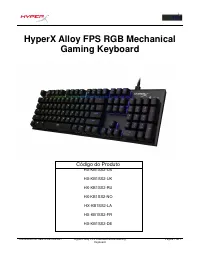
Documento No. 480HX-KB1002.A01 HyperX Alloy FPS RGB Mechanical Gaming Keyboard Página 1 do 7 HyperX Alloy FPS RGB Mechanical Gaming Keyboard Código do Produto HX-KB1SS2-US HX-KB1SS2-UK HX-KB1SS2-RU HX-KB1SS2-NO HX-KB1SS2-LA HX-KB1SS2-FR HX-KB1SS2-DE
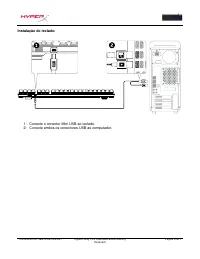
Page 36 - Visão Geral do teclado:; F- Setas para cima e para baixo = teclas de controle de brilho do LED.
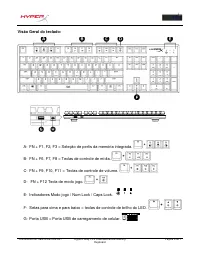
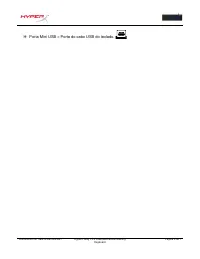
Documento No. 480HX-KB1002.A01 HyperX Alloy FPS RGB Mechanical Gaming Keyboard Página 3 do 7 Visão Geral do teclado: A- FN + F1, F2, F3 = Seleção de perfis da memória integrada. B- FN + F6, F7, F8 = Teclas de controle de mídia. C- FN + F9, F10, F11 = Teclas de controle de volume. D- FN + F12 Tecla d...
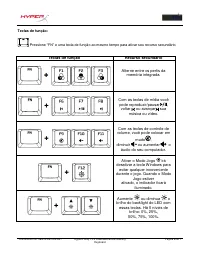
Page 39 - Teclas de função
Documento No. 480HX-KB1002.A01 HyperX Alloy FPS RGB Mechanical Gaming Keyboard Página 6 do 7 Teclas de função: Pressione “FN” e uma tecla de função ao mesmo tempo para ativar seu recurso secundário. Teclas de função Recurso secundário Alterne entre os perfis da memória integrada. Com as teclas de mí...
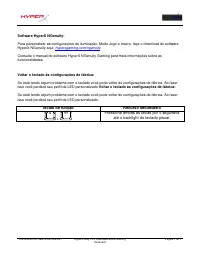
Page 40 - Pressione ambas as teclas por 5 segundos
Documento No. 480HX-KB1002.A01 HyperX Alloy FPS RGB Mechanical Gaming Keyboard Página 7 do 7 Software HyperX NGenuity: Para personalizar as configurações de iluminação, Modo Jogo e macro, faça o download do software HyperX NGenuity aqui: hyperxgaming.com/ngenuity . Consulte o manual do software Hype...
Page 41 - Mechaniczna klawiatura dla graczy; Numery katalogowe
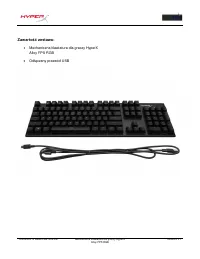
Dokument nr 480HX-KB1002.A01 Mechaniczna klawiatura dla graczy HyperX Alloy FPS RGB Strona 1 z 7 Mechaniczna klawiatura dla graczy HyperX Alloy FPS RGB Numery katalogowe HX-KB1SS2-US HX-KB1SS2-UK HX-KB1SS2-RU HX-KB1SS2-NO HX-KB1SS2-LA HX-KB1SS2-FR HX-KB1SS2-DE
Page 43 - aźniki włączonego trybu gry / Num Lock / Caps Lock
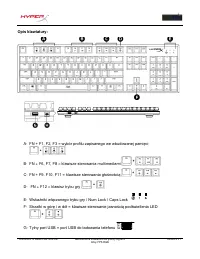
Dokument nr 480HX-KB1002.A01 Mechaniczna klawiatura dla graczy HyperX Alloy FPS RGB Strona 3 z 7 Opis klawiatury: A- FN + F1, F2, F3 = wybór profilu zapisanego we wbudowanej pamięci B- FN + F6, F7, F8 = klawisze sterowania multimediami C- FN + F9, F10, F11 = klawisze sterowania głośnością D- FN + F1...
Page 44 - H- Tylny port mini USB = port przewodu USB klawiatury
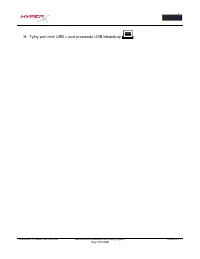
Dokument nr 480HX-KB1002.A01 Mechaniczna klawiatura dla graczy HyperX Alloy FPS RGB Strona 4 z 7 H- Tylny port mini USB = port przewodu USB klawiatury
Page 46 - Klawisze funkcyjne
Dokument nr 480HX-KB1002.A01 Mechaniczna klawiatura dla graczy HyperX Alloy FPS RGB Strona 6 z 7 Klawisze funkcyjne: Naciśnij jednocześnie klawisz FN i klawisz funkcyjny, aby aktywować jego dodatkową funkcję. Klawisze funkcyjne Funkcja dodatkowa Przełączanie się między profilami zapisanymi we wbudow...
Page 47 - Naciśnij i przytrzymaj oba klawisze przez 5
Dokument nr 480HX-KB1002.A01 Mechaniczna klawiatura dla graczy HyperX Alloy FPS RGB Strona 7 z 7 Oprogramowanie HyperX NGenuity: Aby dostosować podświetlenie, tryb gry i ustawienia makr, pobierz oprogramowanie HyperX NGenuity ze strony: hyperxgaming.com/ngenuity . Więcej informacji na temat funkcji ...
Page 48 - Механическая геймерская; Номера по каталогу
Document No. 480HX-KB1002.A01 Механическая геймерская клавиатура HyperX Alloy FPS RGB Page 1 of 6 Механическая геймерская клавиатура HyperX Alloy FPS RGB Номера по каталогу HX-KB1SS2-US HX-KB1SS2-UK HX-KB1SS2-RU HX-KB1SS2-NO HX-KB1SS2-LA HX-KB1SS2-FR HX-KB1SS2-DE
Page 50 - Стрелки вверх и вниз = Клавиши регулировки яркости светодиодов.
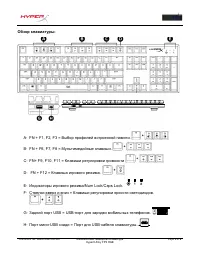
Document No. 480HX-KB1002.A01 Механическая геймерская клавиатура HyperX Alloy FPS RGB Page 3 of 6 Обзор клавиатуры: A- FN + F1, F2, F3 = Выбор профилей встроенной памяти. B- FN + F6, F7, F8 = Мультимедийные клавиши. C- FN+ F9, F10, F11 = Клавиши регулировки громкости D- FN + F12 = Клавиша игрового р...
Page 52 - Функциональные клавиши
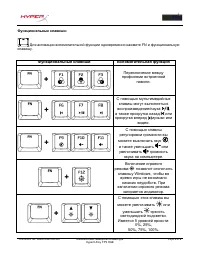
Document No. 480HX-KB1002.A01 Механическая геймерская клавиатура HyperX Alloy FPS RGB Page 5 of 6 Функциональные клавиши: Для активации вспомогательной функции одновременно нажмите FN и функциональную клавишу. Функциональные клавиши Вспомогательная функция Переключение между профилями встроенной пам...
Page 53 - Нажмите обе клавиши на 5 секунд, пока
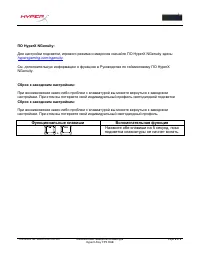
Document No. 480HX-KB1002.A01 Механическая геймерская клавиатура HyperX Alloy FPS RGB Page 6 of 6 ПО HyperX NGenuity: Для настройки подсветки, игрового режима и макросов скачайте ПО HyperX NGenuity здесь: hyperxgaming.com/ngenuity . См. дополнительную информацию о функциях в Руководстве по геймингов...
Page 54 - HyperX Alloy FPS RGB Mekanik Oyun; Parça Numaraları
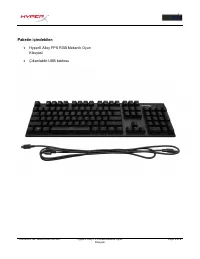
Document No. 480HX-KB1002.A01 HyperX Alloy FPS RGB Mekanik Oyun Klavyesi Page 1 of 6 HyperX Alloy FPS RGB Mekanik Oyun Klavyesi Parça Numaraları HX-KB1SS2-US HX-KB1SS2-UK HX-KB1SS2-RU HX-KB1SS2-NO HX-KB1SS2-LA HX-KB1SS2-FR HX-KB1SS2-DE
Page 56 - Klavyeye Genel Bakış:; Arka USB bağlantı noktası = Cep telefonu USB şarj bağlantı noktası.
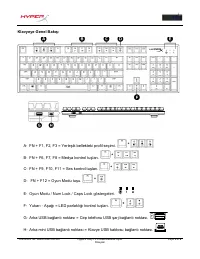
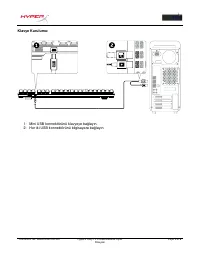
Document No. 480HX-KB1002.A01 HyperX Alloy FPS RGB Mekanik Oyun Klavyesi Page 3 of 6 Klavyeye Genel Bakış: A- FN + F1, F2, F3 = Yerleşik bellekteki profil seçimi. B- FN + F6, F7, F8 = Medya kontrol tuşları. C- FN + F9, F10, F11 = Ses kontrol tuşları. D- FN + F12 = Oyun Modu tuşu. E- Oyun Modu / Num ...
Page 58 - Fonksiyon Tuşları
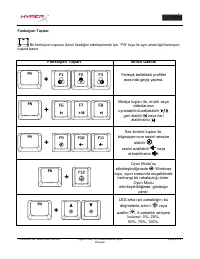
Document No. 480HX-KB1002.A01 HyperX Alloy FPS RGB Mekanik Oyun Klavyesi Page 5 of 6 Fonksiyon Tuşları: Bir fonksiyon tuşunun ikincil özelliğini etkinleştirmek için, “FN” tuşu ile aynı anda ilgili fonksiyon tuşuna basın. Fonksiyon Tuşları İkincil Özellik Yerleşik bellekteki profiller a rasında geçiş...
Page 59 - Klavye arka ışığı yanıp sönene kadar, her iki
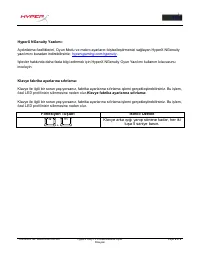
Document No. 480HX-KB1002.A01 HyperX Alloy FPS RGB Mekanik Oyun Klavyesi Page 6 of 6 HyperX NGenuity Yazılımı: Aydınlatma özelliklerini, Oyun Modu ve makro ayarlarını kişiselleştirmenizi sağlayan HyperX NGenuity yazılımını buradan indirebilirsiniz: hyperxgaming.com/ngenuity . İşlevler hakkında daha ...
Page 60 - HyperX Alloy FPS RGB; メカニカルゲ; 製品番
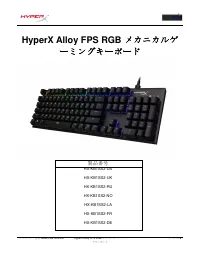
ドキュメント番 号 480HX-KB1002.A01 HyperX Alloy FPS RGB メカニカルゲ ー ミン グキ ー ボ ー ド ペ ー ジ 1 / 6 HyperX Alloy FPS RGB メカニカルゲ ー ミングキ ー ボ ー ド 製品番 号 HX-KB1SS2-US HX-KB1SS2-UK HX-KB1SS2-RU HX-KB1SS2-NO HX-KB1SS2-LA HX-KB1SS2-FR HX-KB1SS2-DE
Page 61 - パッケ
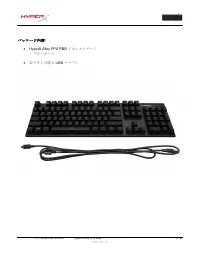
ドキュメント番 号 480HX-KB1002.A01 HyperX Alloy FPS RGB メカニカルゲ ー ミン グキ ー ボ ー ド ペ ー ジ 2 / 6 パッケ ー ジ 内 容 :
HyperX Alloy FPS RBG メカニカルゲ ー ミ ングキ ー ボ ー ド 取り外し可能な USB ケ ー ブル
Page 62 - USB
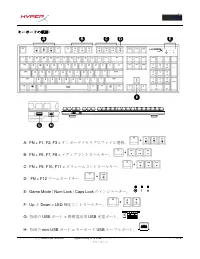
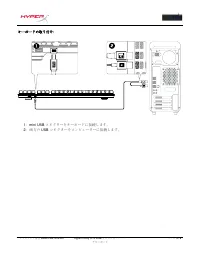
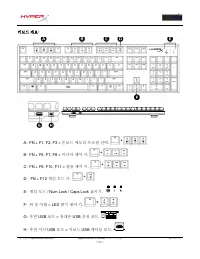
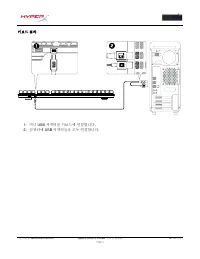
ドキュメント番 号 480HX-KB1002.A01 HyperX Alloy FPS RGB メカニカルゲ ー ミン グキ ー ボ ー ド ペ ー ジ 3 / 6 キ ー ボ ー ドの 概 要 : A- FN + F1, F2, F3 = オンボ ー ドメモリプロファイル選 択 。 B- FN + F6, F7, F8 = メディアコントロ ー ルキ ー 。 C- FN + F9, F10, F11 = ボリュ ー ムコントロ ー ルキ ー 。 D- FN + F12 ゲ ー ムモ ー ドキ ー 。 E- Game Mode / Num Lock / Caps Lock のインジケ ー タ ...
Page 64 - Windows
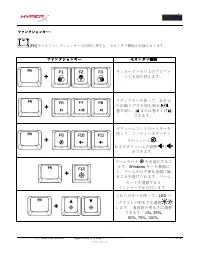
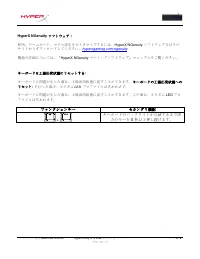
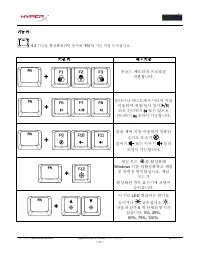
ドキュメント番 号 480HX-KB1002.A01 HyperX Alloy FPS RGB メカニカルゲ ー ミン グキ ー ボ ー ド ペ ー ジ 5 / 6 ファンクションキ ー : [FN] キ ー とファンクションキ ー を同時に押すと、セカンダリ機能が有 効 になります。 ファンクションキ ー セカンダリ機能 オンボ ー ドメモリ上のプロファ イルを切り替えます。 メディアキ ー を使って、お手元 の音 楽 / ビデオを再生 / 休止 、 巻 き 戻 し、 または 巻 き上げ できます。 ボリュ ー ムコントロ ー ルキ ー を 使って、コンピュ ー タオ ー ディ オのミュ ー...
Page 66 - 기계식; 부품
문서번호 480HX-KB1002.A01 HyperX Alloy FPS RGB 기계식 게임용 키보드 1/7 페이지 HyperX Alloy FPS RGB 기계식 게임용 키보드 부품 번호 HX-KB1SS2-US HX-KB1SS2-UK HX-KB1SS2-RU HX-KB1SS2-NO HX-KB1SS2-LA HX-KB1SS2-FR HX-KB1SS2-DE
Page 67 - 구성품
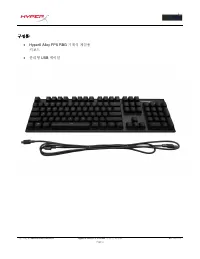
문서번호 480HX-KB1002.A01 HyperX Alloy FPS RGB 기계식 게임용 키보드 2/7 페이지 구성품 : HyperX Alloy FPS RBG 기계식 게임용 키보드 분리형 USB 케이블
Page 73 - คีย์บอร์ดเกมมิ่ง; หมายเลขชิ ้นส่วน
เลขเอกสาร 480HX-KB1002.A01 คีย์บอร์ดเกมมิ่ง HyperX Alloy FPS RGB HyperX Alloy FPS RGB หน้า 1 จาก 7 คีย์บอร์ดเกมมิ่ง HyperX Alloy FPS RGB หมายเลขชิ ้นส่วน HX-KB1SS2-US HX-KB1SS2-UK HX-KB1SS2-RU HX-KB1SS2-NO HX-KB1SS2-LA HX-KB1SS2-FR HX-KB1SS2-DE
Page 74 - สิ่งที่จัดมาให้
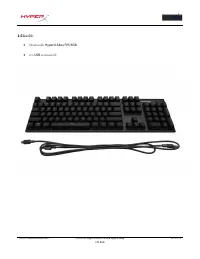
เลขเอกสาร 480HX-KB1002.A01 คีย์บอร์ดเกมมิ่ง HyperX Alloy FPS RGB HyperX Alloy FPS RGB หน้า 2 จาก 7 สิ่งที่จัดมาให้ : คีย์บอร์ดเกมมิ่ง HyperX Alloy FPS RGB สาย USB แบบถอดแยกได้
Page 75 - เบื ้องต้นเกี่ยวกับแป้นพิมพ์
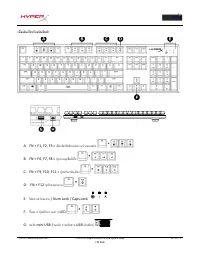
เลขเอกสาร 480HX-KB1002.A01 คีย์บอร์ดเกมมิ่ง HyperX Alloy FPS RGB HyperX Alloy FPS RGB หน้า 3 จาก 7 เบื ้องต้นเกี่ยวกับแป้นพิมพ์ : A- FN + F1, F2, F3 = เลือกโพรไฟล์หน่วยความจ าออนบอร์ด B- FN + F6, F7, F8 = ปุ่มควบคุมสื่อมีเดีย C- FN + F9, F10, F11 = ปุ่มปรับระดับเสียง D- FN + F12 ปุ่มโหมดเล่นเกม E- ไ...
Page 76 - พอร์ต
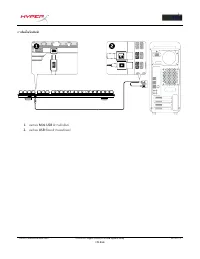
เลขเอกสาร 480HX-KB1002.A01 คีย์บอร์ดเกมมิ่ง HyperX Alloy FPS RGB HyperX Alloy FPS RGB หน้า 4 จาก 7 H- พอร์ต mini USB ด้านหลัง = พอร์ตสาย USB แป้นพิมพ์
Page 78 - ปุ่มฟังก์ชั่น; Game Mode
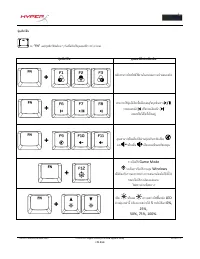
เลขเอกสาร 480HX-KB1002.A01 คีย์บอร์ดเกมมิ่ง HyperX Alloy FPS RGB HyperX Alloy FPS RGB หน้า 6 จาก 7 ปุ่มฟังก์ชั่น กด “FN” และปุ่มฟังก์ชั่นพร้อม ๆ กันเพื่อเปิดใช้คุณสมบัติการท างานรอง ปุ่มฟังก์ชั่น คุณสมบัติเด่นเพิ่มเติม สลับระหว่างโพรไฟล์ใช้งานในหน่วยความจ าออนบอร์ด สามารถใช้ปุ่มมีเดียเพื่อเปิดเล่น /...
Page 79 - กดปุ่มทั ้งสองเป็นเวลา
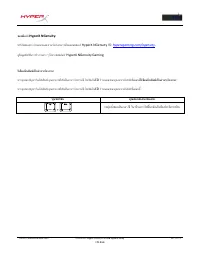
เลขเอกสาร 480HX-KB1002.A01 คีย์บอร์ดเกมมิ่ง HyperX Alloy FPS RGB HyperX Alloy FPS RGB หน้า 7 จาก 7 ซอฟต์แวร์ HyperX NGenuity: ปรับไฟส่องสว่าง โหมดเกมและค่ามาโครโดยดาวน์โหลดซอฟต์แวร์ HyperX NGenuity ที่นี่ : hyperxgaming.com/ngenuity . ดูข้อมูลฟังก์ชั่นการท างานต่าง ๆ ได้จากซอฟต์แวร์ HyperX NGenuity ...
Page 80 - Bàn phím chơi game cơ học HyperX; Mã s
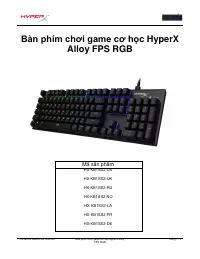
Tài li ệu số 480HX-KB1002.A01 Bàn phím chơi game cơ học HyperX Alloy FPS RGB Trang 1 / 7 Bàn phím chơi game cơ học HyperX Alloy FPS RGB Mã s ản phẩm HX-KB1SS2-US HX-KB1SS2-UK HX-KB1SS2-RU HX-KB1SS2-NO HX-KB1SS2-LA HX-KB1SS2-FR HX-KB1SS2-DE
Page 82 - Gi; ọn cấu hình trên bộ nhớ riêng.
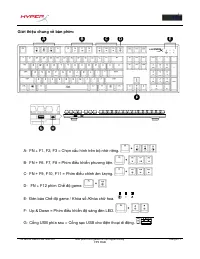
Tài li ệu số 480HX-KB1002.A01 Bàn phím chơi game cơ học HyperX Alloy FPS RGB Trang 3 / 7 Gi ới thiệu chung về bàn phím: A- FN + F1, F2, F3 = Ch ọn cấu hình trên bộ nhớ riêng. B- FN + F6, F7, F8 = Phím điều khiển phương tiện. C- FN + F9, F10, F11 = Phím điều chỉnh âm lượng. D- FN + F12 phím Ch ế độ g...
Page 83 - ổng mini USB phía sau = Cổng cáp USB bàn phím.
Tài li ệu số 480HX-KB1002.A01 Bàn phím chơi game cơ học HyperX Alloy FPS RGB Trang 4 / 7 H- C ổng mini USB phía sau = Cổng cáp USB bàn phím.
Page 85 - Các phím ch
Tài li ệu số 480HX-KB1002.A01 Bàn phím chơi game cơ học HyperX Alloy FPS RGB Trang 6 / 7 Các phím ch ức năng: Nh ấn “FN” và một phím chức năng cùng lúc để kích hoạt tính năng phụ của phím chức năng đó. Các phím ch ức năng Tính năng phụ Chuy ển đổi giữa các cấu hình trên b ộ nhớ riêng. V ới phím ph...
Page 87 - 机械游; 品型
文 档 编号 480HX-KB1002.A01 HyperX Alloy FPS RGB 机械游 戏键盘 第 1 页 ,共 6 页 HyperX Alloy FPS RGB 机械游 戏键盘 产 品型 号 HX-KB1SS2-US HX-KB1SS2-UK HX-KB1SS2-RU HX-KB1SS2-NO HX-KB1SS2-LA HX-KB1SS2-FR HX-KB1SS2-DE
Page 88 - 包含
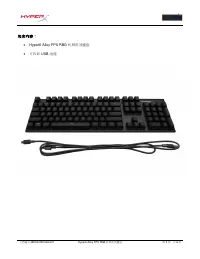
文 档 编号 480HX-KB1002.A01 HyperX Alloy FPS RGB 机械游 戏键盘 第 2 页 ,共 6 页 包含 内 容: HyperX Alloy FPS RBG 机械游 戏键盘 可拆卸 USB 线缆
Page 92 - 按下
文 档 编号 480HX-KB1002.A01 HyperX Alloy FPS RGB 机械游 戏键盘 第 6 页 ,共 6 页 HyperX NGenuity 软 件: 要定制灯光、游 戏 模式和宏 设 置, 请 在此 处 下 载 HyperX NGenuity 软 件: hyperxgaming.com/ngenuity 。 参 阅 HyperX NGenuity 游 戏软 件手 册 了解更多有 关 功能的信息。 键盘 恢 复 出 厂 设 置: 如果遇到任何 键盘问题 ,可以 执 行恢 复 出 厂 设 置。恢 复 键盘 出 厂 设 置 将 失去自定 义 LED 配置文件: 如果遇到任何 ...
Page 93 - 機械式電競鍵; 品型號
文件號碼: 480HX-KB1002.A01 HyperX Alloy FPS RGB 機械式電競鍵盤 第 1 頁,共 6 HyperX Alloy FPS RGB 機械式電競鍵 盤 產 品型號 HX-KB1SS2-US HX-KB1SS2-UK HX-KB1SS2-RU HX-KB1SS2-NO HX-KB1SS2-LA HX-KB1SS2-FR HX-KB1SS2-DE
Page 94 - 內容物:
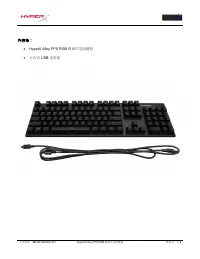
文件號碼: 480HX-KB1002.A01 HyperX Alloy FPS RGB 機械式電競鍵盤 第 2 頁,共 6 內容物: HyperX Alloy FPS RGB 機械式電競鍵盤 可拆式 USB 電源線
Page 98 - 功能鍵
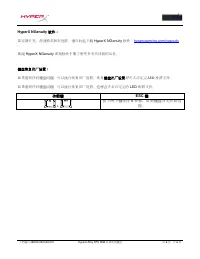
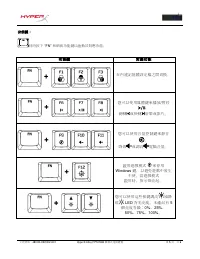
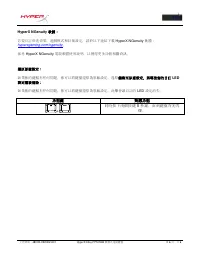
文件號碼: 480HX-KB1002.A01 HyperX Alloy FPS RGB 機械式電競鍵盤 第 6 頁,共 6 HyperX NGenuity 軟體: 若要自訂燈光效果、遊戲模式和巨集設定,請於以下連結下載 HyperX NGenuity 軟體: hyperxgaming.com/ngenuity 。 參考 HyperX NGenuity 電競軟體使用說明,以獲得更多功能相關資訊。 還原原廠設定: 如果 你 的鍵盤有任何問題, 你 可以將鍵盤還原 為 原廠設定。還原鍵盤至原廠設定,將導致 您 的自訂 LED 設定檔被 清 除: 如果 你 的鍵盤有任何問題, 你 可以將鍵盤還原 為 ...