Hilti 2062051 - User Manual
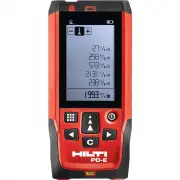
Hilti 2062051 Laser Distance Measurer – User Manual, read for free online in PDF format. We hope this helps you resolve any issues you may have. If you have further questions, please contact us through the contact form.


Table of Contents:
- Page 5 – ORIGINAL OPERATING INSTRUCTIONS; PD‐E laser range meter; It is essential that the operating instructions; General information
- Page 6 – Description
- Page 7 – Accessories
- Page 8 – Technical data
- Page 9 – Safety instructions
- Page 10 – Before use
- Page 13 – Operation
- Page 20 – Care and maintenance
- Page 21 – Troubleshooting
- Page 22 – 1 Manufacturer’s warranty - tools
- Page 23 – Hilti Corporation; Printed in Germany © 2013
*2068470*
2068470
PD-E
Operating instructions
en
Mode d’emploi
fr
Manual de instrucciones
es
Manual de instruções
pt
Printed: 18.11.2013 | Doc-Nr: PUB / 5151889 / 000 / 01
"Loading the manual" means you need to wait until the file loads and becomes available for online reading. Some manuals are very large, and the time they take to appear depends on your internet speed.
Summary
ORIGINAL OPERATING INSTRUCTIONS PD‑E laser range meter It is essential that the operating instructions are read before the tool is operated for the first time.Always keep these operating instructions to- gether with the tool.Ensure that the operating instructions are with the tool when it is given t...
Location of identification data on the tool The type designation and serial number can be found on the type identification plate on the tool. Make a note of this data in your operating instructions and always refer to it when making an enquiry to your Hilti representative or service department. Type...
2.9 Control panel “Measure” button Quick start (when the tool is switched off, press the button briefly to switch it on). Begins distance measurement.Activates the laser beam.Activates continuous measuring mode (long press, approx. 2 sec.).Stops continuous measuring mode.Confirms the selected functi...