Google T3021US - User Manual
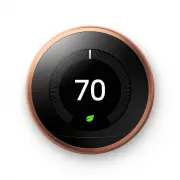
Google T3021US Thermostat – User Manual, read for free online in PDF format. We hope this helps you resolve any issues you may have. If you have further questions, please contact us through the contact form.


Welcome home.
Control from anywhere.
Connect your thermostat to Wi-Fi and you
can control it from your phone, tablet
or laptop. Just download the free Nest app
or go to
nest.com/account
Get to know each other.
Press the ring for the menu,
then rotate to select.
Meet the Nest Learning Thermostat.
Display
Turns blue when cooling
and orange when heating.
Status
Shows Time-to-Temp
and if it’s heating, cooling
or using Airwave.
Current temperature
Shows the temperature
in your home.
Target temperature
Shows the temperature
you want to reach.
Nest Leaf
Appears when you’re
saving energy.
Sensor window
Contains temperature,
humidity, light and
activity sensors.
We take your privacy seriously. Go to
nest.com/privacy to find out more.
Visit
nest.com/support for more info
about Nest’s facts and figures.
Thermostat
If you have heating and
cooling, easily switch
between them manually
or automatically.
Energy History
See how much energy
you’ve used in the last
ten days and why.
Schedule
See or adjust the schedule
the Nest Thermostat has
learned from your
temperature changes.
Away
Set the Nest Thermostat
to Away when you leave
to save energy while
you’re gone.
Settings
Choose options like
Thermostat Lock and
Fan Control.
"Loading the manual" means you need to wait until the file loads and becomes available for online reading. Some manuals are very large, and the time they take to appear depends on your internet speed.


