Fujifilm Instax Mini 11 Pink - User Manual
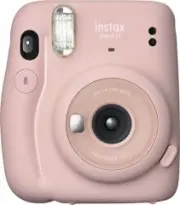
Fujifilm Instax Mini 11 Pink Camera – User Manual, read for free online in PDF format. We hope this helps you resolve any issues you may have. If you have further questions, please contact us through the contact form.


Table of Contents:
- Page 9 – Names of Parts; Front; English
- Page 10 – Taking Pictures
- Page 11 – Taking a Photo in Selfie Mode; Taking a picture of yourself; Taking a closeup
- Page 12 – Precautions for Taking Photos; Precautions for Holding the Camera; Flash charging
- Page 14 – Handling; Handling of Camera
- Page 16 – Specifications; Information for traceability in Europe
- Page 19 – Названия деталей; Лицевая сторона; Русский
- Page 20 – Съемка
- Page 21 – Съемка автопортрета; Съемка крупным планом
- Page 22 – Меры предосторожности при съемке; Состояние
- Page 24 – Уход за изделием; Уход за фотокамерой
- Page 26 – Технические характеристики; Информация для отслеживания в Европе
CPL13B703-200
EN
DE
FR
ES
PT
RU
IT
NL
PL
CS
SK
HU
UK
User’s Guide/Safety Precautions
Bedienungsanleitung/Sicherheitsmaßnahmen
Guide d’utilisation/Précautions de sécurité
Manual de instrucciones/Precauciones de seguridad
Manual de Utilização/Precauções de segurança
Руководство пользователя/меры предосторожности
Guida per l’Utente/Precauzioni per la sicurezza
Gebruikershandleiding/Veiligheidsmaatregelen
Instrukcja obsługi/Wskazówki bezpieczeństwa
Uživatelská příručka/Bezpečnostní opatření
Používateľská príručka/Bezpečnostné pokyny
Használati útmutató/Biztonsági óvintézkedések
Посібник користувача/Заходи безпеки
BO-13_EUEN.indb 1
2019/12/03 18:56:39
"Loading the manual" means you need to wait until the file loads and becomes available for online reading. Some manuals are very large, and the time they take to appear depends on your internet speed.
Was this manual helpful?
About this manual
- Brand
- Fujifilm
- Model
- Instax Mini 11 Pink
- Document type
- User Manual
- Category
- Camera
- Language(s)
- English, Russian
- Pages
- 26
- File size
- 3.9 MB
- Format
Summary
9 EN Names of Parts Front 1 3 2 4 5 6 8 9 12 10 7 11 Back 15 16 12 18 14 13 17 1 AE light sensor 2 Flash light sensor 3 Film ejection slot 4 Flash lampface 5 Viewfinder 6 Shutter button 7 Lens cover / Lens 8 Selfie mirror 9 Lens barrel 10 Power button 11 Flash charging lamp 12 Strap eyelet 13 Viewfi...
10 EN Taking Pictures Do not open the back cover until you have used up the film. Otherwise, the rest of the film will become exposed and turn white, and can no longer be used. 1 Once the batteries are loaded, press the power button to turn the camera on. The lens barrel extends and the flash chargi...
11 EN Taking a Photo in Selfie Mode To switch from the selfie mode to normal shooting mode, turn off the camera by pushing the lens barrel back in and then turn it on again. Taking a picture of yourself If you shoot in selfie mode, you can take a picture of yourself using the selfie mirror on the fr...
Ask a question
Related manuals
More Fujifilm Cameras models


Other Fujifilm appliances
 Fujifilm 3D W3 Manual
 Fujifilm 90 Manual
 Fujifilm 100 Manual
 Fujifilm 100F Manual
 Fujifilm 120 Manual
 Fujifilm 200 Manual
 Fujifilm 3000 Manual
 Fujifilm 16221735 Manual
 Fujifilm A235 Manual
 Fujifilm AF3-177E Manual
 Fujifilm AV200 Manual
- Fujifilm AX300 Manual
 Fujifilm BAS-2500 Manual
 Fujifilm digital camera Manual