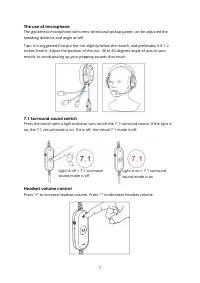
Page 5 - Features
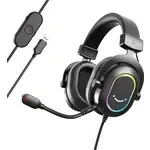
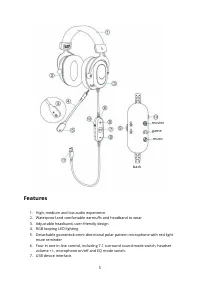
5 Features 1. High, medium and low audio experience 2. Waterproof and comfortable earmuffs and headband to wear 3. Adjustable headband, user-friendly design 4. RGB looping LED lighting 5. Detachable gooseneck omni-directional polar pattern microphone with red light mute reminder 6. Four in one in-li...
Page 6 - Guidelines for use; Adjusting the headband
6 Guidelines for use Adjusting the headband Adjust the headband via its snap-in locking mechanism on the left and right sides. For good transmission quality and best possible comfort, adjust the headband to properly fit your head. Detach/Install the microphone Unplug the microphone outward to separa...
Page 8 - EQ Mode switch; Computer Set Up; Windows; Headset Settings
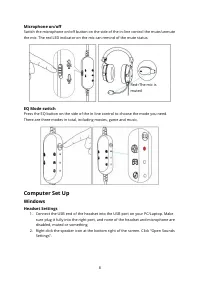
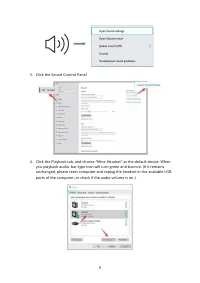
8 Microphone on/off Switch the microphone on/off button on the side of the in-line control the mute/unmute the mic. The red LED indicator on the mic can remind of the mute status. EQ Mode switch Press the EQ button on the side of the in-line control to choose the mode you need. There are three modes...
Page 10 - Microphone Settings
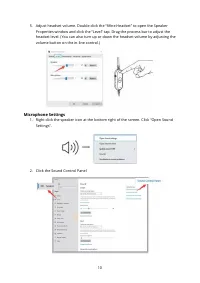
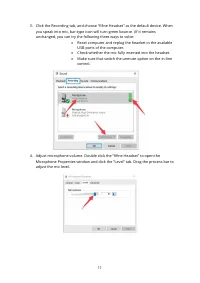
10 5. A djust headset volume. Double click the “fifine Headset” to open the Speaker Properties window and click the “Level” tap. Drag the process bar to adjust the headset level. (You can also turn up or down the headset volume by adjusting the volume button on the in-line control.) Microphone Setti...
Page 12 - Apple MAC OS
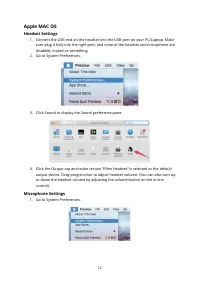
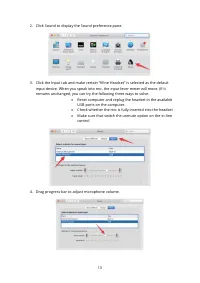
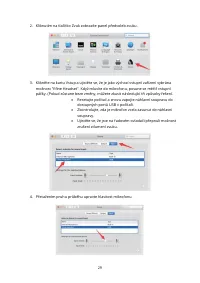
12 Apple MAC OS Headset Settings 1. Connect the USB end on the headset into the USB port on your PC/Laptop. Make sure plug it fully into the right port, and none of the headset and microphone are disabled, muted or something. 2. Go to System Preferences. 3. Click Sound to display the Sound preferenc...
Page 14 - PRECAUTIONS; On Headset Use
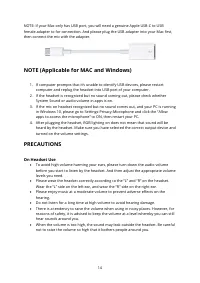
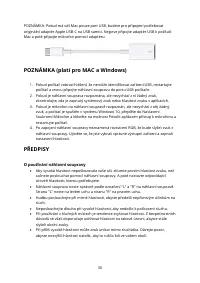
14 NOTE: If your Mac only has USB port, you will need a genuine Apple USB-C to USB female adapter to for connection. And please plug the USB adapter into your Mac first, then connect the mic with the adapter. NOTE (Applicable for MAC and Windows) 1. I f computer prompts that it’s unable to identify ...
Page 15 - Specification
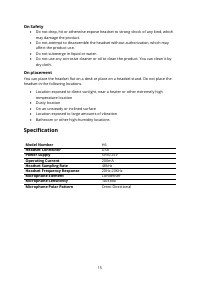
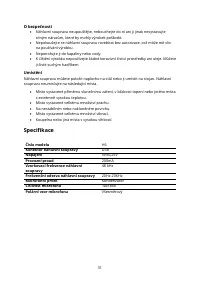
15 On Safety • Do not drop, hit or otherwise expose headset to strong shock of any kind, which may damage the product. • Do not attempt to disassemble the headset without authorization, which may affect the product use. • Do not submerge in liquid or water. • Do not use any corrosive cleaner or oil ...
Page 16 - Warranty Conditions
16 Warranty Conditions A new product purchased in the Alza.cz sales network is guaranteed for 2 years. If you need repair or other services during the warranty period, contact the product seller directly, you must provide the original proof of purchase with the date of purchase. The following are co...
Page 17 - EU Declaration of Conformity; Subject of the declaration:
17 EU Declaration of Conformity Identification data of the manufacturer's / importer's authorized representative: Importer: Alza.cz a.s. Registered office: Jankovcova 1522/53, Holešovice, 170 00 Prague 7 CIN: 27082440 Subject of the declaration: Title: Headset Model / Type: H6 The above product has ...
Page 18 - WEEE
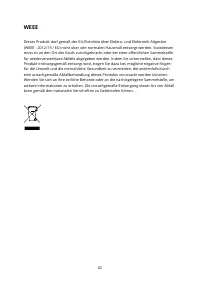
18 WEEE This product must not be disposed of as normal household waste in accordance with the EU Directive on Waste Electrical and Electronic Equipment (WEEE - 2012/19 / EU). Instead, it shall be returned to the place of purchase or handed over to a public collection point for the recyclable waste. ...
Page 20 - Obsah balení
20 Obsah balení 1. Náhlavní souprava sestavená z měkkých a pohodlných materiálů. 2. Chrániče sluchu s chladicími ušními polštářky. 3. Vestavěné smyčkové černé světlo RGB. 4. Odnímatelný všesměrový mikrofon; konstrukci lze nastavit a odpojit. 5. Indikátor LED na mikrofonu Červené světlo připomíná sta...
Page 21 - Funkce
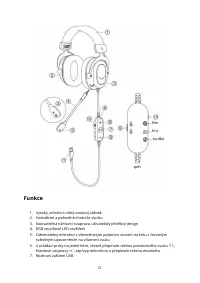
21 Funkce 1. Vysoký, střední a nízký zvukový zážitek 2. Vodotěsné a pohodlné chrániče sluchu 3. Nastavitelná náhlavní souprava, uživatelsky přívětivý design 4. RGB smyčkové LED osvětlení 5. Odnímatelný mikrofon s všesměrovým polárním vzorem na krku s červeným světelným upozorněním na ztlumení zvuku ...
Page 22 - Pokyny pro použití; Nastavení náhlavní s
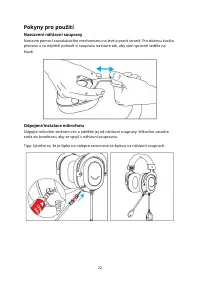
22 Pokyny pro použití Nastavení náhlavní s oupravy Nastavte pomocí zacvakávacího mechanismu na levé a pravé straně. Pro dobrou kvalitu přenosu a co největší pohodlí si soupravu nastavte tak, aby vám správně seděla na hlavě. Odpojení/instalace mikrofonu Odpojte mikrofon směrem ven a oddělte jej od ná...
Page 23 - Použití mikrofonu; Přepínač prostorového zvuku 7.1
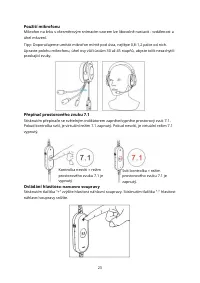
23 Použití mikrofonu Mikrofon na krku s všesměrovým snímacím vzorem lze libovolně nastavit - vzdálenost a úhel mluvení. Tipy: Doporučujeme umístit mikrofon mírně pod ústa, nejlépe 0,8 -1,2 palce od nich. Upravte polohu mikrofonu, úhel osy vůči ústům 30 až 45 stupňů, abyste tolik nezachyti li praskaj...
Page 24 - Nastavení počítače; Nastavení náhlavní soupravy
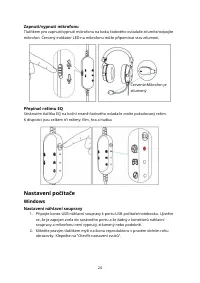
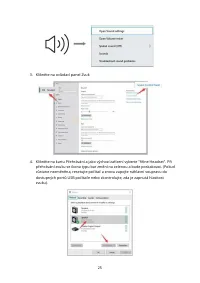
24 Zapnutí/vypnutí mikrofonu Tlačítkem pro zapnutí/vypnutí mikrofonu na boku řadového ovladače ztlumíte/odpojíte mikrofon. Červený indikátor LED na mikrofonu může připomínat stav ztlumení. Přepínač režimu EQ Stisknutím tlačítka EQ na boční straně řadového ovladače zvolte požadovaný režim. K dispozic...
Page 26 - Nastavení mikrofonu
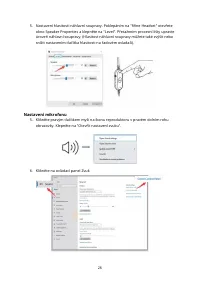
26 5. Nast avení hlasitosti náhlavní soupravy. Poklepáním na "fifine Headset" otevřete okno Speaker Properties a klepněte na "Level". Přetažením procesní lišty upravte úroveň náhlavní soupravy. (Hlasitost náhlavní soupravy můžete také zvýšit nebo snížit nastavením tlačítka hlasitosti...
Page 30 - PŘEDPISY; O používání náhlavní soupravy
30 POZNÁMKA: Pokud má váš Mac pouze port USB, budete pro připojení potřebovat originální adaptér Apple USB- C na USB samici. Nejprve připojte adaptér USB k počítači Mac a poté připojte mikrofon pomocí adaptéru. POZNÁMKA (platí pro MAC a Windows) 1. Pokud počítač zobrazí hlášení, že nemůže identifiko...
Page 31 - Specifikace; soupravy
31 O bezpečnosti • Náhlavní soupravu neupouštějte, nebouchejte do ní ani ji jinak nevystavujte silným nárazům, které by mohly výrobek poškodit. • Nepokoušejte se náhlavní soupravu rozebírat bez autorizace, což může mít vliv na používání výrobku. • Neponořujte ji do kapaliny ne bo vody. • K čištění v...
Page 32 - Záruční podmínky
32 Záruční podmínky Na nový výrobek zakoupený v prodejní síti Alza.cz se vztahuje záruka 2 roky. V případě potřeby opravy nebo jiného servisu v záruční době se obraťte přímo na prodejce výrobku, je nutné předložit originální doklad o koupi s datem nákupu. Za rozpor se záručními podmínkami, pro který...
Page 33 - EU prohlášení o shodě; Identifikační údaje zplnomocněného zástupce výrobce/dovozce:
33 EU prohlášení o shodě Identifikační údaje zplnomocněného zástupce výrobce/dovozce: Dovozce: Alza.cz a.s. Sídlo společnosti: Jankovcova 1522/53, Holešovice, 170 00 Praha 7. IČO : 27082440 Předmět prohlášení: Název: Náhlavní souprava Model / typ: H6 Výše uvedený výrobek byl testován v souladu s nor...
Page 37 - Funkcie
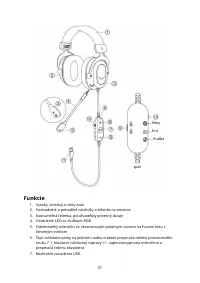
37 Funkcie 1. Vysoký, stredný a nízky zvuk 2. Vodoodolné a pohodlné náušníky a čelenka na nosenie 3. Nastaviteľná čelenka, používateľsky prívetivý dizajn 4. Osvetleni e LED so slučkami RGB 5. Odnímateľný mikrofón so všesmerovým polárnym vzorom na husom krku s červeným svetlom 6. Štyri ovládacie prvk...
Page 38 - Návod na použitie; Nastavenie čelenky; Odpojenie/inštalácia mikrofónu
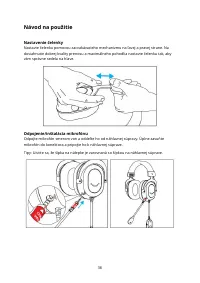
38 Návod na použitie Nastavenie čelenky Nastavte čelenku pomocou zacvakávacieho mechanizmu na ľavej a pravej strane. Na dosiahnutie dobrej kvality prenosu a maximálneho pohodlia nastavte čelenku tak, aby vám správne sedela na hlave. Odpojenie/inštalácia mikrofónu Odpojte mikrofón smerom von a oddeľt...
Page 39 - Používanie mikrofónu; Prepínač priestorového zvuku 7.1
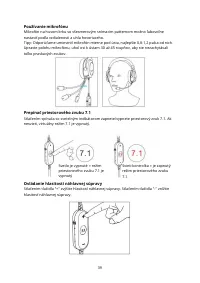
39 Používanie mikrofónu Mikrofón na husom krku so všesmerovým snímacím patternom možno ľubovoľne nastavi ť podľa vzdialenosti a uhla hovoriaceho. Tipy: Odporúčame umiestniť mikrofón mierne pod ústa, najlepšie 0,8 -1,2 palca od nich. Upravte polohu mikrofónu, uhol osi k ústam 30 až 45 stupňov, aby st...
Page 40 - Nastavenia počítača; Nastavenie náhlavnej súpravy
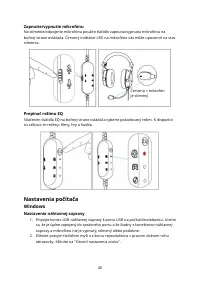
40 Zapnutie/vypnutie mikrofónu Na stlmenie/odpojenie mikrofónu použite tlačidlo zapnutia/vypnutia mikrofónu na bočnej strane ovládača. Červený indikátor LED na mikrofóne vás môže upozorniť na stav stlmenia. Prepínač režimu EQ Stlačením tlačidla EQ na bočnej strane ovládača vyberte požadovaný režim. ...
Page 42 - Nastavenia mikrofónu
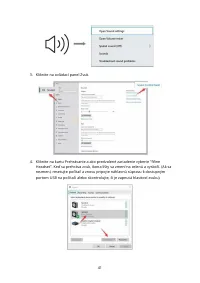
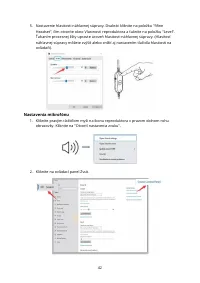
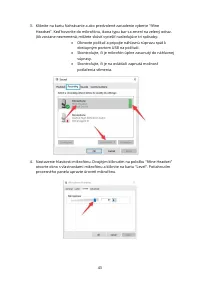
42 5. Nastavenie hlasitosti náhlavnej súpravy. Dvakrát kliknite na položku "fifine Headset", čím otvoríte okno Vlastnosti reproduktora a ťuknite na položku "Level". Ťahaním procesnej lišty upravte úroveň hlasitosti náhlavnej súpravy. (Hlasitosť náhlavnej súpravy môžete zvýšiť alebo z...
Page 46 - PREDPISY; O používaní náhlavnej súpravy
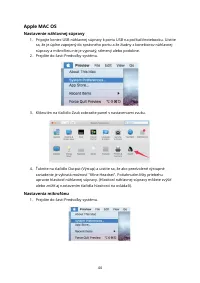
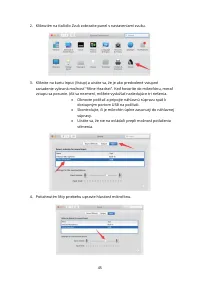
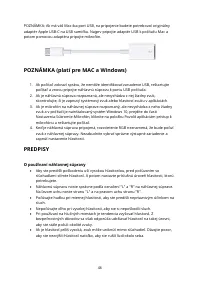
46 POZNÁMKA: Ak má váš Mac iba port USB, na pripojenie budete potrebovať originálny adaptér Apple USB - C na USB samičku. Najprv pripojte adaptér USB k počítaču Mac a potom pomocou adaptéra pripojte mikrofón. POZNÁMKA (platí pre MAC a Windows) 1. Ak počítač zobrazí správu, že nemôže identifikovať za...
Page 47 - Špecifikácia
47 O bezpečnosti • Náhlavnú súpravu neupúšťajte, nebúchajte do nej ani ju inak nevystavujte silným nárazom, ktoré by mohli výrobok poškodiť. • Nepokúšajte sa náhlavnú súpravu rozoberať bez oprávnenia, čo môže ovplyvniť používanie výrobku. • Neponárajte ich do kvapaliny alebo vody. • Na čistenie výro...
Page 48 - Záručné podmienky
48 Záručné podmienky Na nový výrobok zakúpený v predajnej sieti Alza.sk sa vzťahuje záruka 2 roky. V prípade potreby opravy alebo iného servisu v záručnej dobe sa obráťte priamo na predajcu výrobku, je nutné predložiť originálny doklad o kúpe s dátumom nákupu. Za rozpor so záručnými podmienkami, pre...
Page 49 - EÚ prehlásenie o zhode; Identifikačné údaje splnomocneného zástupcu výrobcu/dovozcu:
49 EÚ prehlásenie o zhode Identifikačné údaje splnomocneného zástupcu výrobcu/dovozcu: Dovozca: Alza.cz a.s. Sídlo: Jankovcova 1522/53, Holešovice, 170 00 Praha 7. IČO : 27082440 Predmet prehlásenia: Náhlavná súprava Model/typ: H6 Vyššie uvedený výrobok bol testovaný v súlade s normou (normami) použ...
Page 53 - Jellemzők
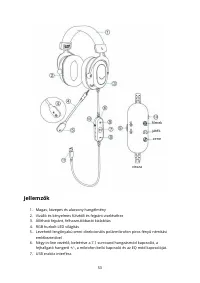
53 Jellemzők 1. Magas, közepes és alacsony hangélmény 2. Vízálló és kényelmes fülvédő és fejpánt viseléséhez 3. Állítható fejpánt, felhasználóbarát kialakítás 4. RGB hurkolt LED világítás 5. Levehető lengőnyakú omni - direkcionális polármikrofon piros fényű némítási emlékeztetővel 6. Négy in - line ...
Page 54 - Használati útmutató; A fejpánt beállítása
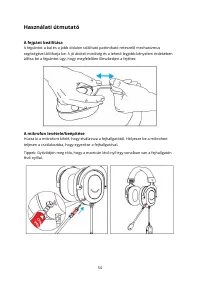
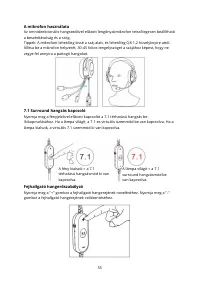
54 Használati útmutató A fejpánt beállítása A fejpántot a bal és a jobb oldalon található pattintható reteszelő mechanizmus segítségével állíthatja be. A jó átviteli minőség és a lehető legjobb kényelem érdekében állítsa be a fejpántot úgy, hogy megfelelően illeszkedjen a fejéhez. A mikrofon levétel...
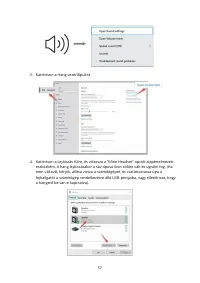
Page 56 - EQ mód kapcsoló; Számítógép beállítása; Fejhallgató beállítások
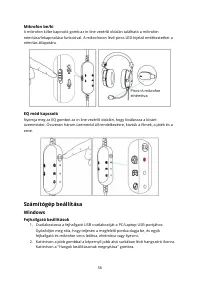
56 Mikrofon be/ki A mikrofon ki/be kapcsoló gomb az in - line vezérlő oldalán található a mikrofon némítása/lekapcsolása funkcióval. A mikrofonon lévő piros LED - kijelző emlékeztethet a némítás állapotára. EQ mód kapcsoló Nyomja meg az EQ gombot az in- line vezérlő oldalán, hogy kiválassza a kívánt...
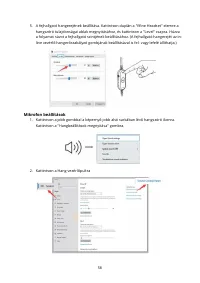
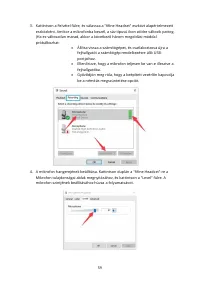
Page 58 - Mikrofon beállítások
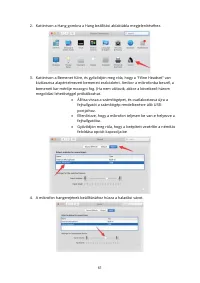
58 5. A fejhallgató hangerejének beállítása. Kattintson duplán a "fifine Headset" elemre a hangszóró tulajdonságai ablak megnyitásához, és kattintson a "Level" csapra. Húzza a folyamat sávot a fejhallgató szintjének beállításához. (A fejhallgató hangerejét az in - line vezérlő hanger...
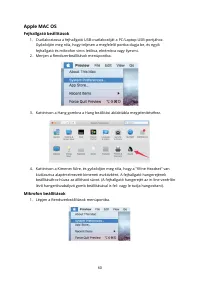
Page 62 - MEGJEGYZÉS (MAC és Windows esetén alkalmazható); ÓVINTÉZKEDÉSI SZABÁLYOK; A headset használatáról
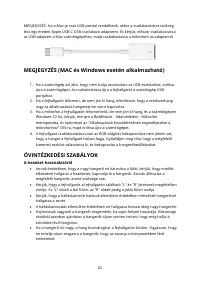
62 MEGJEGYZÉS: Ha a Mac -je csak USB- porttal rendelkezik, akkor a csatlakozáshoz szükség lesz egy eredeti Apple USB-C USB- csatlakozó adapterre. És kérjük, először csatlakoztassa az USB- adaptert a Mac számítógépéhez, majd csatlakoztassa a mikrofont az adapterrel. MEGJEGYZÉS (MAC és Windows esetén ...
Page 63 - Specifikáció; Mikrofon elem
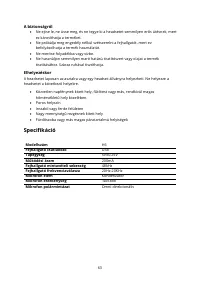
63 A biztonságról • Ne ejtse le, ne üsse meg, és ne tegye ki a headsetet semmilyen erős ütésn ek, mert ez károsíthatja a terméket. • Ne próbálja meg engedély nélkül szétszerelni a fejhallgatót, mert ez befolyásolhatja a termék használatát. • Ne merítse folyadékba vagy vízbe. • Ne használjon semmilye...
Page 64 - Jótállási feltételek
64 Jótállási feltételek Az Alza.cz értékesítési hálózatában vásárolt új termékre 2 év garancia vonatkozik. Ha a garanciális időszak alatt javításra vagy egyéb szolgáltatásra van szüksége, forduljon közvetlenül a termék eladójához, a vásárlás dátumával ellátott eredeti vásárlási bizonylatot kell bemu...
Page 65 - megfelelőségi nyilatkozat; A nyilatkozat tárgya:
65 EU- megfelelőségi nyilatkozat A gyártó/importőr meghatalmazott képviselőjének azonosító adatai: Importőr: Alza.cz a.s. Bejegyzett székhely: Jankovcova 1522/53, Holešovice, 170 00 Prága 7 CIN: 27082440 A nyilatkozat tárgya: Cím: Headset Modell / típus: H6 A fenti terméket az irányelv(ek)ben meghat...
Page 68 - Was ist in der Schachtel?
68 Was ist in der Schachtel? 1. Kopfband - Aus weichen und bequemen Materialien. 2. Kapselgehörschützer - mit kühlenden Ohrpolstern. 3. RGB-Licht - Eingebautes RGB-Schwarzlicht mit Schleifenfunktion. 4. Abnehmbares omnidirektionales Mikrofon - der Schwanenhals kann eingestellt und abgenommen werden....
Page 69 - Eigenschaften
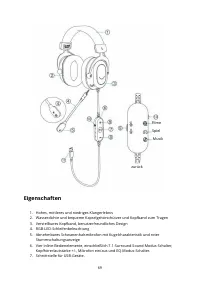
69 Eigenschaften 1. Hohes, mittleres und niedriges Klangerlebnis 2. Wasserdichte und bequeme Kapselgehörschützer und Kopfband zum Tragen 3. Verstellbares Kopfband, benutzerfreundliches Design 4. RGB-LED-Schleifenbeleuchtung 5. Abnehmbares Schwanenhalsmikrofon mit Kugelcharakteristik und roter Stumms...
Page 70 - Leitlinien für die Verwendung; Einstellen des Kopfbandes
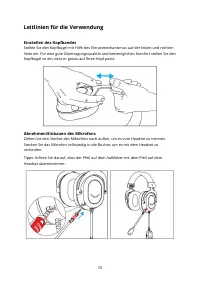
70 Leitlinien für die Verwendung Einstellen des Kopfbandes Stellen Sie den Kopfbügel mit Hilfe des Einrastmechanismus auf der linken und rechten Seite ein. Für eine gute Übertragungsqualität und bestmöglichen Komfort stellen Sie den Kopfbügel so ein, dass er genau auf Ihren Kopf passt. Abnehmen/Einb...
Page 71 - Die Verwendung von Mikrofonen; Lautstärkeregler des Headsets
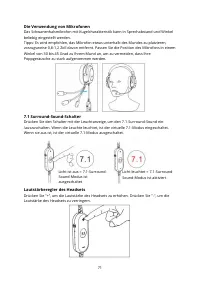
71 Die Verwendung von Mikrofonen Das Schwanenhalsmikrofon mit Kugelcharakteristik kann in Sprechabstand und Winkel beliebig eingestellt werden. Tipps: Es wird empfohlen, das Mikrofon etwas unterhalb des Mundes zu platzieren, vorzugsweise 0,8-1,2 Zoll davon entfernt. Passen Sie die Position des Mikro...
Page 72 - Computer einrichten; Headset-Einstellungen
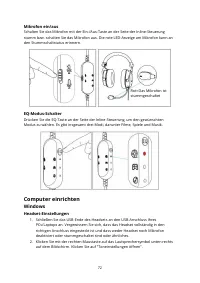
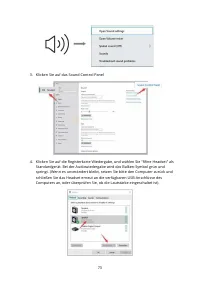
72 Mikrofon ein/aus Schalten Sie das Mikrofon mit der Ein-/Aus-Taste an der Seite der Inline-Steuerung stumm bzw. schalten Sie das Mikrofon aus. Die rote LED-Anzeige am Mikrofon kann an den Stummschaltstatus erinnern. EQ-Modus-Schalter Drücken Sie die EQ -Taste an der Seite der Inline- Steuerung, um...
Page 74 - Mikrofon-Einstellungen
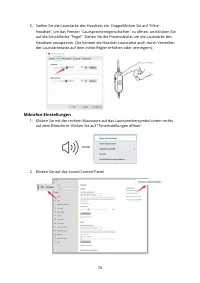
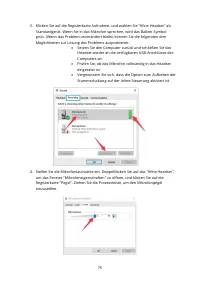
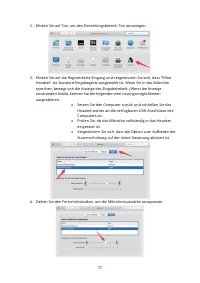
74 5. Stellen Sie die Lautstärke des Headsets ein. Doppelklicken Sie auf "fifine Headset", um das Fenster "Lautsprechereigenschaften" zu öffnen, und klicken Sie auf die Schaltfläche "Pegel". Ziehen Sie die Prozessleiste, um die Lautstärke des Headsets anzupassen. (Sie können ...
Page 78 - VORSICHTSMASSNAHMEN; Zur Verwendung des Headsets
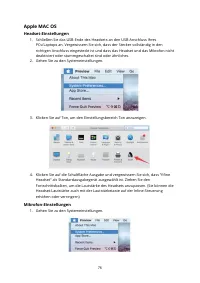
78 HINWEIS: Wenn Ihr Mac nur über einen USB - Anschluss verfügt, benötigen Sie einen echten Apple USB-C-auf-USB-Buchse- Adapter für den Anschluss. Und bitte stecken Sie zuerst den USB- Adapter in Ihren Mac, dann schließen Sie das Mikrofon mit dem Adapter an. HINWEIS (Anwendbar für MAC und Windows) 1...
Page 79 - Zur Sicherheit; Im Praktikum; Spezifikation; Kopfhörer Frequenzgang
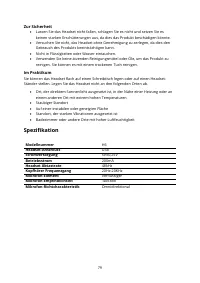
79 Zur Sicherheit • Lassen Sie das Headset nicht fallen, schlagen Sie es nicht und setzen Sie es keinen starken Erschütterungen aus, da dies das Produkt beschädigen könnte. • Versuchen Sie nicht, das Headset ohne Genehmigung zu zerlegen, da dies den Gebrauch des Produkts beeinträchtigen kann. • Nich...
Page 80 - Garantiebedingungen; Anspruch nicht anerkannt werden kann, gelten:
80 Garantiebedingungen Auf ein neues Produkt, das im Vertriebsnetz von Alza gekauft wurde, wird eine Garantie von 2 Jahren gewährt. Wenn Sie während der Garantiezeit eine Reparatur oder andere Dienstleistung en benötigen, wenden Sie sich direkt an den Produktverkäufer. Sie müssen den Originalkaufbel...
Page 81 - Konformitätserklärung; Gegenstand der Erklärung:
81 EU- Konformitätserklärung Angaben zur Identifizierung des bevollmächtigten Vertreters des Herstellers/Importeurs: Importeur: Alza.cz a.s. Einget ragener Sitz: Jankovcova 1522/53, Holešovice, 170 00 Prag 7 ID-Nummer: 27082440 Gegenstand der Erklärung: Titel: Kopfhörer Modell/Typ: H6 Das oben genan...