Electrolux EWW1042R7WB - User Manual
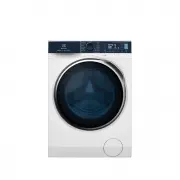
Electrolux EWW1042R7WB Washing Machine – User Manual, read for free online in PDF format. We hope this helps you resolve any issues you may have. If you have further questions, please contact us through the contact form.


Table of Contents:
- Page 2 – WE’RE THINKING OF YOU; Visit our website to:
- Page 4 – SAFETY INFORMATION; Conditions Of Use; This washing machine is not intended for use by
- Page 6 – PRODUCT DESCRIPTION
- Page 9 – Load Sensor
- Page 10 – CONTROL PANEL; Control Panel Description
- Page 13 – Program Options Compatibility
- Page 14 – Time Manager
- Page 15 – Stain Touchpad
- Page 16 – Buzzer; BEFORE FIRST USE
- Page 18 – DAILY USE; Loading The Laundry
- Page 22 – WASHING HINTS; Sorting The Laundry; Quantity of detergent to be
- Page 24 – INTERNATIONAL WASH CODE SYMBOLS; CARE AND CLEANING; External Cleaning
- Page 28 – Emergency Drain; Frost Precautions
- Page 30 – TROUBLESHOOTING; Possible Failures
- Page 33 – Emergency Door Opening
- Page 34 – INSTALLATION; TECHNICAL DATA
- Page 38 – Packaging Materials; ENVIRONMENT CONCERNS; Electrical Connection
Washing Machine
EWF8042R7WB
EWF9042R7WB
EWF1042R7WB
User Manual
2
WI-FI Connectivity Setup
40
"Loading the manual" means you need to wait until the file loads and becomes available for online reading. Some manuals are very large, and the time they take to appear depends on your internet speed.
Was this manual helpful?
Helpful for 4 of 4 readers
About this manual
- Brand
- Electrolux
- Model
- EWW1042R7WB
- Document type
- User Manual
- Category
- Washing Machine
- Language(s)
- English
- Pages
- 44
- File size
- 18.5 MB
- Format
Summary
2 www.electrolux.com CONTENTS 1.1 Conditions Of Use 1.2 Child Safety 1.3 General Safety 1.4 Installation 1.5 Use 1. SAFETY INFORMATION ........................................................................................................ 4 .............................................................
4 www.electrolux.com SAFETY INFORMATION In the interest of your safety and to ensure the correct use, before installing and first using the appliance, read this user manual carefully, including its hints and warnings. This appliance is intended to be used in household and similar applications such a...
6 www.electrolux.com Never use the washing machine if the power supply cable, the control panel, the working surface or the base are damaged so that the inside of the washing machine is accessi- ble. This appliance is heavy. Care should be taken when moving it.When unpacking the appliance, check tha...
Ask a question
Related manuals
Popular Electrolux Washing Machines


More Electrolux Washing Machines models
 Electrolux EWF14742 User Manual
 Electrolux EWF14822 User Manual
 Electrolux EWF14933 User Manual
 Electrolux EWG 12740 W Manual
 Electrolux EWP 86100 W Manual
 Electrolux EWW1042ADWA User Manual
 Electrolux EWW7524ADWA User Manual
 Electrolux EWW8024Q5WB User Manual
 Electrolux EWW12832 User Manual
 Electrolux EWW14013 User Manual
 Electrolux EWW 14791 W Manual
 Electrolux E4WMSTPN1 User Manual