DeLonghi DCH7992ER - User Manual
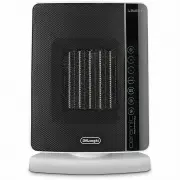
A user manual for a smart heating appliance covers its core functions, from basic controls to advanced features like energy-saving modes, timers, and remote operation. The document outlines setup requirements–including electrical connections–and highlights operational modes such as fan-assisted heating, freeze prevention, and digital scheduling. It also addresses maintenance tasks like battery replacement and troubleshooting common issues, including display errors or overheating, with guidance on basic fixes or escalation to support services.


Table of Contents:
- Page 1 – Appliance Controls, Modes, and Safety Settings
- Page 2 – Timer Operation, Remote Control, and Maintenance
- Page 3 – Troubleshooting Guide for Appliance Faults
7
DESCRIPTION
(see fig. 1)
A
ON/STAND-BY button
B
+/- adjustment buttons
C
MODE button (selects the operating mode)
D “
ECO plus” button
E
Timer button
F
Swing button
G
Remote control receiver
H
Remote control
I
Indicator light
J
Air intake grille
K
Filter
USE
Installation
The appliance can be used on any horizontal surface.
Do not overload the electrical circuit. Avoid using the same
socket for other appliances.
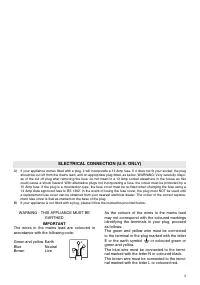
Electrical connection
-
Before plugging the appliance into the mains socket,
check that the mains power supply corresponds to the
value indicated on the rating plate and that the mains
power supply is adequate for the load.
- THIS APPLIANCE COMPLIES WITH DIRECTIVE 2004/108/
EEC ON RADIO INTERFERENCE SUPPRESSION.
Operation and use
- Plug into the mains socket.
- The appliance emits a beep. The indicator light (
I
) comes
on and remains lit while the appliance is powered.
- The appliance switches to stand-by. A dot flashing
on the display means the tip over device has been
activated. See paragraph: “Safety functions”.
- Press the ON/STAND-BY (
A
) to turn the appliance on.
It begins heating the room according to the current
settings.
- Press the MODE button (
C
) to select one of the following
operating modes:
-
Fan
In this mode, only the fan operates and the appliance
does not heat the room.
-
Freeze prevention
In this mode, the appliance keeps the room at a
temperature of 7°C to avoid freezing.
-
Heating
In this mode, the desired temperature can be selected
by pressing the adjustment buttons + and – (
B
):
-
Heating Silent+
The appliance operates at minimum power, automati-
cally reducing energy consumption and noise level. The
tones emitted by the commands are lower than in other
modes for even more silent operation.
-
Heating
The appliance operates at medium power.
-
Heating
The appliance operates at high power to heat the room
rapidly.
- To turn the appliance off, press the ON/STAND-BY
button (
A
). The display may visualize a countdown for
about 6 seconds.
Please note:
Room temperature can be displayed in
either °C or °F. To change the unit of measurement for the
temperature, press the + button for a few seconds, then
release.
“
ECO plus” function
The
“
ECO plus” function is available in Heating 1, 2 and 3 modes
only. To activate the function, press the
“
ECO plus” button (
D
).
When this function is active the appliance automatically sets
the most appropriate power level to guarantee optimum
comfort while reducing energy consumption.
While the
“
ECO plus” function is active, the appliance may
switch automatically to a lower heating power than the one
displayed. This may happen a number of times in an hour.
Swing button
To distribute the air flow over a wider surface, press the swing
button (
F
)
. The appliance starts swinging to the right
and left. To stop the appliance in the desired position, simply
press the swing button (
F
) again.
Digital 24 h timer
This function can be activated from any operating mode.
Auto-start:
with the appliance in STAND-BY, press the timer
button
(
E
). The symbol is displayed together with
the time remaining before the appliance comes on.
To adjust the timer, use the adjustment buttons + and - (
B
),
then wait a few seconds for the setting to be memorised. The
stand-by light (
I
) is displayed together with the symbol,
indicating that the timer has been set.
When the programmed time is reached, the appliance comes
on with the settings used during the previous period of
operation.
"Loading the manual" means you need to wait until the file loads and becomes available for online reading. Some manuals are very large, and the time they take to appear depends on your internet speed.
Was this manual helpful?
About this manual
- Brand
- DeLonghi
- Model
- DCH7992ER
- Document type
- User Manual
- Category
- Heater
- Language(s)
- English
- Pages
- 3
- File size
- 164.5 KB
- Format
Summary
Details on control buttons, installation, electrical connection, operational modes (Fan, Freeze Prevention, Heating), features like ECO plus, swing mode, 24-hour timer, and temperature display settings.
Instructions for using the timer function, operating the remote control, battery insertion/replacement procedures, and technical specifications including a battery replacement diagram.
Guide listing common problems such as display errors, failure to turn on, unexpected shutdowns, and overheating, along with recommended solutions and corrective actions.
Ask a question
Related manuals
Popular DeLonghi Heaters


More DeLonghi Heaters models
 DeLonghi TRD50615E User Manual
 DeLonghi TRRS0510T User Manual
 DeLonghi TRRS0715T User Manual
 DeLonghi TRRS0920T User Manual
 DeLonghi TRRS1224EG User Manual
 DeLonghi TRRS1224T User Manual
 DeLonghi DL1001T User Manual
 DeLonghi HCM2030 User Manual
 DeLonghi HCS2552FTS User Manual
 DeLonghi HFX25S20 User Manual
 DeLonghi HFX65V20 User Manual
 DeLonghi HSX3324FTS User Manual
 DeLonghi HX65L22 User Manual
 DeLonghi KH770510M User Manual
 DeLonghi TCH8093ER User Manual
 DeLonghi TRD41500ET User Manual