Page 3 - DellTM PowerEdgeTM 1900 Systems; Getting Started
w w w . d e l l . c o m | s u p p o r t . d e l l . c o m Dell™ PowerEdge™ 1900 Systems Getting Started With Your System
Page 5 - System Features
Getting Started With Your System 3 System Features The major hardware and software features of your system include: • One or two Dual-Core Intel ® Xeon ® Processors 5000 Sequence. • Support for symmetric multiprocessing (SMP), which is available on systems with two Intel Xeon processors. SMP greatly...
Page 6 - Supported Operating Systems
4 Getting Started With Your System • Dedicated PCI slot for an optional integrated RAID controller card. NOTE: System boot is not supported from an external device attached to a SAS or SCSI adapter, including SAS 5/E, PERC 5/E, or PERC 4e/DC. Contact your technical support provider for the latest su...
Page 7 - Other Information You May Need; Obtaining Technical Assistance; Installation and Configuration
Getting Started With Your System 5 Other Information You May Need CAUTION: The Product Information Guide provides important safety and regulatory information. Warranty information may be included within this document or as a separate document. • The Hardware Owner’s Manual provides information about...
Page 8 - Unpacking the System; Installing the Stabilizer Feet
6 Getting Started With Your System Unpacking the System Unpack your system and identify each item. Keep all shipping materials in case you need them later. Installing the Stabilizer Feet See the documentation included with your system on installing the system stabilizer feet.
Page 9 - Connecting the Keyboard, Mouse, and Monitor
Getting Started With Your System 7 Connecting the Keyboard, Mouse, and Monitor Connect the keyboard, mouse, and monitor (optional). The connectors on the back of your system have icons indicating which cable to plug into each connector. Be sure to tighten the screws (if any) on the monitor's cable c...
Page 10 - Turning on the System
8 Getting Started With Your System Turning on the System Turn on the system and monitor (optional). Press the power button on the system and the monitor. The power indicators should light. Adjust the monitor’s controls until the displayed image is satisfactory. Installing the Bezel Install the bezel...
Page 11 - Complete the 0perating System Setup; Technical Specifications
Getting Started With Your System 9 Complete the 0perating System Setup If you purchased a preinstalled operating system, see the operating system documentation that ships with your system. To install an operating system for the first time, see the Quick Installation Guide . Be sure the operating sys...
Page 15 - Systèmes DellTM PowerEdgeTM 1900; Guide de mise en route
w w w . d e l l . c o m | s u p p o r t . d e l l . c o m Systèmes Dell™ PowerEdge™ 1900 Guide de mise en route
Page 16 - Remarques, avis et précautions
Remarques, avis et précautions REMARQUE : une REMARQUE indique des informations importantes qui peuvent vous aider à mieux utiliser votre ordinateur. AVIS : un AVIS vous avertit d'un risque de dommage matériel ou de perte de données et vous indique comment éviter le problème. PRÉCAUTION : une PRÉCAU...
Page 17 - Caractéristiques du système
Guide de mise en route 15 Caractéristiques du système Les caractéristiques principales du système sont les suivantes : • Un ou deux processeurs double cœur Intel ® Xeon ® 5000. • Prise en charge du SMP (Symmetric Multiprocessing [multi-traitement symétrique]), disponible sur les systèmes dotés de de...
Page 18 - Systèmes d'exploitation pris en charge
16 Guide de mise en route • Un logement PCI dédié pour une carte contrôleur RAID intégrée (en option). REMARQUE : le démarrage du système à partir d'un périphérique externe connecté à une carte SAS ou SCSI n'est pas pris en charge (cartes SAS 5/E, PERC 5/E et PERC 4e/DC incluses). Adressez-vous à vo...
Page 19 - Autres informations utiles; Obtention d'une assistance technique; Installation et configuration
Guide de mise en route 17 Autres informations utiles PRÉCAUTION: le Guide d'informations sur le produit contient d'importantes informations se rapportant à la sécurité et aux réglementations. Les informations sur la garantie se trouvent soit dans ce document, soit à part. • Le Manuel du propriétaire...
Page 20 - Déballage du système
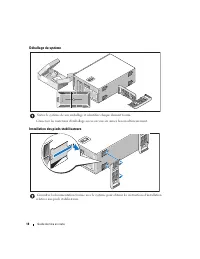
18 Guide de mise en route Déballage du système Sortez le système de son emballage et identifiez chaque élément fourni. Conservez les matériaux d'emballage au cas où vous en auriez besoin ultérieurement. Installation des pieds stabilisateurs Consultez la documentation fournie avec le système pour obt...
Page 21 - Connexion du clavier, de la souris et du moniteur
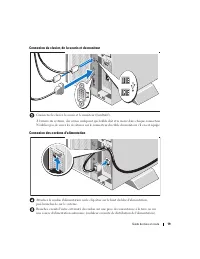
Guide de mise en route 19 Connexion du clavier, de la souris et du moniteur Connectez le clavier, la souris et le moniteur (facultatif). À l'arrière du système, des icônes indiquent quel câble doit être inséré dans chaque connecteur. N'oubliez pas de serrer les vis situées sur le connecteur du câble...
Page 22 - Mise sous tension du système
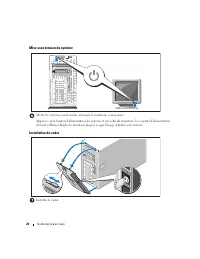
20 Guide de mise en route Mise sous tension du système Mettez le système sous tension, ainsi que le moniteur, si nécessaire. Appuyez sur le bouton d'alimentation du système et sur celui du moniteur. Les voyants d'alimentation doivent s'allumer. Réglez le moniteur jusqu'à ce que l'image affichée soit...
Page 23 - Finalisation de l'installation du système d'exploitation; Spécifications techniques
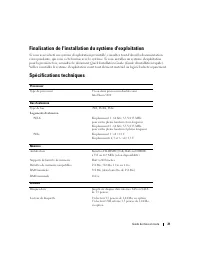
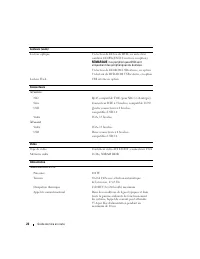
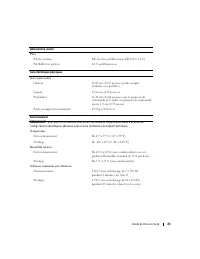
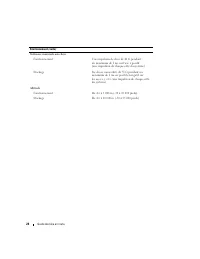
Guide de mise en route 21 Finalisation de l'installation du système d'exploitation Si vous avez acheté un système d'exploitation préinstallé, consultez tout d'abord la documentation correspondante, qui vous a été fournie avec le système. Si vous installez un système d'exploitation pour la première f...
Page 27 - Sistemas DellTM PowerEdgeTM 1900; Primeiros passos
w w w . d e l l . c o m | s u p p o r t . d e l l . c o m Sistemas Dell™ PowerEdge™ 1900 Primeiros passos com o sistema
Page 28 - Notas, avisos e cuidados
Notas, avisos e cuidados NOTA: As NOTAS fornecem informações importantes que o ajudam a utilizar melhor o computador. AVISO: As mensagens de AVISO informam sobre possíveis danos no hardware ou perda de dados e indicam como evitar o problema. CUIDADO: As mensagens de CUIDADO indicam possíveis danos à...
Page 29 - Recursos do sistema
Primeiros passos com o sistema 27 Recursos do sistema Os principais recursos de hardware e software do sistema incluem: • Um ou dois processadores Intel ® Xeon ® Dual Core Série 5000. • Suporte para multiprocessamento simétrico (SMP), disponível nos sistemas com dois processadores Intel Xeon. O SMP ...
Page 30 - Sistemas operacionais admitidos
28 Primeiros passos com o sistema • Slot PCI dedicado para uma placa controladora RAID opcional integrada. NOTA: A inicialização do sistema não tem suporte de dispositivos externos conectados ao adaptador SAS ou SCSI, incluindo SAS 5/E, PERC 5/E ou PERC 4e/DC. Entre em contato com o fornecedor de su...
Page 31 - Outras informações úteis; Como obter assistência técnica; Instalação e configuração
Primeiros passos com o sistema 29 Outras informações úteis CUIDADO: O Guia de informações do produto fornece informações importantes sobre segurança e regulamentação. As informações sobre garantia podem estar incluídas nesse documento ou ser fornecidas como documento separado. • O Hardware Owner’s M...
Page 32 - Remoção do sistema da embalagem; Instalação dos pés estabilizadores
30 Primeiros passos com o sistema Remoção do sistema da embalagem Remova o sistema da embalagem e identifique cada item. Guarde todos os materiais de envio caso sejam necessários mais tarde. Instalação dos pés estabilizadores Consulte a documentação fornecida com o sistema para saber como instalar o...
Page 33 - Conexão de teclado, mouse e monitor
Primeiros passos com o sistema 31 Conexão de teclado, mouse e monitor Conecte o teclado, o mouse e o monitor (opcional). Os conectores localizados na parte traseira do sistema possuem ícones indicando quais cabos devem ser ligados a cada conector. Certifique-se de apertar os parafusos (se houver) no...
Page 34 - Como ligar o sistema
32 Primeiros passos com o sistema Como ligar o sistema Ligue o sistema e o monitor (opcional). Pressione o botão Liga/Desliga do sistema e do monitor. As luzes indicadoras de energia deverão se acender. Ajuste os controles do monitor até que a imagem exibida seja satisfatória. Instalação do painel I...
Page 35 - Conclusão da configuração do sistema operacional; Especificações técnicas
Primeiros passos com o sistema 33 Conclusão da configuração do sistema operacional Caso tenha adquirido um sistema operacional pré-instalado, consulte a respectiva documentação fornecida com o sistema. Para instalar um sistema operacional pela primeira vez, consulte o Guia de instalação rápida . Cer...
Page 39 - Procedimientos iniciales
w w w . d e l l . c o m | s u p p o r t . d e l l . c o m Sistemas Dell™ PowerEdge™ 1900 Procedimientos iniciales con el sistema
Page 40 - Notas, avisos y precauciones
Notas, avisos y precauciones NOTA: una NOTA proporciona información importante que le ayudará a utilizar mejor el ordenador. AVISO: un AVISO indica la posibilidad de daños en el hardware o la pérdida de datos, e informa de cómo evitar el problema. PRECAUCIÓN: un mensaje de PRECAUCIÓN indica el riesg...
Page 41 - Características del sistema
Procedimientos iniciales con el sistema 39 Características del sistema Éstas son las características principales de hardware y software del sistema: • Uno o dos procesadores Intel ® Xeon ® de doble núcleo 5000 Sequence. • Compatibilidad con SMP (multiprocesamiento simétrico), disponible en sistemas ...
Page 42 - Sistemas operativos admitidos
40 Procedimientos iniciales con el sistema • Ranura PCI dedicada para una tarjeta controladora RAID integrada opcional. NOTA: no es posible iniciar el sistema desde un dispositivo externo conectado a un adaptador SAS o SCSI, incluidos SAS 5/E, PERC 5/E o PERC 4e/DC. Póngase en contacto con su provee...
Page 43 - Otra información necesaria; Obtención de asistencia técnica; Instalación y configuración
Procedimientos iniciales con el sistema 41 Otra información necesaria PRECAUCIÓN: en la Guía de información del producto se proporciona información importante sobre seguridad y normativas. La información de la garantía puede estar incluida en este documento o constar en un documento aparte. • En el ...
Page 44 - Desembalaje del sistema; Instalación del pie estabilizador
42 Procedimientos iniciales con el sistema Desembalaje del sistema Desembale el sistema e identifique cada elemento. Guarde el material de embalaje por si lo necesitara más adelante. Instalación del pie estabilizador Consulte las instrucciones de la documentación incluida con el sistema acerca de la...
Page 45 - Conexión del teclado, el ratón y el monitor
Procedimientos iniciales con el sistema 43 Conexión del teclado, el ratón y el monitor Conecte el teclado, el ratón y el monitor (opcional). Los conectores de la parte posterior del sistema tienen iconos que indican qué cable enchufar a cada conector. Asegúrese de apretar los tornillos (si los hubie...
Page 46 - Encendido del sistema
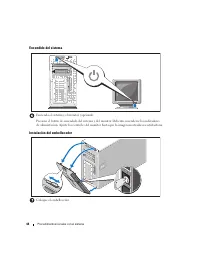
44 Procedimientos iniciales con el sistema Encendido del sistema Encienda el sistema y el monitor (opcional). Presione el botón de encendido del sistema y del monitor. Deberán encenderse los indicadores de alimentación. Ajuste los controles del monitor hasta que la imagen mostrada sea satisfactoria....
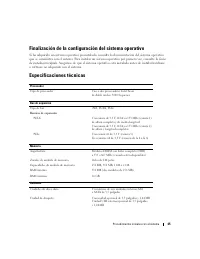
Page 47 - Finalización de la configuración del sistema operativo; Especificaciones técnicas
Procedimientos iniciales con el sistema 45 Finalización de la configuración del sistema operativo Si ha adquirido un sistema operativo preinstalado, consulte la documentación del sistema operativo que se suministra con el sistema. Para instalar un sistema operativo por primera vez, consulte la Guía ...