Dell E1910Hc - Manual

A user manual for the Dell E1910H flat-panel monitor covers its core functionality, from basic operation to advanced settings. The guide highlights key features such as front-panel controls (power, brightness/contrast, OSD menu), power management modes, and technical specifications like resolution support, viewing angles, and environmental requirements. It also includes troubleshooting for common display issues–such as signal loss, color inaccuracies, or hardware malfunctions–and setup instructions for connecting to computers via VGA cables. Safety warnings and regulatory compliance details are addressed in the appendix.


Table of Contents:
- Page 1 – Warning Symbols and Copyright Information
- Page 2 – Included Components
- Page 3 – Front Panel Controls and Initial View
- Page 4 – Physical Views and Mounting Features
- Page 5 – Power Management and Signal Pin Assignments
- Page 6 – Technical Specifications
- Page 7 – Physical Dimensions and Environmental Conditions
- Page 8 – Environmental Guidelines and Quality Policy
- Page 9 – Safety and Compliance Information
- Page 10 – Setup Instructions with Desktop/Portable Systems
- Page 11 – Setup Instructions with Third-Party Graphics Cards
- Page 12 – Power On and Front Panel Functions
- Page 13 – OSD Menu Navigation
- Page 14 – Brightness and Contrast Adjustment
- Page 15 – Color Setting Adjustments
- Page 16 – Display and Video Preset Modes
- Page 17 – Advanced Display Settings
- Page 18 – On-Screen Display Menu Options
- Page 19 – OSD Warning Messages
- Page 20 – Display Configuration and Tilt Adjustment
- Page 21 – Physical Adjustment Limits
- Page 22 – Setting Resolution on Windows Systems
- Page 23 – User Guide Introduction and Compliance
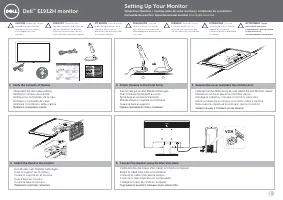
- Page 24 – Assembly and Connection Procedures
- Page 25 – Stand Detachment and Soundbar Attachment
- Page 26 – VESA Mounting and Soundbar Installation
- Page 27 – Built-in Diagnostics and Self-Test
- Page 28 – Common Troubleshooting Problems
- Page 29 – Display Issue Troubleshooting
Dell™
E1910H Flat Panel Monitor User's Guide
Notes, Notices, and Cautions
Information in this document is subject to change without notice.
© 2009 Dell Inc. All rights reserved.
R e p r o d u c t i o n o f t h e s e m a t e r i a l s i n a n y m a n n e r w h a t s o e v e r w i t h o u t t h e w r i t t e n p e r m i s s i o n o f D e l l I n c .
is strictly forbidden.
T r a d e m a r k s u s e d i n t h i s t e x t :
Dell
a n d t h e
DELL
l o g o a r e t r a d e m a r k s o f D e l l I n c . ;
Microsoft
a n d
Windows
a r e e i t h e r t r a d e m a r k s o r r e g i s t e r e d t r a d e m a r k s o f M i c r o s o f t C o r p o r a t i o n i n
t h e U n i t e d S t a t e s a n d / o r o t h e r c o u n t r i e s .
ENERGY STAR
i s a r e g i s t e r e d t r a d e m a r k o f t h e U . S . E n v i r o n m e n t a l P r o t e c t i o n A g e n c y . A s a n E N E R G Y S T A R p a r t n e r , D e l l I n c . h a s
d e t e r m i n e d t h a t t h i s p r o d u c t m e e t s t h e E N E R G Y S T A R g u i d e l i n e s f o r e n e r g y e f f i c i e n c y .
O t h e r t r a d e m a r k s a n d t r a d e n a m e s m a y b e u s e d i n t h i s d o c u m e n t t o r e f e r t o e i t h e r t h e e n t i t i e s c l a i m i n g t h e m a r k s a n d n a m e s o r t h e i r p r o d u c t s . D e l l I n c . d i s c l a i m s a n y
p r o p r i e t a r y i n t e r e s t i n t r a d e m a r k s a n d t r a d e n a m e s o t h e r t h a n i t s o w n .
Model E1910Hc
March 2009 Rev. A00
NOTE:
A NOTE indicates important information that helps you make better use of your computer.
NOTICE:
A NOTICE indicates either potential damage to hardware or loss of data and tells you how to avoid the problem.
CAUTION:
A CAUTION indicates a potential for property damage, personal injury, or death.
"Loading the manual" means you need to wait until the file loads and becomes available for online reading. Some manuals are very large, and the time they take to appear depends on your internet speed.
Was this manual helpful?
About this manual
- Brand
- Dell
- Model
- E1910Hc
- Document type
- Manual
- Language(s)
- English
- Pages
- 29
- File size
- 2.9 MB
- Format
Other Manuals for Dell E1910Hc
Summary
Explanation of warning symbols (NOTE, NOTICE, CAUTION) and copyright, trademark, and revision details for the guide.
List of items included in the package, such as the monitor, stand, power cable, VGA cable, and documentation media.
Description of product features, front view controls including function buttons and the power button indicator, and the beginning of the back view description.