Dell E156FP - Manual

Dell E156FP – Manual, read for free online in PDF format. We hope this helps you resolve any issues you may have. If you have further questions, please contact us through the contact form.

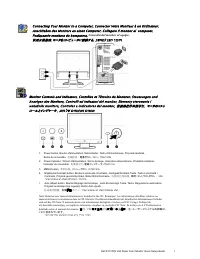
Attach the monitor to the stand.
Turn on the monitor.
1
4
2
21
E156FP Color Monitor
Adjust the monitor.
3
1
2
5
Fixez le moniteur sur le socle.
Acople el monitor a la base.
Coloque o monitor no suporte.
Den Monitor auf den Fuβ befestigen.
Fissare il monitor alla base.
Ajustez le moniteur.
Ajuste el monitor.
Ajuste o monitor.
Stellen Sie den Monitor ein.
Regolare ol monitor.
Wyregulowac monitor
䂓ᭈ乃⼎఼
䇗㡖ᰒ⼎఼
Podlacz monitor do podstawy.
ᇛ乃⼎఼㺱㝇ᑻϞ
ᇚᰒ⼎఼ϢᑩᑻⳌ䖲
Allumez le moniteur.
Encienda el monitor.
Ligue o monitor.
Schalten Sie den Monitor ein.
Accendere il monitor.
Wlacz monitor.
䭟ଳ乃⼎఼䳏⑤
ᠧᓔᰒ⼎఼⬉⑤
Connect the VGA cable to the computer.
Connectez le cable VGA a votre ordinateur.
Conecte el cable VGA o al equiop.
Ligue o cabo VGA ou ao computador.
Verbinden Sie das VGA-Kabel mit dem Computer.
Collegare il cavo VGaA o il al computer.
Podlacz do komputera kabel VGA.
ᇛ
VGA
䳏㑰㟛䳏㜺Ⳍ䗷
ᇚ
VGA
⬉㓚Ϣ䅵ㅫ఼Ⳍ䖲
Connect the power cable to an electrical outlet.
Connectez le cordon d’alimentation sur une prise electrique.
Conecte el cable de alimentaciyn a una toma de corriente.
Ligue o cabo de alimentacao a uma tomada electrica.
Stecken Sie den Netzstecker in eine Steckdose.
Collegare il cavo d’alimentazione ad una presa di corrente.
Podlacz kabel zasilajacy do gniazda elektrycznego.
ᇛ䳏⑤㎮䗷ࠄ䳏⑤ᦦᑻϞ
ᇚ⬉⑤㒓䖲ࠄ⬉⑤ᦦᑻ
VGA
ࠤࡉ࡞ࠍࠦࡦࡇࡘ࠲ߦ
㍮
ߔࠆ
VGA
GG䀴㢨⽈㡸G䀨䘜䉤㜄G㜤ᷤ䚌㐡㐐㝘U
䀴㢨⽈㡸G䀨䘜䉤㜄G㜤ᷤ䚌㐡㐐㝘U
VGA
ࡕ࠾࠲ࠍࠬ࠲࠰࠼ߦขࠅઃߌ߹ߔ
㔚Ḯࡩࡉ࡞ࠍࠦࡦࡦ࠻ߦ
ߒ߹ߔ
䁐
4
"Loading the manual" means you need to wait until the file loads and becomes available for online reading. Some manuals are very large, and the time they take to appear depends on your internet speed.
Was this manual helpful?
About this manual
- Brand
- Dell
- Model
- E156FP
- Document type
- Manual
- Language(s)
- German, English, Spanish, French, Italian, Dutch, Polish, Russian, Swedish
- Pages
- 2
- File size
- 1.6 MB
- Format